
1. Introduction
Thank you for choosing the RAOO MIN LE003 Electric Bicycle. This portable e-bike is designed for urban commuting, campus travel, shopping, and short-distance trips. It combines portability, efficiency, and safety to provide a convenient and eco-friendly travel solution. Please read this manual thoroughly before operating the bicycle to ensure safe and optimal performance.

Figure 1.1: The RAOO MIN LE003 Electric Bicycle, showcasing its compact design and integrated rear battery box.
2. Safety Information
Your safety is paramount. Always adhere to local traffic laws and regulations. Wear a helmet and appropriate safety gear when riding. Perform a pre-ride inspection before each use. Do not operate the bicycle under the influence of alcohol or drugs. Avoid riding in adverse weather conditions.
- Always wear a helmet and protective gear.
- Check brakes, tires, and battery level before each ride.
- Ensure all quick-release mechanisms are securely fastened.
- Do not exceed the maximum load capacity of 120 kg.
- Be aware of your surroundings and other road users.
3. Package Contents
Verify that all items are present in the package:
- 1 x RAOO MIN LE003 Electric Bicycle
- 1 x Charger
- 1 x Seat
- 1 x Fender
- 1 x Front Wheel
- 1 x Headlight
- 1 x User Manual
- 1 x Tool Kit
- 1 x Screwdriver
- Pedals
4. Setup and Assembly
The RAOO MIN LE003 is designed for quick and easy assembly. Most components are pre-assembled. Follow these steps to prepare your bicycle for its first ride:
- Unfolding the Bicycle: Carefully remove the bicycle from its packaging. Unfold the frame and handlebar stem until they lock into place. Ensure all locking mechanisms are secure.
- Installing Pedals: Identify the left (L) and right (R) pedals. Thread the 'L' pedal counter-clockwise into the left crank arm and the 'R' pedal clockwise into the right crank arm. Tighten firmly with a wrench.
- Installing the Seat: Insert the seat post into the frame's seat tube. Adjust the seat height to a comfortable position, ensuring your feet can touch the ground when stopped. Secure the quick-release lever.
- Attaching the Front Wheel and Fender: Follow the instructions in the tool kit to securely attach the front wheel and fender.
- Attaching the Headlight: Mount the headlight to the designated position on the handlebar or front fork and connect any necessary wiring.
- Initial Charge: Before your first ride, fully charge the battery. Refer to the 'Charging the Battery' section for details.

Figure 4.1: The LE003 features a 2-step quick-fold mechanism for compact storage and easy transport.

Figure 4.2: Detailed dimensions of the LE003 electric bicycle for reference during assembly and storage.
5. Operating Instructions
5.1 Powering On/Off
To power on the bicycle, press and hold the power button on the LCD display. To power off, press and hold the same button until the display turns off.
5.2 Riding Modes
The LE003 offers three distinct riding modes to suit various needs:
- Pure Electric Mode: Engage this mode for fully motorized assistance. Simply twist the throttle to accelerate.
- Power-Assisted Mode: This mode provides motor assistance as you pedal, making your ride easier and extending battery range. Adjust the assistance level via the LCD display.
- Assisted Push Mode: A special mode designed to help you push the bicycle effortlessly when not riding, useful for walking alongside the bike.

Figure 5.1: The three riding modes available on the RAOO MIN LE003 electric bicycle.
5.3 LCD Display
The intelligent LCD display provides real-time data to monitor your ride:
- Power Supply: Indicates the current power output.
- Battery Level: Shows the remaining battery charge.
- Riding Mode: Displays the currently active riding mode.
- Distance: Tracks trip distance and total odometer.
- Speed: Shows current speed.
- Error Codes: Alerts you to any system malfunctions.
- Assistance Level: Indicates the level of power assistance in Power-Assisted Mode.
- Cruise Control: Activates and displays cruise control status.
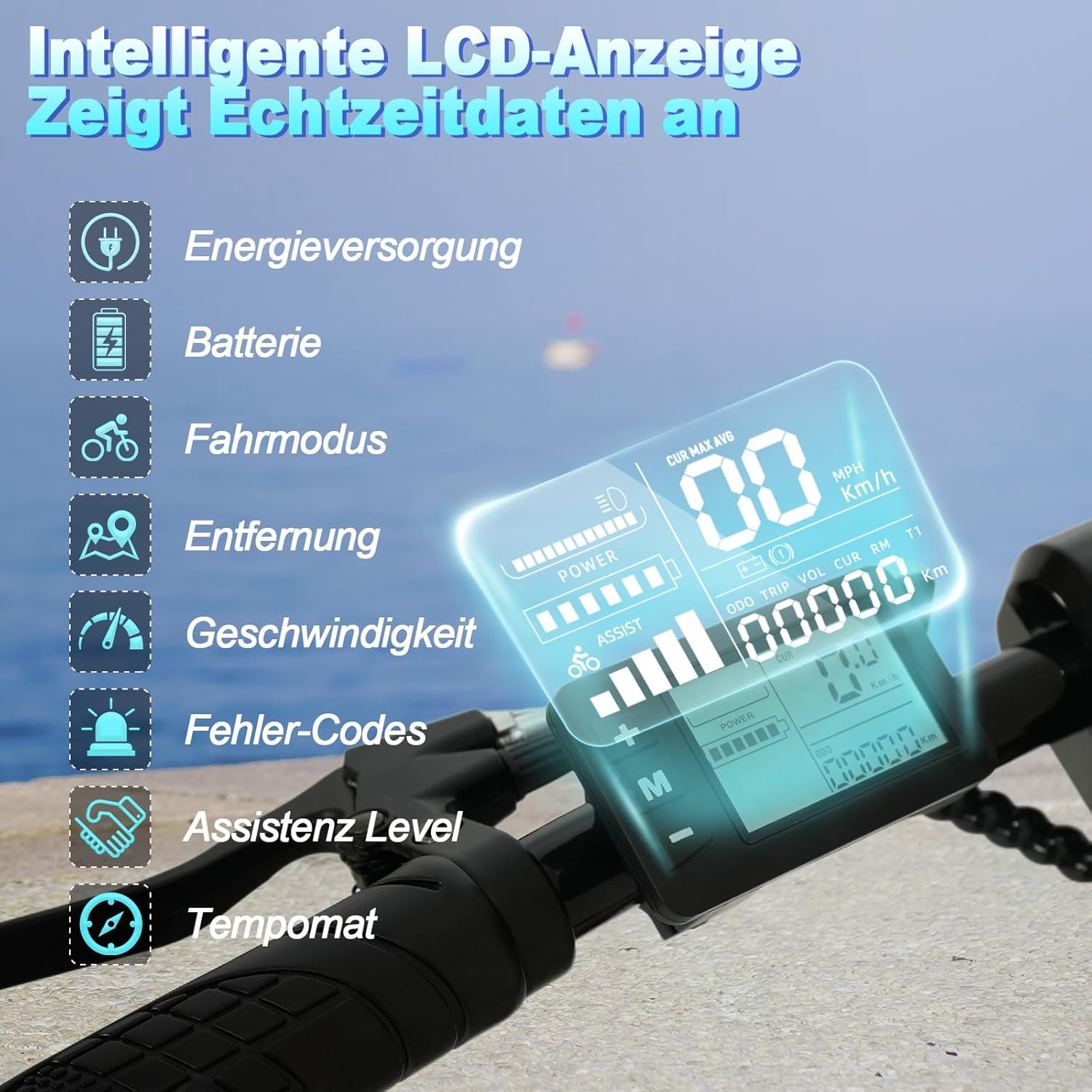
Figure 5.2: The LCD display provides essential riding information at a glance.
5.4 Charging the Battery
The LE003 is equipped with a 36V 7.8Ah Lithium-Ion battery. To charge:
- Ensure the bicycle is powered off.
- Locate the charging port, typically on the frame near the battery.
- Connect the charger to the charging port, then plug the charger into a standard wall outlet.
- The indicator light on the charger will show charging status (e.g., red for charging, green for fully charged).
- Charging typically takes 4-6 hours for a full charge.
- Disconnect the charger once charging is complete.

Figure 5.3: The integrated 36V 7.8Ah Lithium-Ion battery provides a range of 30-45 km with a 4-6 hour charging time.
5.5 Braking System
The LE003 features front and rear disc brakes for reliable stopping power. Always apply both brakes simultaneously for balanced and effective braking. Regularly check brake pads for wear and ensure brake levers are responsive.

Figure 5.4: The 250W motor and front and rear disc brakes ensure powerful performance and safe stopping.
6. Maintenance
Regular maintenance ensures the longevity and safe operation of your RAOO MIN LE003 electric bicycle.
- Tires: Check tire pressure before each ride. Maintain recommended pressure for optimal performance and safety.
- Brakes: Inspect brake pads for wear and ensure cables are not frayed. Adjust brakes as needed for proper function.
- Battery Care: Store the battery in a cool, dry place. If storing for extended periods, charge the battery to 50-70% every 1-2 months.
- Cleaning: Clean the bicycle with a damp cloth. Avoid using high-pressure water jets directly on electrical components.
- Fasteners: Periodically check all bolts and nuts for tightness, especially on the handlebars, seat post, and wheels.
7. Troubleshooting
If you encounter issues with your LE003, refer to the following common troubleshooting tips:
- Bicycle not powering on: Ensure the battery is fully charged and properly seated. Check all electrical connections.
- Motor not assisting: Verify that the riding mode is set correctly (Pure Electric or Power-Assisted). Check battery level.
- Brakes feel weak: Inspect brake pads for wear. Adjust brake cable tension. If issues persist, consult a professional.
- Unusual noises: Stop riding immediately and inspect the bicycle for loose parts or damage.
For persistent problems or issues not covered here, please contact customer support.
8. Specifications
| Feature | Specification |
|---|---|
| Brand | RAOO MIN |
| Model Number | LE003 |
| Age Range | Adult |
| Bike Type | Electric Bicycle |
| Brakes | Disc (Front & Rear) |
| Color | Black |
| Size | One Size |
| Style | Urban |
| Height | 107 cm |
| Length | 110 cm |
| Width | 56.5 cm |
| Main Material | ABS Polypropylene Carbon Steel |
| Items in Package | 1 |
| Special Features | Digital display, Dual disc brake, Lightweight, Portable, Adjustable saddle |
| Suspension | None |
| Wheel Size | 14 Inches |
| Motor Power | 250 Watts |
| Battery | 36V 7.8Ah Lithium-Ion |
| Max Speed | 25 km/h |
| Range | 20-30 km (Pure Electric), 30-45 km (Power-Assisted) |
| Charging Time | 4-6 hours |
| Load Capacity | Up to 120 kg |
| Product Dimensions (L x W x H) | 110 x 56.5 x 107 cm |
| Product Weight | 20.5 kg |
9. Warranty and Support
For warranty information and customer support, please refer to the warranty card included with your purchase or visit the official RAOO MIN website. Keep your proof of purchase for warranty claims.