
HARMONY TWENTY-TWO HTT-19
HARMONY TWENTY-TWO HTT-19 Wireless Earbuds User Manual
Model: HTT-19
1. Introduction
Thank you for choosing the HARMONY TWENTY-TWO HTT-19 Wireless Earbuds. This manual provides essential information for setting up, operating, and maintaining your earbuds to ensure optimal performance and longevity. Please read it thoroughly before use.
Package Contents
- HARMONY TWENTY-TWO HTT-19 Wireless Earbuds (Left and Right)
- Charging Case
- 3 Pairs of Rubber Ear Tips (S/M/L)
- USB-C Charging Cable
- User Manual
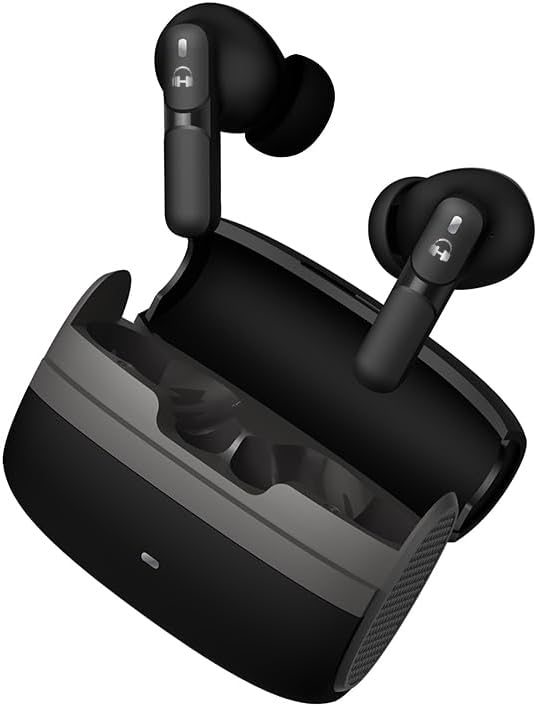
Image: The HARMONY TWENTY-TWO HTT-19 Wireless Earbuds resting in their charging case.
2. Setup and Pairing
2.1 Initial Charging
Before first use, fully charge the earbuds and the charging case. Connect the provided USB-C cable to the charging port on the case and a power source. The indicator light on the case will show charging status.
- Charging Time: Approximately 45 minutes for a full charge.
- Fast Charging: 10 minutes of charge provides approximately 100 minutes of playback.

Image: A visual representation of the earbuds' battery life, showing 6 hours of playback from earbuds and an additional 35 hours from the charging case, along with the fast charging capability.
2.2 Pairing with Your Device
- Ensure the earbuds are charged and placed inside the charging case.
- Open the charging case lid. The earbuds will automatically enter pairing mode, indicated by flashing lights (refer to LED indicator section for specifics).
- On your device (smartphone, tablet, laptop), enable Bluetooth.
- Search for available Bluetooth devices and select "HTT-19" from the list.
- Once connected, the earbuds will indicate successful pairing (e.g., a voice prompt or steady light).
The earbuds will automatically reconnect to the last paired device when removed from the case, if Bluetooth is enabled on the device.

Image: A person enjoying music with the HTT-19 earbuds, highlighting Bluetooth 5.4 connectivity.
3. Operating Your Earbuds
3.1 Touch Controls
The HTT-19 earbuds feature touch-sensitive controls on the side of each earbud for easy management of audio playback, calls, and voice assistant functions.

Image: A detailed diagram illustrating the various touch control gestures for the HTT-19 earbuds.
| Action | Function | Earbud (L/R) |
|---|---|---|
| 1x Tap | Play/Pause Music, Answer Call | Left or Right |
| 2x Tap | Previous Track | Left |
| 2x Tap | Next Track | Right |
| 2x Tap | End Call / Reject Call | Left or Right |
| 3x Tap | Volume Down | Left |
| 3x Tap | Volume Up | Right |
| 4x Tap | Game Mode On/Off | Left or Right |
| Press for 1.5s | Activate Voice Assistant | Left or Right |
3.2 Voice Assistant
The HTT-19 earbuds support voice assistants like Siri or Google Assistant. Press and hold the touch control area for 1.5 seconds on either earbud to activate your device's voice assistant.

Image: A person interacting with their device's voice assistant using the earbuds.
3.3 Environmental Noise Cancellation (ENC)
The earbuds feature ENC technology with 4 microphones to reduce background noise during calls, ensuring clearer conversations. This technology primarily enhances microphone performance for the listener on the other end of the call.

Image: A diagram showing the internal structure of an earbud, highlighting the noise cancellation and voice input microphones for ENC Clear Call Technology.
4. Maintenance
4.1 Cleaning
- Regularly clean the earbuds and charging case with a soft, dry, lint-free cloth.
- Remove ear tips and clean them with mild soap and water, then dry thoroughly before reattaching.
- Do not use harsh chemicals or abrasive materials.
4.2 Storage
When not in use, store the earbuds in their charging case to protect them from dust, damage, and to keep them charged.
4.3 Water Resistance (IPX5)
The HTT-19 earbuds are IPX5 water-resistant, meaning they are protected against sweat and light rain. They are not designed for submersion in water or for use during swimming.

Image: A person wearing the HTT-19 earbuds outdoors in light rain, illustrating their IPX5 water-resistant design.
5. Troubleshooting
| Problem | Possible Cause | Solution |
|---|---|---|
| Earbuds not pairing | Low battery, Bluetooth off, already paired to another device | Charge earbuds, ensure Bluetooth is on, forget device on previous connections, try pairing again. |
| Only one earbud working | One earbud not charged, pairing issue, earbud not properly seated in case | Ensure both earbuds are charged. Place both back in case, close lid, then reopen to re-establish connection. Re-pair if necessary. |
| Poor sound quality | Improper fit, low battery, interference, dirty ear tips | Adjust earbud fit, ensure full charge, move away from interference sources, clean ear tips. |
| Earbuds not charging | Charging cable issue, dirty charging contacts, power source issue | Check USB-C cable and power adapter. Clean charging contacts on earbuds and case. Ensure earbuds are correctly seated in the case. |
| Touch controls unresponsive | Temporary software glitch, dirty sensor | Restart earbuds by placing them in the case and closing the lid. Clean the touch sensor area. |
If you encounter issues not listed here, please refer to the support section for further assistance.
6. Specifications
| Feature | Detail |
|---|---|
| Model Name | HTT-19 |
| Bluetooth Version | 5.4 |
| Bluetooth Range | Up to 10 meters (33 feet) |
| Audio Driver Size | 13 mm Dynamic Driver |
| Noise Control | Environmental Noise Cancellation (ENC) |
| Water Resistance | IPX5 |
| Battery Life (Earbuds) | Up to 6 hours |
| Total Playtime (with Case) | Up to 40 hours |
| Fast Charging | 10 min charge = 100 min playtime |
| Charging Time | Approx. 45 minutes |
| Control Type | Touch Sensitive |
| Frequency Response | 2.4 GHz |
| Sensitivity | 98 dB |
| Impedance | 32 Ohm |
| Audio Latency | 45 Milliseconds |
| Weight (Item) | 3.52 ounces |
| Material | Plastic |
| Included Components | Wireless Earbuds, 3 Rubber Ear Tips S/M/L, USB-C Cord |

Image: An internal diagram of the earbud driver, highlighting the 13mm Hi-Fidelity drivers and Adaptive Boom Technology for immersive audio.
7. Safety Information
- Do not expose earbuds to extreme temperatures or direct sunlight.
- Avoid dropping or applying excessive force to the earbuds and charging case.
- Keep out of reach of children and pets.
- Do not attempt to disassemble or modify the product.
- Use only the provided charging cable or a certified equivalent.
- Prolonged listening at high volumes may cause hearing damage. Adjust volume to a safe level.
8. Warranty Information
HARMONY TWENTY-TWO products are covered by a limited warranty against defects in materials and workmanship. For specific warranty terms and conditions, please refer to the warranty card included with your product or visit the official HARMONY TWENTY-TWO website.
9. Customer Support
For further assistance, technical support, or warranty claims, please contact HARMONY TWENTY-TWO customer service:
- Website: Visit the HARMONY TWENTY-TWO Store on Amazon
- Email: Refer to product packaging or official website for contact email.
Related documentsHTT-19


Ask a question about this manual
Ask about setup, troubleshooting, compatibility, parts, safety, or missing instructions. Manuals+ will review the question and use this page’s manual context to help answer it.