
HX Q5
HX Q5 Electric Mountain Bike User Manual
Model: Q5
Brand: HX
1. Introduction
Welcome to the HX Q5 Electric Mountain Bike user manual. This guide provides essential information for the safe assembly, operation, maintenance, and troubleshooting of your new electric bicycle. Please read this manual thoroughly before your first ride to ensure optimal performance and safety.
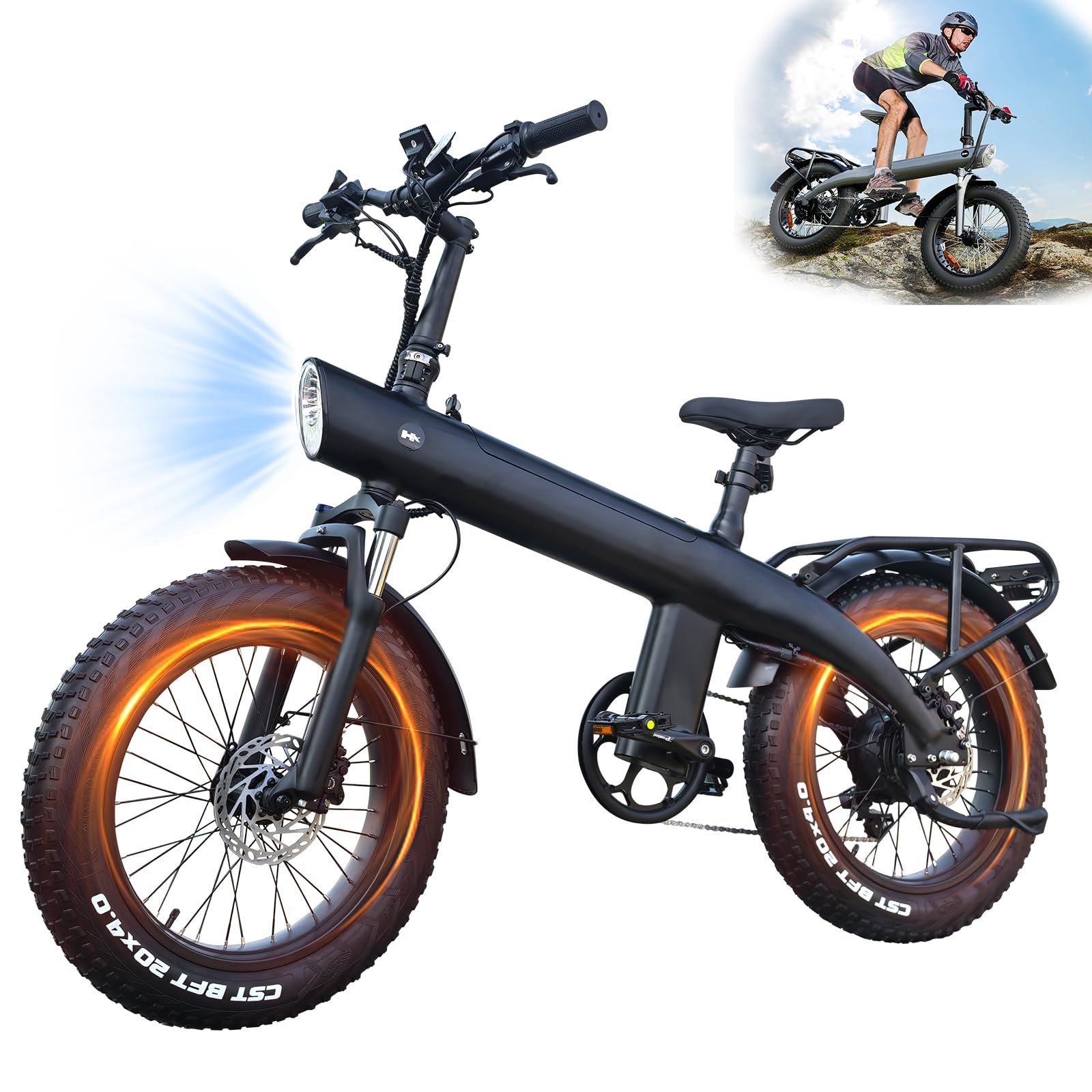
Figure 1: HX Q5 Electric Mountain Bike, side view.
Key Features:
- Unique Dolphin Dynamic Line Design: An adult electric bicycle with a dolphin-inspired body and a rear rack for luggage. Constructed from sturdy aluminum alloy for durability.
- Powerful Climbing Performance: Features a brushless wheel hub motor with a peak power of up to 2000 W, providing enhanced climbing ability and a maximum speed of 45 km/h in pure electric mode.
- Ultra Long Range: Safety Tested to UL 2849. Achieves up to 40-60 km per charge in pure electric mode and 90-100 km in assisted mode. Equipped with a detachable 13Ah/20Ah upgraded battery (UL certified) with IP54 waterproof rating.
- Dual Front and Rear Brakes: Provides a smooth riding experience with front disc brake, rear hydraulic brake, and EABS system for reliable braking on various terrains.
- Universal Across All Terrains: Adjustable front fork shock absorbers and 20-inch x 4-inch wide all-terrain off-road tires ensure strong grip, low resistance, and puncture resistance for diverse road surfaces.
- Multi-Mode Selection: Offers Pure Electric Mode, Assist Mode, and Regular Riding Mode for versatile use.
Video 1: Overview of the HX Q5 Electric Mountain Bike's shark-inspired design and premium features.
2. Safety Information
Your safety is paramount. Always wear a helmet and appropriate safety gear when riding. Familiarize yourself with local regulations regarding electric bicycles. Perform a pre-ride inspection before each use.
Important Safety Guidelines:
- Always wear a certified helmet.
- Ensure brakes are functioning correctly before each ride.
- Check tire pressure and condition regularly.
- Do not ride under the influence of alcohol or drugs.
- Be aware of your surroundings and traffic laws.
- Avoid riding in extreme weather conditions.
3. Package Contents
Upon unpacking, ensure all items listed below are present:
- HX Q5 Electric Mountain Bike (partially assembled)
- Tool kit
- Front and Rear Fenders
- Instruction Manual
- Battery Charger
Video 2: Unboxing and initial inspection of the HX Electric Bike for Adults.
4. Assembly Instructions
Your HX Q5 Electric Mountain Bike comes partially assembled. Follow these steps carefully to complete the assembly.
4.1 Unpacking and Initial Setup
Carefully remove the bike and all components from the packaging. Remove all protective wrapping and zip ties.

Figure 2: Components of the HX Q5 Electric Mountain Bike ready for assembly.
4.2 Installing the Front Wheel
Attach the front wheel to the fork, ensuring the brake rotor aligns correctly with the caliper. Secure it with the provided axle and nuts.

Figure 3: Front fork suspension, a key component during front wheel installation.
4.3 Attaching Handlebars and Display
Mount the handlebars to the stem, adjust to a comfortable riding position, and tighten all bolts. Connect the display and ensure all cables are securely routed.

Figure 4: Ergonomic handlebar design with integrated LCD display.
4.4 Installing Pedals and Fenders
Install the pedals, ensuring the left (L) and right (R) pedals are on the correct sides and tightened securely. Attach the front and rear fenders.
Video 3: Detailed installation guide for the Q5 Electric Bike.
Video 4: General moped-style e-bike installation video (R002 model), useful for similar assembly steps.
5. Operating Instructions
Understand the different riding modes and controls for an enjoyable and safe experience.
5.1 Powering On/Off
To power on the bike, insert the key into the battery lock and turn it to the 'ON' position. Then, press and hold the power button on the display until it illuminates. To power off, reverse the process.
5.2 Riding Modes
- Pure Electric Mode: Provides full motor power without pedaling, ideal for quick commutes.
- Assist Mode: The motor provides assistance as you pedal, extending battery life and aiding on inclines.
- Regular Riding Mode: Ride as a traditional bicycle with no motor assistance.

Figure 5: The HX Q5 is designed for various terrains including highway, gravel, mountain, dirt, bumpy, and cycle roads.
5.3 Gear Shifting and Braking
Utilize the Shimano 7-speed gear system for optimal pedaling efficiency. The dual front disc and rear hydraulic brakes provide responsive stopping power. Always apply brakes smoothly.
Video 5: Demonstrating the performance capabilities of the electric bicycle.
Video 6: The HX Q5 electric mountain bike in action, showcasing its versatility.
Video 7: Features of the electric bike, including its LED lighting system.
6. Battery Care & Charging
The HX Q5 is equipped with a 48V/20Ah removable lithium-ion battery. Proper care ensures longevity and performance.
6.1 Charging the Battery
- Connect the charger to the battery charging port, then plug it into a power outlet.
- The indicator light on the charger will show charging status (typically red for charging, green for fully charged).
- A full charge takes approximately 6 hours.
- Do not overcharge the battery. Disconnect once fully charged.
6.2 Battery Maintenance
- Store the battery in a cool, dry place away from direct sunlight and extreme temperatures.
- If storing for extended periods, charge the battery to 50-70% every 2-3 months.
- The battery has an IP54 waterproof rating, but avoid submerging it in water.
7. Maintenance
Regular maintenance is crucial for the safety and lifespan of your e-bike.
7.1 General Cleaning
Clean your bike regularly with a damp cloth and mild soap. Avoid high-pressure washing directly on electrical components.
7.2 Brake System
Check brake pads for wear and replace them when necessary. Ensure brake levers are firm and responsive. Adjust brake cables as needed.
7.3 Tires
Maintain recommended tire pressure (refer to tire sidewall for specifications). Inspect tires for cuts, punctures, or excessive wear.
7.4 Chain and Drivetrain
Keep the chain clean and lubricated. Inspect gears and derailleur for proper function and alignment.
8. Troubleshooting
This section addresses common issues you might encounter with your HX Q5 Electric Mountain Bike.
8.1 No Power to Display/Motor
- Check if the battery is fully charged and securely installed.
- Ensure the battery key is in the 'ON' position.
- Verify all electrical connections are secure.
8.2 Motor Not Assisting
- Confirm you are in Assist Mode or Pure Electric Mode.
- Check if the brake levers are fully released (some e-bikes cut motor power when brakes are applied).
- Inspect motor cable connections.
8.3 Brakes Squealing or Ineffective
- Clean brake rotors and pads.
- Check for worn brake pads and replace if necessary.
- Adjust brake caliper alignment or cable tension.
9. Specifications
| Feature | Specification |
|---|---|
| Bike Type | Electric Bike |
| Model Number | Q3 (Note: Product is marketed as Q5) |
| Age Range (Description) | Adult |
| Brand | HX |
| Number of Speeds | 7 |
| Color | Black |
| Wheel Size | 20 Inches |
| Frame Material | Aluminum Alloy |
| Suspension Type | Front |
| Special Feature | Adjustable Seat, Multi-Speed |
| Brake Style | Disc |
| Specific Uses For Product | Mountain, Road, Gravel, Off-road |
| Power Source | Electric motor (rechargeable battery) |
| Lithium Battery Energy Content | 96 Kilowatt Hours (48V/20Ah) |
| Item Weight | 40 Kilograms |
| Maximum Weight Recommendation | 150 Kilograms |
| Minimum User Height | 168 Centimeters |
10. Warranty & Support
Your HX Q5 Electric Mountain Bike comes with a Lifetime Warranty on the frame. For other components, please refer to the warranty card included in your package.
10.1 Customer Support
If you have any questions, concerns, or require technical assistance, please contact HX customer support through the retailer where you purchased the product or visit the official HX store online.
For additional information and resources, you may visit the HX Store on Amazon.