
Introduction
Thank you for choosing the Coleshome L-Shaped Desk. This manual provides detailed instructions for the assembly, operation, and maintenance of your new desk. Designed for versatility and efficiency, this desk features spacious storage, integrated power outlets, and a reversible configuration to suit various room layouts and needs.
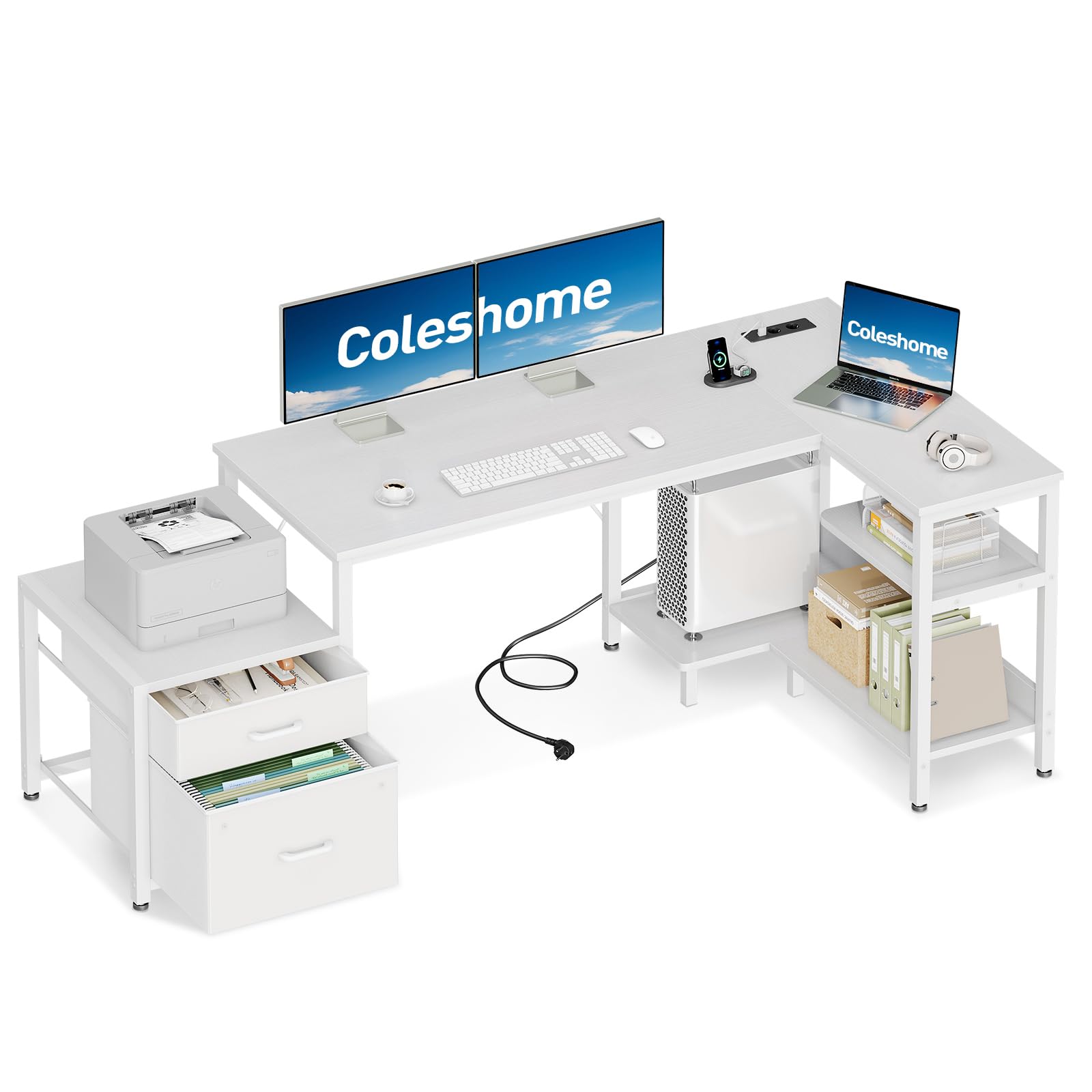
Image: The Coleshome L-Shaped Desk, showcasing its spacious design and integrated features in a modern office environment.
Safety Information
Please read all instructions carefully before assembly and use. Keep this manual for future reference.
- Assembly is required. Ensure all parts are present and undamaged before beginning.
- Follow the provided step-by-step instructions for safe and correct assembly.
- Do not overtighten screws, as this may damage the material.
- Place the desk on a flat, stable surface to prevent wobbling.
- Keep small parts and packaging materials away from children.
- Do not exceed the weight capacity of the desk or its shelves.
- Ensure all electrical connections are secure when using the integrated power outlets.
Package Contents
Before starting assembly, verify that all components listed in the assembly guide are present. The package typically includes:
- Desk panels (main desktop, L-extension, shelves)
- Metal frame components
- Fabric drawers and frame
- Integrated power strip with outlets and USB ports
- Hardware kit (screws, bolts, nuts, Allen wrench)
- Assembly instructions manual
Setup and Assembly
Follow the detailed, step-by-step instructions provided in the separate assembly guide included with your product. Ensure you have adequate space for assembly and consider the reversible design option before you begin.
Reversible Design
The L-shaped desktop can be configured for either a left-hand or right-hand orientation, allowing you to adapt the desk to your room layout. Decide on your preferred orientation before attaching the main desktop sections.

Image: Illustration demonstrating the reversible L-shape configuration of the desk, allowing for flexible placement.
Product Dimensions
Refer to the diagram below for detailed product dimensions to plan your space effectively.

Image: A comprehensive diagram illustrating the dimensions of the desk, including the main desktop, L-extension, and storage units.
Operating Instructions (Features)
Spacious Storage Drawers
The desk includes a spacious fabric drawer for daily essentials and a robust file cabinet for document organization. The breathable fabric helps prevent dust accumulation, and the smooth-gliding drawer ensures quiet operation. These are ideal for keeping your workspace tidy.

Image: The fabric storage drawers, designed for easy access and dust protection for documents and office supplies.
Open Storage Shelves & CPU Stand
The corner section features open shelves for office accessories, books, and frequently used items. A raised CPU stand is included to elevate your computer tower, promoting better heat dissipation and protecting it from floor dust. This keeps your essentials within reach whether you are working, studying, or gaming.

Image: The open storage shelves and CPU stand, providing organized space for computer equipment and other items.
Integrated Power Outlets
The desk is equipped with a built-in power strip featuring two AC power outlets (220V-250V/15A) and two USB ports (5V/2.1A). This eliminates the need for additional power strips, making it convenient to charge laptops, phones, gaming devices, or power desk lamps. The integrated design helps maintain a clutter-free workspace by reducing cable mess.

Image: The integrated power strip with two power outlets and two USB ports for convenient device charging and power supply.
Printer Cabinet
A dedicated cabinet is provided to accommodate most standard printers or other office equipment, keeping your desktop clear and organized.

Image: The printer cabinet, designed to hold a printer or other office supplies, keeping the main desk surface clear.
Maintenance
Proper care will ensure the longevity and appearance of your Coleshome L-Shaped Desk.
- Cleaning: Wipe surfaces with a soft, damp cloth. Avoid abrasive cleaners, harsh chemicals, or solvents that could damage the finish.
- Dusting: Regularly dust the desk with a dry, soft cloth.
- Spills: Clean up spills immediately to prevent staining or damage to the wood surface.
- Hardware Check: Periodically check all screws and bolts to ensure they remain tight. Retighten if necessary to maintain stability.
- Avoid Direct Sunlight: Prolonged exposure to direct sunlight can cause fading or discoloration.
- Heat Protection: Use coasters or protective pads under hot items to prevent heat damage.
Troubleshooting
If you encounter any issues with your desk, refer to the following common problems and solutions:
| Problem | Possible Cause | Solution |
|---|---|---|
| Desk is wobbly or unstable. | Loose screws or uneven floor. | Ensure all assembly screws are securely tightened. Adjust leveling feet if present, or place shims under legs on uneven floors. |
| Integrated power outlets are not working. | Power cable not fully plugged in, or circuit breaker tripped. | Check that the desk's power cable is securely plugged into a functional wall outlet. Verify your home's circuit breaker. |
| Drawers do not slide smoothly. | Obstruction or misaligned drawer frame. | Check for any items obstructing the drawer's path. Ensure the fabric drawer frame is correctly assembled and aligned. |
If the problem persists, please contact customer support.
Specifications
| Brand: | Coleshome |
| Model Number: | IV-DESK-LS001 |
| Color: | White |
| Dimensions (L x W x H): | 160 cm x 80 cm x 75.4 cm (approx. 63 in x 31.5 in x 29.7 in) |
| Item Weight: | 15.6 Kilograms (approx. 34.4 lbs) |
| Material: | Wood (top), Metal (base) |
| Special Features: | L-shape, Spacious and dust-proof storage, Integrated power outlets (2 AC, 2 USB), Reversible design |
| Power Outlet Specs: | 220V-250V/15A (AC), 5V/2.1A (USB) |
Warranty and Support
Coleshome is committed to providing quality products and customer satisfaction. While specific warranty details are not provided in this manual, our dedicated customer service team is available to assist you with any questions or concerns regarding your new desk.
For assistance, please contact Coleshome customer support. We aim to provide prompt assistance within 24 hours.
Please retain your purchase receipt for any warranty claims or support inquiries.


