
1. Introduction
The ZHRCLY universal parts are designed to be compatible with specific SHIMADEN SR93-8V-N-90 series temperature controllers, including models SR93-8V-N-90-1600, SR93-8V-N-90-100R, SR93-8V-N-90-105R, and SR93-8V-N-90-140R. These parts facilitate the proper functioning and maintenance of your temperature control system.
2. Safety Information
Adherence to safety guidelines is crucial for preventing injury and damage to equipment. Always follow these precautions:
- Always disconnect power to the SHIMADEN temperature controller and associated equipment before performing any installation, maintenance, or inspection.
- Ensure that installation and wiring are performed by qualified and experienced personnel.
- Refer to the original SHIMADEN controller manual for specific wiring diagrams, electrical ratings, and additional safety precautions.
- Do not operate the device if it shows any signs of physical damage, such as cracks, exposed wires, or unusual odors.
- Keep the device away from moisture, corrosive substances, and environments with extreme temperatures or high humidity.
- Ensure proper grounding to prevent electrical shock.
3. Product Overview
The universal part serves as a replacement or supplementary component for the SHIMADEN SR93-8V-N-90 series temperature controllers. It features a durable casing and multiple connection terminals for integration into your control system.

Figure 1: Side view of the universal part, displaying the model identification label and cooling vents.
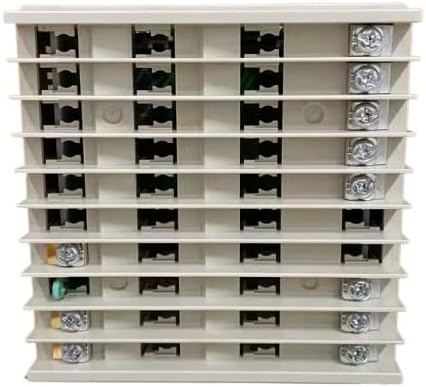
Figure 2: Rear view of the universal part, illustrating the array of connection terminals.
4. Setup and Installation
Follow these steps for proper installation of the universal part:
- Power Disconnection: Before beginning any installation, ensure that the main power supply to the SHIMADEN temperature controller and associated equipment is completely disconnected and locked out to prevent accidental re-energization.
- Identify Compatibility: Verify that the universal part model (e.g., SR93-8V-N-90-140R) is compatible with your existing SHIMADEN temperature controller. Refer to the specifications section of this manual and your controller's documentation.
- Mounting: Securely mount the universal part in the designated slot or location within the control panel or enclosure. Ensure adequate space for ventilation and access to terminals. Refer to the original controller's manual for specific mounting instructions if applicable.
- Wiring Connections: Carefully connect the wiring to the terminals on the universal part. Pay close attention to the wiring diagram provided with your SHIMADEN temperature controller to ensure correct polarity, signal routing, and power connections. Incorrect wiring can cause damage to the device or system and pose safety risks.
- Secure Connections: Ensure all screw terminals are tightened securely to prevent loose connections, which can lead to intermittent operation, signal loss, or electrical hazards. Do not overtighten.
- Final Check: After all connections are made, perform a thorough visual inspection to confirm that all wires are correctly routed and secured, and that there are no exposed conductors or potential short circuits.
5. Operation
This universal part functions as a component within a larger SHIMADEN temperature control system. Its operation is integrated with the main controller. Once installed and wired correctly, its functionality is typically managed through the primary temperature controller's interface.
- Power On: After successful installation and verification of all connections, restore power to the system.
- System Initialization: Allow the SHIMADEN temperature controller to initialize. Observe any error indicators or messages on the main controller's display.
- Function Verification: Refer to your SHIMADEN temperature controller's manual to verify that the newly installed universal part is recognized and functioning as expected within the system. This may involve checking input/output signals, status indicators, or specific diagnostic menus on the main controller.
- Parameter Settings: Any operational parameters or configurations related to this universal part will be set and managed via the main SHIMADEN temperature controller's programming interface.
6. Maintenance
Regular maintenance ensures the longevity and reliable performance of the universal part and the overall temperature control system.
- Periodic Inspection: Periodically inspect the universal part for any signs of physical damage, loose connections, or discoloration that might indicate overheating.
- Cleaning: Keep the device clean and free from dust, dirt, and debris. Use a soft, dry cloth for cleaning. Do not use liquid cleaners, abrasive materials, or solvents, as these can damage the components.
- Connection Check: Annually, or as needed based on environmental conditions and usage, disconnect power and re-check the tightness of all terminal screws to ensure secure electrical connections.
- Environmental Conditions: Ensure the operating environment remains within the specified temperature and humidity ranges to prevent premature failure and ensure optimal performance.
7. Troubleshooting
If you encounter issues, consult the following basic troubleshooting steps. For complex problems or issues not resolved by these steps, refer to the SHIMADEN temperature controller's comprehensive manual or contact technical support.
| Problem | Possible Cause | Solution |
|---|---|---|
| Device not responding or no power | No power supply; Incorrect wiring; Loose connection | Check the main power supply to the system; Verify all wiring connections against the diagram; Tighten all terminal screws securely. |
| Erratic readings or inconsistent behavior | Electrical interference; Faulty connection; Component malfunction | Ensure proper grounding of the system; Re-check all connections for tightness and correct routing; Consult the SHIMADEN manual for diagnostic procedures. |
| Unit overheating | Poor ventilation; Excessive electrical load | Ensure adequate airflow around the unit and within the enclosure; Verify that the electrical load connected to the unit does not exceed its specified limits. |
8. Specifications
The following specifications apply to the ZHRCLY universal part for SHIMADEN SR93-8V-N-90-140R temperature controllers:
- Brand: ZHRCLY
- Manufacturer: Original factory
- Model: SR93-8V-N-90-140R
- Compatible SHIMADEN Models: SR93-8V-N-90-1600, SR93-8V-N-90-100R, SR93-8V-N-90-105R, SR93-8V-N-90-140R
- Included Components: New universal part
- ASIN: B0F3HSH1NP
9. Warranty and Support
For warranty information and technical support regarding this ZHRCLY universal part, please contact the seller or manufacturer directly. Refer to your purchase documentation for specific warranty terms and contact details.
For issues related to the SHIMADEN temperature controller itself, please consult the original SHIMADEN product documentation or their official support channels.