
1. Introduction
The LexonElec M96 is a versatile wireless keyboard designed for various computing needs, offering multi-mode connectivity, a compact 94-key layout, and customizable RGB backlighting. This manual provides detailed instructions for setting up, operating, and maintaining your keyboard.

Image 1.1: LexonElec M96 Wireless Keyboard with its 2.4G USB receiver.
2. What's in the Box
- LexonElec M96 Wireless Keyboard
- USB-C to USB-A Cable
- 2.4G Wireless Receiver
- User Manual
3. Setup & Connectivity
The LexonElec M96 keyboard supports three connection modes: 2.4G wireless, Bluetooth, and wired USB-C.

Image 3.1: Overview of the three available connection methods.
3.1. 2.4G Wireless Connection
- Locate the 2.4G wireless receiver stored in the keyboard's bottom compartment.
- Plug the 2.4G wireless receiver into an available USB-A port on your computer.
- Turn on the keyboard using the power switch located on the side.
- The keyboard will automatically connect to your device. The display will indicate "2.4G".
3.2. Bluetooth Connection
- Turn on the keyboard using the power switch.
- Press the FN + W, FN + E, or FN + R keys to select Bluetooth channels BT1, BT2, or BT3 respectively. The display will show the selected channel.
- For initial pairing, press and hold ESC + Q simultaneously until the keyboard enters pairing mode (indicated by a flashing light).
- On your device (PC, Mac, Android, etc.), go to Bluetooth settings and search for "LexonElec M96" or a similar device name.
- Select the keyboard to pair. Once connected, the display will show the active Bluetooth channel.
3.3. Wired Connection
- Connect the provided USB-C to USB-A cable to the keyboard's USB-C port and to a USB-A port on your computer.
- The keyboard will automatically switch to wired mode. The display will indicate "USB".
4. Operating Instructions
4.1. Multi-Function Display & Knob
The keyboard features a smart display and a multi-function knob for easy control.

Image 4.1: Close-up of the multi-function display and control knob.
- Display Information: Shows battery level, current connection mode (2.4G, BT1, BT2, BT3, USB), and charging status.
- Knob Function (Multimedia Mode):
- Turn left: Decrease volume.
- Turn right: Increase volume.
- Press: Mute/Unmute audio.
- Knob Function (Backlight Mode): Press and hold the knob for 5 seconds to switch to backlight mode.
- Turn left: Decrease backlight brightness.
- Turn right: Increase backlight brightness.
- Press: Switch backlight effects.
4.2. Key Combination Functions
Utilize the FN key in combination with other keys for additional functions:
- FN + F1-F12: Access multimedia controls (e.g., play/pause, volume, previous/next track).
- FN + Arrow Keys: Adjust backlight speed and direction.
- FN + Insert: Switch between 20 RGB lighting effects.
- FN + Win: Lock/Unlock the Windows key.
5. Battery & Charging
The keyboard is equipped with a built-in 3000 mAh rechargeable battery.
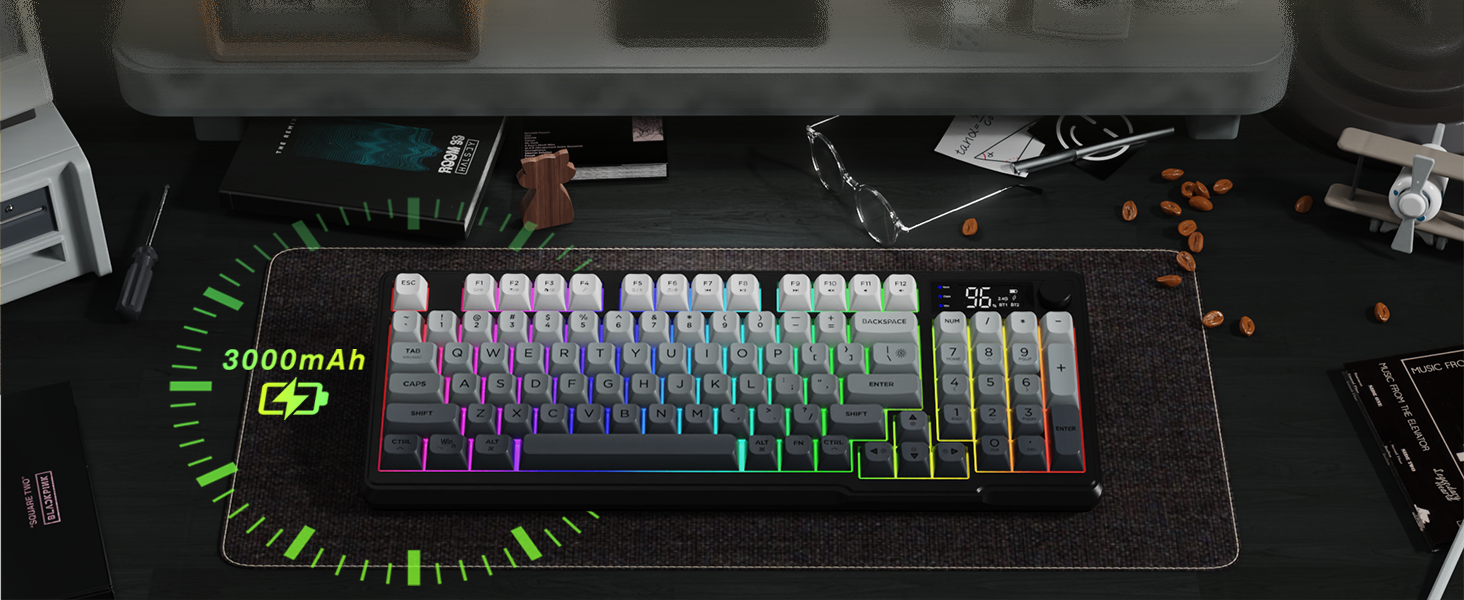
Image 5.1: Battery capacity and estimated usage times.
- Usage Time: Approximately 60 hours with backlight on, and up to 200 hours with backlight off.
- Charging: Connect the keyboard using the USB-C cable to a 5V USB port on your computer or a compatible charger. The display will show the charging status.
- Low Battery Warning: The display will indicate a low battery level when charging is required.
6. Ergonomic Design
The LexonElec M96 keyboard features an ergonomic design for enhanced comfort during extended use.

Image 6.1: Adjustable feet for customizing keyboard height.
- Adjustable Feet: The keyboard includes 2-in-1 adjustable feet, allowing you to set the keyboard at three different heights for optimal typing posture.
- PBT Keycaps: Durable PBT keycaps provide a comfortable and long-lasting typing experience.
7. Compatibility
The LexonElec M96 keyboard is widely compatible with various operating systems and devices.

Image 7.1: Wide compatibility across different operating systems.
- Supported Operating Systems: Windows Vista/7/8/10/11, macOS, Linux, Android.
- Compatible Devices: PCs, Laptops, Tablets, Smartphones (with Bluetooth).
8. Maintenance
To ensure the longevity and optimal performance of your LexonElec M96 keyboard, follow these maintenance guidelines:
- Cleaning: Use a soft, dry cloth to wipe the keyboard surface. For deeper cleaning, use compressed air to remove dust and debris from between the keycaps. Avoid using harsh chemicals or abrasive materials.
- Liquid Exposure: Keep the keyboard away from liquids. In case of accidental spills, immediately disconnect the keyboard and allow it to dry completely before re-using.
- Storage: Store the keyboard in a cool, dry place away from direct sunlight and extreme temperatures.
9. Troubleshooting
If you encounter any issues with your LexonElec M96 keyboard, refer to the following troubleshooting tips:
- Keyboard Not Connecting:
- Ensure the keyboard is powered on.
- For 2.4G, verify the receiver is securely plugged into a USB port.
- For Bluetooth, ensure the keyboard is in pairing mode (ESC + Q) and visible in your device's Bluetooth settings. Try re-pairing.
- For wired, ensure the USB-C cable is properly connected to both the keyboard and your device.
- Backlight Not Working/Adjusting:
- Ensure the keyboard battery has sufficient charge.
- Press and hold the knob for 5 seconds to enter backlight mode, then turn or press the knob to adjust brightness or switch effects.
- Use FN + arrow keys to adjust backlight speed/direction.
- Keys Not Responding:
- Check the connection mode.
- Ensure the battery is charged.
- Restart your computer and the keyboard.
10. Specifications
| Feature | Detail |
|---|---|
| Product Dimensions | 15.75 x 6.5 x 1.77 inches |
| Item Weight | 1.74 pounds |
| Manufacturer | LexonElec |
| Item Model Number | M96 |
| Compatible Devices | Laptop, Linux, MAC, PC |
| Connectivity Technology | 2.4G Wireless, Bluetooth, USB-C Wired |
| Keyboard Description | Wireless Gaming Keyboard (Membrane Semi-Mechanical) |
| Special Feature | 94 Keys PBT Keycap, Low-Profile Key, Rainbow Backlit, Smart Display, Volume Roller |
| Keyboard Backlighting | RGB |
| Battery Capacity | 3000 mAh |
11. Warranty & Support
For warranty information or technical support, please refer to the documentation included in your product packaging or contact LexonElec customer service directly. Keep your proof of purchase for any warranty claims.


