
Apetaccat DBXSY001-APCA
Apetaccat Vanity Desk User Manual
Model: DBXSY001-APCA
Introduction
Thank you for choosing the Apetaccat Vanity Desk. This manual provides essential information for the safe assembly, operation, and maintenance of your new vanity desk. Please read this manual thoroughly before beginning assembly or use, and retain it for future reference.
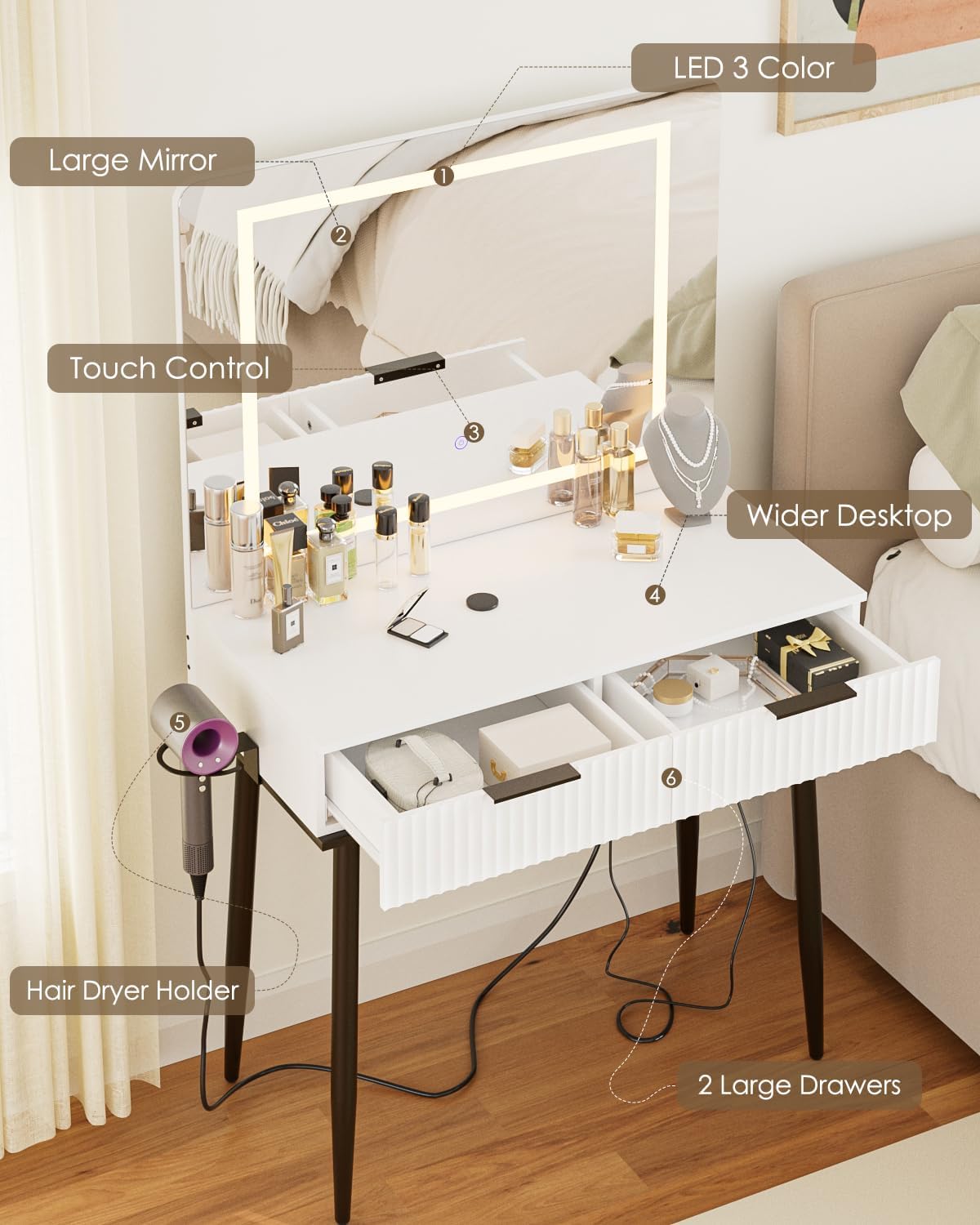
This vanity desk features a large mirror with adjustable lighting, ample storage with two drawers, and a convenient hair dryer holder. Its durable construction ensures long-lasting performance.
Important Safety Information
- Always assemble the product on a soft, clean surface to prevent scratches.
- Ensure all parts are present and undamaged before assembly.
- Do not overtighten screws during assembly to avoid damaging the material.
- Keep small parts and packaging materials away from children.
- Do not stand or sit on the vanity desk.
- Ensure the vanity is placed on a stable, level surface to prevent tipping.
- For electrical components (mirror lights), ensure the power cord is not pinched or damaged. Unplug from the power outlet when not in use or during cleaning.
- Do not expose the vanity to excessive moisture or direct sunlight.
Package Contents
Before assembly, verify that all components listed below are included in your package. If any parts are missing or damaged, please contact customer support.
- Vanity Tabletop with Mirror Assembly
- Desk Legs (4)
- Drawers (2)
- Hair Dryer Holder
- Assembly Hardware (screws, bolts, tools if provided)
- Instruction Manual (this document)
Setup and Assembly
Assembly is required for this vanity desk. Please follow the steps carefully. It is recommended to have two people for assembly.
- Unpack and Identify Parts: Carefully remove all components from the packaging. Lay them out on a soft, clean surface to prevent scratches. Refer to the parts list to ensure all pieces are present.
- Attach Legs to Tabletop: Securely attach the four desk legs to the designated mounting points on the underside of the vanity tabletop using the provided hardware. Ensure they are tightened firmly but do not overtighten.
- Install Drawers: Insert the two drawers into their respective slots. Ensure they slide smoothly.
- Mount Hair Dryer Holder: The hair dryer holder can be installed on either the left or right side of the vanity. Attach it to the pre-drilled holes using the provided screws.
- Position the Vanity: Carefully lift and place the assembled vanity desk in its desired location. Ensure it is on a stable and level surface.
- Connect Power: Plug the power cord for the mirror lights into a suitable electrical outlet.
Operating Instructions
Mirror Lighting Control
The vanity mirror features integrated LED lighting with adjustable color temperature and brightness.
- Power On/Off: Lightly touch the power icon on the mirror surface to turn the lights on or off.
- Change Color Temperature: With the lights on, short-press the touch control button to cycle through the three available lighting modes:
- Cool White: Provides bright, clear illumination for precision tasks.
- Warm White: Offers a soft, inviting glow, ideal for evening makeup.
- Natural Light: Mimics natural daylight for accurate color rendering.
- Adjust Brightness: With the lights on, long-press the touch control button to smoothly adjust the brightness level. Release the button when the desired brightness is achieved.


Drawer Usage
The two large drawers provide ample storage for cosmetics, accessories, and other personal items. Pull the drawers gently to open and push to close.

Care and Maintenance
- Cleaning the Surface: The vanity's smooth, waterproof surface can be easily wiped clean with a soft, damp cloth. Avoid abrasive cleaners or harsh chemicals that may damage the finish.
- Mirror Cleaning: Use a glass cleaner specifically designed for mirrors and a lint-free cloth to clean the mirror surface. Do not spray cleaner directly onto the mirror; spray onto the cloth first.
- Dusting: Regularly dust the vanity with a soft, dry cloth to prevent dust buildup.
- Avoid Moisture: While the surface is waterproof, avoid prolonged exposure to standing water or excessive moisture. Wipe up spills immediately.
- Check Connections: Periodically check all screws and connections to ensure they remain tight. Retighten if necessary.
Troubleshooting
| Problem | Possible Cause | Solution |
|---|---|---|
| Mirror lights do not turn on. |
|
|
| Lights flicker or dim unexpectedly. |
|
|
| Drawers do not slide smoothly. |
|
|
| Vanity feels wobbly. |
|
|
Product Specifications
| Feature | Detail |
|---|---|
| Model Number | DBXSY001-APCA |
| Brand | Apetaccat |
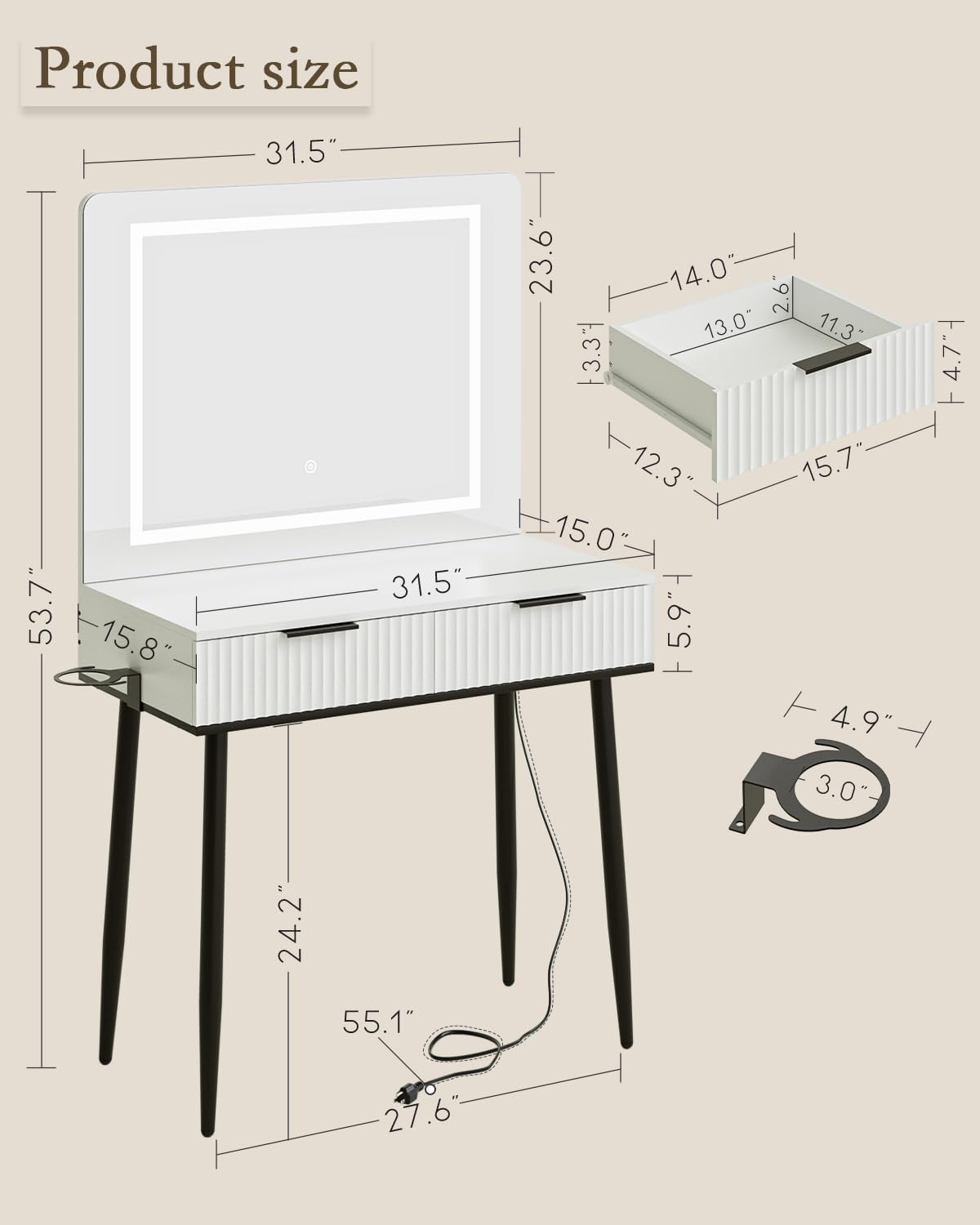
| Dimensions (L x W x H) | 40 x 80 x 136 cm (15.7D x 31.5W x 53.5H inches) |
| Item Weight | 19.5 kg (43 lbs) |
| Material | Engineered Wood, Metal (legs) |
| Color | White with Black Legs |
| Number of Drawers | 2 |
| Mirror Lighting | LED, 3 Adjustable Color Temperatures (Cool White, Warm White, Natural Light), Touch-Adjustable Brightness |
| Assembly Required | Yes |
Warranty and Support
Apetaccat is committed to providing high-quality products. For any questions, concerns, or assistance with assembly, missing parts, or product issues, please contact our customer support team.
Contact Information:
- Manufacturer: Apetaccat
- Place of Business: Xiamensongxindianzishangwuyouxiangongsi, Room 1101-7, No. 860, Xianyue Road, Huli District, Xiamen 361006, Fujian Province, CN
- Telephone: (86) 14759271564
- Please refer to your purchase documentation for specific warranty terms and conditions.
Ask a question about this manual
Ask about setup, troubleshooting, compatibility, parts, safety, or missing instructions. Manuals+ will review the question and use this page’s manual context to help answer it.