
Battery Tender Charge N Start 1120
Battery Tender Charge N Start 1120 User Manual
Smart 12V/1 AMP Battery Charger and 1200 AMP Jump Starter
Model: Charge N Start 1120 (030-7012-WH)
Introduction
The Battery Tender Charge N Start 1120 is a versatile 2-in-1 device designed to provide both smart battery charging/maintaining and powerful jump-starting capabilities. Engineered for reliability and ease of use, this unit ensures your vehicle's battery remains in optimal condition and provides emergency starting power when needed. It is suitable for a wide range of vehicles including cars, SUVs, motorcycles, and ATVs.

Image: The Battery Tender Charge N Start 1120 unit, showcasing its compact design and integrated smart clamps.
Safety Information
Always read and understand all safety warnings and instructions before using this product. Failure to follow these instructions may result in electric shock, fire, or serious injury.
General Safety Precautions:
- Wear eye protection and protective clothing when working with batteries.
- Ensure adequate ventilation when charging batteries.
- Keep children and unauthorized persons away from the work area.
- Do not expose the unit to rain or wet conditions.
- Do not operate the unit if it has received a sharp blow, been dropped, or otherwise damaged.
Integrated Safety Features:
The Charge N Start 1120 incorporates advanced safety mechanisms for worry-free operation:
- Spark-Proof Connections: Prevents sparks during connection to the battery terminals.
- Reverse Polarity Protection: Protects against damage if clamps are connected incorrectly.
- Temperature Compensation: Adjusts charging based on ambient temperature for optimal battery health.
- Microprocessor-Controlled Charging: Ensures precise and safe charging cycles.
- Over-Voltage Protection: Safeguards against excessive voltage.
- Auto-Shutoff Technology: Automatically powers down when not in use or in case of fault.
- Short Circuit Protection: Prevents damage from short circuits.

Image: Visual representation of the multiple safety features integrated into the Charge N Start 1120.
Package Contents
Verify that all items are present in your package:
- Battery Tender Charge N Start 1120 Unit
- Heavy-duty Smart Clamps with Copper-Plated Jaws
- Premium Storage Case
- 6-foot AC Input Cable
- 6-foot DC Output Cable
- Alligator Clips and Ring Terminal Cable Combo with 7.5 AMP Fuse
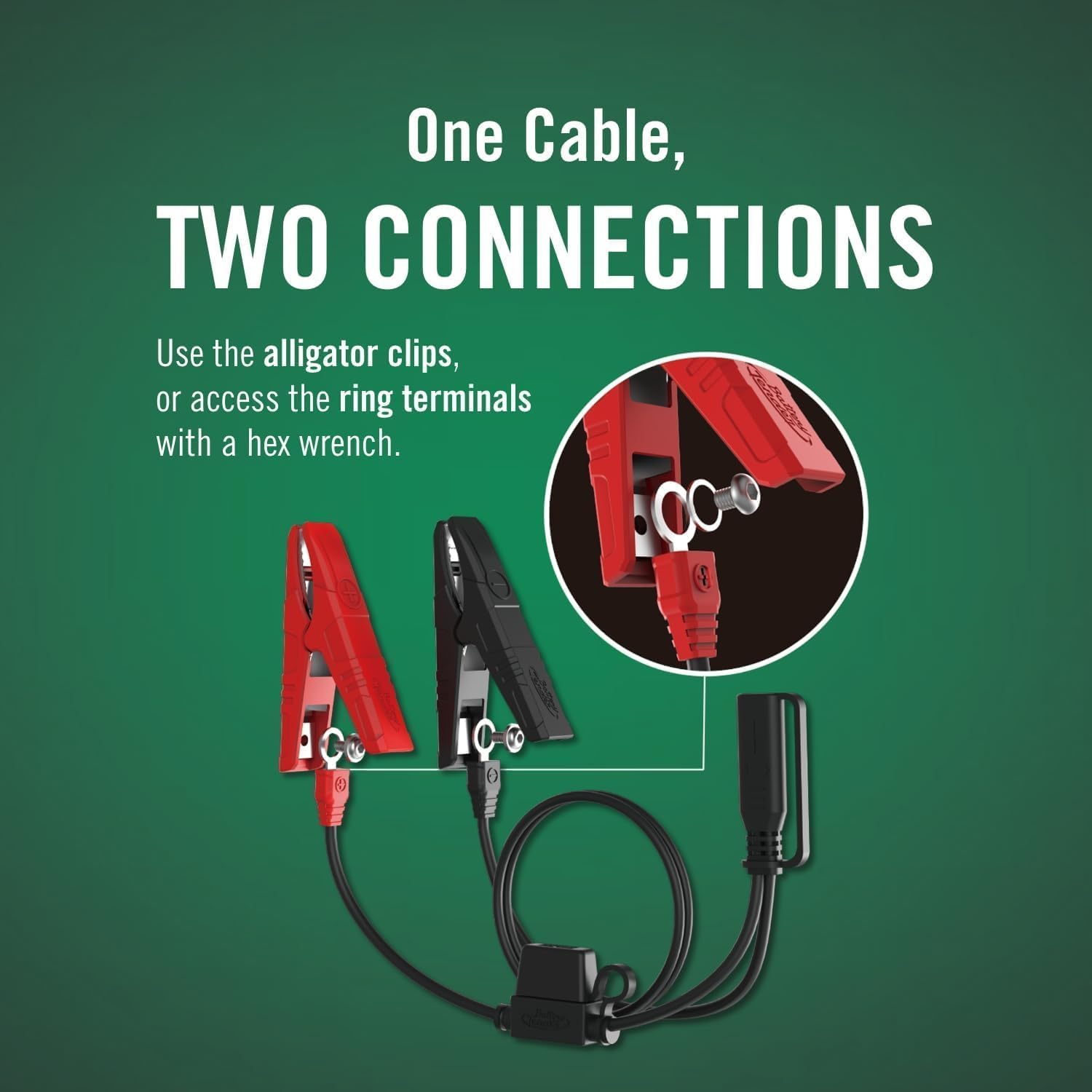
Image: The Charge N Start 1120 unit, emphasizing its intelligent power management capabilities.
Setup
Initial Charging of the Unit:
- Connect the AC input cable to the Charge N Start 1120 unit.
- Plug the AC input cable into a standard wall outlet.
- Allow the unit to fully charge its internal battery before first use. The 'FULLY CHARGED' indicator will illuminate when complete.
Connecting to a Vehicle Battery (Charging/Maintaining):
- Ensure the vehicle's ignition is off.
- Connect the red positive (+) clamp to the positive (+) battery terminal.
- Connect the black negative (-) clamp to the negative (-) battery terminal or a chassis ground point away from the battery.
- Connect the DC output cable to the Charge N Start 1120 unit.
- Plug the AC input cable into a standard wall outlet. The unit will automatically begin charging/maintaining the vehicle battery.

Image: The Charge N Start 1120 connected to a vehicle battery, illustrating proper clamp placement for charging.
Battery Type Selection:
The Charge N Start 1120 is compatible with various battery types:
- Standard Lead-Acid
- AGM (Absorbed Glass Mat)
- Gel Cell
- Lithium (LiFePO4)
Press the 'SELECT' button on the unit to cycle through the battery types (Lithium, AGM/Standard). Ensure the correct battery type is selected for optimal charging and maintenance.

Image: Display indicating the various battery types compatible with the Charge N Start 1120.
Connection Options:
The unit comes with a versatile cable combo, offering both alligator clips and ring terminals for connection. Use the appropriate connection method for your battery terminals.

Image: The included cable with both alligator clips and ring terminal options for flexible connection.
Operating Instructions
Battery Charging and Maintaining:
Once connected to a vehicle battery and plugged into an AC outlet, the Charge N Start 1120 will automatically begin its charging and maintenance cycle. The unit features exclusive auto-switch technology that intelligently maintains both the vehicle battery and its internal jump starter, switching charging between them to ensure both are always ready.
- Charging Indicators: The display will show the charging status, progressing towards 'FULLY CHARGED'.
- Automatic Maintenance: After reaching full charge, the unit will switch to a maintenance mode to keep the battery at optimal voltage without overcharging.

Image: Close-up view of the Charge N Start 1120 display, showing charging status indicators.
Jump Starting a Vehicle:
The Charge N Start 1120 can jump start vehicles with up to 6.5L gas engines and 3.5L diesel engines.
- Ensure the Charge N Start 1120's internal battery is sufficiently charged (check the 'FULL JUMP START' indicator).
- Connect the red positive (+) clamp to the positive (+) battery terminal of the vehicle.
- Connect the black negative (-) clamp to the negative (-) battery terminal or a solid, unpainted metal part of the vehicle's engine block or chassis, away from the battery.
- Ensure all connections are secure.
- Attempt to start the vehicle. If the vehicle does not start immediately, wait a few minutes before trying again.
- Once the vehicle starts, disconnect the black negative (-) clamp first, then the red positive (+) clamp.

Image: The Charge N Start 1120 positioned in a vehicle's engine bay, ready for jump starting.

Image: An infographic highlighting the jump start capacity and other key features of the unit.
LED Emergency Light:
The unit includes a built-in LED emergency light. To activate, press and hold the power button for a few seconds. Press again to cycle through light modes (e.g., steady, strobe, SOS) or turn off.
Product Video:
Video: An official product video demonstrating the 2-in-1 functionality of the Battery Tender Charge N Start, including both charging and jump-starting applications.
Maintenance
Cleaning:
Periodically clean the unit and clamps with a dry cloth. Do not use abrasive cleaners or solvents. Ensure clamps are free of dirt and corrosion for optimal conductivity.
Storage:
Store the Charge N Start 1120 in its premium storage case in a cool, dry place when not in use. Avoid extreme temperatures and direct sunlight.
Internal Battery Recharging:
To ensure the jump starter is always ready for emergency use, it is recommended to recharge the internal battery every 3-6 months, or after each jump start, even if the unit has been connected to an AC outlet for vehicle battery maintenance. The auto-switch technology helps maintain both, but periodic checks are advised.
Troubleshooting
Unit Not Charging:
- Check if the AC input cable is securely plugged into both the unit and the wall outlet.
- Verify that the wall outlet is functional.
- Inspect the AC input cable for any damage.
Vehicle Not Starting (Jump Start):
- Ensure the Charge N Start 1120's internal battery has sufficient charge (check 'FULL JUMP START' indicator).
- Verify that the clamps are securely connected to the correct battery terminals (red to positive, black to negative or chassis ground).
- Check for any corrosion on battery terminals and clean if necessary.
- Ensure the vehicle's battery is not severely damaged or completely dead, which may prevent a successful jump start.
- Allow a few minutes between jump start attempts to prevent overheating the unit.
Indicator Lights Not Functioning:
- Ensure the unit is powered on.
- If the unit is connected to an AC source, check the power connection.
- If issues persist, contact customer support.
Specifications
| Feature | Specification |
|---|---|
| Brand | Battery Tender |
| Model | Charge N Start 1120 |
| Item Model Number | 030-7012-WH |
| Product Dimensions | 3.5"D x 8.66"W x 4.21"H |
| Item Weight | 1.65 pounds |
| Amperage (Charger) | 1 Amp |
| Peak Output Current (Jump Starter) | 1200 Amps |
| Engine Compatibility (Gas) | Up to 6.5L |
| Engine Compatibility (Diesel) | Up to 3.5L |
| Battery Voltage | 12V |
| Battery Type Compatibility | Standard Lead-Acid, AGM, Gel Cell, Lithium (LiFePO4) |
| Specification Met | DOE, ETL, FCC |
| UPC | 734357370126 |
| Automotive Fit Type | Universal Fit |
Warranty Information
The Battery Tender Charge N Start 1120 comes with a 1-year limited warranty from the date of purchase. This warranty covers defects in materials and workmanship under normal use. It does not cover damage caused by misuse, abuse, unauthorized modifications, or improper installation.
Please retain your proof of purchase for warranty claims. For detailed warranty terms and conditions, refer to the documentation included with your product or contact customer support.
Support
For technical assistance, troubleshooting not covered in this manual, or warranty inquiries, please contact Battery Tender customer support. Contact information can typically be found on the manufacturer's website or on the product packaging.
When contacting support, please have your product model number (Charge N Start 1120) and serial number (if applicable) ready.
Related documentsCharge N Start 1120


Ask a question about this manual
Ask about setup, troubleshooting, compatibility, parts, safety, or missing instructions. Manuals+ will review the question and use this page’s manual context to help answer it.