
Introduction
This manual provides instructions for the Snrigw Replacement Remote Control, designed for use with Bose SoundTouch 300 soundbars, including models 421650 and 755001-0030. This remote utilizes advanced Infrared (IR) technology to provide reliable control over your audio system. It requires no programming and is ready for use once batteries are installed.
Please read this manual carefully to ensure proper setup and operation of your new remote control.
Setup
The Snrigw Replacement Remote Control is designed for immediate use without any complex programming. Follow these simple steps to begin using your remote:
- Unpack the Remote: Carefully remove the remote control from its packaging.
- Install Batteries: The remote requires two AAA batteries (not included). Locate the battery compartment on the back of the remote control. Slide the battery cover downwards to open it. Insert two AAA batteries, ensuring the positive (+) and negative (-) terminals align correctly with the indicators inside the compartment. Close the battery cover by sliding it back into place until it clicks securely.
Once batteries are installed, the remote is ready to control your compatible Bose SoundTouch 300 soundbar.

Operating Instructions
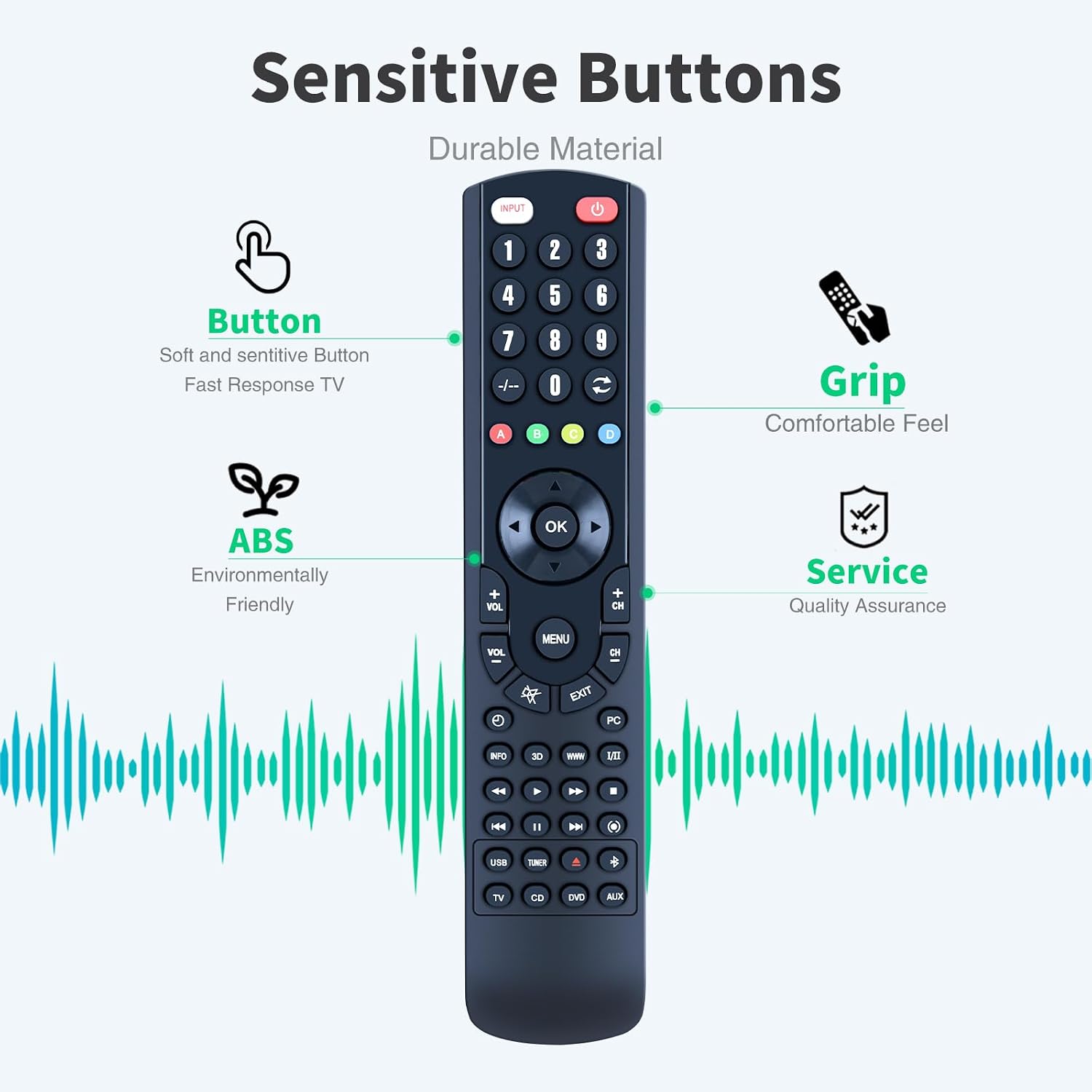
This remote control provides intuitive and straightforward functionality for your Bose SoundTouch 300 soundbar. The buttons are clearly labeled for ease of use.

Basic Functions:
- Power Button (INPUT): Turns the soundbar on or off.
- Number Buttons (0-9): For direct input or channel selection if applicable to your soundbar's functions.
- Volume Control (VOL +/-): Adjusts the soundbar's volume level.
- Channel Control (CH +/-): Navigates through channels or presets if supported by your soundbar.
- Navigation Pad (Up, Down, Left, Right, OK): Used for menu navigation and selection.
- MENU: Accesses the soundbar's main menu.
- EXIT: Exits the current menu or function.
- Playback Controls (Play, Pause, Stop, Rewind, Fast Forward, Skip): Controls media playback.
- Source Selection (e.g., TV, CD, DVD, AUX, USB): Selects the input source for the soundbar.
The remote features sensitive buttons and an ergonomic grip for comfortable and responsive control.
Signal Range and Angle:
The remote control operates effectively within a maximum range of 40 feet (approximately 12 meters) and supports multi-angle remote control up to 120 degrees. Ensure there are no obstructions between the remote and the soundbar's IR receiver for optimal performance.

Maintenance
To ensure the longevity and optimal performance of your Snrigw Replacement Remote Control, follow these maintenance guidelines:
- Cleaning: Wipe the remote control with a soft, dry cloth. Do not use liquid cleaners, sprays, or abrasive materials, as these can damage the remote's surface or internal components.
- Battery Replacement: Replace batteries when the remote's response becomes sluggish or stops working. Always replace both batteries at the same time with new AAA alkaline batteries. Do not mix old and new batteries, or different types of batteries.
- Storage: Store the remote in a cool, dry place away from direct sunlight, extreme temperatures, and high humidity.
- Handling: Avoid dropping the remote or subjecting it to strong impacts, as this can damage internal circuitry.
The remote is crafted from durable ABS plastic, designed to withstand daily use.
Troubleshooting
If you encounter issues with your remote control, please refer to the following common troubleshooting steps:
- Remote Not Responding:
- Ensure the batteries are inserted correctly with the correct polarity (+/-).
- Replace old batteries with new AAA alkaline batteries.
- Check for any obstructions between the remote and the soundbar's IR receiver.
- Ensure you are within the operational range (up to 40 feet) and pointing the remote directly at the soundbar.
- Intermittent Functionality:
- This could indicate low battery power. Replace the batteries.
- Ensure no strong light sources (like direct sunlight or certain fluorescent lights) are interfering with the IR signal.
- Remote Buttons Not Working:
- Clean the remote's surface and buttons with a dry cloth to remove any dirt or residue.
- If only specific buttons are not working, the remote might be damaged.
This remote control does not require programming, so issues related to pairing or code setup are not applicable.
Specifications
| Brand | Snrigw |
| Model Name | SoundTouch 300 |
| Compatible Devices | Bose SoundTouch 300 Soundbars (Models 421650, 755001-0030) |
| Connectivity Technology | Infrared (IR) |
| Special Feature | No Programming Required |
| Color | Black |
| Max Number of Supported Devices | 1 |
| Button Quantity | 10 |
| Controller Type | Button Control |
| Maximum Range | 40 Feet (approx. 12 meters) |
| Battery Type | 2 x AAA Alkaline Batteries (not included) |
| Material | Durable ABS Plastic |
Warranty and Support
Snrigw is committed to providing quality products and customer satisfaction. If you have any questions, concerns, or require assistance with your replacement remote control, please do not hesitate to contact our customer support team.
For support inquiries, please refer to the contact information provided with your purchase or visit the Snrigw official website.
Please retain your proof of purchase for any warranty claims.