
Philips Sonicare DiamondClean 9900 Prestige Electric Toothbrush User Manual
Model: HX9992/43
1. Introduction
The Philips Sonicare DiamondClean 9900 Prestige electric toothbrush is designed to provide advanced oral care. It incorporates SenseIQ technology to adapt to your brushing style, offers multiple cleaning modes, and connects to an app for personalized guidance. This manual provides essential information for the proper setup, operation, and maintenance of your device.
2. Package Contents
Carefully unpack your Philips Sonicare DiamondClean 9900 Prestige. The package should contain the following items:
- 1x DiamondClean Prestige 9900 Electric Toothbrush Handle
- 4x A3 Premium All-in-One Brush Heads
- 1x Travel Case with USB Charger
- 1x Charging Base

Image: The Philips Sonicare DiamondClean 9900 Prestige electric toothbrush, four brush heads, charging base, and travel case.
3. Key Features
3.1 SenseIQ Technology
SenseIQ technology detects your brushing habits up to 100 times per second, including pressure, motion, and coverage. It automatically adapts the intensity if you brush too hard, helping to protect your teeth and gums.

Image: A visual depicting the SenseIQ technology, showing sonic pulses and water droplets.
3.2 Pressure Sensor
The integrated pressure sensor features a light ring at the end of the handle that illuminates if you apply too much pressure during brushing. This visual cue reminds you to reduce pressure to protect your teeth and gums.
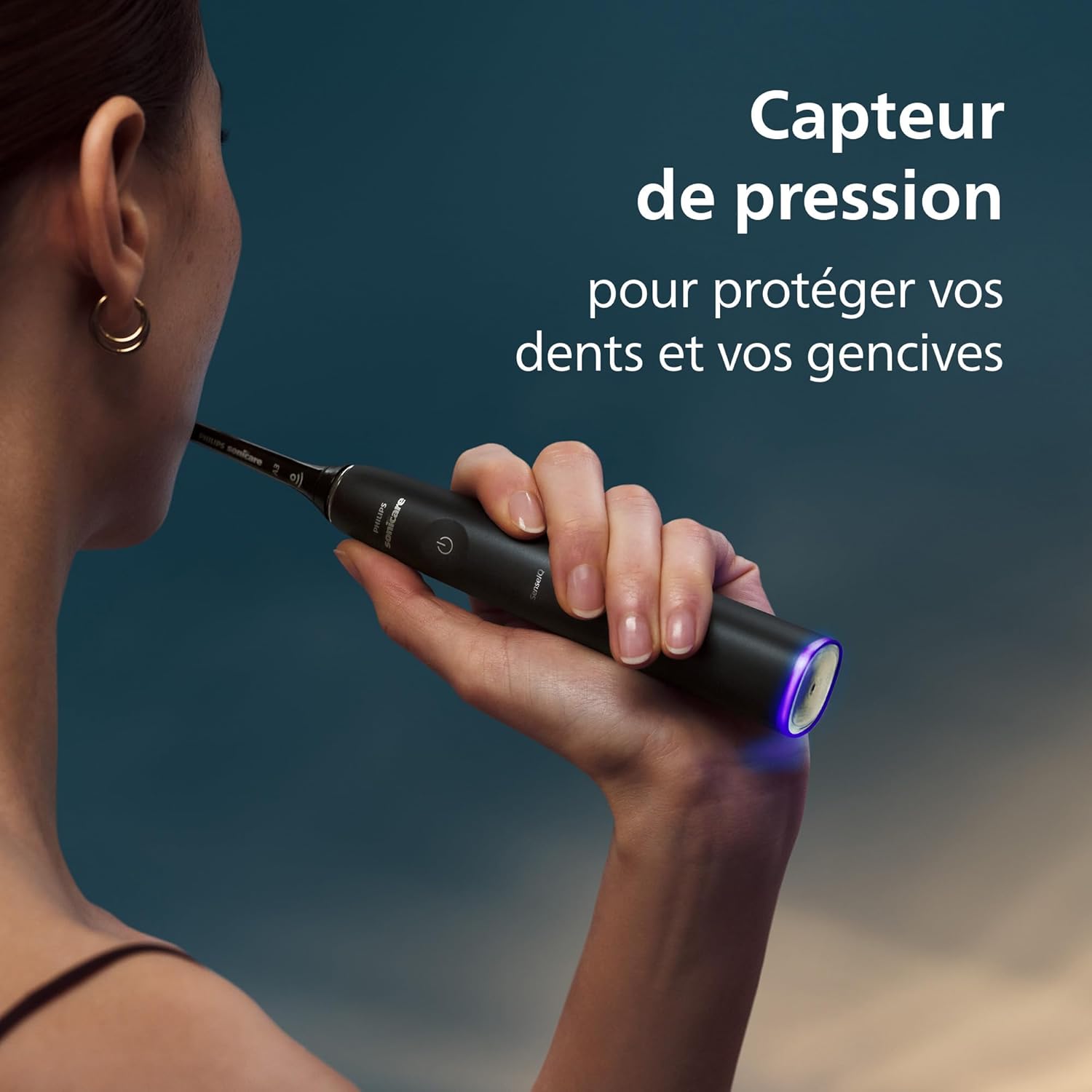
Image: A hand holding the toothbrush, with the light ring at the base of the handle glowing purple, indicating excessive pressure.
3.3 Advanced Sonic Technology
The advanced sonic technology delivers up to 62,000 brush movements per minute, creating dynamic fluid action that drives liquid deep into interdental spaces and along the gumline for effective cleaning.

Image: A close-up view of the toothbrush bristles effectively cleaning a tooth surface.
3.4 Brushing Modes and Intensity Levels
The toothbrush offers 5 brushing modes and 3 intensity levels to customize your brushing experience:
- Clean: For daily cleaning.
- White+: For stain removal.
- Gum Health: For gentle yet effective gum cleaning.
- Deep Clean+: For a refreshing and deep clean.
- Sensitive: For sensitive gums.
3.5 Philips Sonicare App
Connect your toothbrush to the Philips Sonicare app for personalized brushing guidance, real-time feedback, and insights to improve your brushing habits. The app also notifies you when your teeth are thoroughly brushed and when it's time to replace your brush head via BrushSync™ technology.

Image: A smartphone displaying the Philips Sonicare app interface, showing a dental arch and brushing timer.
4. Setup
4.1 Charging the Toothbrush
- Place the toothbrush handle onto the charging base.
- Connect the charging base to a power outlet.
- Allow the toothbrush to charge for at least 24 hours for the first use. A full charge provides approximately two weeks of regular use (based on two 2-minute brushing sessions per day).
- The battery indicator light on the handle will show the charging status.
4.2 Attaching a Brush Head
Align the brush head with the metal shaft on the handle and push it down firmly until it clicks into place.
4.3 App Installation and Pairing
- Download the Philips Sonicare app from your device's app store.
- Open the app and follow the on-screen instructions to pair your toothbrush via Bluetooth.
- Ensure your toothbrush is charged and nearby during the pairing process.
5. Operating Instructions
5.1 General Brushing
- Wet the bristles and apply a small amount of toothpaste.
- Place the brush head against your teeth at a slight angle towards the gumline.
- Press the power button to turn on the toothbrush.
- Gently move the brush head slowly across each tooth, allowing the sonic action to clean. Do not scrub.
- Brush for two minutes, twice a day. The built-in timer will signal when two minutes are complete.
- If the pressure sensor light illuminates, reduce the pressure you are applying.

Image: A person demonstrating the proper way to hold and use the Philips Sonicare toothbrush for effective cleaning.
5.2 Selecting Modes and Intensity
To change the brushing mode, press the mode button (if available, otherwise cycle through with power button after turning on). To adjust intensity, use the intensity buttons on the handle or the Philips Sonicare app.
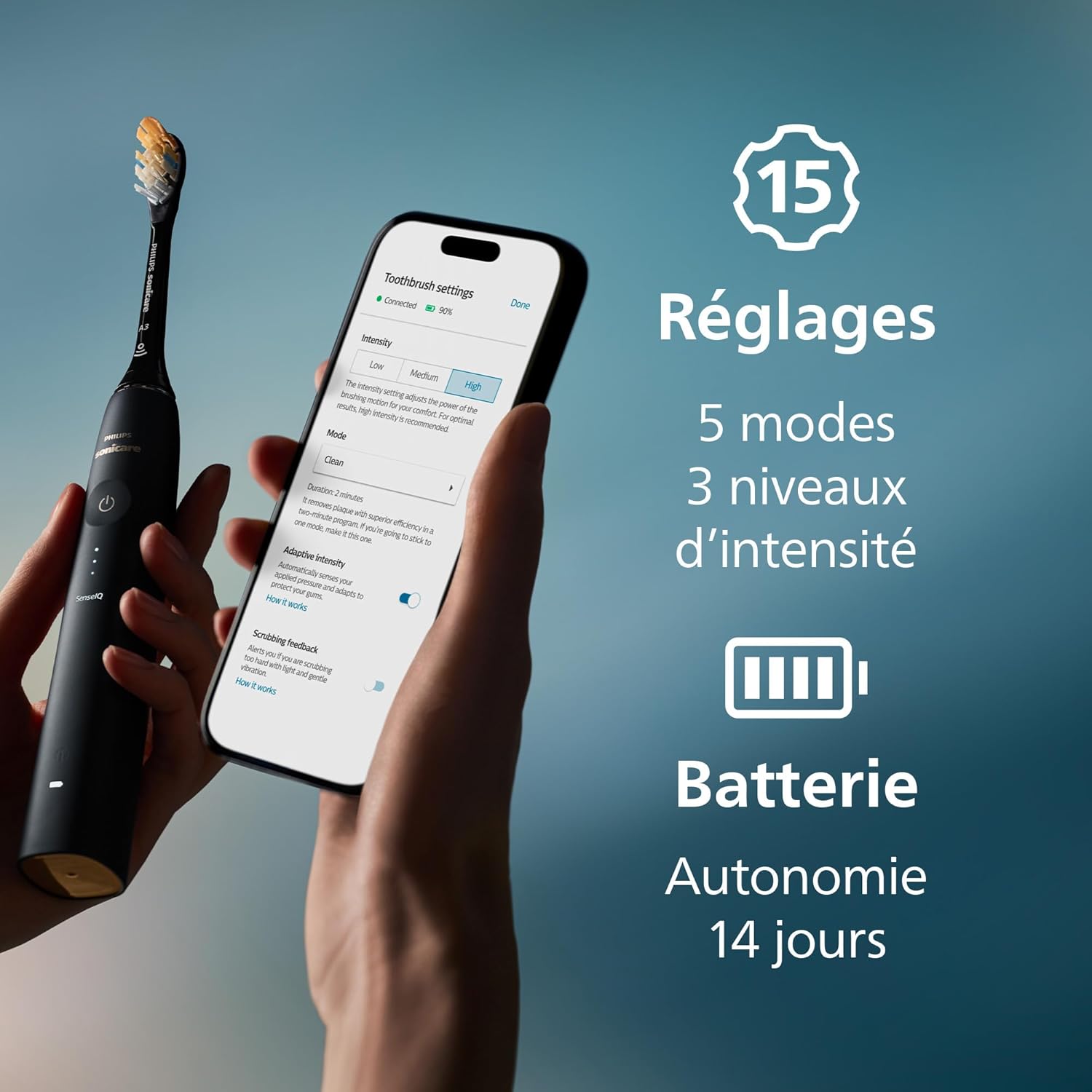
Image: A smartphone displaying the Philips Sonicare app with options for adjusting brushing intensity and selecting different modes.
6. Maintenance
6.1 Cleaning the Toothbrush
- After each use, rinse the brush head and bristles thoroughly under running water.
- Wipe the handle with a damp cloth. Do not immerse the handle in water.
- Remove the brush head periodically and rinse the metal shaft area.
6.2 Replacing Brush Heads
For optimal performance and hygiene, replace your brush head every 3 months, or sooner if the bristles appear worn. The BrushSync™ technology in the Philips Sonicare app will also remind you when it's time for a replacement.

Image: An illustration showing different types of Philips Sonicare brush heads and their compatibility with the toothbrush handle.
7. Safety Warnings
- Use the toothbrush only for oral hygiene purposes.
- Pay attention to the pressure sensor to avoid applying excessive force, which can harm gums and teeth.
- Do not use this product if you have recently had oral or gum surgery. Consult your dentist if excessive bleeding occurs after using this product or if bleeding continues after 1 week.
- Keep out of reach of children.
8. Troubleshooting
If you encounter any issues with your Philips Sonicare DiamondClean 9900 Prestige, please refer to the following general advice:
- Toothbrush not turning on: Ensure the battery is charged.
- Toothbrush not charging: Check the power connection of the charging base and ensure the handle is correctly placed on the base.
- App connectivity issues: Ensure Bluetooth is enabled on your device and the toothbrush is within range. Try restarting both the app and the toothbrush.
- Reduced performance: Replace the brush head if it is old or worn.
For more detailed troubleshooting or persistent issues, please contact Philips customer support.
9. Specifications
| Feature | Specification |
|---|---|
| Brand | PHILIPS |
| Model Number | HX9992/43 |
| Power Source | Battery Powered |
| Color | Black |
| Bristle Material | Nylon |
| Item Firmness Description | Medium |
| Toothbrush Head Shape | Oval |
| Country of Origin | China |
| Package Dimensions | 24.7 x 16.9 x 7.6 cm; 474 grams |
10. Warranty and Support
Philips offers a 30-day satisfaction guarantee for this product. For warranty claims, technical support, or further assistance, please refer to the official Philips website or contact their customer service directly. Keep your proof of purchase for any warranty-related inquiries.

Image: An illustration highlighting Philips Sonicare as the #1 dental professional recommended sonic toothbrush brand and a 30-day satisfaction guarantee.