
1. Introduction
Thank you for choosing the Supdex 1/24 RC Tank Model 680-6. This remote-controlled military vehicle is designed to provide an engaging and realistic play experience with its advanced features, including a rotating turret, sound and light effects, and a simulated smoke function. Please read this manual thoroughly before operation to ensure proper setup, safe use, and optimal performance.
2. Product Overview
The Supdex 1/24 RC Tank is equipped with a range of realistic functions for an immersive experience:
- Full-Function Remote Control: Offers forward, backward, left/right rotation, and 360-degree central rotation.
- Movable Turret: The turret can rotate 330 degrees for dynamic aiming.
- Realistic Effects: Features engine sounds, machine gun noises, LED lights, and a simulated smoke exhaust (requires water). Sound and smoke functions can be toggled on/off.
- Terrain Adaptability: Capable of climbing slopes up to 40 degrees.
- Auto-Demo Function: Demonstrates the tank's various capabilities automatically.
3. What's in the Box
- 1 x Supdex 1/24 RC Tank (Model 680-6)
- 1 x 2.4Ghz Remote Controller
- 2 x Rechargeable Batteries (for tank)
- 1 x USB Charging Cable
- 1 x Water Bottle (for smoke function)
- 2 x Soldier Figures (accessories)
- 1 x Sticker Sheet
4. Setup
- Charge the Tank Battery: Connect the rechargeable battery to the USB charging cable and plug it into a suitable USB power source. Allow 2-3 hours for a full charge, which provides approximately 60+ minutes of continuous play.
- Install Remote Controller Batteries: Open the battery compartment on the remote controller and insert 2 x AA batteries (not included), ensuring correct polarity. Close the compartment securely.
- Power On: Turn on the power switch on both the tank and the remote controller. The devices will automatically pair.
- Add Water for Smoke Function: Locate the water inlet at the rear of the tank. Use the provided water bottle to carefully add a small amount of clean water. Do not overfill.
5. Operating Instructions
Familiarize yourself with the remote controller layout for optimal operation:

Figure 1: Remote Controller Layout. This image displays the various buttons and joysticks on the remote control, indicating their functions such as movement, firing, and special effects.
- Movement: Use the left joystick for forward/backward movement and the right joystick for left/right turns.
- Turret Control: Use the dedicated turret joystick to rotate the turret 330 degrees.
- Firing: Press the 'Shooting' button to activate the firing sound and light effects.
- Smoke Function: Press the 'Fog Spray' button to activate the smoke exhaust. Ensure water has been added to the tank. This function can be turned on/off.
- Sound & Lights: Use the 'Turn On Sound Effects' and 'Turn Off Lights' buttons to control these features.
- Auto Demonstration: Press the 'Automated Demonstration' button for the tank to perform a pre-programmed sequence of movements and effects.
6. Maintenance
- Cleaning: Wipe the tank and remote controller with a dry, soft cloth. Do not use water or chemical cleaners.
- Storage: Store the tank and remote in a cool, dry place away from direct sunlight when not in use. Remove batteries from the remote controller if storing for extended periods.
- Battery Care: Always fully charge the tank's rechargeable batteries before storage to prolong their lifespan.
7. Troubleshooting
- Tank not responding:
- Ensure both the tank and remote controller are powered on.
- Check if the tank's rechargeable battery is fully charged.
- Replace the AA batteries in the remote controller.
- Ensure the tank and remote are within operating range (2.4Ghz).
- Smoke function not working:
- Verify that clean water has been added to the tank's water inlet.
- Ensure the smoke function is toggled on via the remote controller.
- Tank movement is jerky or tracks bind:
- Avoid playing in deep grass or on very uneven surfaces that may obstruct track movement.
- Ensure tracks are free from debris.
8. Safety Information
- Do not play in deep grass, as this may damage the tank's tracks or motor.
- Adult supervision is recommended, especially for younger children.
- Keep away from water and moisture to prevent electrical damage, except for the designated smoke function water inlet.
- Do not attempt to modify or disassemble the tank or remote controller.
- Ensure batteries are inserted correctly and disposed of responsibly.
9. Specifications
| Feature | Detail |
|---|---|
| Product Dimensions | 12 x 5 x 4 inches |
| Item Weight | 2.16 pounds |
| Model Number | 680-6 |
| Recommended Age | 6 - 12 years |
| Tank Battery | Rechargeable (2-3 hours charge for 60+ minutes play) |
| Remote Controller Battery | 2 x AA batteries (not included) |
| Manufacturer | Supdex |
10. Visual Guide
Product Images

Image 1: The Supdex 1/24 RC Tank and its accompanying remote control. The tank features a detailed camouflage pattern, while the remote has dual joysticks for precise control.
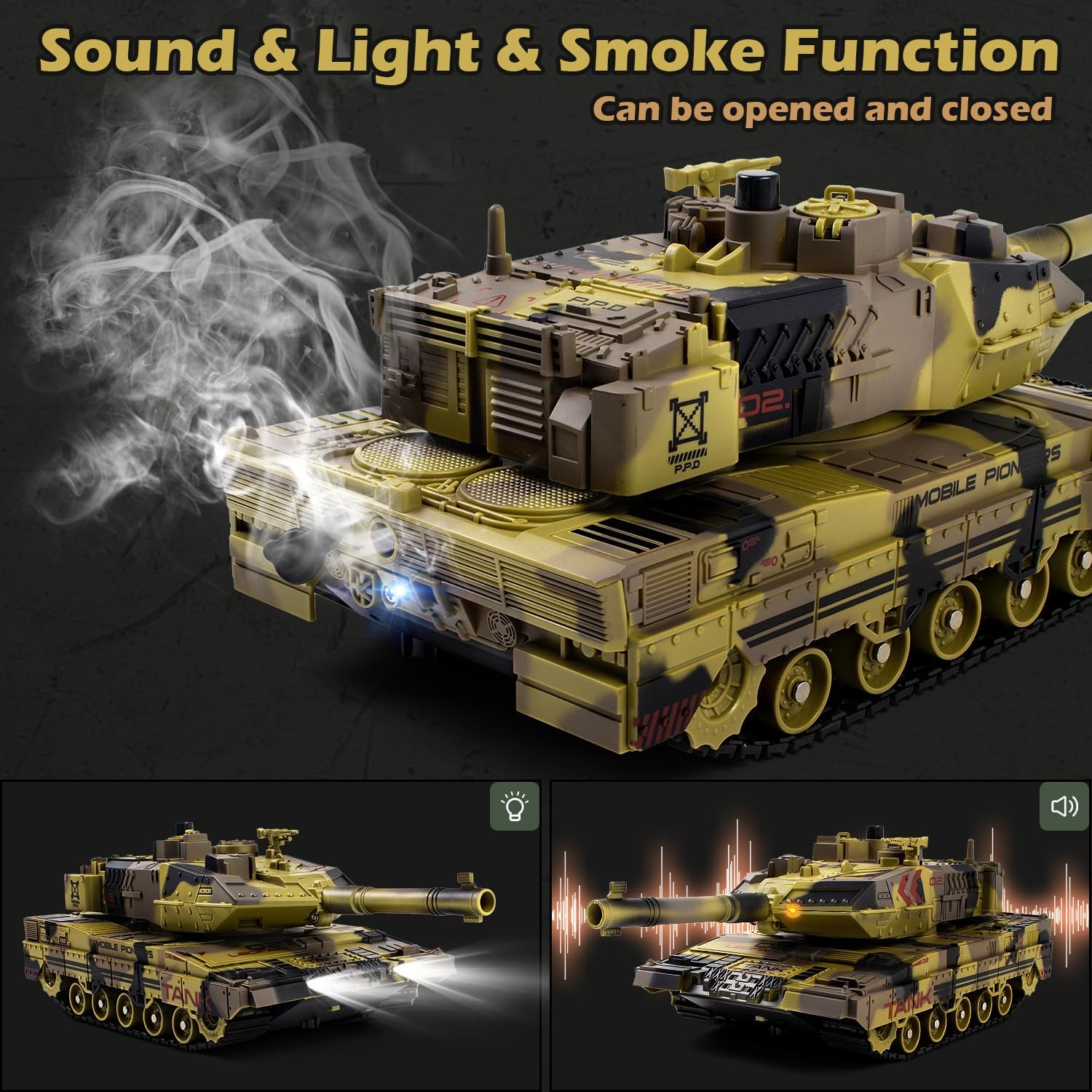
Image 2: The tank showcasing its realistic sound, light, and smoke functions. Smoke is visible from the rear, and the headlights are illuminated, enhancing the play experience.

Image 3: Visual representation of the tank's turret rotation (330 degrees) and full 360-degree central rotation, highlighting its maneuverability.

Image 4: The tank operating in auto demo mode, demonstrating its various functions automatically, accompanied by visual cues for sound effects.
Official Product Videos
Video 1: This video demonstrates the RC tank's movement capabilities, including driving over various terrains, smoke emission, and turret rotation. It highlights the realistic features and overall performance of the tank.
Video 2: This video showcases the Yoyoom RC Tank, demonstrating its smoke effects, lights, sounds, and smooth movement across different surfaces. It also illustrates the ease of adding water for the smoke function.
Video 3: This video from Supdex highlights the 1/18 remote control tank, demonstrating its agile movement, turret rotation, and firing capabilities in an outdoor setting.