
1. Introduction
This instruction manual provides detailed guidance for assembling and operating your INSOON SC9913 Jewelry Store Building Set. This 1933-piece modular construction model is inspired by classic European streetscapes, featuring intricate details, a cart fountain, and integrated LED lighting. Please read these instructions carefully before beginning assembly to ensure a smooth and enjoyable building experience.
2. Safety Information
WARNING: CHOKING HAZARD - Small Parts. Not for children under 3 years. This product contains small components that may pose a choking risk if swallowed. Adult supervision is recommended during assembly, especially for younger builders.
3. Package Contents
Before starting, please verify that all components are present in your package:
- 1933 x Building Blocks (various shapes and sizes)
- 1 x Instruction Guide
- 1 x LED Lighting Kit (pre-integrated or separate modules)

Figure 3.1: The INSOON SC9913 Jewelry Store Building Set, including the packaging and the fully assembled model.
4. Assembly Instructions
The INSOON SC9913 model is designed with a modular structure for easier assembly. Follow the steps below, referring to the detailed diagrams in your included Instruction Guide.
4.1 General Assembly Tips
- Sort Pieces: Before starting, sort the building blocks by color, size, or type as indicated in the instruction guide. This will significantly speed up the building process.
- Follow Steps Sequentially: Each step builds upon the previous one. Do not skip steps.
- Apply Firm Pressure: Ensure blocks are securely connected. Some connections may require firm pressure.

Figure 4.1: A builder engaged in the assembly process, demonstrating the hands-on nature of the construction.
4.2 Base and Foundation Assembly
Begin by constructing the baseplate and the initial foundation layers. This forms the stable platform for the entire structure, including the exterior street elements.
4.3 First Floor Construction
Assemble the walls and interior details of the first floor, which houses the main jewelry display area and a refined lounge. Pay close attention to the placement of windows and doors.
4.4 Second Floor Construction
Proceed to build the second floor, which includes the jewelry workshop and additional decorative elements like a grand chandelier and a record player. This section is designed to be modular and will connect to the first floor.

Figure 4.2: Illustration of the modular design, showing how the base, first floor, second floor, and roof sections are assembled.

Figure 4.3: A detailed view of the interior, showcasing the intricate design elements within the jewelry store.
4.5 Roof Assembly
Attach the roof section to complete the main structure of the building. Ensure all connections are secure to maintain structural integrity.
4.6 Exterior Details and Street Elements
Add the exterior decorative elements, including the jewelry cart, the European-style streetlamp, the graceful fountain, and various floral arrangements. These details enhance the overall aesthetic of the model.
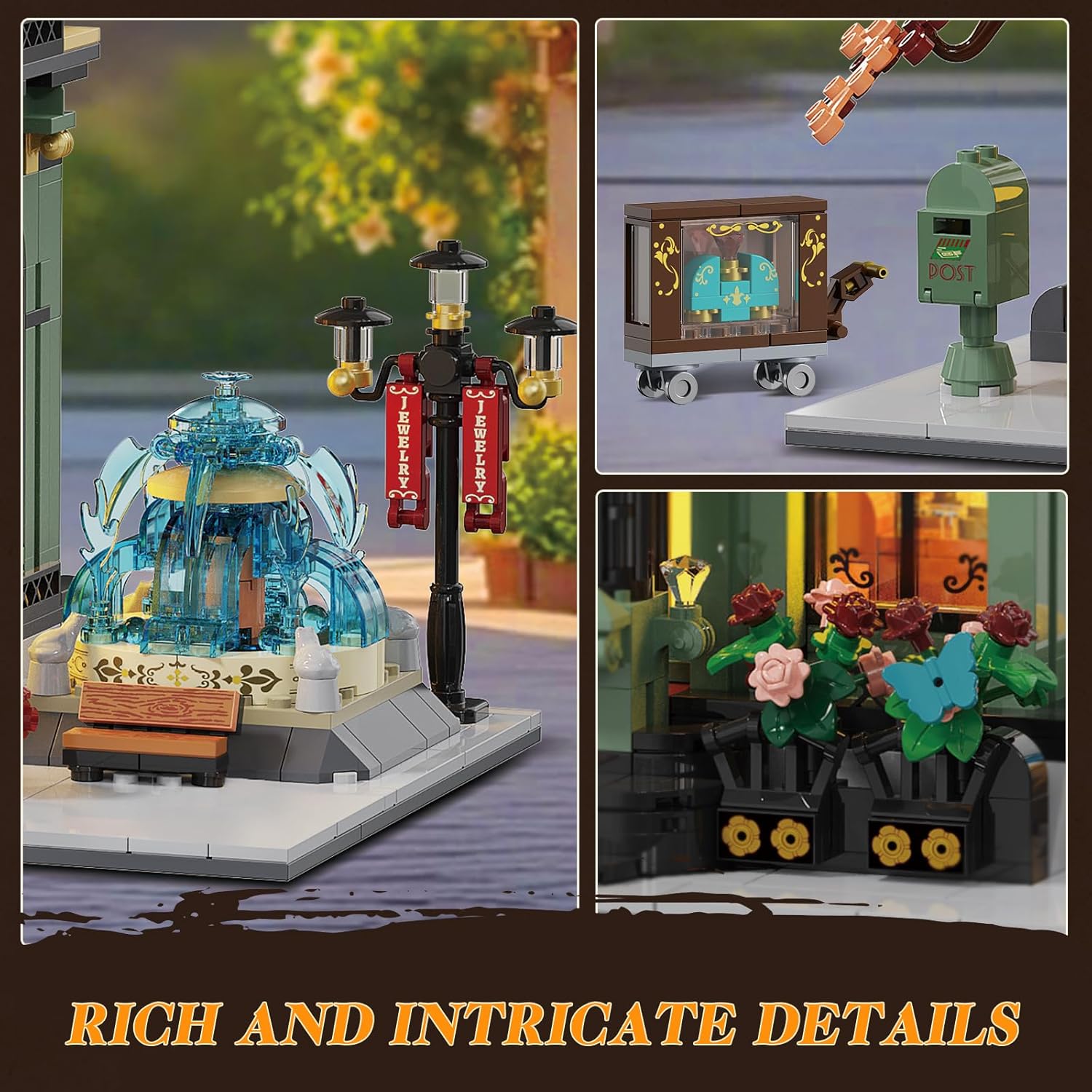
Figure 4.4: A close-up view of the detailed exterior elements, such as the fountain, streetlamp, and decorative plants.
4.7 Lighting Installation
The set includes a dual light module for each floor. Carefully integrate the LED lighting components as instructed in the guide. Ensure all wires are properly routed and connected to illuminate the interior and exterior features.
5. Operating Instructions
The INSOON SC9913 Jewelry Store Building Set features integrated LED lighting to enhance its display. To operate the lights:
- Power Source: Connect the lighting system to the designated power source (e.g., battery box or USB cable, as specified in your instruction guide).
- Activate Lights: Locate the power switch for the LED lighting system. Flip the switch to the 'ON' position to illuminate the model.
- Deactivate Lights: Flip the power switch to the 'OFF' position when not in use to conserve power.

Figure 5.1: A visual comparison of the model with its LED lights off and then illuminated, showcasing the enhanced aesthetic.
6. Maintenance
Proper care will ensure the longevity and appearance of your building set.
- Cleaning: Use a soft, dry cloth to gently wipe away dust from the model. Avoid using liquid cleaners or abrasive materials, as these can damage the plastic blocks or electronic components.
- Storage: Store the assembled model or disassembled blocks in a cool, dry place away from direct sunlight and extreme temperatures to prevent warping or discoloration.
- Handling: Handle the model with care, especially when moving it, to prevent pieces from detaching.
7. Troubleshooting
Here are solutions to common issues you might encounter:
- Missing Pieces: If you discover any missing pieces, please refer to the contact information in the Warranty and Support section to request replacements.
- Tight Block Fit: Some blocks may have a tighter fit than others. This is a characteristic of the material and design. Apply firm, even pressure to connect them. Avoid excessive force, which could damage the blocks.
- Lights Not Working:
- Ensure the power source (e.g., batteries) is correctly installed and functional.
- Check all wiring connections to ensure they are secure and properly seated.
- Verify that the power switch is in the 'ON' position.
8. Specifications
| Brand | INSOON |
| Model Name | SC9913 |
| Number of Pieces | 1933 |
| Material | Acrylonitrile Butadiene Styrene (ABS) |
| Assembled Dimensions (L x W x H) | 17.2 x 7.24 x 15.78 inches (437 x 184 x 401 mm) |
| Item Weight | 7.21 pounds (3.28 Kilograms) |
| Recommended Age | 14+ years |
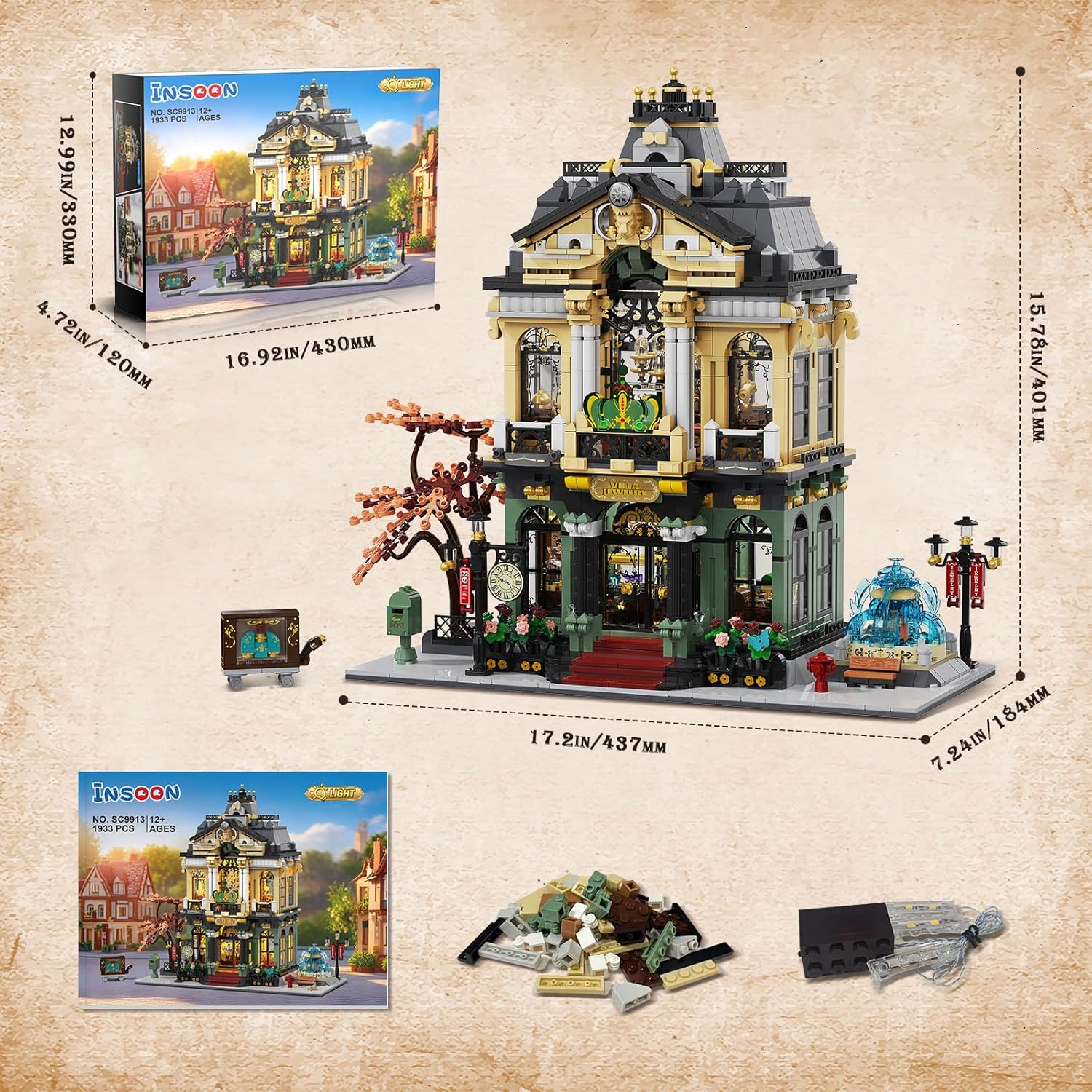
Figure 8.1: Dimensional diagram of the assembled model, indicating length, width, and height.
9. Warranty and Support
For any questions, concerns, or assistance with missing parts, please contact INSOON customer service. Refer to the contact information provided on the product packaging or the official INSOON website for support.