
1. Product Overview
The JKsmart 3-Tier Rustic Brown Wine Bar Cabinet is a versatile furniture piece designed for storing wine, spirits, and bar accessories. It features integrated LED lighting, a wine rack, glass holders, and multiple shelves for organized storage. Its compact design makes it suitable for various living spaces.

Figure 1: Fully assembled JKsmart 3-Tier Rustic Brown Wine Bar Cabinet.
2. Package Contents
Before assembly, please verify that all components listed below are present and undamaged. If any parts are missing or damaged, please contact customer support.
- Metal frame components
- Wooden shelves (top, middle, bottom, side shelves)
- Wine rack insert
- Wine glass holders
- LED light strip with remote control
- Adjustable feet
- Assembly hardware (screws, Allen wrench)
- Instruction manual
3. Setup and Assembly
This wine bar cabinet is designed for user-friendly assembly. Follow the numbered steps in the included instruction manual. All parts are labeled for your convenience.
- Unpack all components and lay them out on a clean, soft surface to prevent scratches.
- Identify all hardware and components using the provided parts list.
- Attach the main frame components using the provided screws and Allen wrench. Do not overtighten screws until all parts are aligned.
- Secure the wooden shelves to the frame.
- Install the wine rack insert and wine glass holders.
- Attach the adjustable feet to the bottom of the frame. Adjust them to ensure stability on uneven surfaces.
- Carefully attach the LED light strip to the designated area, ensuring the adhesive is firm. Connect the power supply.
No prior assembly experience is required. Ensure all connections are secure before placing items on the cabinet.
Video 1: Overview of the multi-functional liquor stand, demonstrating its features and potential uses.
4. Operating the LED Lights
The integrated LED light strip offers customizable ambiance for your wine bar cabinet. It features 250,000 vivid colors and 60 color modes, including music/mic sync functionality.
- Remote Control: Use the provided remote control to turn the lights on/off, change colors, select modes, and adjust brightness.
- Mobile App: Download the compatible mobile application (refer to the LED light strip's specific instructions for app details) to control the lights remotely. The app allows for advanced customization, including music synchronization.
Experiment with different settings to match your mood or occasion.

Figure 2: LED light control options via mobile app and remote control.
5. Storage and Features
This cabinet is designed for optimal storage and display of your bar essentials.
- Wine Rack: The central wine rack holds up to 12 standard red wine bottles horizontally, which is ideal for maintaining cork moisture and wine quality.
- Glass Holders: Two integrated glass holders can securely store up to 6 wine glasses.
- Shelving: Multiple open shelves provide ample space for liquor bottles, mixology tools, ice buckets, coffee items, and decorative pieces.
- Adjustable Feet: Six adjustable feet ensure the cabinet remains stable on various floor types.
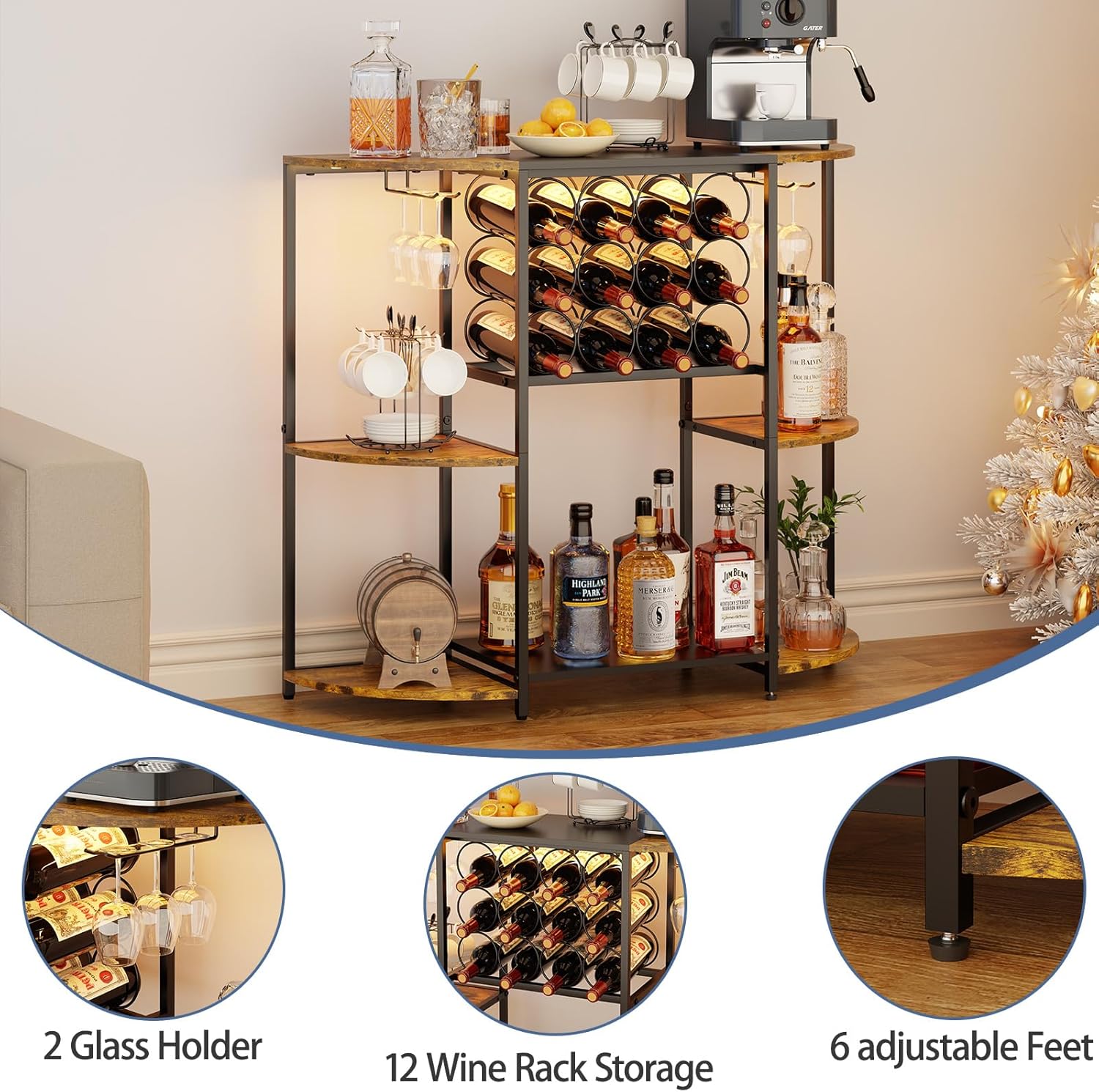
Figure 3: Detailed view of glass holders, wine rack, and adjustable feet.
Video 2: Demonstrates the organization and storage capabilities of the bar cabinet for various spirits and accessories.
6. Maintenance
To ensure the longevity and appearance of your JKsmart Wine Bar Cabinet, follow these maintenance guidelines:
- Cleaning: Wipe surfaces with a soft, damp cloth. Avoid harsh chemicals or abrasive cleaners that may damage the finish.
- Spills: Clean up spills immediately to prevent staining, especially on wooden surfaces.
- Stability: Periodically check and tighten all screws and connections. Adjust the feet as needed to maintain stability.
- LED Lights: Ensure the LED light strip and its connections are dry. If the lights malfunction, check the power connection and remote control battery.
7. Troubleshooting
If you encounter any issues with your wine bar cabinet, refer to the following common troubleshooting steps:
- Cabinet is wobbly: Ensure all screws are tightened. Adjust the individual feet on the bottom of the cabinet until it is stable on your floor surface.
- LED lights not working: Check if the power adapter is securely plugged into both the light strip and a working electrical outlet. Verify the remote control battery is functional. If using the app, ensure Bluetooth connection is active.
- Difficulty during assembly: Double-check the instruction manual for the correct orientation of parts. Ensure you are using the correct screws for each step. Do not force parts together.
For persistent issues, please contact customer support.
8. Specifications
| Feature | Detail |
|---|---|
| Brand | JKsmart |
| Model Number | 3BZSJJ01 |
| Color | Rustic Brown |
| Size | 3-Tier |
| Product Dimensions | 35.4"D x 11.4"W x 30.7"H |
| Style | Rustic |
| Bottle Capacity | 12 bottles |
| Material | Metal, Wood |
| Mounting Type | Floor Standing |
| Item Weight | 18 Pounds |
| Assembly Required | Yes |
| Included Components | Shelves |
| LED Lights | Yes (250,000 colors, 60 modes, music/mic sync) |

Figure 4: Product dimensions for planning your space.
9. Warranty and Support
For warranty information, product support, or to report missing/damaged parts, please contact JKsmart customer service through the retailer where the product was purchased. Please have your model number (3BZSJJ01) and purchase date available.