1. Introduction
This manual provides comprehensive instructions for the installation, operation, and maintenance of your ReachMall 9995266-R1 Replacement Pool Impeller. This component is crucial for maintaining the optimal cleaning performance of your robotic pool cleaner. Please read this manual thoroughly before proceeding with installation or use.
2. Product Overview and Compatibility
The 9995266-R1 impeller is a high-quality replacement part designed to restore powerful suction and efficient debris removal to your robotic pool cleaner. It is engineered for durability and seamless integration.
2.1. Key Features
- Enhanced Cleaning Performance: Creates powerful suction for effective removal of debris, dirt, and contaminants.
- Durable Construction: Manufactured from robust plastic materials to withstand continuous use in chlorinated water and resist wear.
- Easy Installation: Designed for a hassle-free replacement process without the need for special tools.
- Perfect Fit: Ensures optimal performance and longevity for your pool cleaner.
2.2. Compatible Models
This replacement impeller (part number 9995266-R1) is specifically designed to fit a wide range of Dolphin robotic pool cleaner models, including but not limited to:
- Dolphin M200
- Dolphin M400
- Dolphin M500
- And other compatible Dolphin robotic pool cleaner models.
3. Installation Guide
The replacement process for the impeller is straightforward and does not require specialized tools. Always ensure your pool cleaner is disconnected from power before beginning any maintenance.
3.1. What's Included
- 1 x Replacement Impeller (9995266-R1)
- 1 x Mounting Screw
3.2. Step-by-Step Replacement
- Disconnect Power: Before handling your robotic pool cleaner, ensure it is completely disconnected from its power supply and removed from the pool.
- Access Impeller Compartment: Refer to your specific Dolphin pool cleaner's user manual to locate and open the impeller compartment. This usually involves removing a cover or panel.
- Remove Old Impeller: Carefully unscrew and remove the old impeller. Note its orientation for correct installation of the new part.
- Clean Compartment: While the compartment is open, clean any debris or obstructions that may have accumulated.
- Install New Impeller: Position the new ReachMall 9995266-R1 impeller into the compartment, ensuring it aligns correctly with the motor shaft.
- Secure with Screw: Use the provided mounting screw to firmly secure the new impeller in place. Do not overtighten.
- Reassemble: Close and secure the impeller compartment cover or panel.
- Test: Reconnect your pool cleaner to power and test its operation to ensure the new impeller functions correctly and provides strong suction.
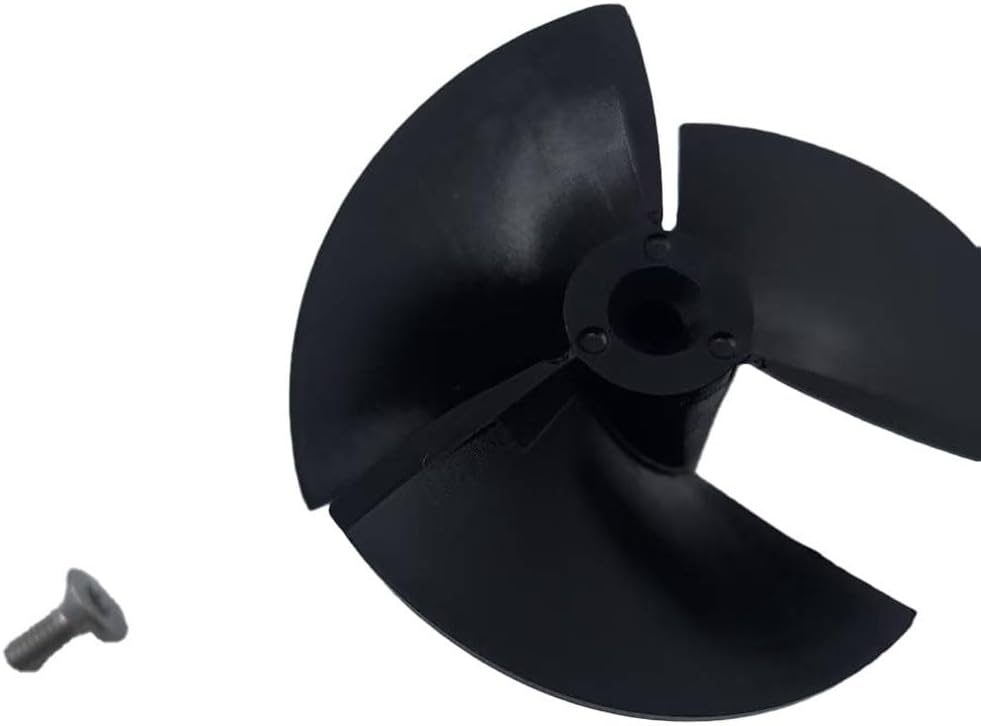
Image: The 9995266-R1 replacement impeller shown alongside its accompanying mounting screw.

Image: A top-down view of the 9995266-R1 replacement impeller, highlighting its three-blade design.
4. Operation
Once installed, the impeller works by rapidly rotating to create a powerful water flow, drawing water and debris into the pool cleaner's filtration system. This continuous circulation and suction are essential for effective pool cleaning. A properly functioning impeller ensures that your robotic cleaner can efficiently pick up leaves, dirt, and other particles from the pool floor and walls.
5. Maintenance
Regular inspection and maintenance of the impeller can extend its lifespan and ensure consistent cleaning performance.
- Regular Inspection: Periodically check the impeller for any signs of wear, cracks, or damage.
- Clear Debris: Ensure no large debris (e.g., leaves, twigs, hair) is entangled around the impeller, as this can impede its rotation and reduce suction. Clean out any obstructions promptly.
- Proper Storage: When the pool cleaner is not in use for extended periods, store it in a clean, dry place away from direct sunlight and extreme temperatures.
6. Troubleshooting
If your robotic pool cleaner experiences reduced suction or movement issues, the impeller may be a contributing factor. Consider the following troubleshooting steps:
- Weak Suction:
- Check for blockages: Ensure no debris is clogging the impeller or the intake ports of the cleaner.
- Inspect for damage: Look for any cracks or broken blades on the impeller that could affect its ability to create suction.
- No Movement or Erratic Movement:
- Verify proper installation: Ensure the impeller is securely fastened and correctly aligned.
- Check for motor issues: If the impeller is clear and undamaged but still not spinning, the issue might be with the cleaner's motor, not the impeller itself. Consult your pool cleaner's main manual.
If issues persist after checking the impeller, refer to your Dolphin robotic pool cleaner's original instruction manual or contact the manufacturer's support.
7. Specifications
| Attribute | Detail |
|---|---|
| Product Name | Replacement Impeller |
| Part Number (Model) | 9995266-R1 |
| Brand | ReachMall |
| Material | Plastic |
| Color | Black |
| Dimensions (L x W x H) | Approximately 3 x 6 x 6 cm |
| Item Weight | Approximately 15 grams |
| Compatibility | Dolphin Robotic Pool Cleaners (M200, M400, M500, etc.) |
8. Warranty and Support
Specific warranty information for this replacement part (9995266-R1) is not explicitly provided. For any questions regarding product defects, returns, or general support, please contact the seller, ReachMall, directly through the platform where the purchase was made. Always retain your proof of purchase for any warranty or support claims.
For operational issues related to your Dolphin robotic pool cleaner itself, please refer to the original manufacturer's manual or contact Dolphin customer support.