
1. Introduction
Thank you for choosing the UYRUREL A30T Android 10-inch Tablet Case. This manual provides essential information for the proper installation, use, and maintenance of your new tablet case. Please read these instructions carefully to ensure optimal performance and longevity of the product.
2. Product Features
- Compatibility: Designed exclusively for the aiprotablet A30T Android 10-inch Tablet. Not compatible with other tablet models.
- High-Quality Material: Made from skin-friendly, soft silicone.
- Heat Dissipation: Features a back hollow texture to balance heat dissipation and aesthetics, preventing performance degradation from heat accumulation.
- Easy Installation & Removal: Designed for easy installation and disassembly without scratching the tablet.
- Adjustable Stand Function: Includes a detachable PC material bracket for adjustable viewing angles, convenient for typing and watching videos.
- Lightweight Design: Maintains a lightweight profile while offering robust protection.
- Precise Cutouts: Allows easy access to all camera, ports, buttons, and features without removing the case.
- Easy to Clean: The soft silicone material can be cleaned directly with water.
- Durability: Resistant to oil and stains, not easy to deform, wear-resistant, and fall-resistant.
- Capacitive Pen: Includes a capacitive pen for enhanced tablet interaction.
3. Setup and Installation
Follow these steps to properly install your tablet into the UYRUREL A30T case and utilize its features.
3.1 Installing the Tablet
- Ensure your aiprotablet A30T Android 10-inch Tablet is clean and free of debris.
- Gently align your tablet with the case, starting with one corner.
- Press the tablet firmly into the soft silicone case, ensuring all edges and corners are securely fitted. The flexible silicone will stretch to accommodate the tablet.
- Verify that all ports, buttons, and the camera are accessible through the precise cutouts.
3.2 Using the Adjustable Stand
- Locate the detachable PC material bracket on the back of the case.
- Pull the stand outwards until it clicks into one of the three available positions.
- Adjust the stand to your desired viewing or typing angle.
- To fold the stand back, gently push it until it lies flat against the case.
3.3 Attaching the Capacitive Pen
The case includes a dedicated loop or slot for the capacitive pen. Insert the pen into this holder to keep it secure and easily accessible.
3.4 Attaching the Shoulder Strap
If your case includes a shoulder strap, attach the clips of the strap to the designated attachment points on the case. Adjust the strap length for comfortable carrying.
4. Operating Instructions
The UYRUREL A30T Tablet Case is designed for intuitive use. Once your tablet is securely installed, you can operate it as usual, benefiting from the case's protective and functional features.
- Viewing Content: Use the adjustable stand to prop up your tablet for hands-free viewing of videos, movies, or presentations.
- Typing and Browsing: Adjust the stand to a lower, more inclined angle for comfortable typing or web browsing.
- Using the Capacitive Pen: Utilize the included capacitive pen for precise navigation, drawing, or note-taking on your tablet screen.
- Portability: Use the shoulder strap for convenient and secure transportation of your tablet.
5. Maintenance
To keep your UYRUREL A30T Tablet Case in excellent condition, follow these simple maintenance guidelines:
- Cleaning: The soft silicone material can be cleaned directly with water. Use a mild soap solution if necessary, then rinse thoroughly and air dry.
- Avoid Harsh Chemicals: Do not use abrasive cleaners or harsh chemicals, as these may damage the silicone material.
- Regular Inspection: Periodically check the case for any signs of wear or damage, especially the stand mechanism and strap attachment points.
6. Troubleshooting
If you encounter any issues with your tablet case, please refer to the following common solutions:
- Tablet Not Fitting Properly: Ensure the tablet is correctly aligned with the case and gently push each corner into place. The silicone is flexible and designed to stretch for a snug fit.
- Stand Not Functioning: Check if the stand is fully extended and locked into one of the adjustment grooves. Ensure no debris is obstructing the mechanism.
- Ports or Buttons Blocked: Double-check that the tablet is correctly seated within the case. The precise cutouts should align perfectly with your aiprotablet A30T.
If the issue persists, please contact customer support for assistance.
7. Specifications
| Feature | Description |
|---|---|
| Brand | UYRUREL |
| Model Number | A30T |
| Compatible Devices | aiprotablet A30T Android 10 inch Tablet |
| Material | Soft Silicone (Case), PC (Stand) |
| Color | Black |
| Item Weight | 7.4 ounces |
| Package Dimensions | 10.01 x 7.56 x 0.91 inches |
| Special Features | Adjustable Stand, Hollow Design for Heat Dissipation, Kids Friendly, Capacitive Pen Included |
8. Warranty and Support
UYRUREL is committed to providing high-quality products and excellent customer service. If you encounter any problems with your product or packaging, please do not hesitate to contact us. We are dedicated to providing you with a satisfactory solution within 24 hours.
For support, please refer to the contact information provided with your purchase or visit the official UYRUREL website.
9. Product Visuals and Demonstrations
9.1 Product Images

Image: Full Wrap-Around Protection
This image illustrates the case's design, which fully wraps around the tablet to protect it from accidental drops and impacts, minimizing damage to the main unit.

Image: Honeycomb Heat Dissipation Design
The interior of the case features a three-dimensional honeycomb texture, designed to effectively dissipate heat from the tablet, ensuring optimal performance and preventing overheating.
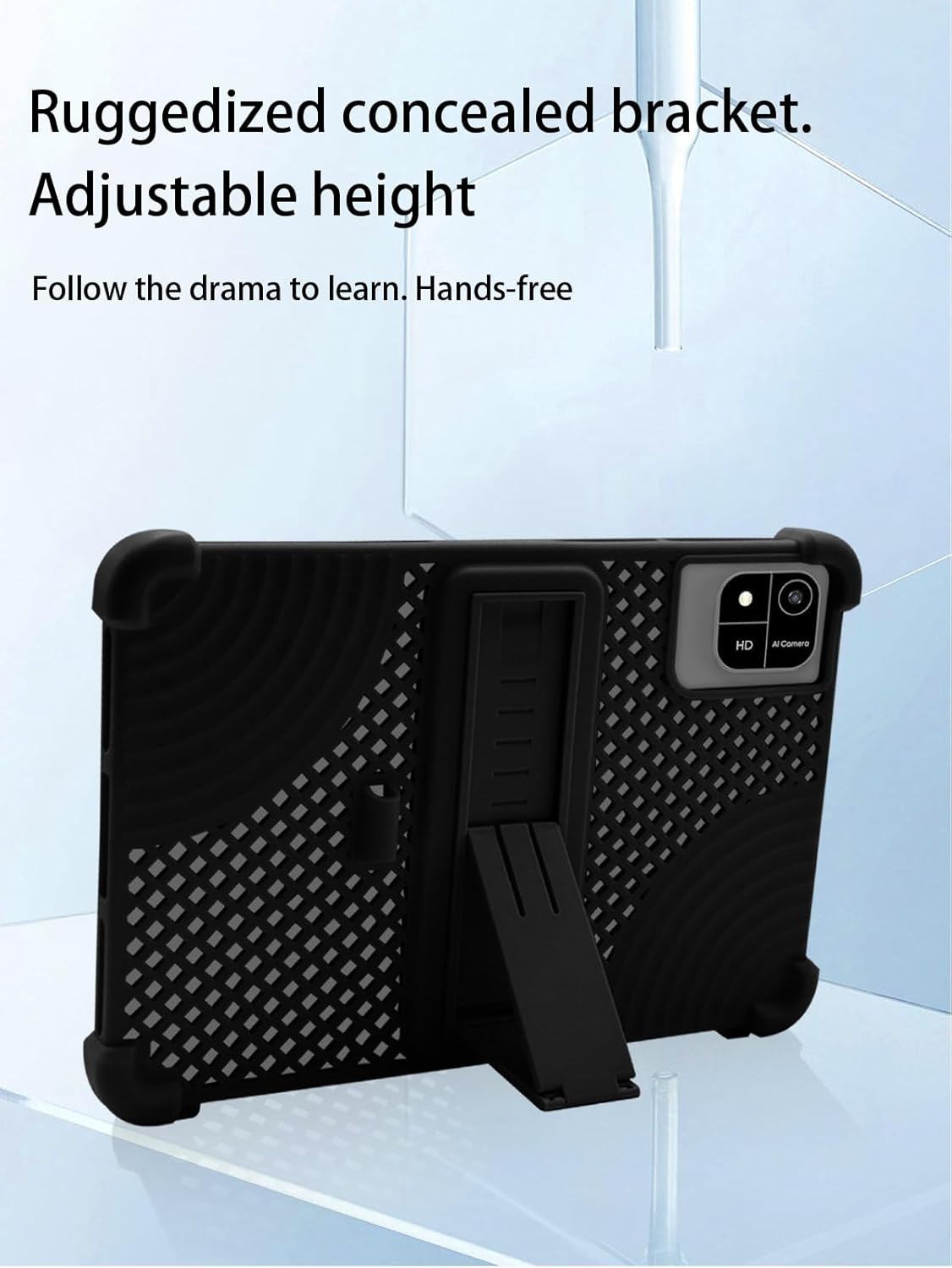
Image: Adjustable Kickstand
A ruggedized, concealed kickstand is integrated into the back of the case, offering adjustable height for hands-free viewing, ideal for watching videos or engaging in online learning.

Image: High-Quality Silicone Material Benefits
This image highlights the benefits of the high-quality silicone material, including its skin-friendly nature, ease of cleaning, resistance to oil and stains, and its durable, wear-resistant, and fall-resistant properties.

Image: Precise Openings and Cutouts
The case features precise cutouts and openings, ensuring easy access to all ports, buttons, and the camera without needing to remove the tablet from its protective cover.
9.2 Product Videos
Video: Soft Silicone Case Overview
This video demonstrates the soft silicone case, highlighting its easy installation, the adjustable stand feature, and the overall protective design. It shows the tablet being placed into the case and the stand being utilized for different viewing angles.
Video: TiMOVO Lightweight Folding Cover Features
This video showcases a lightweight folding cover, demonstrating its compatibility with 10.1-inch Android tablets, the integrated pen loop, and the hand strap for secure holding. It also illustrates the folding stand functionality.
Video: 10.1 inch Tablet Case Demonstration
This video provides a quick demonstration of a 10.1-inch tablet case, showing how the tablet fits securely and the functionality of the integrated stand for hands-free use.
Video: TiMOVO Lightweight Case with Hand Strap
This video highlights the features of a lightweight case with a hand strap, suitable for 9-11 inch tablets. It demonstrates the secure fit, the hand strap for comfortable holding, and the stand functionality.
Video: DETUOSI 10/10.1 inch Android Tablet Case
This video provides a detailed look at the DETUOSI Android tablet case for 10/10.1 inch devices, showcasing its design, protective features, and how the tablet is securely held within the case.


