1. Introduction
This manual provides essential information for the safe and efficient operation of the Generic LOGO! 230RCE Logic Module, model 6ED1052-1FB08-0BA2. Please read this manual thoroughly before installation and use to ensure proper functionality and to prevent damage or injury. This document is intended for qualified personnel familiar with industrial control systems.
2. Safety Information
- Always disconnect power to the module and associated equipment before performing any installation, wiring, or maintenance tasks.
- Installation and wiring should only be performed by qualified and authorized personnel in accordance with all local and national electrical codes and regulations.
- Ensure proper grounding to prevent electrical shock.
- Do not operate the module if it appears damaged or if any components are missing.
- Protect the module from moisture, extreme temperatures, and corrosive environments.
3. Product Overview
The LOGO! 230RCE is a versatile logic module designed for various control applications. It features an integrated display, a robust power supply, and comprehensive input/output capabilities. This module operates on 115 V/230 V AC/DC and includes 8 digital inputs and 4 relay outputs. Advanced features include 400 block memory, modular expandability, Ethernet connectivity for network integration, an integrated web server for remote access, data logging functionality, and support for user-defined web pages. It is compatible with standard microSD cards for use with LOGO! Soft Comfort V8.4 or higher and supports cloud connection and MQTT protocols in all LOGO! 8.4 basic units.
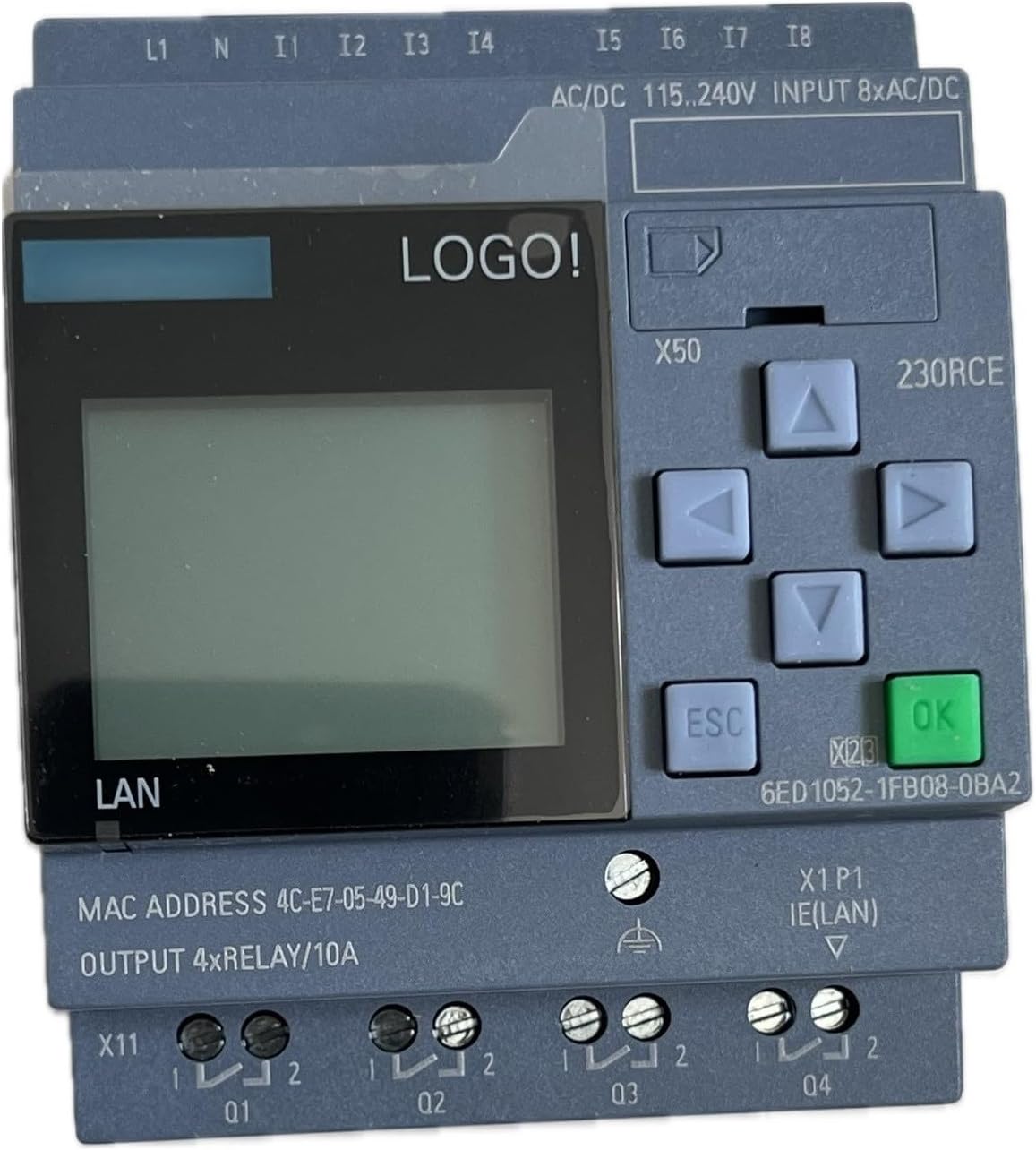
Figure 1: Front view of the LOGO! 230RCE Logic Module. Visible components include the display screen, navigation buttons (up, down, left, right, ESC, OK), the 'LOGO!' branding, LAN port, MAC address, and input/output terminals (L1, N, I1-I8, Q1-Q4).
4. Setup
4.1 Mounting
Mount the LOGO! 230RCE module securely on a DIN rail within an appropriate electrical enclosure. Ensure adequate ventilation around the module to prevent overheating.
4.2 Power Supply Connection
- Connect the main power supply to the L1 and N terminals on the module.
- Verify that the supply voltage is within the specified range of 115 V to 230 V AC/DC.
- Ensure proper polarity for DC connections.
4.3 Input/Output Wiring
- Wire your digital input devices (e.g., switches, sensors) to the I1-I8 terminals.
- Connect your output loads (e.g., contactors, lamps) to the Q1-Q4 relay output terminals. Each relay output is rated for 10A.
- Refer to your application's wiring diagrams for specific connections.
4.4 Ethernet Connection
Connect a standard Ethernet cable to the LAN port (X1 P1 IE(LAN)) on the module for network communication, programming, and web server access.
5. Operating Instructions
5.1 Basic Navigation
- Use the Up, Down, Left, and Right arrow buttons to navigate through menus and parameters on the integrated display.
- Press the OK button to confirm selections or enter sub-menus.
- Press the ESC button to return to the previous menu or cancel an operation.
5.2 Programming and Configuration
The LOGO! 230RCE is programmed using the LOGO! Soft Comfort software (V8.4 or higher). Connect the module to your PC via Ethernet for programming. Refer to the LOGO! Soft Comfort software manual for detailed programming instructions, including logic block configuration, parameter settings, and network setup.
5.3 Web Server Access
The integrated web server allows for remote monitoring and control. To access it, ensure the module is connected to a network and its IP address is configured. Enter the module's IP address into a standard web browser. User-defined web pages can be created and uploaded via LOGO! Soft Comfort.
6. Maintenance
- Cleaning: Keep the module clean and free from dust and debris. Use a dry, soft cloth for cleaning. Do not use liquid cleaners or solvents.
- Connection Checks: Periodically inspect all wiring connections to ensure they are secure and free from corrosion.
- Firmware Updates: Refer to the Siemens support website or LOGO! Soft Comfort documentation for information on available firmware updates and the procedure for installation.
- MicroSD Card: If using a microSD card for data logging or program storage, ensure it is properly inserted and periodically check its integrity.
7. Troubleshooting
- Module Does Not Power On:
- Verify that the power supply is connected correctly to L1 and N terminals.
- Check that the supply voltage is within the 115 V/230 V AC/DC range.
- Ensure the power source is active.
- No Network Communication:
- Check the Ethernet cable connection to the LAN port.
- Verify the module's IP address configuration using LOGO! Soft Comfort.
- Ensure network settings (subnet mask, gateway) are correct.
- Incorrect Output Behavior:
- Review your program logic in LOGO! Soft Comfort.
- Check the wiring of the output devices to Q1-Q4.
- Ensure the output loads do not exceed the 10A relay rating.
- For further assistance, consult the detailed documentation provided with LOGO! Soft Comfort software or contact technical support.
8. Specifications
| Feature | Specification |
|---|---|
| Model Number | 6ED1052-1FB08-0BA2 |
| Manufacturer | Siemens |
| Power Supply / I/O Voltage | 115 V / 230 V AC/DC |
| Digital Inputs (DI) | 8 |
| Digital Outputs (DO) | 4 (Relay, 10A) |
| Memory | 400 blocks |
| Connectivity | Ethernet, microSD card slot |
| Integrated Features | Display, Web Server, Data Log, User-defined Web Pages, Cloud Connection, MQTT |
| Software Compatibility | LOGO! Soft Comfort V8.4 or higher |
| Item Weight | 9.5 ounces (0.27 Kilograms) |
| Material | Plastic |
9. Warranty and Support
For detailed warranty information, technical support, and service inquiries regarding the LOGO! 230RCE Logic Module, please contact your authorized distributor or refer to the official Siemens documentation and support channels for LOGO! products. Keep your purchase receipt as proof of purchase.


