
1. Introduction
The SJCAM C200 4K Mini Action Camera is designed for capturing high-quality video and photos in various environments. This compact and waterproof camera features 4K video recording, 20MP photos, 6-axis gyro stabilization, and a wearable design, making it suitable for sports, travel, and vlogging. This manual provides essential information for setting up, operating, maintaining, and troubleshooting your C200 camera.
2. Important Safety Information
- Do not expose the camera to extreme temperatures (above 45°C or below -10°C).
- Avoid dropping or subjecting the camera to strong impacts.
- Ensure all ports are securely closed before using the camera in wet conditions.
- Use only SJCAM approved batteries and charging accessories.
- Keep the camera away from strong magnetic fields.
- Do not attempt to disassemble or modify the camera.
3. Package Contents
Verify that all items listed below are included in your package:
- SJCAM C200 Action Camera
- Back Clip
- Frame Mount
- Base Mount
- Attachment Screw
- Neck Strap
- 3M Sticker
- Curved Base
- USB Cable
- Cleaning Cloth
- 50-in-1 Action Accessory Kit
- 64GB Extreme Pro microSDXC Memory Card
- USB-C Adapter
- Deluxe Cleaning Kit
- Memory Card Wallet
- Memory Card Reader
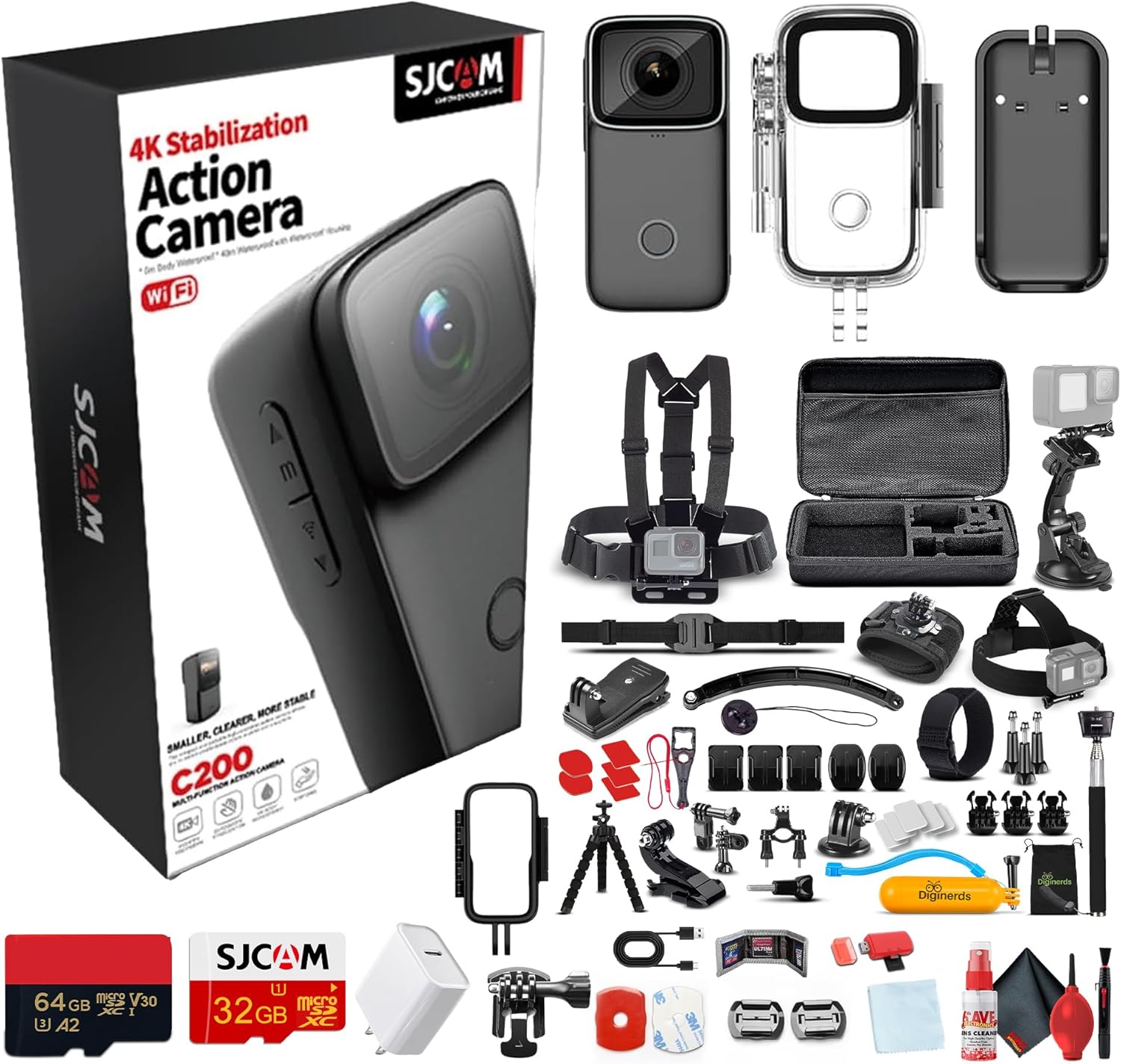
Image: The SJCAM C200 camera shown alongside its comprehensive accessory kit, including various mounts, clips, cables, and memory cards.
4. Product Overview
The SJCAM C200 features a compact design with intuitive controls. Familiarize yourself with the camera's components:

Image: Multiple views of the SJCAM C200 camera, highlighting its compact form factor and button placement.
Key Features:
- 4K Ultra HD Video: Records crisp, detailed footage in 4K resolution.
- Waterproof Design: Waterproof up to 40 meters without an additional case.
- Wearable & Vlogger-Approved: Lightweight with a built-in clip for hands-free recording.
- 6-Axis Gyro Stabilization: Ensures smooth and shake-free footage.
- Noise Reduction: Equipped with a function to reduce wind noise during recording.
- Dual Wi-Fi (2.4/5G): For fast viewing, editing, and transfer via the SJCAM Zone app.
5. Setup
5.1. Charging the Battery
Connect the camera to a USB power source using the provided USB-C cable. The charging indicator light will illuminate during charging and turn off when fully charged. A full charge typically takes approximately 2-3 hours.
5.2. Inserting a MicroSD Card
The SJCAM C200 requires a Class 10 or higher MicroSD card (up to 128GB recommended) for recording. Open the MicroSD card slot cover, insert the card with the contacts facing the front of the camera until it clicks into place. Close the cover securely.
5.3. Mounting the Camera
Utilize the included back clip, frame mount, and base mount to attach the camera to various surfaces or gear. The 50-in-1 accessory kit provides additional options for helmets, handlebars, and chest straps. Ensure all mounts are securely fastened before use.
6. Operating Instructions
6.1. Powering On/Off
- Power On: Press and hold the Power/Mode button for a few seconds until the screen illuminates.
- Power Off: Press and hold the Power/Mode button again until the screen turns off.
6.2. Basic Recording (Video/Photo)
- Switch Modes: Briefly press the Power/Mode button to cycle through Video, Photo, and other modes.
- Start/Stop Recording: In Video mode, press the Shutter button to start recording. Press again to stop.
- Take Photo: In Photo mode, press the Shutter button to capture a still image.

Image: Visual representation of available video resolutions including 4K at 30FPS, 2K at 60FPS, and 1080P at 120FPS.
6.3. Connecting to Wi-Fi (SJCAM Zone App)
Download the SJCAM Zone app on your smartphone. Enable Wi-Fi on your C200 camera through the settings menu. Connect your phone to the camera's Wi-Fi network. The app allows for remote control, live preview, and quick transfer of footage.
6.4. Waterproof Usage
The C200 is waterproof up to 40 meters (131 feet) without an external housing. For deeper dives or added protection, ensure all port covers are sealed tightly. After use in saltwater, rinse the camera with fresh water and dry thoroughly.

Image: The SJCAM C200 camera enclosed within its transparent waterproof housing, suitable for underwater activities.
6.5. Image Stabilization (EIS 2.0)
The camera features 6-axis gyro stabilization (EIS 2.0) to minimize camera shake and deliver smooth video footage, even during dynamic activities. This feature can be enabled or disabled in the camera settings.

Image: A side-by-side comparison demonstrating the effectiveness of EIS 2.0 stabilization, showing a shaky view with stabilization off and a smooth view with stabilization on.
6.6. Noise Reduction
The C200 includes a noise reduction function, which is particularly useful for reducing wind noise during outdoor activities like cycling or motorcycling. This setting can be adjusted in the camera's audio options.

Image: The SJCAM C200 camera mounted on a bicycle handlebar and a motorcycle helmet, demonstrating scenarios where noise reduction is beneficial.
6.7. Battery Life
The camera's battery provides extended recording times. With a combination of the internal battery and an additional power source (if applicable), it can offer up to 6 hours of recording in 4K 30fps mode and 8 hours in 1080P 30fps mode.

Image: An illustration depicting the SJCAM C200's long battery life, indicating up to 7 hours of usage.
7. Maintenance
- Cleaning: Use a soft, lint-free cloth to clean the camera lens and body. For stubborn dirt, slightly dampen the cloth with water. Do not use harsh chemicals.
- Storage: Store the camera in a cool, dry place away from direct sunlight when not in use. Remove the battery if storing for extended periods.
- Battery Care: Avoid fully discharging the battery frequently. Charge the battery regularly, even if not in use, to maintain its lifespan.
8. Troubleshooting
- Camera not turning on: Ensure the battery is charged. Try connecting to a power source.
- Recording issues (freezing, corrupted files): Format the MicroSD card in the camera's settings. Ensure you are using a high-speed (Class 10 or U3) MicroSD card.
- Wi-Fi connection problems: Restart both the camera and your smartphone. Ensure the SJCAM Zone app is updated. Check that the camera's Wi-Fi is enabled.
- Poor image quality: Clean the camera lens. Check the resolution settings. Ensure adequate lighting.
- Camera overheating: Discontinue use and allow the camera to cool down. Avoid prolonged recording in direct sunlight or enclosed spaces.
9. Technical Specifications
| Brand | SJCAM |
| Model Name | C200 |
| Video Capture Resolution | 4K |
| Video Capture Format | MP4 |
| Photo Sensor Technology | CMOS |
| Special Features | 4K Recording, Waterproof, Wearable Vlogging, Image Stabilization |
| Connectivity Technology | HDMI, USB, Wi-Fi (2.4/5G) |
| Waterproof Depth | Up to 40 meters (131 feet) |
| Image Stabilization | 6-axis Gyro (EIS 2.0) |
| Item Weight | Approximately 3.78 pounds (with accessories) |
| Product Dimensions | Approximately 7 x 4 x 2 inches (packaging) |
10. Warranty and Support
The SJCAM C200 Action Camera comes with a standard manufacturer's warranty. For detailed warranty information, product support, or service inquiries, please refer to the official SJCAM website or contact their customer service directly. Keep your proof of purchase for warranty claims.


