
1. Product Overview
The YSVQHHDV PJA505A124 Air Conditioning Wire Controller is designed to replace or upgrade the control panel for compatible Mitsubishi central air conditioning systems. This controller ensures precise temperature regulation, optimizes energy consumption, and extends the operational lifespan of your air conditioning unit by coordinating core components effectively.
Key Features:
- Precise Temperature Control: Corrects temperature sensing deviations for stable cooling and heating, preventing fluctuations caused by sensor malfunctions.
- Optimized Energy Efficiency: Reduces unnecessary power consumption, potentially lowering electricity costs over time.
- Extended Equipment Lifespan: Balances the load on compressors and fans, minimizing abnormal wear and tear on related components.
- Improved Responsiveness: Addresses issues like button failure and program freezing, ensuring immediate execution of commands and preventing frequent system crashes or restarts.
- Compatibility: Specifically designed for Mitsubishi PJA505A124 air conditioning systems.
2. Safety Information
Please read all safety instructions before installation and operation. Failure to follow these instructions may result in electric shock, fire, or property damage.
- Always disconnect power to the air conditioning unit at the circuit breaker before attempting any installation or maintenance.
- Installation should be performed by a qualified technician or electrician.
- Ensure all wiring connections are secure and correctly matched to prevent short circuits or malfunctions.
- Do not expose the controller to moisture or extreme temperatures.
- Verify compatibility with your specific Mitsubishi air conditioning model (PJA505A124) before installation.
3. Installation Guide
This section provides general guidance for installing the PJA505A124 wire controller. Specific steps may vary based on your air conditioning unit's configuration. Refer to your air conditioner's service manual for detailed wiring diagrams.
3.1. Required Tools
- Screwdriver set (Phillips and flathead)
- Wire strippers
- Multimeter (for verifying power and connections)
3.2. Installation Steps
- Disconnect Power: Locate the circuit breaker for your air conditioning unit and turn off the power supply. Verify power is off using a multimeter.
- Access Existing Controller: Carefully open the housing or access panel of your existing air conditioning control unit to expose the wiring.
- Document Wiring: Before disconnecting any wires, take clear photos of the existing wiring connections. Note the color and terminal designation of each wire. This is crucial for correct re-connection.
- Remove Old Controller: Disconnect the wires from the old controller and carefully remove it from its mounting.
- Install New Controller: Mount the YSVQHHDV PJA505A124 controller in the same location as the old unit.
- Connect Wiring: Connect the 3-core wiring to the new controller's terminals. Refer to the image below for typical terminal markings. Ensure that the RED, WHITE, and BLACK wires are connected to their corresponding terminals as per your system's wiring diagram.
- Secure Connections: Tighten all terminal screws to ensure secure electrical contact. Gently tug on each wire to confirm it is firmly seated.
- Close Housing: Carefully close the housing or access panel, ensuring no wires are pinched.
- Restore Power: Turn the power supply back on at the circuit breaker.
- Test Operation: Power on your air conditioning unit and test the functionality of the new controller. Verify that all functions (e.g., temperature adjustment, mode selection) are working correctly.
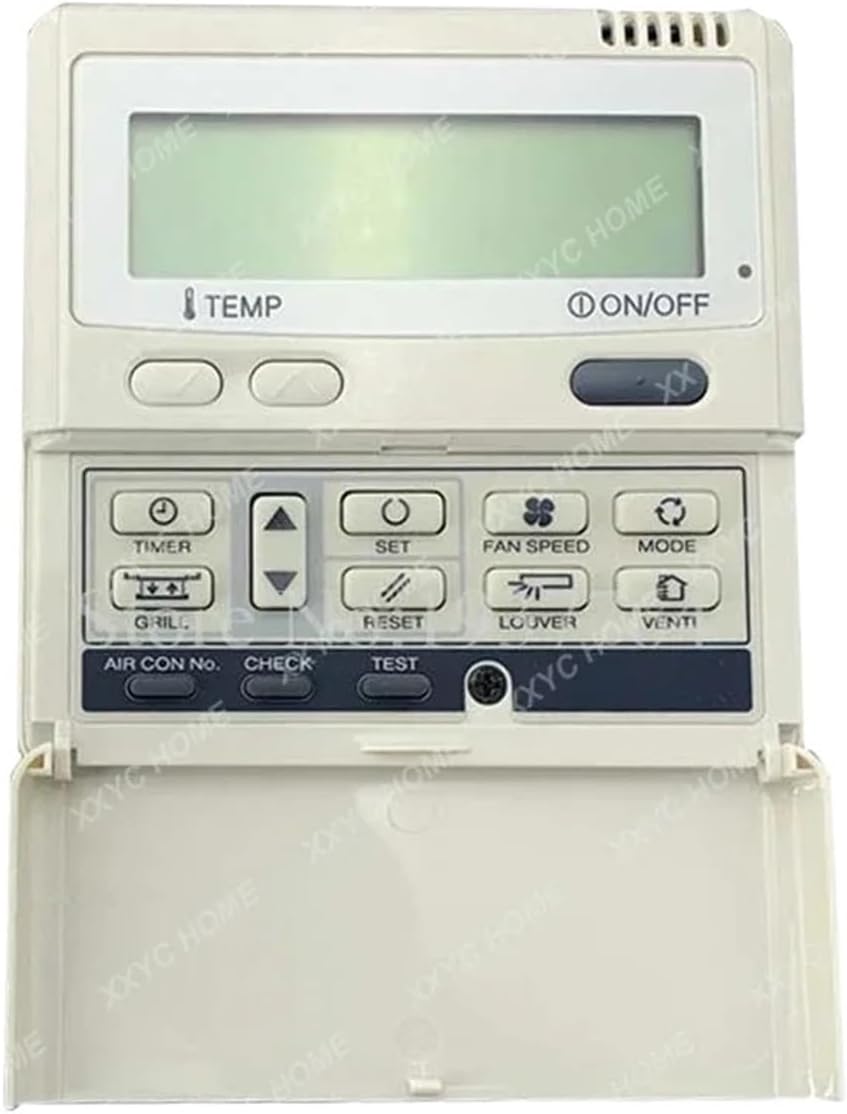
Figure 1: Internal view of the PJA505A124 Wire Controller circuit board. Note the "PJA505A124" model number printed on the board and the three wiring terminals labeled "RED", "WHITE", and "BLACK" at the bottom left. These terminals are crucial for connecting the 3-core wiring from your air conditioning system. The board also features various integrated circuits and components for control logic.
4. Operating Instructions
Once installed, the PJA505A124 wire controller functions as the primary interface for your Mitsubishi central air conditioning system. Operation will typically involve the user interface provided by your specific air conditioning unit, which communicates through this controller.
- Power On/Off: Use the main power button on your air conditioning unit's display panel to turn the system on or off.
- Temperature Adjustment: Adjust the desired temperature using the up/down arrows or rotary dial on your unit's display. The controller processes these commands to regulate the system.
- Mode Selection: Select operating modes such as Cool, Heat, Fan, or Auto via the mode button on your display.
- Fan Speed Control: Adjust fan speed settings (Low, Medium, High, Auto) as available on your unit's interface.
- Timer Functions: If your system supports it, set timers for automatic power on/off cycles.
Refer to your specific Mitsubishi air conditioning unit's user manual for detailed instructions on operating its display panel and features.
5. Maintenance
The PJA505A124 wire controller is designed for reliable operation with minimal maintenance. However, periodic checks can help ensure its longevity and optimal performance.
- Power Disconnection: Always disconnect power before performing any maintenance.
- Visual Inspection: Periodically inspect the controller and its wiring for any signs of damage, loose connections, or corrosion.
- Cleaning: If necessary, gently clean the exterior of the controller with a soft, dry cloth. Do not use liquid cleaners or solvents, as these can damage the electronic components.
- Environmental Conditions: Ensure the controller is not exposed to excessive dust, humidity, or extreme temperatures, which can degrade performance and lifespan.
6. Troubleshooting
If you encounter issues with your air conditioning system after installing the PJA505A124 wire controller, refer to the following troubleshooting guide.
| Problem | Possible Cause | Solution |
|---|---|---|
| System not responding to commands | No power to the controller; Loose wiring connections; Controller malfunction. | Check circuit breaker. Verify all wiring connections are secure. If issues persist, the controller may need replacement. |
| Incorrect temperature readings | Faulty temperature sensor (internal or external to controller); Controller malfunction. | Ensure the controller is properly installed and not obstructed. If the problem continues, the controller or an associated sensor may be defective. |
| Intermittent operation | Loose connections; Electrical interference; Controller malfunction. | Check all wiring connections. Ensure the controller is not near sources of strong electromagnetic interference. |
| Air conditioner not turning on/off | Wiring error; Controller malfunction; Issue with the AC unit itself. | Re-check wiring against the installation guide and your AC unit's diagram. If wiring is correct, consult an HVAC technician. |
If troubleshooting steps do not resolve the issue, contact a qualified HVAC technician or the product support for further assistance. Do not attempt repairs beyond your technical capabilities.
7. Specifications
- Model: PJA505A124
- Brand: YSVQHHDV
- Compatibility: Mitsubishi PJA505A124 Central Air Conditioning Systems
- Wiring: 3 Core Wiring
- Item Weight: 50 Grams
- Manufacturer: congyili
- ASIN: B0F38LBQ1M
8. Warranty and Support
For warranty information, technical support, or service inquiries, please contact the seller or manufacturer directly. Keep your purchase receipt as proof of purchase.
- Manufacturer: congyili
- Brand: YSVQHHDV
- Seller: congyili (as per product listing)
- Contact: Refer to your purchase platform or documentation for seller contact details.