
dainslef NT7uPuwmHVY1BL1FTaLblwNAO9y
dainslef 10000 BTU Portable Air Conditioner User Manual
Model: NT7uPuwmHVY1BL1FTaLblwNAO9y
Important Safety Instructions
Please read all instructions carefully before using your portable air conditioner and retain this manual for future reference. Failure to follow these instructions may result in electric shock, fire, or serious injury.
- Electrical Safety: Always plug the unit into a grounded 3-prong outlet. Do not use extension cords or adapter plugs. Ensure the power cord is not damaged or pinched.
- Placement: Place the unit on a flat, stable surface. Maintain at least 20 inches (50 cm) of clearance from walls or other objects to ensure proper airflow. Do not block air inlets or outlets.
- Operation: Do not operate the unit with wet hands. Do not insert objects into the air outlets. Keep children and pets away from the unit during operation.
- Maintenance: Always unplug the unit before cleaning or performing any maintenance. Do not use flammable cleaning agents.
- Disposal: Dispose of the unit and its components, including refrigerant, according to local regulations.
Product Overview
Components
Your dainslef Portable AC unit is designed for efficient cooling, dehumidifying, and fan operation in rooms up to 450 sq.ft. It features a compact design with integrated handles and 360° casters for easy mobility.

Image: The dainslef 10000 BTU Portable Air Conditioner, showcasing its sleek grey design and compact form factor, suitable for various room settings.

Image: A detailed view of the portable AC unit highlighting its key features: adjustable up and down louvers, built-in handles for easy lifting, a washable air filter for simple maintenance, and four 360° casters for effortless movement between rooms.
Control Panel and Remote Control
The unit features an intuitive LED display and touch control panel on top, complemented by a full-function remote control for convenient operation from a distance.
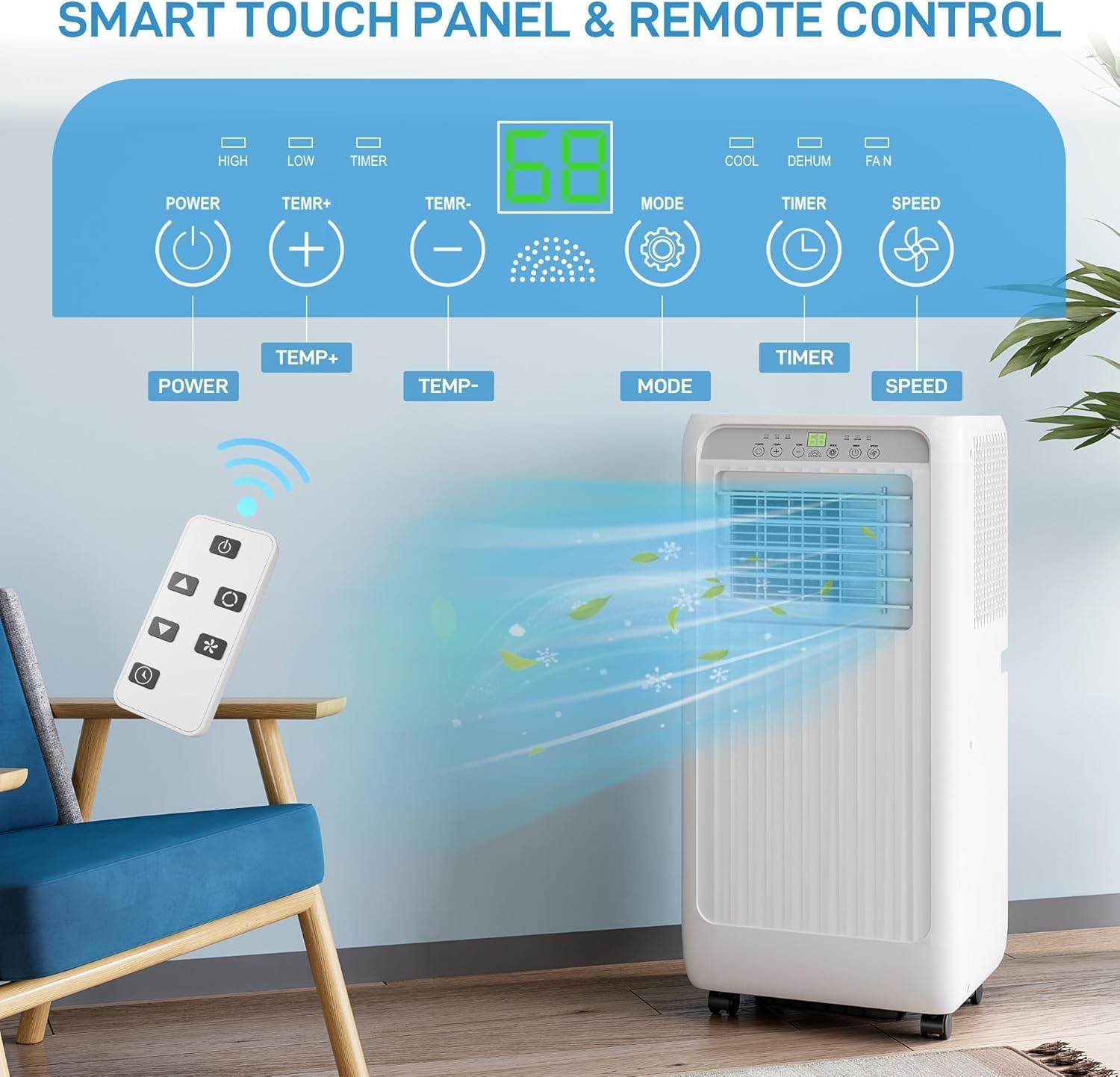
Image: An illustration of the portable AC's smart touch panel and accompanying remote control. The panel displays temperature and mode settings, with clear icons for Power, Temperature adjustment, Mode, Timer, and Fan Speed. The remote control mirrors these functions, allowing for convenient operation.
- Power Button: Turns the unit On or Off.
- TEMP +/- Buttons: Adjusts the desired temperature.
- Mode Button: Cycles through Cooling, Dehumidifying, and Fan modes.
- Timer Button: Sets the auto-on/off timer (1-24 hours).
- Speed Button: Adjusts fan speed (High/Low).
Setup and Installation
Unpacking
Carefully remove the unit and all accessories from the packaging. Check for any damage during transit. Keep the packaging for future storage or transport.
Window Kit Installation
The included window kit is designed for most standard vertical and horizontal sliding windows. It helps to exhaust hot air outside, ensuring efficient cooling.
- Assemble the window slider kit by connecting the slide bar pieces to fit your window opening.
- Open the window and place the assembled window slider kit into the window frame. Extend the slider to fit snugly and secure it.

Image: A visual guide demonstrating the easy installation process of the portable AC unit. It shows the unit connected to the exhaust hose and the window kit installed in both a vertical and horizontal window, illustrating how to vent hot air outdoors. Dimensions of the unit are also shown.
Exhaust Hose Connection
The exhaust hose is crucial for expelling hot air from the room.
- Screw one end of the exhaust hose onto the exhaust pipe joint.
- Attach the other exhaust pipe joint to the window slider kit.
- Connect the exhaust hose assembly to the exhaust outlet on the back of the portable AC unit. Ensure all connections are secure to prevent air leakage.
Operating Instructions
Powering On/Off
Press the Power button on the control panel or remote control to turn the unit on or off.
Mode Selection
Your dainslef Portable AC offers three primary functions: Cooling, Dehumidifying, and Fan.

Image: A visual representation of the 3-in-1 multifunctional air conditioner, showing its capabilities for Cooling, Dehumidifying, and Fan modes. The unit is depicted in a living room setting with air flowing from its vent, indicating its active operation.
- Cooling Mode: Press the Mode button until the snowflake icon appears. This mode provides powerful cooling for rooms up to 450 sq.ft.
- Dehumidifying Mode: Press the Mode button until the water droplet icon appears. This mode helps reduce humidity, removing up to 1.5 gallons of moisture daily.
- Fan Mode: Press the Mode button until the fan icon appears. This mode circulates air without cooling or dehumidifying.

Image: A comparison showing the effectiveness of the dehumidification function. The left side depicts a room with high humidity (80% RH) and condensation, while the right side shows the same room after dehumidification, with significantly reduced humidity (50% RH) and a clearer environment.
Temperature Adjustment (Cooling Mode Only)
In Cooling mode, use the TEMP +/- buttons to set your desired temperature between 59°F (15°C) and 88°F (31°C).
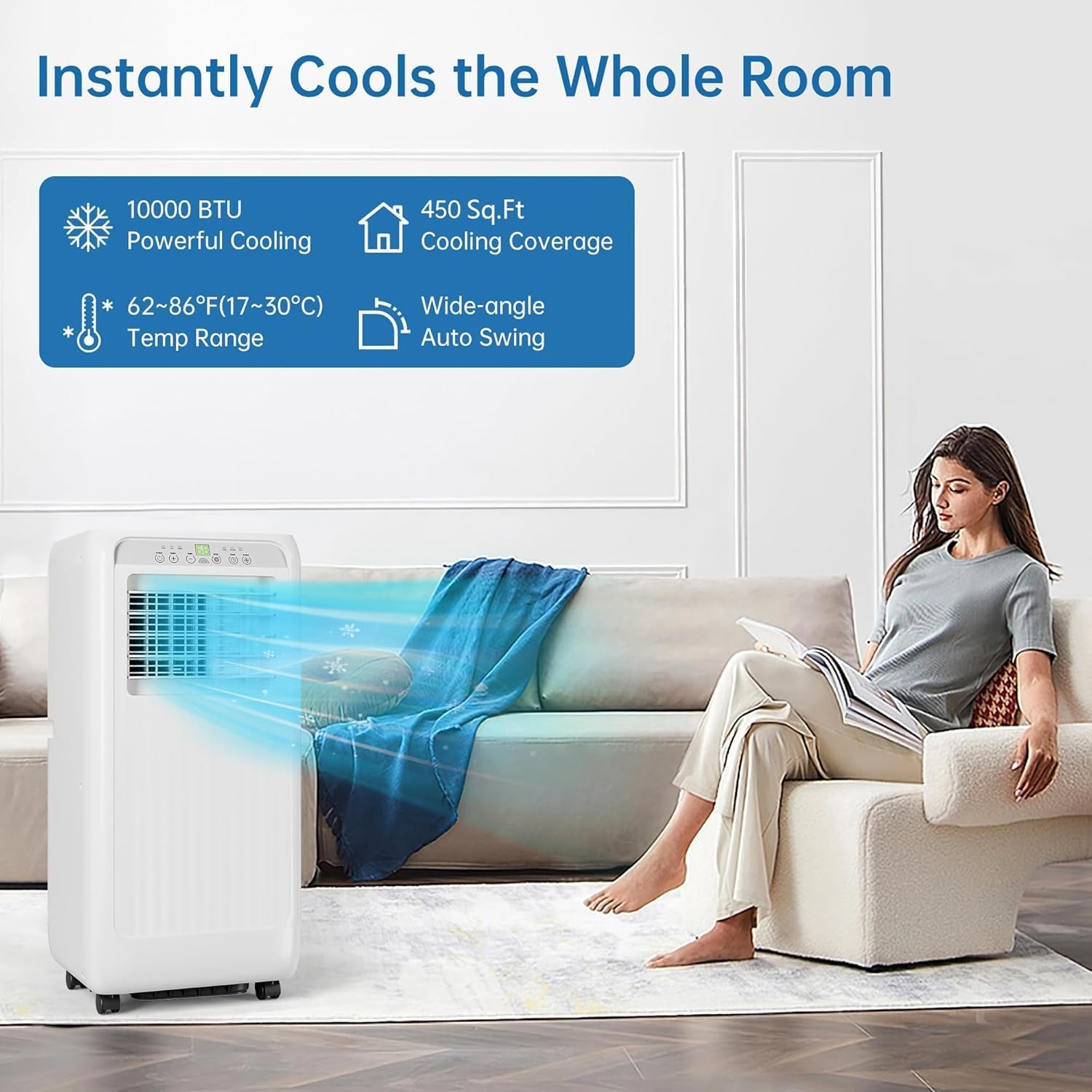
Image: This graphic illustrates the cooling capabilities of the portable AC, highlighting its 10000 BTU powerful cooling, 450 sq.ft cooling coverage, a temperature range of 62-86°F (17-30°C), and wide-angle auto swing feature. A person is shown comfortably relaxing in a cooled room.
Fan Speed Control
Press the Speed button to toggle between High and Low fan speeds.
Timer Function
The 24-hour timer allows you to program the unit to turn on or off automatically.
- To set Auto-Off: With the unit running, press the Timer button and use TEMP +/- to set the desired hours until shutdown.
- To set Auto-On: With the unit off, press the Timer button and use TEMP +/- to set the desired hours until startup.
Sleep Mode
Sleep mode operates the unit at a lower fan speed and gradually increases the set temperature to ensure quiet and comfortable sleep while saving energy.

Image: This image illustrates the ultra-quiet and energy-saving features, particularly the sleep mode. It shows a couple sleeping peacefully with the AC unit operating quietly (indicated by <55dB noise level) and a 0-24H timer and sleep mode icons. A graph below shows how the setting temperature adjusts over time in sleep mode for optimal comfort.
Maintenance
Regular maintenance ensures optimal performance and extends the lifespan of your portable AC unit.
Cleaning the Air Filter
The washable air filter traps dust and pet hair, improving air quality and unit efficiency. Clean it every two weeks or more frequently if used in dusty environments.
- Unplug the unit from the power outlet.
- Locate the air filter panel, usually on the side or back of the unit.
- Gently pull out the air filter.
- Rinse the filter under running water (warm, not hot) until clean. For heavy dirt, use a mild detergent.
- Allow the filter to air dry completely before reinserting it into the unit. Do not expose to direct sunlight.

Image: A hand demonstrating the removal of the washable air filter from the side of the portable AC unit, emphasizing the ease of maintenance.
Draining Water
During dehumidification or cooling in high humidity, water will accumulate inside the unit. The unit has a self-evaporative system, but in very humid conditions, manual draining may be necessary.
- Unplug the unit.
- Place a shallow pan or tray under the drain port (usually at the bottom rear of the unit).
- Remove the drain plug to allow water to flow out.
- Once drained, replace the drain plug securely.
Storage
If storing the unit for an extended period, ensure it is completely drained and the filter is clean and dry. Store in a cool, dry place, preferably in its original packaging.
Troubleshooting
Before contacting customer support, please refer to the following table for common issues and their solutions.
| Problem | Possible Cause | Solution |
|---|---|---|
| Unit does not turn on. | No power supply. Power cord damaged. Unit's internal safety switch activated. | Check if plugged in securely. Check circuit breaker. Inspect power cord for damage. Unplug and wait 30 minutes before plugging back in. |
| Unit does not cool effectively. | Air filter is dirty. Room size too large. Window kit not properly installed. Doors/windows open. Temperature setting too high. | Clean the air filter. Ensure room is within 450 sq.ft. Check exhaust hose and window kit for leaks. Close all doors and windows. Lower the set temperature. |
| Unit is noisy. | Unit not on a flat surface. Air filter clogged. Internal components vibrating. | Place on a level surface. Clean the air filter. This may be normal operation noise (53 dB). If excessive, contact support. |
| Water leakage. | Drain plug not secured. Water tank full (if applicable). Unit tilted. | Ensure drain plug is tightly closed. Drain the unit manually. Place unit on a level surface. |
| Remote control not working. | Batteries are dead or incorrectly inserted. Obstruction between remote and unit. | Replace batteries, check polarity. Remove any obstructions. Ensure remote is pointed at the unit's receiver. |
Specifications
| Feature | Detail |
|---|---|
| Brand | dainslef |
| Model Number | NT7uPuwmHVY1BL1FTaLblwNAO9y |
| Cooling Power | 10000 BTU (British Thermal Units) |
| Coverage Area | Up to 450 sq.ft |
| Functions | Cooling, Dehumidifying, Fan |
| Dehumidification Capacity | 1.5 gallons/day |
| Temperature Range | 59°F - 88°F (15°C - 31°C) |
| Noise Level | 53 dB |
| Voltage | 115V |
| Wattage | 1000W |
| Annual Energy Consumption | 1250 Watts |
| Refrigerant | R32 (Eco-friendly) |
| Product Dimensions (D x W x H) | 15.08"D x 13.11"W x 34.65"H |
| Item Weight | 56.2 pounds |
| Color | Gray |
| Special Features | Remote Controlled, Programmable 1-24H Timer, Washable Air Filter |
| Included Components | Portable Air Conditioner, Remote Control, Window Kit, Exhaust Hose |
Warranty and Support
Your dainslef Portable Air Conditioner comes with a manufacturer's warranty. Please refer to the warranty card included in your product packaging for specific terms and conditions, including warranty period and coverage details.
For technical support, troubleshooting assistance beyond this manual, or warranty claims, please contact dainslef customer service. Contact information can typically be found on the product packaging, the official dainslef website, or through your point of purchase.
When contacting support, please have your product model number (NT7uPuwmHVY1BL1FTaLblwNAO9y) and purchase date readily available.