
1. Introduction
Thank you for choosing the JISULIFE Portable Handheld Fan Ultra2. This versatile device combines a powerful fan, a robust power bank, and a multi-functional flashlight, making it an essential companion for various activities. Designed for convenience and durability, the Ultra2 offers customizable airflow and reliable power on the go.
Key features include:
- 100 adjustable wind speeds with a powerful 43000 RPM motor and Storm Mode.
- 9000mAh rechargeable battery providing up to 25 hours of runtime.
- 18W reverse quick charging function to serve as a power bank.
- Digital display for real-time wind speed and battery life.
- Integrated flashlight with 3 brightness levels and an SOS flashing mode.
- Magnetic accessories for dust removal and inflation.
- Durable metal shell and safety lock design.
2. What's in the Box
Please check the package contents to ensure all items are present:
- JISULIFE Portable Handheld Fan Ultra2
- Small screwdriver
- Cleaning brush
- Storage bag
- Magnetic circular air nozzle
- Magnetic rectangular air nozzle
- Instruction manual
- Hanging rope
- USB-A to USB-C charging cable

Image: JISULIFE Portable Handheld Fan Ultra2 with included accessories.
Video: An overview of the JISULIFE Handheld Fan Ultra2 and its features.
3. Setup
3.1 Initial Charging
Before first use, fully charge the device. Connect the provided USB-A to USB-C charging cable to the fan's USB-C port and a compatible power adapter (not included). The digital display will show the charging progress. A full charge takes approximately 2.5 hours with 18W fast charging.

Image: The fan connected via USB-C, demonstrating its charging capability.
4. Operating Instructions
4.1 Power On/Off and Safety Lock
The fan features a safety lock to prevent accidental activation. To power on the device, slide the safety lock switch to the '-' position. To power off, slide it to the 'o' position.

Image: Close-up of the fan's controls, including the safety lock and power button.
4.2 Fan Operation and Speed Adjustment
Once powered on, the digital display will activate. Use the scroll wheel to adjust the wind speed from 1 to 100. Press and hold the scroll wheel for 3 seconds to activate "Storm Mode" (100 speed). Release to return to the previous speed setting.
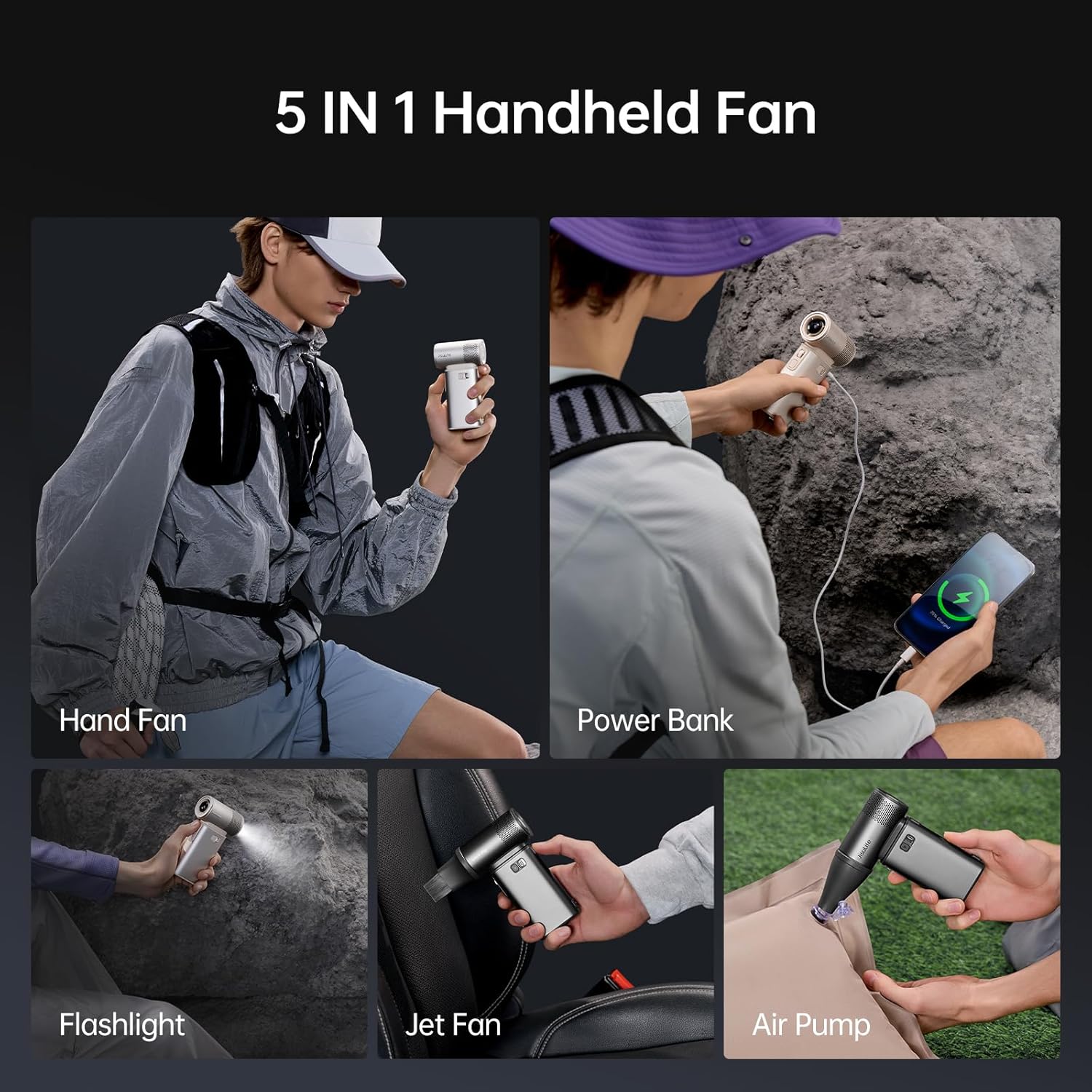
Image: The fan's digital display indicating 100% wind speed.
4.3 Flashlight Operation
The flashlight is located on the front of the fan. Press the flashlight switch button to cycle through 3 brightness levels. Long press the button to turn off the flashlight. An SOS flashing light mode is also available for emergencies.

Image: The fan's integrated flashlight in operation.
4.4 Power Bank Function
The fan is equipped with a 9000mAh battery and supports 18W reverse quick charging. Connect your device to the fan's USB-C port using a compatible cable to charge it. The digital display will show the remaining battery life.

Image: The fan being used to charge a smartphone, highlighting its power bank capability.
Video: Demonstrating the fan's power bank feature, charging a phone in an outdoor setting.
4.5 Magnetic Accessories
The fan comes with two magnetic air nozzles that can be easily attached to the front. These nozzles enhance its versatility:
- Dust Removal Tool: Attach the appropriate nozzle to use the fan as a powerful dust blower for cleaning keyboards, camera lenses, or other delicate items.
- Inflation Pump: Use the nozzles to inflate small items like air mattresses or swimming rings.

Image: The fan with its magnetic air nozzles, ready for various applications.
Video: Showcasing the multi-functional capabilities of the fan, including its use as an air pump and dust blower.
5. Maintenance
5.1 Cleaning
The fan features a removable rear net for easy cleaning. Before cleaning, ensure the device is powered off and the safety lock is engaged. Use the provided small screwdriver to remove the screws on the rear net, then detach it. Use the cleaning brush to remove dust and debris from the air inlet and fan blades. Wipe the exterior with a soft, dry cloth. Do not use water or harsh chemicals directly on the device.

Image: The fan with its rear net removed, illustrating the cleaning process.
6. Troubleshooting
| Problem | Possible Cause | Solution |
|---|---|---|
| Fan does not turn on. | Battery is low or depleted; Safety lock is engaged. | Charge the fan fully. Ensure the safety lock is slid to the '-' position. |
| Weak airflow. | Low speed setting; Air inlet/outlet blocked by dust. | Increase wind speed using the scroll wheel. Clean the rear net and fan blades. |
| Device not charging. | Charging cable or adapter issue; Port is dirty. | Try a different USB-C cable and power adapter. Ensure the USB-C port is clean. |
| Flashlight not working. | Battery is low; Flashlight switch not pressed correctly. | Charge the fan. Press the flashlight switch button firmly. |
7. Specifications
| Feature | Detail |
|---|---|
| Brand | JISULIFE |
| Model Name | Handheld Fan Ultra2 |
| Battery Capacity | 9000mAh |
| Max Runtime | 25 hours |
| Charging Power | 18W (Reverse Quick Charging) |
| Wind Speed Levels | 1-100 (Adjustable) |
| Motor Speed | 43000 RPM |
| Max Wind Speed | 17m/s |
| Flashlight Brightness | 3 levels + 1 flashing mode |
| Material | Metal Shell |
| Dimensions | 5.31"D x 2.95"W x 1.57"H |
| Item Weight | 10.5 Ounces |
8. Warranty and Support
JISULIFE offers a 1-Year (12 months) warranty period for the Portable Handheld Fan Ultra2. During this time, our dedicated support team is available to assist you with any issues arising during product usage. For warranty claims or technical support, please contact JISULIFE-NA customer service through the Amazon platform or visit the official JISULIFE website for contact information.
For more information, visit the JISULIFE Store on Amazon.