
1. Introduction
This instruction manual provides detailed guidance for the assembly, setup, operation, and maintenance of your Suplanet V8 Engine Building Blocks Kit, model K96207. This kit is designed to offer an engaging and educational experience, allowing users to construct a functional V8 engine model complete with LED lighting and app-controlled features. It serves as an excellent STEM project, promoting understanding of mechanical principles and engineering concepts.
2. Safety Information
WARNING: Choking Hazard - Small Parts. Not for children under 3 years of age.
- Keep all small parts away from young children to prevent accidental ingestion.
- Ensure all connections are secure during assembly to avoid parts detaching during operation.
- Do not attempt to modify the electrical components or power unit, as this may cause damage or injury.
3. Package Contents
Verify that all components are present before beginning assembly:
- Approximately 700 high-quality building blocks
- 1x Rechargeable Power Unit (Master Control)
- 1x LED Light Strip (Lamp)
- 1x USB Charging Cable
- 1x Detailed Instruction Manual

Figure 3.1: Overview of the Suplanet V8 Engine Building Blocks Kit components and assembled dimensions. The image displays the assembled engine model alongside its main components: the master control unit, LED light strip, USB cable, and the instruction manual. The dimensions of the assembled model are indicated as 3.85 x 3.22 x 2.63 inches (9.3 x 8.2 x 6.7cm).
4. Assembly Instructions
Follow the step-by-step instructions provided in the included physical instruction manual. Organize parts by type and size to facilitate the building process. Pay close attention to the diagrams and ensure all connections are firm.
- Preparation: Unpack all components and verify against the package contents list.
- Structural Assembly: Begin by constructing the main engine block and chassis as detailed in the manual.
- Piston and Crankshaft Mechanism: Assemble the internal moving parts, ensuring smooth operation.
- Chain Drive System: Install the simulated mechanical chain drive system.
- Exhaust System and External Details: Attach the exhaust pipes and other aesthetic components.
- Electrical Integration: Carefully integrate the LED light strip and connect the rechargeable power unit according to the manual's diagrams.

Figure 4.1: The fully assembled Suplanet V8 Engine Building Blocks Kit alongside its product packaging. This image illustrates the intricate details of the model, including its red and silver components, and the overall compact design.

Figure 4.2: Close-up views highlighting key functional and aesthetic features of the V8 engine model. This includes a transparent cover design revealing precise piston movement, a detailed fuselage structure with a fine flywheel, a simulated mechanical chain drive system, and LED lighting for enhanced visual effects.
5. Setup
5.1 Charging the Power Unit
The included power unit is rechargeable. Connect the USB charging cable to the power unit and a compatible USB power source (e.g., computer USB port, wall adapter). The indicator light on the power unit will show charging status. Ensure the unit is fully charged before first use for optimal performance.
5.2 App Installation and Connection
- Download the App: Scan the QR code provided in the physical instruction manual or on the product packaging to download the official Suplanet control application to your smartphone or tablet.
- Enable Bluetooth: Ensure Bluetooth is enabled on your mobile device.
- Power On Engine: Turn on the power unit integrated into your V8 engine model.
- Connect via App: Open the Suplanet app. The app will automatically search for nearby devices. Select your V8 engine model from the list to establish a Bluetooth connection.
6. Operating Instructions
Once assembled and connected to the app, you can control the V8 engine model's functions.
6.1 Starting and Stopping the Engine
Within the app interface, locate the 'Start' or 'Power' button to activate the engine. The pistons will begin to move, and the LED lights will illuminate. Use the 'Stop' button to halt operation.
6.2 Adjusting Speed
The app provides three distinct speed settings for the engine's operation. Use the speed control interface within the app to select between 1st, 2nd, and 3rd gear. Each gear corresponds to a different piston movement speed.
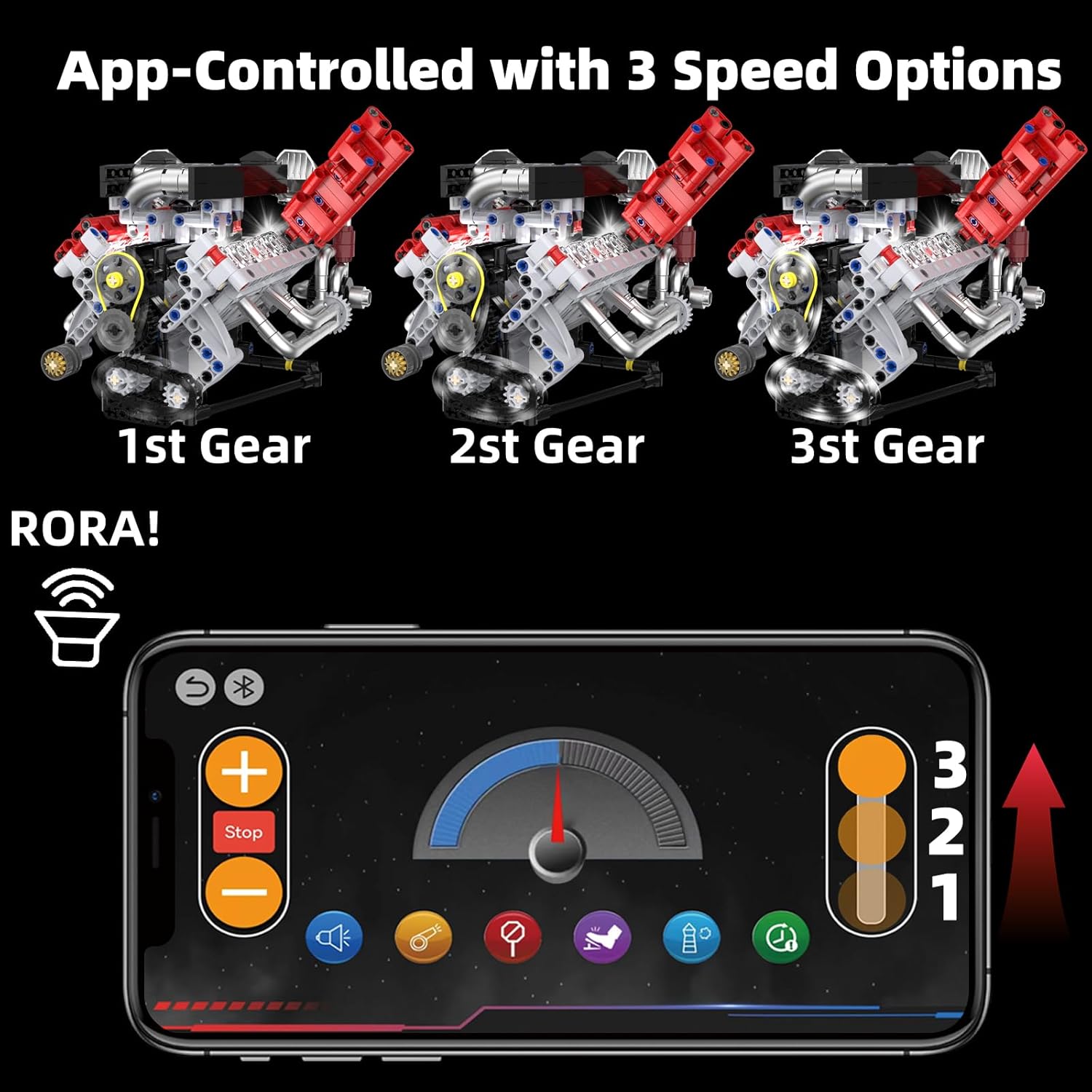
Figure 6.1: The mobile application interface demonstrating the three-speed control options for the V8 engine model. The app allows users to adjust the engine's operational speed and includes a visual representation of the selected gear.
6.3 LED Lighting
When the engine is running, the integrated LED light strip illuminates the internal components, showcasing the precise movement of the pistons and other mechanisms. The lighting enhances the visual appeal of the model.

Figure 6.2: The Suplanet V8 engine model in its operating state, with internal LED lights illuminating the moving parts. This image highlights the dynamic visual effect created by the integrated lighting system.
7. Maintenance
Proper care ensures the longevity and optimal performance of your V8 engine model.
- Cleaning: Use a soft, dry cloth to gently wipe dust from the model. Avoid using harsh chemicals or abrasive materials.
- Storage: Store the model in a cool, dry place away from direct sunlight and extreme temperatures. Keep it in its original packaging or a protective container when not on display.
- Power Unit Care: Recharge the power unit regularly, even if not in frequent use, to maintain battery health. Do not overcharge or allow it to fully discharge for extended periods.
- Component Check: Periodically inspect for any loose or damaged parts. Re-secure or replace as necessary.
8. Troubleshooting
Refer to the following table for common issues and their solutions:
| Problem | Possible Cause | Solution |
|---|---|---|
| Engine does not start/run. | Power unit is not charged or not connected properly. | Ensure the power unit is fully charged and securely connected to the engine. Verify the power unit is switched on. |
| LED lights do not illuminate. | LED strip is not connected or damaged. | Check the connection of the LED light strip to the power unit. If still not working, contact support. |
| App cannot connect to the engine. | Bluetooth is off, engine is off, or app is outdated. | Ensure Bluetooth is enabled on your device and the engine's power unit is on. Restart the app and the engine. Update the app to the latest version. |
| Parts are loose or fall off. | Incomplete or incorrect assembly. | Review the assembly instructions for the affected section and re-assemble parts securely. |
9. Specifications
- Model Number: K96207
- Brand: Suplanet
- Number of Pieces: Approximately 700
- Assembled Dimensions: 3.85 x 2.63 x 3.22 inches (9.3 x 8.2 x 6.7 cm)
- Item Weight: 1.54 pounds
- Power Source: Rechargeable 9V battery (included, integrated into power unit)
- Control Method: Mobile Application (Bluetooth)
- Recommended Age: 8 - 14 years (also suitable for adults)
10. Warranty and Support
For any questions, concerns, or issues not covered in this manual, please contact Suplanet customer support. Refer to the contact information provided on the product packaging or the official Suplanet website for assistance. Please retain your proof of purchase for warranty claims, if applicable.