
Introduction
This manual provides instructions for the CTRLBETTER RC45157 CT-8564 Universal Remote Control. This remote is designed as a direct replacement for various Daewoo, Hitachi, Toshiba, and JVC TV models, offering convenient control and quick access to popular streaming services.
Important: Before use, ensure the buttons on your original remote control are identical to those on this replacement remote. Incompatibility may occur if buttons do not match.

Image: The CTRLBETTER RC45157 CT-8564 remote control, showing its full layout and design.
Setup
Battery Installation
- Locate the battery compartment on the back of the remote control.
- Slide the battery cover downwards or press the latch to open it.
- Insert two new AAA alkaline batteries (not included), ensuring the positive (+) and negative (-) terminals match the diagrams inside the compartment.
- Replace the battery cover, ensuring it clicks securely into place.
No pairing or programming is required. The remote control is ready for use immediately after battery installation.

Image: The back of the remote control with the battery compartment open, showing where to insert two AAA batteries.

Image: A remote control being used in front of a TV, illustrating that no pairing or setup is needed for immediate use.
Operating Instructions
The RC45157 CT-8564 remote control operates using infrared technology, providing a responsive experience with a transmission distance of up to 10 meters (32 feet) and a response time of 0.2 seconds.
Basic Functions
- Power Button (⏻): Turns the TV on or off.
- Number Buttons (0-9): Directly select channels.
- Volume Up/Down (V+/V-): Adjusts the TV volume.
- Channel Up/Down (P+/P-): Changes TV channels.
- Navigation Buttons (Arrows): Navigate through menus and options.
- OK Button: Confirms selections.
- Exit Button: Exits current menu or application.
- Menu Button: Accesses the TV's main menu.
Quick Access Buttons
This remote features dedicated buttons for instant access to popular streaming services:
- NETFLIX
- YouTube
- Google Play
- PrimeVideo
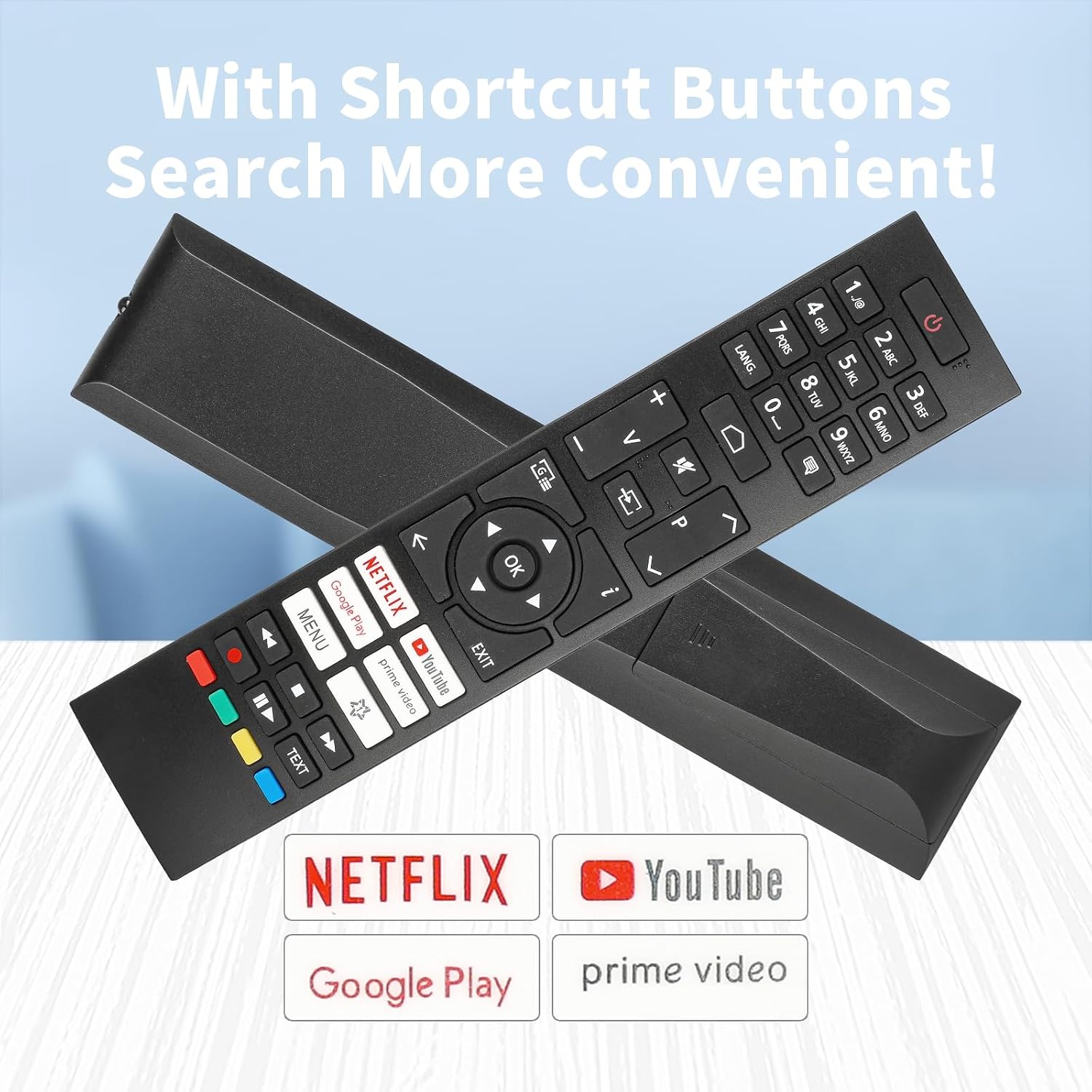
Image: The remote control highlighting the dedicated quick access buttons for Netflix, YouTube, Google Play, and PrimeVideo.

Image: A visual representation of the remote control's long-distance capability, showing it can precisely control a TV from up to 32 feet away.
Maintenance
- Cleaning: Wipe the remote control with a soft, dry cloth. Do not use liquid cleaners or abrasive materials.
- Storage: Store the remote in a cool, dry place away from direct sunlight and extreme temperatures.
- Battery Replacement: Replace batteries promptly when the remote's performance degrades. Remove batteries if the remote will not be used for an extended period to prevent leakage.
Troubleshooting
Remote Not Responding
- Check Batteries: Ensure batteries are inserted correctly with the correct polarity and are not depleted. Replace with fresh alkaline batteries if necessary.
- Line of Sight: Ensure there is a clear line of sight between the remote control and the TV's infrared receiver. Obstructions can block the signal.
- Distance: Confirm you are within the effective operating range of 10 meters (32 feet).
Compatibility Issues
- Button Match: Re-verify that the buttons on this replacement remote are an exact match to your original TV remote. This remote is designed for specific models and button layouts.
- TV Model: Confirm your TV model is listed as compatible. Refer to the 'Specifications' section for a list of compatible models.
If you are unsure about compatibility or continue to experience issues, please contact customer support with a photo of your original remote control for assistance.
Specifications
| Model Number | RC45157 CT-8564 |
| Brand | CTRLBETTER |
| Connectivity Technology | Infrared (IR) |
| Maximum Range | 10 Meters (32 feet) |
| Response Time | 0.2 seconds |
| Battery Type | 2 x AAA Alkaline Batteries (not included) |
| Dimensions | 21 x 5.3 x 2.3 cm |
| Weight | 60 g |
| Compatible TV Brands | Daewoo, Hitachi, Toshiba, JVC |
| Partial List of Compatible TV Models | 32HAE2351E, 32DM54FAI, 32DMA45FB, 32DM54HA, 43DM54UA, 43DM62UA, 65DM54UA, 50DH55UQ, 55DMA55UB, 55DM55UQP, 50DM55UQP2, 55DM55UQP2, 43DM54FA, QL55DMA66UB, 32LA2063DG, 42LA2063DG, 43LA2063DG, 43UA2063DG, 50UA2063DG, 55UA2063DG, 58UA2063DG, 65UA2063DG, 24WA2063DA, 24WA2063DAX, 24WA2063DG, 32WA2063DG, 32WA2063DAI, LT-43VAF3055, LT-39VAH3055, LT-42VAF3055, LT-43VAQ7235, LT-55VAQ8235, LT-55VA3055, LT-65VA3200, LT-40VAF325I, LT-50VA3215ICELED55SA222B3, CELED65UHDSA22B3, CEQLED65SA22B3, CELED40SA22B3, CELED43SA22B3, CELED32SAHD23B3, DL40F550P2CW, DL55U550P2CW |

Image: The remote control held in a hand, illustrating its upgraded smart chip for stable and reliable performance.

Image: Close-up views of the remote control, emphasizing its soft buttons, ergonomic design, and long-distance control capabilities.
Warranty
This product comes with a 6-month warranty from the date of purchase. Please retain your proof of purchase for any warranty claims. The warranty covers manufacturing defects but does not cover damage caused by misuse, accidents, or unauthorized modifications.
Customer Support
For any questions, troubleshooting assistance, or warranty inquiries, please contact the seller directly through your purchase platform. When contacting support, providing your order number and a clear description of the issue, along with a photo of your original remote if it concerns compatibility, will help expedite the process.


