
1. Product Overview
The ZEALFEEL Golf Simulator Cage is a versatile training system designed for both outdoor practice and indoor golf simulation. This unit features a robust construction, a dual-layer HD impact screen, and comprehensive safety barriers to enhance your golf training experience.
Key Features:
- 2-in-1 Design: Suitable for backyard driving practice or indoor simulation with a launch monitor and projector. Dimensions: 10ft (W) × 8ft (H) × 5.5ft (D).
- Durable Construction: Features 6-ply anti-tear netting with reinforced dual-stitching, 16mm flexible fiberglass poles, and a steel base for stability.
- Dual-Layer HD Impact Screen: A 91x86 inch screen provides clear visuals for simulation and absorbs ball impact, reducing bounce and noise.
- Full Coverage Protection: Includes 2 extended side barrier nets, a top net, and a rear protection net to contain off-target shots.
- Sloped Ball Return System: Angled bottom netting guides balls back for continuous practice.

Image 1.1: Assembled ZEALFEEL Golf Simulator Cage in use.
2. What's in the Box
Verify that all components are present before beginning assembly.
- 1 × Golf Practice Hitting Cage (Main Net + Base Net)
- 1 × Blank Simulator Screen (91" × 86")
- 2 × Side Barriers Nets
- 6 × Sandbags (for base stabilization)
- 4 × Ground Stakes (for base stabilization)

Image 2.1: All components included in the package.
3. Setup Instructions
Follow these steps carefully to assemble your golf simulator cage. It is recommended to have two people for assembly.
Assembly Video Guide:
Video 3.1: Official ZEALFEEL setup guide for the 10x8ft Golf Simulator Enclosure Cage.
Step-by-Step Assembly:
- Prepare the Area: Choose a flat, clear area for setup. Ensure sufficient space, especially for indoor use (recommended 9ft ceiling clearance and at least 1ft behind the net).
- Assemble the Base Frame: Connect the steel base tubes according to the diagram in the manual. Ensure all connections are secure.
- Attach Main Net and Poles: Secure the main net to the base frame. Insert the 16mm fiberglass poles into the designated sleeves and connect them to the frame, forming the main structure of the cage.
- Install Impact Screen: Hang the dual-layer HD impact screen (91" x 86") within the main cage structure. Use the provided bungee cords or straps to secure it tautly to the frame.
- Attach Side Barriers and Top Net: Secure the two side barrier nets and the top net to the main cage frame. These provide additional protection for errant shots.
- Stabilize the Unit: Fill the 6 sandbags and place them at the base of the cage for added stability. For outdoor use, utilize the 4 ground stakes to anchor the base securely.
- Set Up Ball Return System: Ensure the sloped bottom netting is correctly positioned to guide balls back towards the hitting area. Lay down the bottom secure net to enable automatic ball return.

Image 3.2: Recommended setup dimensions for safe indoor use.
4. Operating Instructions
The ZEALFEEL Golf Simulator Cage offers flexibility for various training needs.
Outdoor Practice:
- Place the cage in a safe, open area in your backyard.
- Ensure the ground stakes are used for maximum stability.
- Hit golf balls directly into the impact screen or main net. The sloped ball return system will collect balls for convenience.
Indoor Simulation:
- Set up the cage in a room with adequate space, adhering to the recommended room size guidelines (Image 3.2).
- Position your golf launch monitor and projector (not included) according to their respective manufacturer's instructions.
- Project the simulation software onto the dual-layer HD impact screen for an immersive experience.
- Always ensure the side barriers and top net are properly installed to prevent stray balls from causing damage.
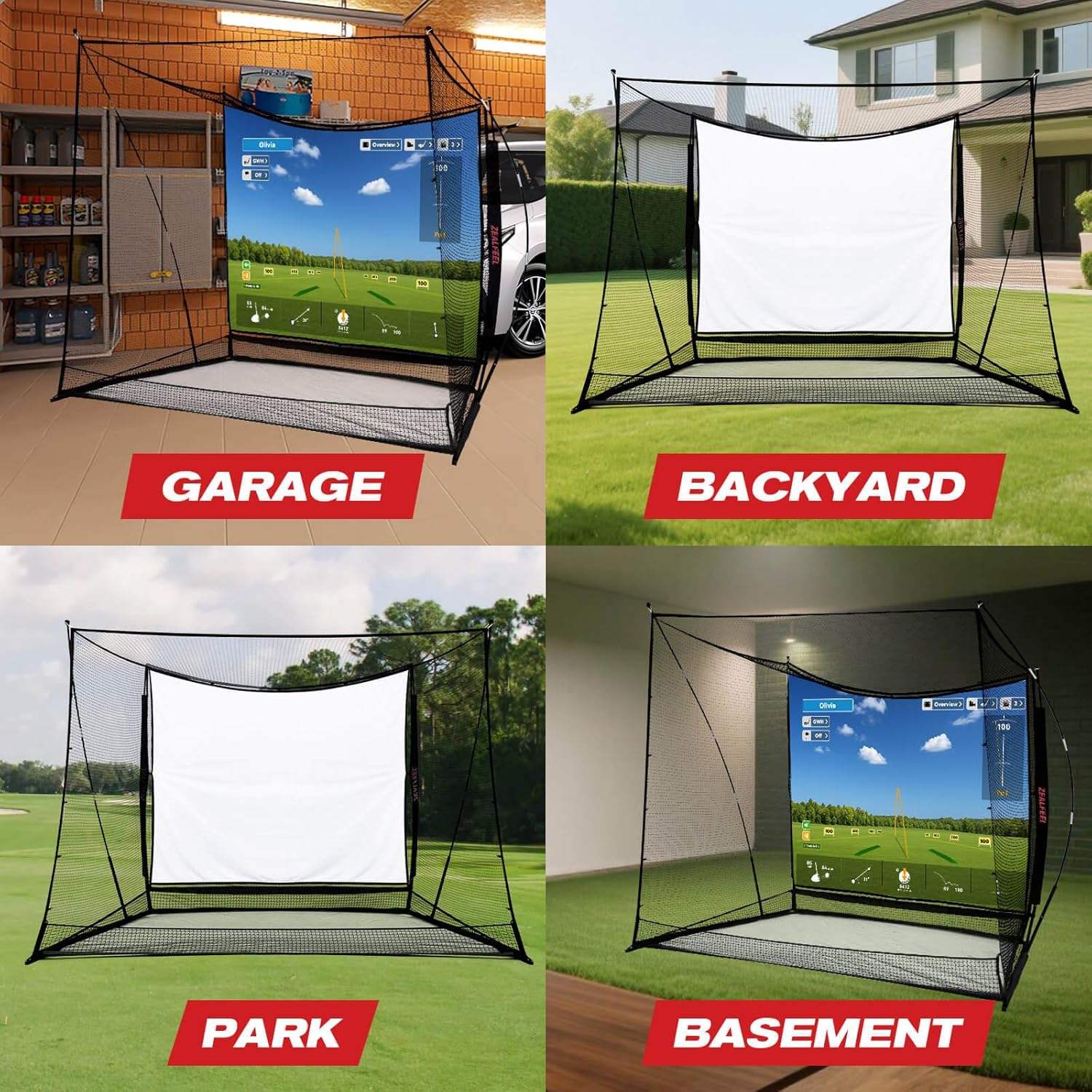
Image 4.1: Versatile usage scenarios for the golf simulator cage.
5. Maintenance
Proper maintenance ensures the longevity and performance of your golf simulator cage.
- Cleaning: Regularly inspect and clean the netting and impact screen. Use a soft cloth and mild soap with water for the screen if necessary. Avoid harsh chemicals.
- Inspection: Periodically check all poles, connectors, and netting for signs of wear, tear, or damage. Replace any damaged components immediately to maintain safety and functionality.
- Storage: If storing the unit for an extended period, especially outdoors, disassemble it and store components in a dry, protected area to prevent weather damage.
- Sandbags: Ensure sandbags remain filled and sealed to provide consistent stability.
6. Troubleshooting
This section addresses common issues you might encounter.
- Instability: If the cage feels unstable, ensure all poles are fully connected and seated. Verify sandbags are properly placed and filled. For outdoor use, ensure ground stakes are firmly inserted.
- Balls Escaping: Check that all nets, including side barriers, top net, and rear protection net, are securely attached and free of gaps. Ensure the cage is positioned correctly relative to the hitting area.
- Impact Screen Sagging/Wrinkling: Ensure the impact screen is stretched tautly and evenly using all attachment points. Adjust tension as needed.
- Net Damage: While the netting is designed for durability, extreme impact or repeated mis-hits outside the impact screen area can cause wear. Inspect regularly and contact support for replacement parts if significant damage occurs.
- Ball Return Not Working: Confirm the bottom secure net is laid down correctly to facilitate ball return. Ensure no obstructions are blocking the ball path.
7. Specifications
| Feature | Detail |
|---|---|
| Model Number | ZF15-A-U1 |
| Size | 10x8FT-HD Impact Screen & Side Barriers (10ft W × 8ft H × 5.5ft D) |
| Material | 7-Strand 1" Knotless Net, 420D Oxford Cloth (reinforced areas) |
| Impact Screen Size | 91" × 86" (Dual-Layer HD) |
| Color | Black |
| Item Weight | 16.49 Kilograms |
| Included Components | Golf Practice Hitting Cage, Blank Simulator Screen, Side Barriers Nets, Sandbags, Ground Stakes |
8. Warranty and Support
Warranty Information:
This ZEALFEEL Golf Simulator Cage comes with a 1 Year Warranty from the date of purchase. This warranty covers manufacturing defects and material flaws under normal use. It does not cover damage resulting from misuse, improper assembly, accidents, or natural disasters.
Customer Support:
For any questions, concerns, or warranty claims, please contact ZEALFEEL Sport US customer service. Refer to your purchase documentation for specific contact details or visit the official ZEALFEEL website.
When contacting support, please have your model number (ZF15-A-U1) and proof of purchase readily available.