
Introduction
This manual provides essential instructions for the safe and effective use of the DLKULJMR Heli Forklift Pallet Truck/Stacker Handle, equipped with the ET-126 Accelerator. Please read this manual thoroughly before attempting installation or operation to ensure proper functionality and safety.
Safety Information
- Always ensure the forklift or pallet truck's power is disconnected before installing, removing, or servicing the handle.
- Installation should be performed by qualified personnel to prevent electrical hazards or improper operation.
- Wear appropriate personal protective equipment (PPE) during installation and maintenance.
- Regularly inspect the handle for any signs of damage, wear, or loose connections. Do not operate if damage is observed.
- Familiarize yourself with all controls and their functions before operating the equipment.
- Ensure the emergency stop function is fully operational at all times.
Product Overview
The DLKULJMR Heli Forklift Pallet Truck/Stacker Handle is a crucial control component designed for precise operation of material handling equipment. It integrates an ET-126 accelerator for variable speed control, along with various buttons for essential operational functions such as horn, lift, and lower.

An angled view of the DLKULJMR Heli Forklift Pallet Truck/Stacker Handle, showing the main gray body, black grips, orange control buttons, and the red safety bumper. This image highlights the ergonomic design and primary control layout.

A top-down view of the handle, highlighting the central orange horn button, two smaller orange buttons, and the overall ergonomic design. This perspective provides a clear view of the button arrangement.
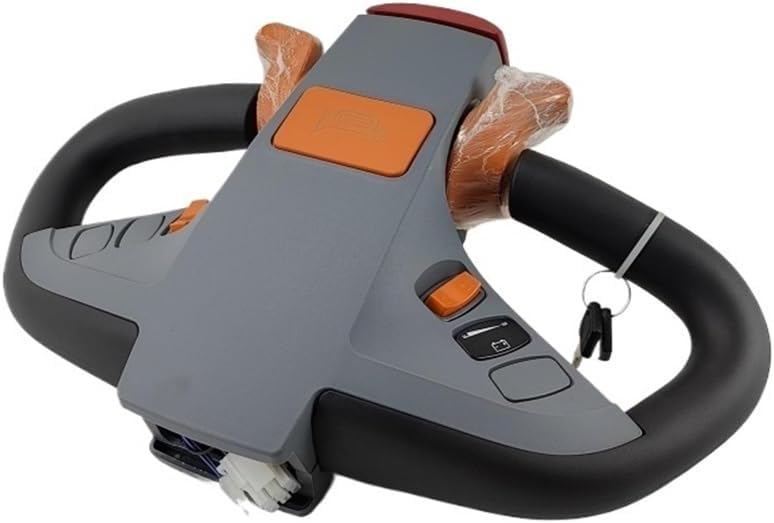
Another angled view of the handle, revealing the wiring harness at the base, indicating its readiness for electrical connection. This image shows the necessary connections for integration into the forklift's electrical system.
Installation Instructions
Proper installation is critical for the safe and reliable operation of your equipment. If you are unsure about any step, consult a qualified technician.
- Prepare the Equipment: Ensure the forklift or pallet truck is powered off and secured to prevent accidental movement. Disconnect the main power source.
- Remove Old Handle (if applicable): Carefully disconnect any wiring and unmount the existing handle from its pivot point.
- Mount the New Handle: Position the DLKULJMR handle onto the designated pivot or mounting bracket. Secure it firmly using appropriate fasteners (not included, typically reused from original equipment).
- Connect Wiring: Refer to the wiring diagram of your specific forklift model and the handle's wiring harness. Connect all electrical wires, ensuring correct polarity and secure connections. Pay close attention to the ET-126 accelerator connections.
- Test Connections: Before fully reassembling, perform continuity checks on all connections to verify proper electrical contact.
- Secure Wiring: Route and secure all wiring to prevent pinching, chafing, or interference with moving parts.
- Final Assembly: Reassemble any covers or protective components.
- Initial Test: Reconnect power and perform a functional test in a safe, clear area, verifying all controls (accelerator, horn, lift/lower, emergency stop) operate as expected.
Note: Professional installation is highly recommended to ensure proper functionality and adherence to safety standards.
Operating Instructions
This section details the operation of the DLKULJMR handle's controls.
Controls Overview
- ET-126 Accelerator: Located on the handle grips, this control allows for variable speed adjustment. Gently rotate or depress to increase speed; release to decrease.
- Horn Button: Typically a central orange button, press to activate the horn for signaling.
- Lift/Lower Buttons: Dedicated buttons (often orange) for controlling the lifting and lowering mechanisms of the forks.
- Emergency Stop Button: A prominent red button or lever, designed to immediately cut power and stop all functions in an emergency.
- Key Switch: (If present) Used to power on/off the equipment.
- Battery Indicator: (If present) Displays the current charge level of the equipment's battery.
Starting the Equipment
- Ensure the emergency stop button is disengaged (pulled out or reset).
- Insert the key (if applicable) and turn it to the 'ON' position.
- Check the battery indicator (if present) to ensure sufficient charge.
Driving and Speed Control
To move the equipment, gently engage the ET-126 accelerator. The further the accelerator is engaged, the faster the equipment will move. Release the accelerator to slow down or stop. Always operate at a safe speed appropriate for the environment and load.
Lifting and Lowering
Use the designated lift and lower buttons to control the vertical movement of the forks. Press and hold the lift button to raise the forks, and the lower button to descend them. Ensure the load is stable before and during movement.
Emergency Stop
In any emergency situation, immediately press or engage the emergency stop button. This will cut power to the drive and lift functions, bringing the equipment to an immediate halt.
Maintenance
Regular maintenance ensures the longevity and reliable performance of your DLKULJMR handle.
- Cleaning: Periodically clean the handle's exterior with a soft, damp cloth. Avoid using harsh chemicals or abrasive cleaners that could damage the plastic or electronic components.
- Inspection: Regularly inspect the handle for any physical damage, cracks, loose screws, or signs of wear on the grips and buttons.
- Wiring Check: Ensure all wiring connections are secure and free from corrosion or damage. Check for any frayed or exposed wires.
- Functionality Test: Periodically test all buttons and the accelerator for proper response and smooth operation. Verify the emergency stop function.
- Lubrication: No user-serviceable lubrication points are typically present on the handle itself. Refer to your forklift's main manual for chassis lubrication.
Troubleshooting
This section addresses common issues you might encounter with the handle. For complex problems, consult a qualified technician.
| Problem | Possible Cause | Solution |
|---|---|---|
| Handle is unresponsive or equipment does not power on. | Main power disconnected, emergency stop engaged, faulty wiring, low battery. | Check main power supply. Disengage emergency stop. Inspect wiring connections. Check battery charge. |
| ET-126 Accelerator not functioning. | Accelerator wiring issue, faulty accelerator unit. | Inspect accelerator wiring for damage or loose connections. If wiring is intact, the accelerator unit may need replacement by a technician. |
| Specific buttons (e.g., lift, lower, horn) are not responding. | Button wiring issue, faulty button switch. | Check wiring to the affected button. If wiring is secure, the button switch may be faulty and require replacement. |
| Intermittent operation or erratic behavior. | Loose wiring connections, moisture ingress, internal component fault. | Inspect all wiring for tightness. Ensure the handle is kept dry. If issues persist, professional diagnosis is required. |
Specifications
The following specifications are provided for the DLKULJMR Heli Forklift Pallet Truck/Stacker Handle:
| Feature | Value |
|---|---|
| Package Dimensions | 1.18 x 0.79 x 0.39 inches |
| Item Weight | 1.76 ounces |
| Department | unisex-adult |
| Manufacturer | DLKULJMR |
| ASIN | B0F37WSLCC |
| Item model number | DLKULJMR |
| Assembly required | No |
| Number of pieces | 1 |
Warranty and Support
This DLKULJMR product is covered by a standard manufacturer's warranty against defects in materials and workmanship. For specific warranty terms, duration, and claim procedures, please refer to the documentation provided at the time of purchase or contact DLKULJMR customer service directly. For technical assistance, troubleshooting beyond this manual, or to inquire about replacement parts, please reach out to the manufacturer's support channels.