
1. Introduction
This manual provides essential information for the proper setup, operation, and maintenance of your ZdalaMit Replacement Remote Control. This remote is designed to be compatible with various Riowois Sound Bar models, offering a direct replacement without the need for programming.
2. Setup
2.1 Battery Installation
The remote control requires two (2) 1.5V AAA Alkaline batteries (not included) for operation.
- Locate the battery compartment cover on the back of the remote control.
- Slide the cover downwards or press the latch (if present) to open the compartment.
- Insert two AAA batteries, ensuring the correct polarity (+ and -) as indicated inside the compartment.
- Replace the battery compartment cover, sliding it back into place until it clicks securely.

Image: Front view of the ZdalaMit Replacement Remote Control. This image shows the layout of the buttons and the overall design of the remote.
2.2 Initial Use
This replacement remote control is pre-programmed for compatible Riowois Sound Bar models. No additional programming or pairing is required. Once batteries are installed, the remote is ready for immediate use.
3. Operating Instructions
Point the remote control directly at your Riowois Sound Bar's infrared receiver to ensure proper signal transmission.
3.1 Button Functions
- Power (Red Button): Turns the sound bar on or off.
- BT: Selects Bluetooth input mode.
- Sub - / Sub +: Adjusts the subwoofer level.
- Volume + / -: Increases or decreases the main volume.
- MUTE: Mutes or unmutes the sound.
- ARC COAX: Selects ARC (Audio Return Channel) or Coaxial input mode.
- Movie: Activates Movie sound mode.
- News: Activates News sound mode.
- Music: Activates Music sound mode.
- OPT: Selects Optical input mode.
- AUX Boost: Selects AUX input mode and may provide an audio boost.
3.2 Compatible Riowois Sound Bar Models
This remote control is compatible with the following Riowois Sound Bar models:
- DS6341
- DS6441
- DS6301H
- DS6341N
- DS6405
- DS6345S
- DS6401D
- DS6445S
- DS6301M
- DS6301N
- DS6701
- DS6801
- S6801K
- DS6400M
- DS6701S
- DS6741S
- DS6301
- DS6302
- DS6302L
- DS6343S
- DS6401D+
- DS6401S
- DS6701UP
- DS6541SB
- DS6301S
- DS6801S
- DS6841S
- DS6541SPB
- DS6301H-Pro
- DS6301H-Plus
- DS6403
- DS6541S
- DS6551
4. Maintenance
- Cleaning: Use a soft, dry cloth to clean the remote control. Do not use liquid cleaners or abrasive materials.
- Battery Replacement: Replace batteries when the remote's response becomes sluggish or stops working. Always replace both batteries at the same time with new AAA Alkaline batteries.
- Storage: If the remote control will not be used for an extended period, remove the batteries to prevent leakage and potential damage. Store in a cool, dry place.
5. Troubleshooting
- Remote not responding:
- Check if the batteries are inserted correctly with the right polarity.
- Replace old batteries with new AAA Alkaline batteries.
- Ensure there are no obstructions between the remote control and the sound bar's infrared receiver.
- Make sure you are within the effective operating range (up to 33 feet).
- Limited range or intermittent response:
- Ensure the batteries are fresh.
- Verify that the remote is pointed directly at the sound bar.
- Avoid strong light sources (like direct sunlight or bright fluorescent lights) that might interfere with the infrared signal.
6. Specifications
| Brand | ZdalaMit |
| Special Feature | Pre Programmed |
| Color | Black |
| Max Number of Supported Devices | 1 |
| Compatible Devices | Riowois Sound Bars (Home Theater) |
| Connectivity Technology | Infrared |
| Button Quantity | 15 |
| Controller Type | Button Control |
| Maximum Range | 33 Feet |
| Battery Type | 2X 1.5V AAA Alkaline Battery (Not Included) |
| Item Weight | 40 Grams |
| Item Dimensions (L x W x H) | 5.96" x 1.51" x 0.55" |
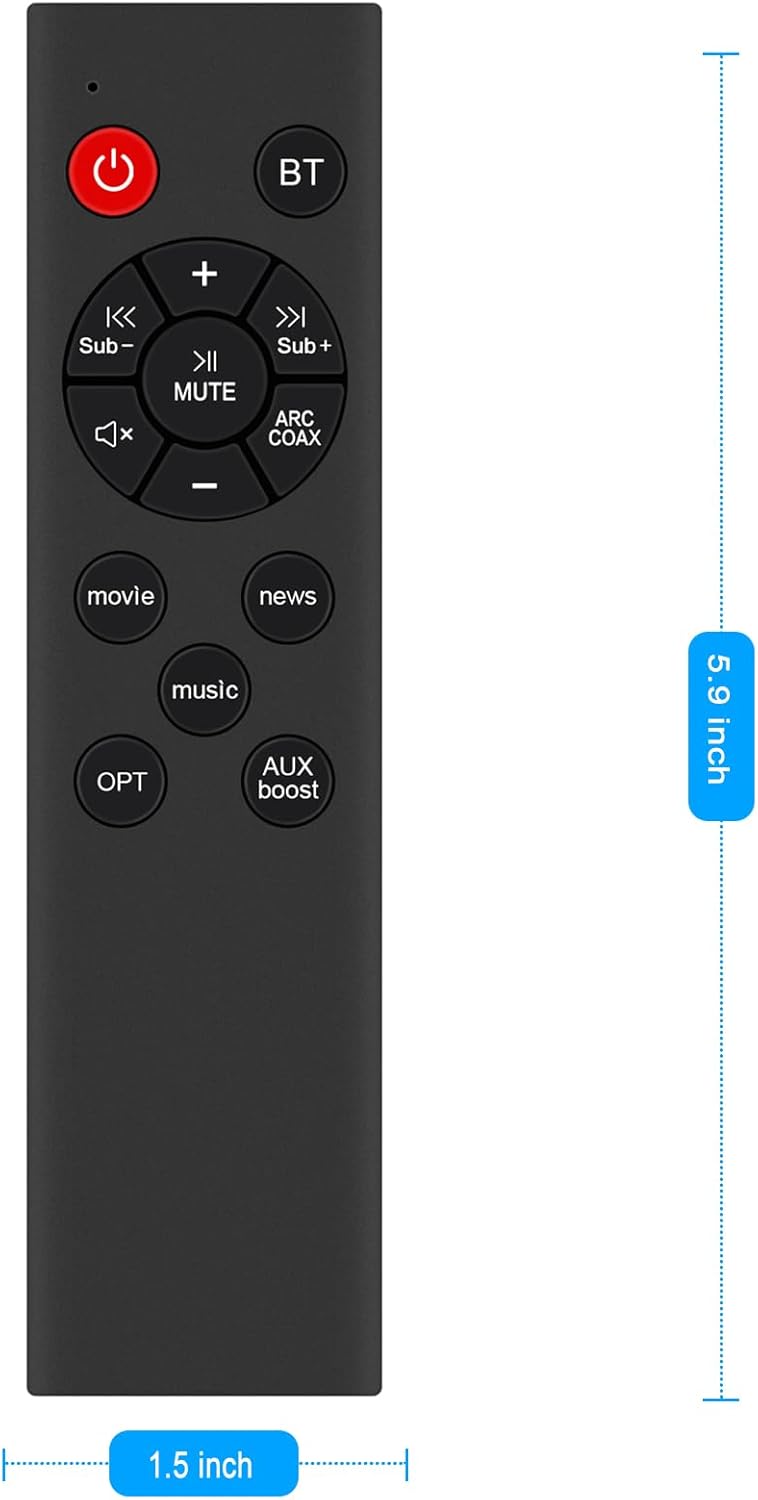
Image: ZdalaMit Replacement Remote Control showing its length (5.9 inches) and width (1.5 inches).
7. Warranty Information
This ZdalaMit Replacement Remote Control comes with a 1-year warranty from the date of purchase. Please retain your proof of purchase for warranty claims. The warranty covers manufacturing defects but does not cover damage caused by misuse, accidents, or unauthorized modifications.
8. Support
For further assistance or inquiries regarding your ZdalaMit Replacement Remote Control, please refer to the retailer where the product was purchased or contact ZdalaMit customer support through their official channels. Ensure you have your product model number (B0F37V3FY5) and proof of purchase ready when seeking support.