
1. Introduction
This manual provides essential information for the safe and effective operation, maintenance, and troubleshooting of the YPMart SKZ2054C Infrared Ethylene Gas Detector. Please read this manual thoroughly before using the device to ensure proper function and safety.
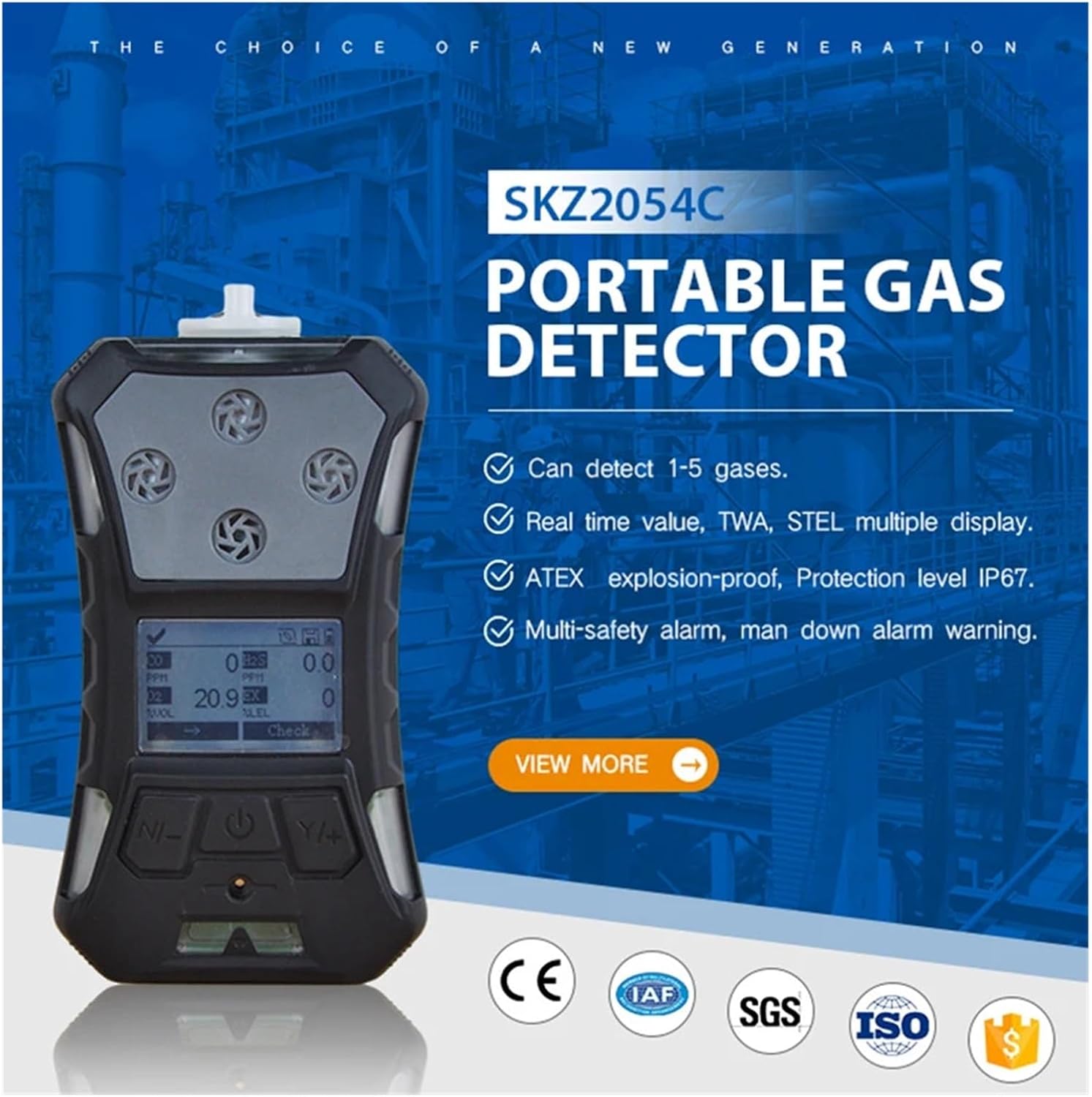
The SKZ2054C portable gas detector is shown with its LCD screen, illustrating its compact design and highlighting its ability to detect 1-5 gases, real-time value display, ATEX explosion-proof rating, IP67 protection, and multi-safety alarm functions.
2. Product Features
- Reliable Gas Meter: Complies with EU regulations 2004/108/EC (EMC), 1995/5/EC (Radio), and 94/9/EC (ATEX), ensuring high safety and performance standards.
- Robust Protection: Features an IP67 protection grade, making it suitable for harsh environments with a working temperature range of -20°C to +50°C and humidity tolerance up to 90% RH (non-condensing).
- Compact and Lightweight Design: Measures 157x84.5x59.5mm and weighs 365g (including battery, belt clip, and filter), ensuring easy handling and transport.
- Advanced Measurement Capabilities: Utilizes infrared principles for accurate readings with a measurement range of 0-100% LEL (0-3% Vol) for efficient gas level monitoring.
- User-Friendly LCD Display: Equipped with a clear LCD screen for easy-to-read measurements and data, enhancing usability for reliable gas detection.
3. Safety Information
WARNING: Failure to follow these safety instructions may result in serious injury or death.
- Always operate the device in accordance with local safety regulations and procedures.
- Ensure the device is properly calibrated before each use, especially in critical environments.
- Do not expose the device to extreme temperatures, corrosive chemicals, or excessive moisture beyond its specified operating conditions.
- Never attempt to open or repair the device yourself. Refer all servicing to qualified personnel.
- Keep the sensor area clean and free from obstructions to ensure accurate readings.
- Be aware of the alarm thresholds and understand the appropriate response actions when an alarm is triggered.
4. Product Overview and Package Contents
The SKZ2054C detector comes with the main unit and essential accessories for immediate use.

This image displays the front and back of the SKZ2054C gas detector, highlighting key components such as the LED light, sensor area, display window, power button, navigation keys (N and Y+), audible alarm (warbler), water trap filter, back splint, LED alarm light, and the charging/data port.

The SKZ2054C gas detector is shown alongside its robust carrying case, emphasizing its portability and protection during transport and storage.
Package Contents:
- SKZ2054C Gas Detector Unit
- Protective Carrying Case
- Charging Cable
- User Manual (this document)
- Belt Clip (pre-installed or separate)
- Water Trap Filter (pre-installed or separate)
5. Setup
5.1 Initial Inspection
Upon unpacking, inspect the device for any visible damage. Ensure all components listed in the package contents are present.
5.2 Charging the Device
Connect the charging cable to the charging/data port on the device and to a suitable power source. The LED indicator will show charging status. Ensure the device is fully charged before first use.
5.3 Powering On/Off
- To Power On: Press and hold the Power button until the display illuminates.
- To Power Off: Press and hold the Power button until the device shuts down.
5.4 Basic Navigation
Use the [N] key and [Y/+] key to navigate through menus and adjust settings on the LCD display.
6. Operating Instructions
6.1 Understanding the Display
The LCD screen provides real-time gas concentration readings, unit of measurement (e.g., PPM, %LEL, %VOL), battery status, and alarm indicators. Familiarize yourself with the layout shown in the product overview.

This image illustrates the multi-sampling capability of the SKZ2054C, supporting both suction and diffusion methods. It also highlights the humanized, simple, and atmospheric user interface for easy interaction.
6.2 Gas Detection Process
Once powered on, the device will perform a self-test. After the self-test, it will enter detection mode, continuously monitoring the ambient air for ethylene (C2H4) gas. The current concentration will be displayed on the LCD screen.
6.3 Alarm Functions
The SKZ2054C features multiple alarm types:
- Audible Alarm (Warbler): A loud sound indicates a gas concentration exceeding a set threshold.
- Visual Alarm (LED Alarm Light): Flashing LED lights provide a visual warning.
- Vibration Alarm: The device vibrates to alert the user, especially in noisy environments.
- Fall Alarm: The device includes a fall alarm function to enhance safety for workers.
When an alarm is triggered, immediately follow your organization's safety protocols for gas detection. Do not ignore alarms.

The image shows the ergonomic design of the SKZ2054C, featuring a convenient back clip for easy portability. It also depicts the multiple security protection, including a fall alarm function designed to enhance worker safety.
7. Maintenance
7.1 Cleaning
Regularly clean the exterior of the device with a soft, damp cloth. Do not use abrasive cleaners or solvents. Ensure the sensor area and water trap filter are free from dust and debris.
7.2 Sensor Care
The infrared sensor is a critical component. Avoid touching the sensor directly. If the water trap filter becomes clogged or damaged, replace it promptly to maintain accurate readings and protect the sensor.
7.3 Battery Maintenance
To prolong battery life, charge the device regularly and avoid fully discharging it frequently. Store the device in a cool, dry place when not in use for extended periods.
7.4 Calibration
Periodic calibration is essential to ensure the accuracy of the gas detector. Refer to the device's on-screen menu or contact YPMart support for detailed calibration procedures and recommended intervals.
8. Troubleshooting
| Problem | Possible Cause | Solution |
|---|---|---|
| Device does not power on. | Low battery or faulty battery. | Charge the device. If problem persists, contact support. |
| Inaccurate readings. | Sensor obstruction, dirty filter, or calibration required. | Clean sensor area and filter. Perform calibration. |
| Alarm triggers frequently without gas presence. | Sensor contamination or calibration issue. | Clean sensor. Perform calibration. If issue persists, contact support. |
| Display is blank or frozen. | Software error or hardware malfunction. | Attempt to restart the device. If unsuccessful, contact support. |
For issues not listed here, please contact YPMart customer support.
9. Specifications
| Model Number | SKZ2054C |
| Gas Type Detected | C2H4 (Ethylene) |
| Detection Principle | Infrared principle |
| Measurement Range | 0-100% LEL (0-3% Vol) |
| Protection Grade | IP67 |
| Working Temperature | -20°C to +50°C |
| Humidity | 0~90% RH (no condensation) |
| Environmental Pressure | 86~106 Kpa |
| Dimensions (L*W*H) | 157 x 84.5 x 59.5 mm (including back clip/water trap filter) |
| Weight | 365g (including battery, belt clip, and filter) |
| Display | LCD Screen |
| Certifications | EU regulations 2004/108/EC (EMC), 1995/5/EC (Radio), 94/9/EC (ATEX) |
10. Warranty and Support
YPMart provides a standard manufacturer's warranty for this product. For specific warranty terms and conditions, please refer to the documentation included with your purchase or visit the official YPMart website.
For technical support, troubleshooting assistance, or service inquiries, please contact YPMart customer service. Have your product model number (SKZ2054C) and purchase information ready when contacting support.