
Introduction
This manual provides comprehensive instructions for the assembly, operation, and maintenance of your Mericonia L-Shaped Computer Desk. Designed for small spaces, this versatile desk offers a functional workspace with integrated power solutions and adaptable storage.
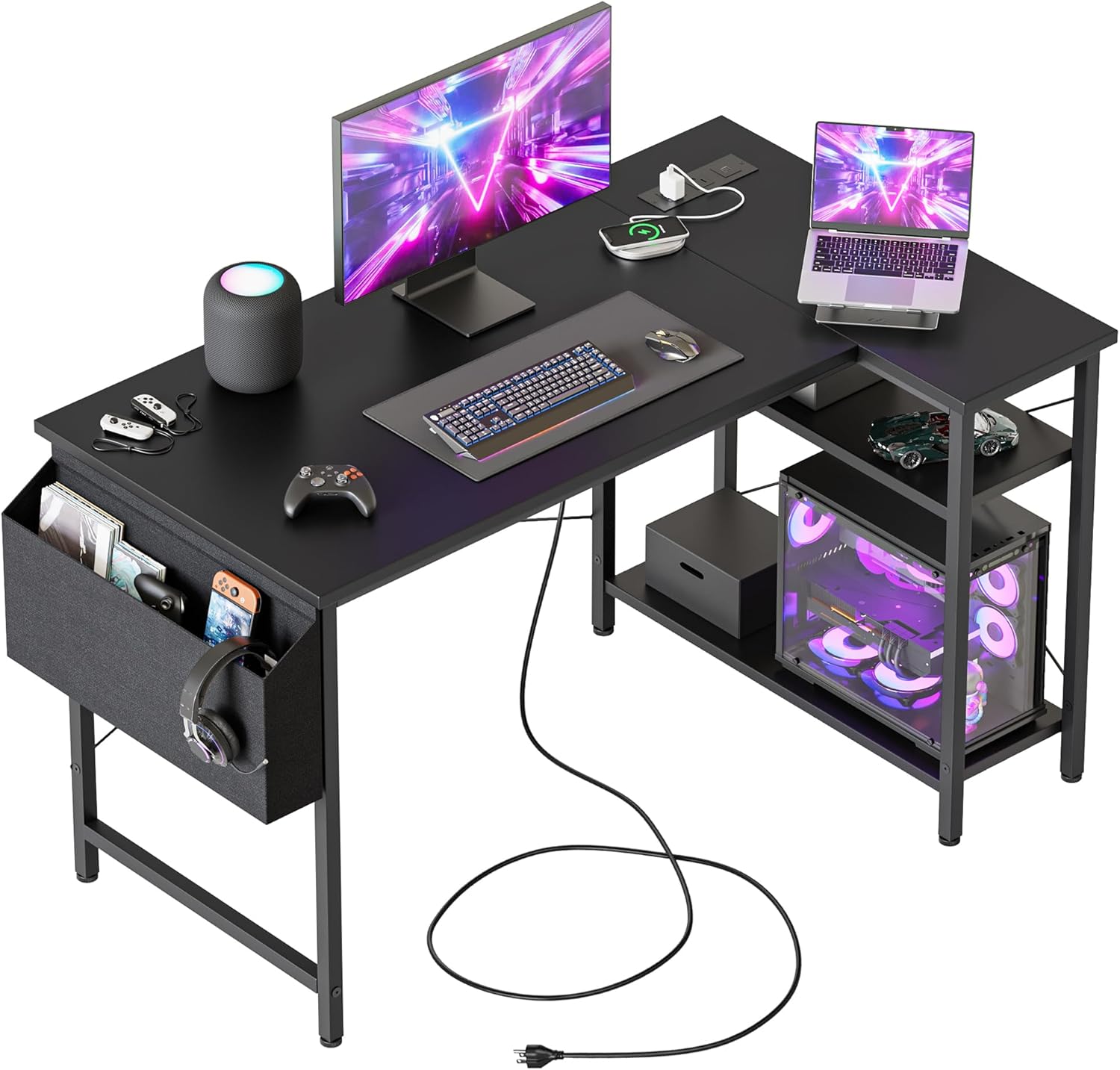
Image: The Mericonia L-Shaped Computer Desk in a modern office setup, showcasing its compact design and integrated features.
Safety Information
Warning:
- Avoid placing heavy items on the desk to prevent damage or instability. This desk is designed for everyday use and may not support excessive weight.
- Ensure all screws and fasteners are securely tightened during assembly and periodically checked for tightness.
- Keep liquids away from power outlets and electronic components to prevent electrical hazards.
Package Contents
Please verify that all components listed below are present before beginning assembly. If any parts are missing or damaged, please contact customer support.
- Desktop Panels (L-shaped sections)
- Metal Frame Components
- Storage Shelves (Reversible)
- Power Outlet Unit (with USB ports and AC outlets)
- Fabric Storage Bag
- Adjustable Foot Pads
- Assembly Hardware (screws, bolts, Allen wrench)
- Instruction Manual
Setup and Assembly
The Mericonia L-Shaped Computer Desk is designed for straightforward assembly. All necessary tools are included, and most users can complete the setup in under an hour by following the clear instructions provided.
- Unpack all components and lay them out on a clean, soft surface to prevent scratches.
- Identify each part using the provided parts list in the instruction manual.
- Assemble the metal frame according to the diagrams, ensuring all connections are secure.
- Attach the desktop panels to the assembled frame. Note the reversible design allows you to choose the orientation of the L-shape (left or right).
- Install the storage shelves. These are reversible and can be adjusted to your preferred height.
- Secure the power outlet unit into its designated slot on the desktop.
- Attach the fabric storage bag to the side of the desk.
- Screw in the adjustable foot pads at the bottom of each leg to level the desk on uneven surfaces.

Image: Detailed view of the desk's construction, highlighting the X-shaped cross bar for stability, adjustable feet, and heavy-coated steel tube frame.
Features
Integrated Power Outlets and USB Ports
The desk includes a built-in power strip with two 125V/12A AC outlets and two 5V/2A USB ports. This feature allows for convenient charging of devices directly on your desktop, reducing cable clutter. The power cord is 6.56 feet long, providing flexibility for placement.

Image: Close-up of the integrated power outlets and USB ports, showing a phone charging wirelessly and a power adapter plugged in.
Reversible L-Shape Design
The L-shaped configuration of the desk is reversible, allowing you to set up the longer or shorter side to your left or right, adapting to your room layout and personal preference. This modular design ensures optimal space utilization in various environments.

Image: Two desk configurations demonstrating the reversible L-shape, allowing the side shelf unit to be placed on either the left or right.
Storage Shelves
The desk features two reversible storage shelves, providing flexible options for organizing your computer tower, books, or other office supplies. These shelves can be adjusted in height to accommodate different items.

Image: Illustration showing the adjustable nature of the storage shelves, with arrows indicating vertical movement to customize shelf height.
Fabric Storage Bag
A convenient fabric storage bag is included, designed to hang on the side of the desk. It provides additional space for documents, headphones, or other small items, keeping your desktop clear and organized. The bag measures approximately 12.6 inches in height and 7.87 inches in width.

Image: Close-up view of the fabric storage bag attached to the desk, along with a detail of the adjustable foot pads.
Adjustable Foot Pads
The desk is equipped with adjustable foot pads that allow you to stabilize the desk on uneven floors. These pads can be rotated 360 degrees to fine-tune the desk's balance and prevent wobbling.
Durable Desktop Surface
The desktop is constructed from engineered wood with a wood finish, designed to be waterproof, easy to clean, and scratch-resistant, ensuring longevity and ease of maintenance.

Image: Visual representation of the desktop's features: waterproof, easy to clean, and scratch-resistant properties.
Operating Instructions
- Power Outlets: Plug your devices into the AC outlets or USB ports located on the desktop for convenient power access.
- Workspace Organization: Utilize the reversible shelves and fabric storage bag to keep your workspace tidy and efficient.
- Stability: Adjust the foot pads as needed to ensure the desk remains stable on any surface.
Maintenance
- Cleaning: Wipe the desktop surface with a soft, damp cloth. Avoid harsh chemicals that may damage the finish.
- Hardware Check: Periodically inspect all screws and fasteners to ensure they remain tight. Re-tighten if necessary.
- Cable Management: Regularly check and organize cables to prevent tangles and potential damage.
Troubleshooting
- Desk Wobbles: Adjust the individual foot pads at the bottom of each leg until the desk is stable.
- Power Outlets Not Working: Ensure the desk's main power cord is securely plugged into a functional wall outlet. Check for any tripped circuit breakers.
- Missing Parts: If any parts are missing upon arrival, refer to the 'Warranty and Support' section for contact information.
Specifications
| Feature | Detail |
|---|---|
| Brand | Mericonia |
| Model Number | XZJ |
| Shape | L-Shape |
| Product Dimensions | 27.5"D x 39.4"W x 28.7"H |
| Size | 40 inch |
| Color | Power-black |
| Style | Modern |
| Base Material | Wood |
| Top Material Type | Engineered Wood |
| Special Feature | Built-In USB Outlet (2 AC Outlets, 2 USB Ports) |
| Item Weight | 12.34 Kilograms |
| Required Assembly | Yes |
| Includes All Assembly Tools | Yes |

Image: Diagram illustrating the key dimensions of the 40-inch L-shaped desk, including depth, width, and height, along with weight capacity information.
Warranty and Support
The Mericonia L-Shaped Computer Desk comes with a Limited Warranty. For specific details regarding the warranty coverage, please refer to the documentation included with your purchase.
For any questions, concerns, or assistance with your product, our dedicated customer support team is ready to help. We provide responsive after-sales service and professional follow-up until your request is completely resolved.
Please contact us through the retailer's platform or visit the official Mericonia website for support options.