
1. Introduction
This manual provides instructions for the Generic universal replacement remote control, designed for use with a wide range of Samsung Smart TVs. This infrared remote offers a convenient and direct replacement for your original Samsung TV remote, requiring no complex setup or programming.
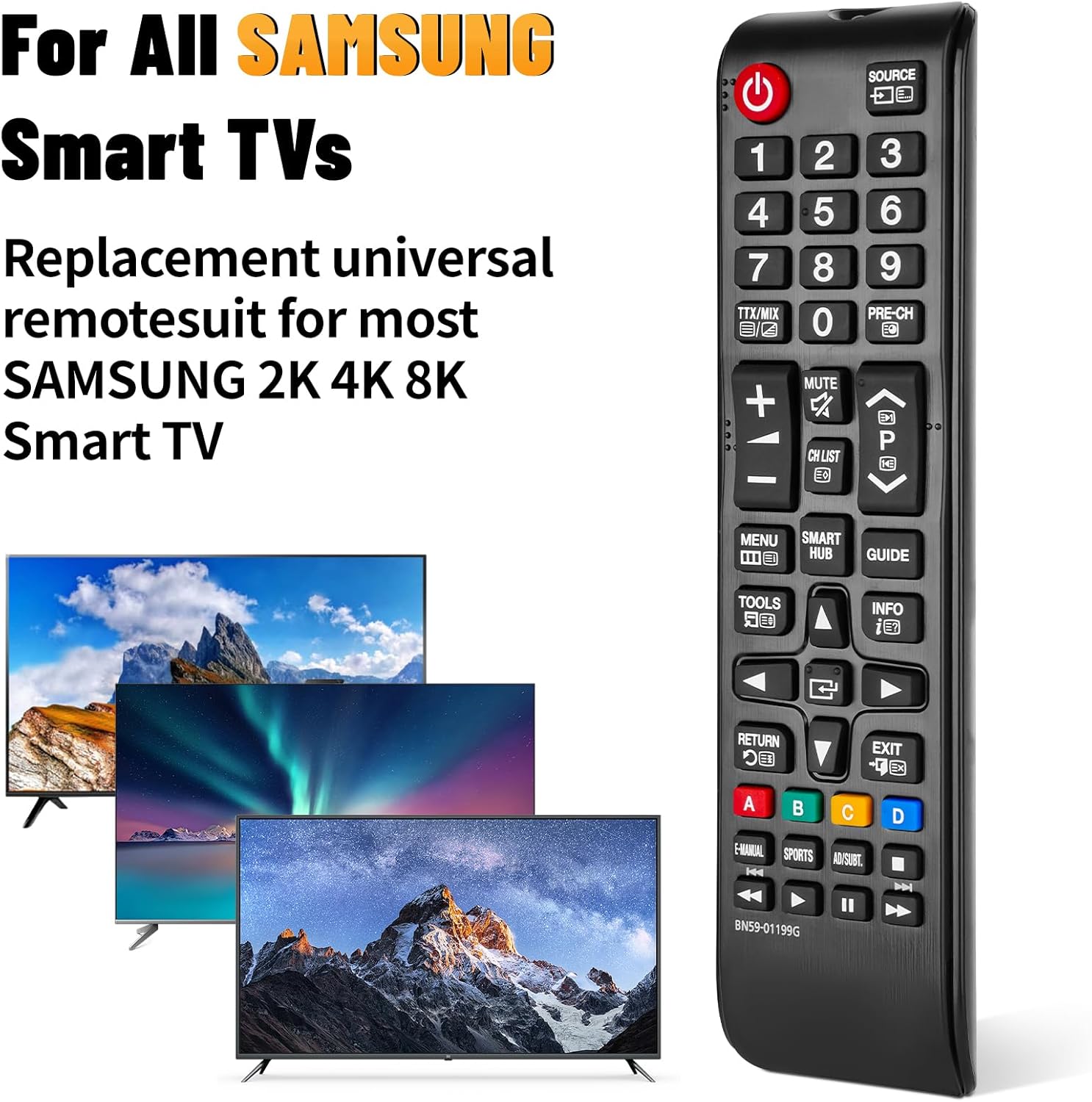
Image: The universal remote control compatible with various Samsung Smart TV models.
2. Setup
2.1 Battery Installation
To begin using your remote control, you must first install two AAA batteries. Batteries are not included with this product.
- Locate the battery compartment cover on the back of the remote control.
- Slide the cover downwards or press the release tab (if present) to remove it.
- Insert two AAA batteries, ensuring the positive (+) and negative (-) terminals align correctly with the markings inside the compartment.
- Replace the battery compartment cover by sliding it back into position until it clicks securely.

Image: Step-by-step guide for installing AAA batteries into the remote control.
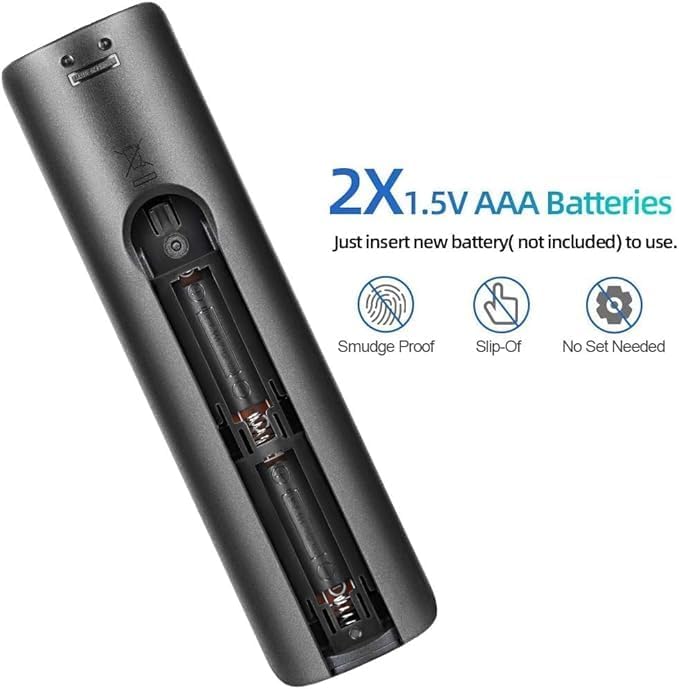
Image: Detailed view of the battery compartment, showing correct battery placement.
Note: Batteries are not included.
2.2 Initial Use
This remote control is designed for immediate use with compatible Samsung Smart TVs. No additional programming, pairing, or setup is required after battery installation. Simply point the remote at your TV and begin operating it.
3. Operating Instructions
The remote control provides full functionality for your Samsung Smart TV. Ensure there are no obstructions between the remote and the TV's infrared receiver for optimal performance.
3.1 Button Functions Overview
Refer to the image below for a visual guide to the remote's buttons and their primary functions:

Image: Front, side, and back views of the remote control, highlighting its layout and dimensions.
- Power Button (⏻): Turns the TV on or off.
- Source Button: Selects input sources (HDMI, AV, etc.).
- Number Buttons (0-9): Direct channel selection.
- TTX/MIX, PRE-CH: Teletext and previous channel functions.
- Volume Up/Down (+/-): Adjusts TV volume.
- Mute Button: Mutes or unmutes TV audio.
- Channel Up/Down (CH LIST, P): Changes TV channels.
- Menu Button: Accesses the TV's main menu.
- Smart Hub Button: Opens the Samsung Smart Hub for apps and streaming services.
- Guide Button: Displays the electronic program guide.
- Tools Button: Accesses quick settings or tools menu.
- Info Button: Displays information about the current program or input.
- Navigation Pad (Up/Down/Left/Right/Enter): Navigates menus and selects options.
- Return Button: Goes back to the previous screen or menu.
- Exit Button: Exits the current menu or application.
- Color Buttons (A, B, C, D): Functionality varies by TV model and application.
- E-MANUAL, SPORTS, AD/SUBT: Accesses e-manual, sports mode, or audio description/subtitle options.
- Playback Controls (Play, Pause, Stop, Fast Forward, Rewind): Controls media playback.
3.2 Operating Range
The remote control operates effectively within a range of up to 10 meters (approximately 32 feet) from the television. Ensure a clear line of sight between the remote and the TV's infrared sensor for optimal performance.
4. Compatibility
This universal replacement remote control is compatible with a wide range of Samsung Smart TVs, including:
- All Samsung LED, QLED, SUHD, UHD, HDR, LCD, Frame, Curved, Solar HDTV, 3D, 4K, and 8K Smart TVs.
- Compatible with Samsung TV series from 2017, 2018, 2019, 2020, 2021, and 2022.
It serves as a replacement for many original Samsung remote models, including but not limited to:
- BN59-01199G, BN59-01312G, BN59-01310A, BN59-01266A, BN59-01259E, BN59-01330A, BN59-01329A, BN59-01298A, BN59-01298H, BN59-01292A, BN59-01241A, BN59-01293A, BN59-01357A, BN59-01199F, BN59-01301A, BN59-01289A.
5. Maintenance
- Cleaning: Use a soft, dry cloth to clean the remote control. Avoid using liquid cleaners or abrasive materials, as they may damage the surface or internal components.
- Battery Replacement: Replace batteries when the remote's response becomes sluggish or it stops functioning. Always replace both batteries at the same time with new AAA alkaline batteries.
- Storage: If the remote will not be used for an extended period, remove the batteries to prevent leakage and potential damage. Store the remote in a cool, dry place.
- Avoid Exposure: Do not expose the remote control to direct sunlight, extreme temperatures, high humidity, or water.
6. Troubleshooting
- Remote Not Responding:
- Check if the batteries are inserted correctly with the correct polarity (+/-).
- Replace old batteries with new AAA alkaline batteries.
- Ensure there are no obstructions between the remote and the TV's infrared sensor.
- Confirm the remote is pointed directly at the TV.
- Short Operating Range:
- Replace batteries with new ones.
- Ensure no strong light sources (like direct sunlight or bright fluorescent lights) are interfering with the TV's IR receiver.
- Specific Buttons Not Working:
- This remote is a universal replacement. While it covers most functions, some highly specific or advanced features of original remotes might not be directly mapped. Refer to your TV's manual for alternative access to such functions if needed.
7. Specifications
| Feature | Detail |
|---|---|
| Brand | Generic |
| Model Name | BN59-01199G |
| Connectivity Technology | Infrared |
| Compatible Devices | Samsung LCD LED HDTV 3D Curved Frame Solar Smart TVs |
| Max Number of Supported Devices | 5 |
| Controller Type | Button Control |
| Button Quantity | 25 |
| Maximum Range | 10 Meters (32 feet) |
| Battery Type | 2 x AAA Alkaline batteries (not included) |
| Item Dimensions (L x W x H) | 0.7"L x 0.39"W x 2.63"H (approximate) |
8. Support
For any questions regarding your Generic universal replacement remote control, please contact our customer service. We aim to provide professional after-sale service and will respond to inquiries within 12 hours on working days.
Please refer to your purchase documentation for specific contact details.


