
NADEZHDA YH-XM-A20S
NADEZHDA Smart Bird Feeder with Camera User Manual
Model: YH-XM-A20S
1. Introduction
Thank you for choosing the NADEZHDA Smart Bird Feeder with Camera. This device combines a traditional bird feeder with advanced smart technology, allowing you to observe and identify various bird species from your smartphone. Featuring 3K live view, AI bird identification, solar power, and night vision, this feeder offers an immersive birdwatching experience. This manual provides detailed instructions for setup, operation, and maintenance to ensure optimal performance and enjoyment of your new smart bird feeder.
2. Safety Information
- Ensure the feeder is securely mounted to prevent falling and potential injury or damage.
- Keep the device away from extreme temperatures, direct flame, and corrosive substances.
- Do not attempt to disassemble or repair the device yourself. Contact customer support for assistance.
- Use only the specified power source and charging methods.
- Keep out of reach of children and pets to prevent accidental ingestion of small parts or damage to the device.
- Ensure proper Wi-Fi signal strength for stable operation and data transmission.
3. Package Contents
Please check the package contents upon opening to ensure all items are present:
- Smart Bird Feeder with Camera Unit
- Solar Panel (integrated)
- Mounting Hook
- User Manual
Note: TF card (up to 128GB) for local storage is not included and must be purchased separately.
4. Product Overview
Familiarize yourself with the components of your smart bird feeder.
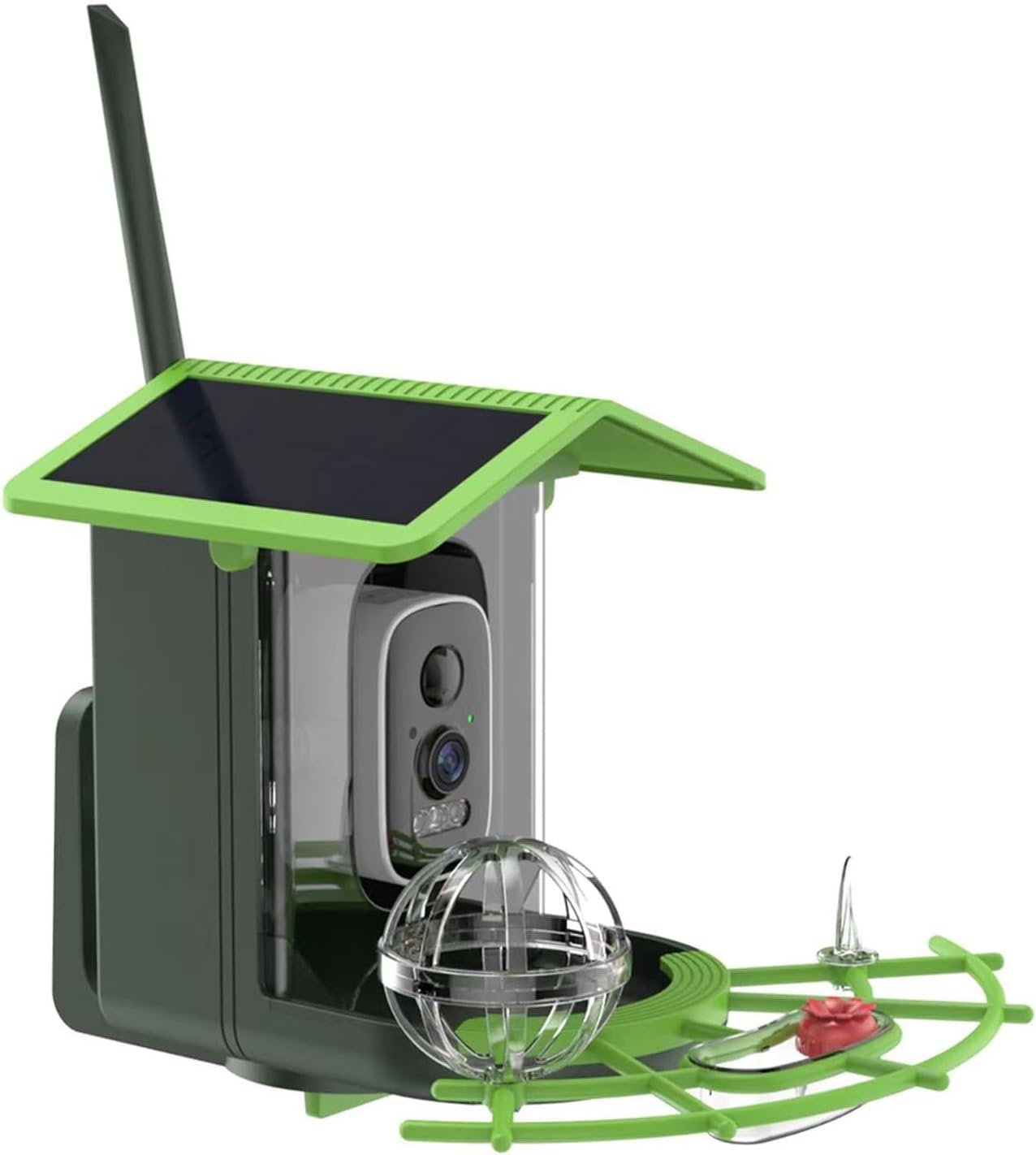
Image: The NADEZHDA Smart Bird Feeder, showing the main unit with integrated solar panel, camera, and feeding tray with perches.

Image: Close-up view of the camera module, highlighting its 2K resolution capability, and the 3W solar panel for power generation.

Image: Diagram illustrating the dimensions of the bird feeder (175mm height, 230mm length, 191mm width) and its 1.2L seed container capacity, with a cardinal bird flying nearby.
The feeder features a durable, IP65 waterproof design, a 1.2L seed capacity, and a 4400mAh battery charged by a 3W solar panel. The camera offers approximately 2304x1296 resolution with a 120° manually adjustable lens and a 5dB antenna for stable 2.4GHz Wi-Fi connectivity.
5. Setup
5.1 Initial Charging
Before first use, it is recommended to fully charge the internal 4400mAh battery. While the integrated 3W solar panel provides continuous charging in sunny conditions, an initial charge via USB (cable not included) ensures the device is ready for immediate setup and operation.
5.2 Mounting the Feeder
Select a suitable location for your bird feeder. Choose a spot that offers a clear view of birds, is within range of your 2.4GHz Wi-Fi network, and receives adequate sunlight for the solar panel. Use the provided hook to hang the feeder securely from a tree branch, shepherd's hook, or other stable structure. Ensure the feeder is level and stable to prevent tipping.
5.3 App Installation and Wi-Fi Connection
- Download the companion app: Search for the 'Birdy Feeder' app (or specified app name in packaging) on your smartphone's app store (iOS or Android).
- Create an account: Follow the on-screen prompts to register a new account.
- Add device: In the app, select 'Add Device' or the '+' icon.
- Power on the feeder: Ensure the feeder is powered on. The camera's indicator light should be blinking, indicating it's ready for pairing.
- Connect to Wi-Fi: Follow the app's instructions to connect the feeder to your 2.4GHz Wi-Fi network. You may need to scan a QR code displayed on your phone with the feeder's camera or enter your Wi-Fi credentials manually.
- Complete setup: Once connected, the app will confirm successful pairing. You can then name your device and adjust initial settings.
6. Operating
6.1 Filling the Feeder
Open the top lid of the feeder and pour in your desired bird seed. The feeder has a capacity of 1.2 liters. Close the lid securely to keep the seeds dry and protected from the elements.
6.2 Live View and Recording
Open the app on your smartphone to access the live view from the feeder's camera. The camera provides ultra-clear video (approx. 2304x1296 resolution). You can manually adjust the camera lens by 120° to optimize your viewing angle. The motion-activated detection feature will send real-time alerts to your phone when a bird is detected.
Videos can be recorded and stored. Choose between cloud storage (3-day loop with a 30-day free trial, optional subscription thereafter) or local storage using a self-provided TF card (up to 128GB).
6.3 AI Bird Identification
The advanced AI technology integrated into the feeder can identify thousands of bird species with high accuracy. When a bird is detected, the app will attempt to identify the species and provide information.

Image: A collage of various bird species, illustrating the AI's capability to identify over 10,000 different types of birds.
6.4 Sharing Birdwatching Moments
The multi-user app supports up to 5 users, allowing you to share live feeds or recorded highlights with family and friends. You can also easily share your birdwatching moments on social media platforms directly from the app.

Image: A family viewing a bird on a smartphone screen, demonstrating the app's feature to share birdwatching moments and offering a 3-day loop cloud service.
6.5 Night Vision
The feeder is equipped with enhanced color night vision, allowing you to observe birds 24/7. For optimal performance, some ambient light is required for full-color night vision. The camera also supports infrared night vision for clear viewing in complete darkness.

Image: Comparison showing a bird captured with full-color night vision (top) and infrared night vision (bottom), illustrating the difference in image quality and detail.
6.6 Squirrel Deterrence
The feeder includes features to help deter squirrels. The app may offer options to activate an alarm siren or two-way audio to discourage unwanted visitors. Motion detection can be configured to alert you to larger animals like squirrels.

Image: A split image showing a squirrel attempting to access the feeder on one side and a bluebird successfully feeding on the other, with text indicating the ability to deter squirrels and receive instant bird notifications.
7. Maintenance
7.1 Cleaning the Feeder
Regular cleaning of the bird feeder is essential for bird health. Disassemble the feeder components as much as possible. Wash all parts with warm, soapy water and a brush. Rinse thoroughly and allow to air dry completely before refilling with seeds. Clean the camera lens gently with a soft, lint-free cloth.
7.2 Battery Care
The integrated solar panel helps maintain the battery charge. Ensure the solar panel is clean and free of obstructions (like leaves or dirt) to maximize charging efficiency. If the feeder is in a shaded area or during prolonged cloudy periods, you may need to periodically charge the battery via USB.
7.3 Software Updates
Periodically check the app for firmware updates for your bird feeder. Updates often include performance improvements, new features, and bug fixes. Follow the in-app instructions to perform any available updates.
8. Troubleshooting
- Feeder not connecting to Wi-Fi: Ensure your Wi-Fi network is 2.4GHz. Check Wi-Fi signal strength at the feeder's location. Restart your router and the feeder. Re-attempt the pairing process in the app.
- Poor video quality or no live view: Check your Wi-Fi connection. Ensure the camera lens is clean. Verify the feeder has sufficient battery charge.
- No motion detection alerts: Check app notification settings. Ensure motion detection is enabled in the app. Adjust sensitivity settings if necessary.
- Battery not charging: Ensure the solar panel is clean and exposed to direct sunlight for several hours daily. If in a shaded area, consider relocating or charging via USB.
- AI identification issues: Ensure the camera view is clear and unobstructed. Good lighting conditions improve accuracy. Ensure the app and feeder firmware are up to date.
- Feeder falling or unstable: Re-secure the mounting hook. Ensure the hanging surface is strong and stable enough to support the feeder's weight when full.
9. Specifications
| Model Number | YH-XM-A20S |
| Brand | NADEZHDA |
| Dimensions | 17.53 x 19.05 x 23.11 cm (L x W x H) |
| Weight | 748.43 g (1.65 Pounds) |
| Camera Resolution | Approx. 2304x1296 (3K) |
| Lens Angle | 120° (Manually Adjustable) |
| Night Vision | Enhanced Color Night Vision, Infrared Night Vision |
| Battery Capacity | 4400mAh |
| Solar Panel Power | 3W |
| Wi-Fi Connectivity | 2.4GHz (5dB antenna) |
| Storage Options | Cloud Storage (3-day loop), TF Card (up to 128GB, not included) |
| Feeder Capacity | 1.2 Liters |
| Waterproof Rating | IP65 |
| Manufacturer | MICHELLE |
10. Warranty and Support
NADEZHDA products are designed for reliability and performance. For warranty information and customer support, please refer to the contact details provided on the product packaging or the official NADEZHDA website. Please have your model number (YH-XM-A20S) and purchase details ready when contacting support.
Ask a question about this manual
Ask about setup, troubleshooting, compatibility, parts, safety, or missing instructions. Manuals+ will review the question and use this page’s manual context to help answer it.