
Technology Parts Store Various Models Robin
Technology Parts Store Trimmer Head Speed Feed Instruction Manual
Model: Various Models Robin
Introduction
Thank you for choosing the Technology Parts Store Trimmer Head Speed Feed. This product is a high-quality, OEM factory replacement part designed to ensure optimal performance for your compatible Robin Trimmer/Brushcutter. This manual provides essential information for the proper installation, operation, and maintenance of your new trimmer head, ensuring its longevity and efficient use.
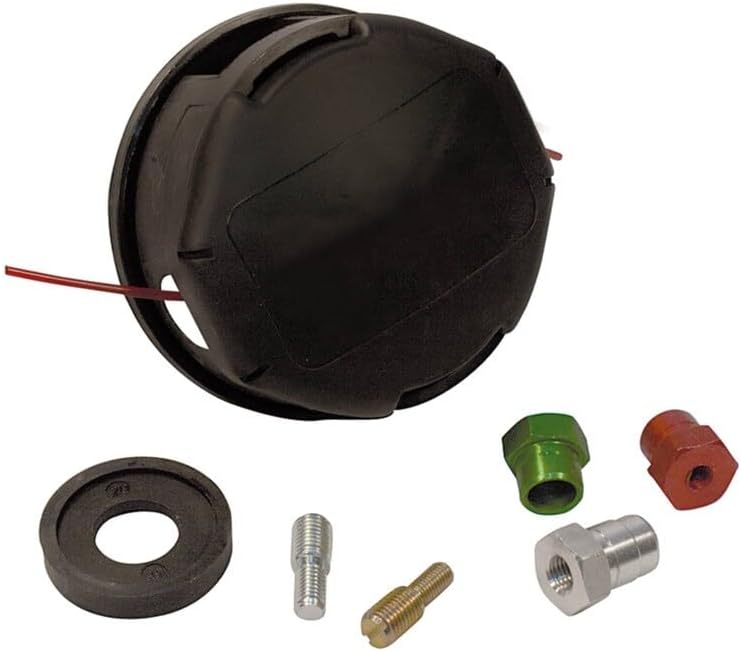
Image: The Trimmer Head Speed Feed with included adapters and components.
Product Overview & Compatibility
The Trimmer Head Speed Feed is a direct replacement for OEM part # Stens 385-284. It is engineered for durability and ease of use, allowing for quick line reloading without disassembly.
Key Features:
- Replacement Trimmer Head Speed Feed: Designed for efficient cutting and easy line management.
- OEM Quality: Manufactured to meet or exceed original equipment specifications.
- Durable Construction: Built to withstand rigorous use in various outdoor conditions.
Compatible Models:
This trimmer head is compatible with the following Robin Trimmer/Brushcutter models:
- NB223
- NB231
- NB281
- NB281AU
- NB321
- NB321AU
- NB351
- NB411
- NB415
- NB2001
- NBF16F
Installation & Setup
Proper installation is crucial for the safe and effective operation of your new trimmer head. Always refer to your trimmer/brushcutter's original instruction manual for specific safety precautions and detailed assembly steps.
Before You Begin:
- Ensure the trimmer/brushcutter engine is off and cool.
- Disconnect the spark plug wire to prevent accidental starting.
- Wear appropriate personal protective equipment (PPE), including gloves and eye protection.
Installation Steps:
- Remove Old Trimmer Head: Secure the shaft to prevent rotation (often with a pin or tool through a hole). Unscrew the old trimmer head, typically by turning it clockwise (reverse thread).
- Clean Shaft Threads: Ensure the shaft threads are clean and free of debris.
- Select Correct Adapter: Identify and use the appropriate adapter or bolt provided with your new Speed Feed head that matches your trimmer's shaft.
- Attach New Trimmer Head: Thread the new Speed Feed trimmer head onto the shaft. Turn counter-clockwise (standard thread) until it is securely tightened. Use a wrench if necessary, but do not overtighten.
- Verify Security: Gently tug on the head to ensure it is firmly attached and does not wobble.

Image: An example exploded diagram, illustrating how parts fit together. While not specific to this trimmer head, it shows the concept of component assembly.
Operating Instructions
Once the trimmer head is installed, you can operate your trimmer/brushcutter as usual. The Speed Feed design simplifies line reloading.
Loading Trimmer Line:
- Align Arrows: Align the arrows on the trimmer head with the eyelets.
- Insert Line: Feed a new length of trimmer line (refer to your trimmer's manual for recommended diameter) through one eyelet and out the other until both ends are even.
- Wind Line: Turn the knob or bump head in the direction indicated by the arrows to wind the line into the head. The line will automatically feed into the spool.
- Trim Excess: Once the line is fully wound, trim any excess line to the appropriate length using the cutter on the guard.
General Operation Tips:
- Always wear appropriate safety gear, including eye protection, hearing protection, long pants, and sturdy footwear.
- Maintain a safe distance from others and objects while operating.
- Use a sweeping motion to cut grass and weeds.
- Avoid hitting hard surfaces, rocks, or metal objects, as this can damage the trimmer line and head.
Maintenance
Regular maintenance will extend the life of your trimmer head and ensure consistent performance.
After Each Use:
- Clean the Head: Remove any grass, dirt, or debris from the trimmer head. A stiff brush can be helpful.
- Inspect Line: Check the trimmer line for wear or damage. Replace if necessary.
Periodic Maintenance:
- Inspect for Damage: Periodically inspect the trimmer head for cracks, chips, or other signs of wear. Replace the head if it is significantly damaged.
- Check Adapters: Ensure all adapters and bolts are securely fastened and not stripped.
- Lubrication: Some trimmer heads may benefit from light lubrication of internal moving parts (if applicable and accessible). Refer to your trimmer's manual.
Troubleshooting
This section addresses common issues you might encounter with your trimmer head.
| Problem | Possible Cause | Solution |
|---|---|---|
| Trimmer line not feeding | Line tangled or fused inside head; incorrect line winding; insufficient line length. | Remove head, untangle/rewind line correctly; ensure sufficient line is loaded. |
| Trimmer head wobbles or vibrates excessively | Head not securely tightened; incorrect adapter used; damaged head. | Ensure head is tightened correctly; verify correct adapter; inspect for damage and replace if necessary. |
| Line breaks frequently | Using incorrect line diameter; hitting hard objects; worn eyelets on head. | Use recommended line diameter; avoid obstacles; inspect and replace head if eyelets are worn. |
Specifications
- Product Type: Trimmer Head Speed Feed
- Brand: Technology Parts Store
- Replaces OEM Part #: Stens 385-284
- Compatible Models: Robin NB223, NB231, NB281, NB281AU, NB321, NB321AU, NB351, NB411, NB415, NB2001, NBF16F
- ASIN: B0F33898R2
- Item Model Number: Various Models Robin
Warranty & Support
Technology Parts Store stands behind the quality of its products. For specific warranty information regarding your Trimmer Head Speed Feed, please refer to the product packaging or contact our customer support directly.
Customer Support:
If you have any questions, require assistance with installation, or need to troubleshoot an issue not covered in this manual, please do not hesitate to contact Technology Parts Store customer service. Our team is ready to assist you.
- Online: Visit the Technology Parts Store Amazon storefront.
- Email/Phone: Refer to your purchase documentation for direct contact details.

Image: Our dedicated customer support team is available to assist you.