
Introduction
This manual provides comprehensive instructions for the assembly, operation, and maintenance of your Casaottima 71 Inch Reversible Electric L Shaped Standing Desk. Designed for ergonomic comfort and versatility, this desk allows seamless transitions between sitting and standing positions, enhancing productivity and well-being in home or office environments. Please read this manual thoroughly before beginning assembly or operation to ensure safe and efficient use.

Image: The Casaottima 71 Inch Reversible Electric L Shaped Standing Desk, showcasing its spacious white desktop and sturdy frame, set up with computers and office supplies.
Important Safety Information
For your safety and to prevent damage to the product, please adhere to the following guidelines:
- Always keep hands away from moving parts when adjusting the desk height.
- Ensure the desk is properly anchored to the floor to prevent tipping.
- Do not exceed the weight limit of the desk. The maximum load capacity is 154 lbs.
- Unplug the desk when not in use or during assembly to prevent electrical shock.
- Keep children and pets away from the desk during operation.
- Do not place liquids directly on the control panel or motor components.
Product Specifications
| Feature | Detail |
|---|---|
| Brand | Casaottima |
| Model | 71 Inch Reversible Electric L Shaped Standing Desk |
| Color | White |
| Product Dimensions (D x W x H) | 55"D x 71"W x 28.4"H (Minimum Height) |
| Adjustable Height Range | 27.9 inches to 46.1 inches |
| Maximum Load Capacity | 154 lbs |
| Base Material | Alloy Steel |
| Top Material Type | Engineered Wood |
| Special Feature | Adjustable Height, Electric |
| Included Components | Desk, Keyboard Tray, Monitor Arm (Note: Components may vary by package) |
| Assembly Required | Yes, all assembly tools included |
| Storage Options | 2 Hooks |

Image: Detailed dimensions of the Casaottima L-shaped desk, indicating its 71-inch length, 55-inch depth, and adjustable height range from 27.9 to 46.1 inches, with a maximum load of 154 lbs.

Image: An illustration of the desk's underside, highlighting the four support gaskets that contribute to its solid and stable construction.
Setup and Assembly
Your Casaottima L-shaped standing desk is designed for straightforward assembly. All necessary parts and tools are included, along with detailed instructions.
Assembly Options
The L-shaped desk features an interchangeable design, allowing you to configure the sub-table plate on either the left or right side to best suit your room layout and personal preference.
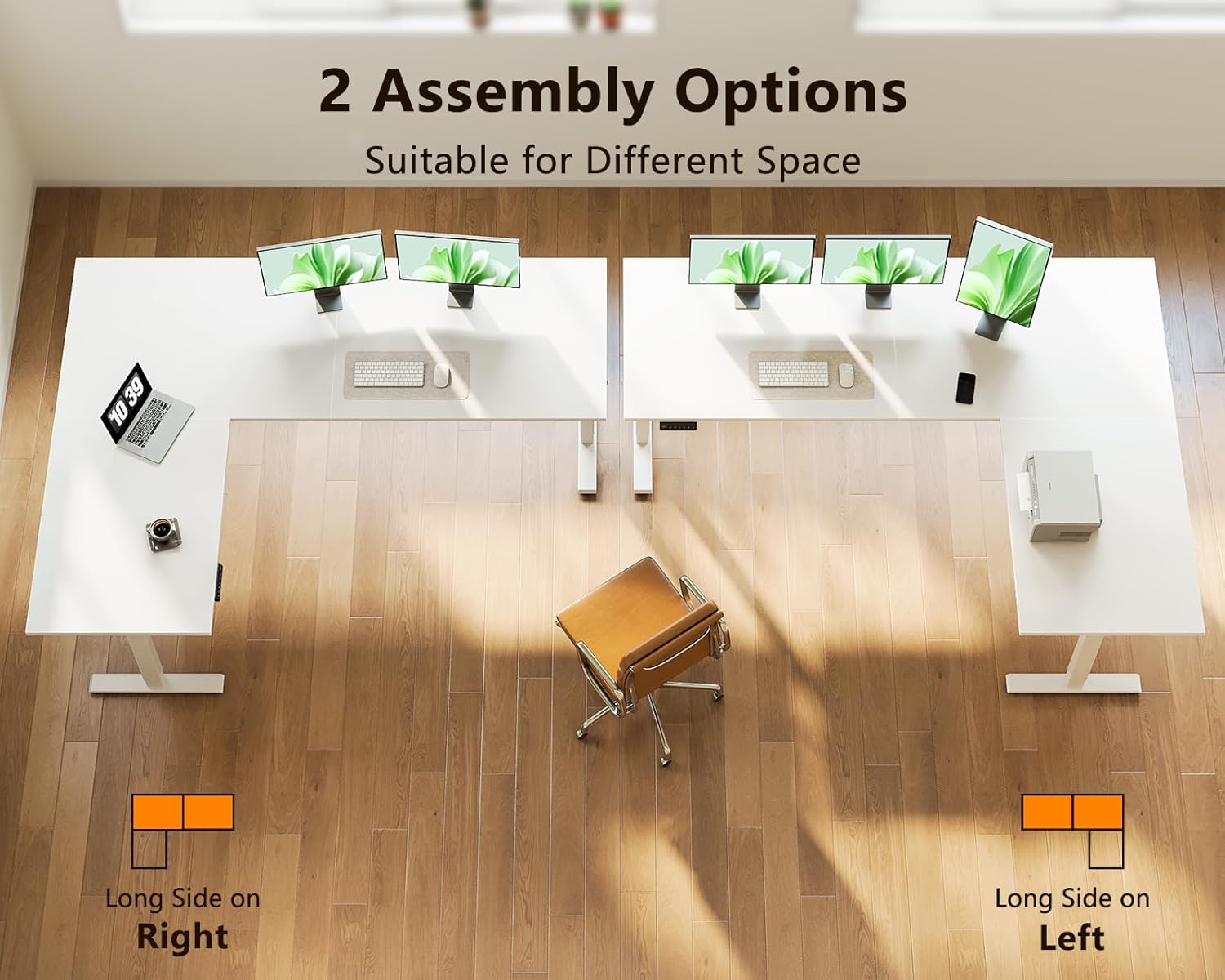
Image: Visual representation of the two assembly options for the L-shaped desk, demonstrating how the longer section can be positioned on either the right or left side to fit different spaces.
Step-by-Step Assembly
- Unpack Components: Carefully unbox all parts and verify against the included parts list. Ensure no components are missing or damaged.
- Review Instructions: Read the provided detailed instruction manual thoroughly before starting. All parts are clearly labeled.
- Assemble Frame: Follow the diagrams to assemble the desk frame, ensuring all screws are tightened securely but do not overtighten until all parts are aligned.
- Attach Desktop: Secure the desktop panels to the assembled frame. Pay attention to the chosen left or right configuration.
- Install Control Panel and Motor: Connect the electric motor and control panel according to the instructions. Ensure all cables are properly routed and secured to avoid pinching.
- Attach Accessories: Install the included hooks and any other accessories like the keyboard tray or monitor arm if applicable.
- Final Check: Before plugging in, ensure all connections are secure and the desk is stable.
Operating Instructions
The Casaottima electric standing desk features an intuitive digital control panel for easy height adjustment.
Adjusting Desk Height
- Up/Down Buttons: Use the ▲ (Up) and ▼ (Down) arrows on the control panel to manually raise or lower the desk to your desired height. The current height will be displayed on the LED screen.
- The desk can be adjusted smoothly between 27.9 inches (sitting height) and 46.1 inches (standing height).
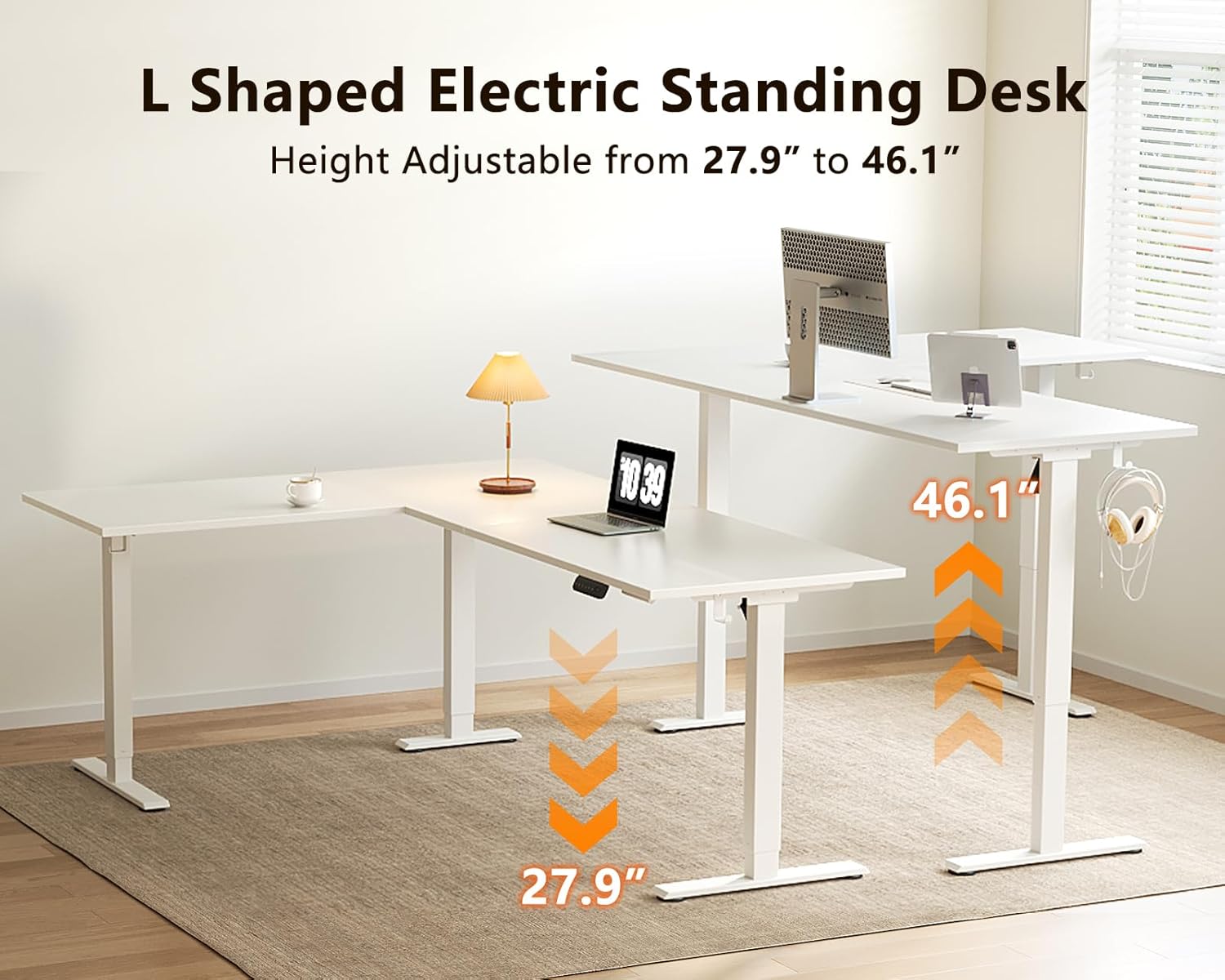
Image: A visual guide illustrating the electric height adjustment feature, showing the desk transitioning from its minimum height of 27.9 inches to its maximum height of 46.1 inches.

Image: A user standing at the Casaottima L-shaped desk, illustrating the comfortable and ergonomic standing position enabled by the desk's height adjustment feature.
Memory Presets
The control panel features 3 height-memory buttons (1, 2, 3) to save and recall your preferred sitting and standing positions.
- To Save a Height: Adjust the desk to your desired height. Press the "S" (Set) button, then immediately press one of the memory buttons (1, 2, or 3) until you hear a beep or see the display confirm.
- To Recall a Height: Simply press the corresponding memory button (1, 2, or 3). The desk will automatically move to the saved position.

Image: A detailed view of the digital control panel, showing the LED screen, up and down arrows, three memory preset buttons (1, 2, 3), and the setting key (S) for saving preferred heights.
Maintenance
Regular maintenance ensures the longevity and optimal performance of your Casaottima standing desk.
- Cleaning: Wipe the desk surfaces with a soft, damp cloth. Avoid abrasive cleaners or harsh chemicals that could damage the finish.
- Check Connections: Periodically inspect all screws and connections to ensure they remain tight. Retighten if necessary.
- Cable Management: Ensure power cords and other cables are neatly managed and not interfering with the desk's movement.
- Motor Care: Keep the motor and lifting mechanisms free from dust and debris. Do not lubricate the motor unless specifically instructed by the manufacturer.
Troubleshooting
If you encounter issues with your desk, refer to the following common troubleshooting steps:
| Problem | Possible Cause | Solution |
|---|---|---|
| Desk does not move | Power cord unplugged; Overload; Motor overheating | Check power connection; Reduce weight on desk; Allow motor to cool down for 20 minutes. |
| Uneven movement | Loose connections; Obstruction | Check and tighten all assembly screws; Remove any obstructions under or around the desk. |
| Error code on display | Specific system error | Refer to the detailed instruction manual for specific error code meanings and solutions, or contact customer support. |
If the problem persists after attempting these solutions, please contact Casaottima customer support.
Warranty and Support
Casaottima is committed to providing high-quality products and excellent customer service.
- Returns: Enjoy 30-day easy returns from the date of purchase.
- Protection Plans: Extended protection plans are available for purchase, including 2-Year and 3-Year options, to cover your investment beyond the standard warranty.
- Customer Support: For any questions, concerns, or assistance with your product, please contact Casaottima customer support. Visit the Casaottima Store on Amazon for contact information and additional resources.


