
1. Introduction
Thank you for choosing the Amzfast AMZG27C1Q Pro 27-inch Curved Gaming Monitor. This manual provides essential information for setting up, operating, and maintaining your monitor. Please read this manual thoroughly before using the product and retain it for future reference.
Safety Information
- Ensure the monitor is placed on a stable, flat surface to prevent accidental falls.
- Use only the power adapter supplied with the monitor.
- Do not expose the monitor to rain or moisture to avoid electric shock.
- Keep the monitor away from direct sunlight, heat sources, and excessive dust.
- Do not block ventilation openings.
- Unplug the monitor from the power outlet before cleaning.
- Refer all servicing to qualified service personnel.
2. Package Contents
Please check the package contents upon opening. If any items are missing or damaged, contact your retailer.
- Amzfast AMZG27C1Q Pro 27-inch Curved Gaming Monitor
- Monitor Stand (Base and Neck)
- Power Adapter and Cable
- HDMI Cable
- DisplayPort (DP) Cable
- User Manual (this document)
3. Setup
3.1 Assembling the Stand
- Carefully remove the monitor from its packaging and place it face down on a soft, clean surface to prevent scratches.
- Attach the stand neck to the monitor's rear panel.
- Secure the stand base to the stand neck using the provided screws.
- Ensure all connections are firm before placing the monitor upright.
3.2 Mounting (VESA)
The monitor supports VESA 100mm x 100mm mounting for wall mounts or monitor arms (sold separately).
- Remove the stand if it is already attached.
- Attach your VESA-compatible mount to the four screw holes on the back of the monitor.
- Use appropriate screws (M4 x 10mm recommended, not included) and ensure they are tightened securely.
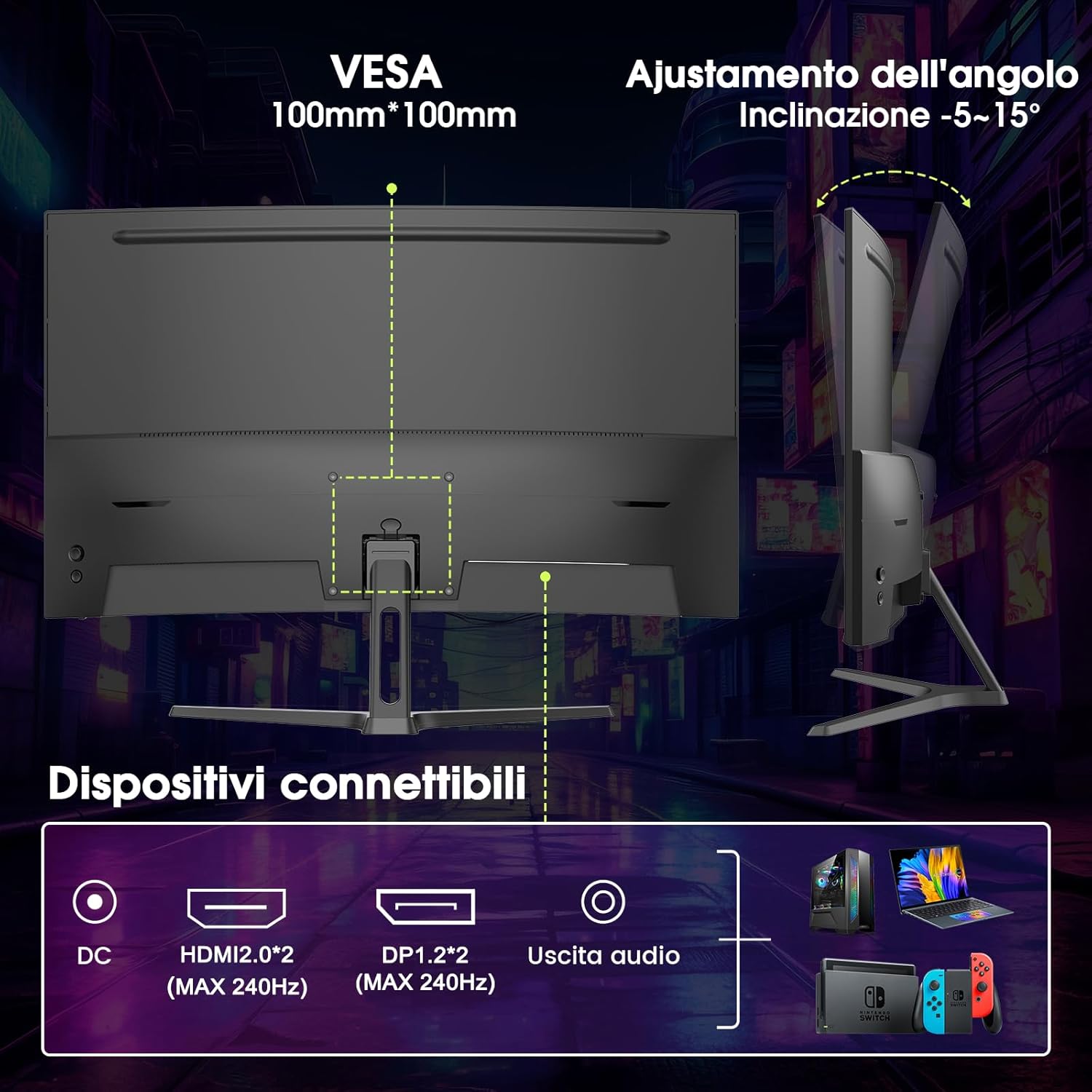
Image: Rear view of the Amzfast AMZG27C1Q Pro monitor. This image illustrates the VESA 100mm x 100mm mounting points, the range of tilt adjustment from -5° to 15°, and the various connectivity ports including DC power input, two HDMI 2.0 ports, two DisplayPort 1.2 ports, and an audio output.
3.3 Connecting to Devices
Connect your computer or other devices to the monitor using the appropriate cables.
- HDMI: Use an HDMI cable to connect your device's HDMI output to one of the monitor's HDMI 2.0 ports. Supports up to 240Hz refresh rate.
- DisplayPort (DP): Use a DisplayPort cable to connect your device's DP output to one of the monitor's DP 1.2 ports. Supports up to 240Hz refresh rate.
- Audio Out: Connect external speakers or headphones to the 3.5mm audio output jack for sound.
3.4 Powering On
- Connect the power adapter to the monitor's DC input port.
- Plug the power cable into a wall outlet.
- Press the power button on the monitor (location may vary, typically on the bottom right or rear) to turn it on.
4. Operating
4.1 On-Screen Display (OSD) Menu Navigation
The OSD menu allows you to adjust various monitor settings. Use the control buttons (usually located on the back or bottom of the monitor) to navigate and select options.
- Press a button to activate the OSD menu.
- Use directional buttons to move through menu options.
- Press the select button to enter a sub-menu or confirm a setting.
- Press the exit button to go back or close the OSD menu.
4.2 Picture Settings
Adjust display characteristics to your preference.
- Brightness: Adjust the overall luminance of the screen.
- Contrast: Adjust the difference between light and dark areas.
- Color Temperature: Select predefined color temperature modes (e.g., Warm, Cool, User) or adjust RGB values manually.
- Gamma: Adjust the tone response curve.
- Sharpness: Adjust the clarity of image details.
4.3 Gaming Features
The AMZG27C1Q Pro monitor includes features designed to enhance your gaming experience.
- Adaptive Sync: This technology synchronizes the monitor's refresh rate with your graphics card's frame rate to eliminate screen tearing and stuttering, providing a smoother gaming experience. Ensure it is enabled in both the monitor OSD and your graphics card settings.

Image: A visual comparison demonstrating the effect of Adaptive Sync. The left side shows a smooth image with Adaptive Sync ON, while the right side shows screen tearing and stuttering when Adaptive Sync is OFF, illustrating the benefit of this feature for gaming.
- Game Modes: Pre-calibrated display settings optimized for different game genres (e.g., FPS, RTS, Racing). Select the mode that best suits your current game.
- Reticle: An on-screen crosshair overlay that can assist in aiming in certain games.
- Black Leveling: Adjusts the visibility of dark areas in games, making enemies or details in shadows more apparent.

Image: This image displays various game modes and features available on the Amzfast monitor. It shows examples of Racing, Real-Time Strategy (RTS), and First-Person Shooter (FPS) modes, along with visual representations of the Reticle and Black Leveling features.
4.4 Input Selection
If you have multiple devices connected, you can switch between inputs using the OSD menu or a dedicated input select button.
5. Maintenance
Cleaning the Monitor
- Always unplug the monitor before cleaning.
- Use a soft, lint-free cloth lightly dampened with water or a non-abrasive screen cleaner.
- Do not spray cleaner directly onto the screen.
- Avoid using harsh chemicals, solvents, or abrasive materials.
6. Troubleshooting
If you encounter issues with your monitor, refer to the following common problems and solutions.
- No Power:
- Ensure the power cable is securely connected to both the monitor and the power outlet.
- Verify the power outlet is functioning.
- No Signal:
- Check that the video cable (HDMI/DP) is securely connected to both the monitor and your device.
- Ensure the correct input source is selected in the monitor's OSD menu.
- Test with a different video cable or device if possible.
- Image Tearing/Stuttering:
- Ensure Adaptive Sync is enabled in both the monitor's OSD menu and your graphics card settings.
- Update your graphics card drivers.
- Flickering Screen:
- Check the refresh rate settings in your operating system.
- Ensure the video cable is not damaged.
- No Sound from Audio Out:
- Verify that external speakers or headphones are properly connected.
- Check audio output settings on your connected device.
- Adjust volume levels on both the monitor (if available) and the connected device.
7. Specifications
Technical specifications for the Amzfast AMZG27C1Q Pro monitor.
| Feature | Specification |
|---|---|
| Brand | Amzfast |
| Model Number | AMZG27C1Q Pro |
| Screen Size | 27 Inches |
| Curvature | 1500R |
| Resolution | QHD (2560 x 1440 Pixels) |
| Aspect Ratio | 16:9 |
| Refresh Rate | 240 Hz |
| Response Time | 1ms (MPRT) |
| Display Type | LCD |
| Color Depth | 10 Bits (8Bit+FRC), 1.07 Billion Colors |
| Color Gamut | 120% sRGB |
| Contrast Ratio | 5000:1 |
| Special Features | Adaptive Sync, HDR Support, Game Modes (FPS, RTS, Racing), Reticle, Black Leveling |
| Connectivity | 2x HDMI 2.0, 2x DisplayPort 1.2, 1x Audio Out |
| VESA Mount | 100mm x 100mm |
| Tilt Adjustment | -5° to 15° |
| Power Consumption (SDR) | 25 kWh/1000h |
| Power Consumption (HDR) | 33 kWh/1000h |
For detailed energy efficiency information, please refer to the EPREL database: https://eprel.ec.europa.eu/qr/2272423

Image: The EU Energy Label for the Amzfast AMZG27C1Q Pro monitor, indicating an energy efficiency class of F. It also shows the SDR power consumption at 25 kWh/1000h and HDR power consumption at 33 kWh/1000h, along with screen size and resolution details.
8. Warranty and Support
Amzfast products are designed for reliability and performance. For warranty information, please refer to the warranty card included with your product or contact your local retailer. For technical support or service inquiries, please visit the official Amzfast website or contact their customer service department.

