
1. Product Overview
The HISION Robotic Pool Vacuum is an advanced, cordless cleaning solution designed for inground pools. Featuring a powerful 180W motor and intelligent navigation, it efficiently cleans pool floors, walls, and waterlines, removing various debris from leaves to fine particles. Its long-lasting battery provides up to 150 minutes of cleaning time, covering areas up to 2,100 sq. ft. The unit is equipped with smart self-parking for easy retrieval and is compatible with various pool types and surfaces.
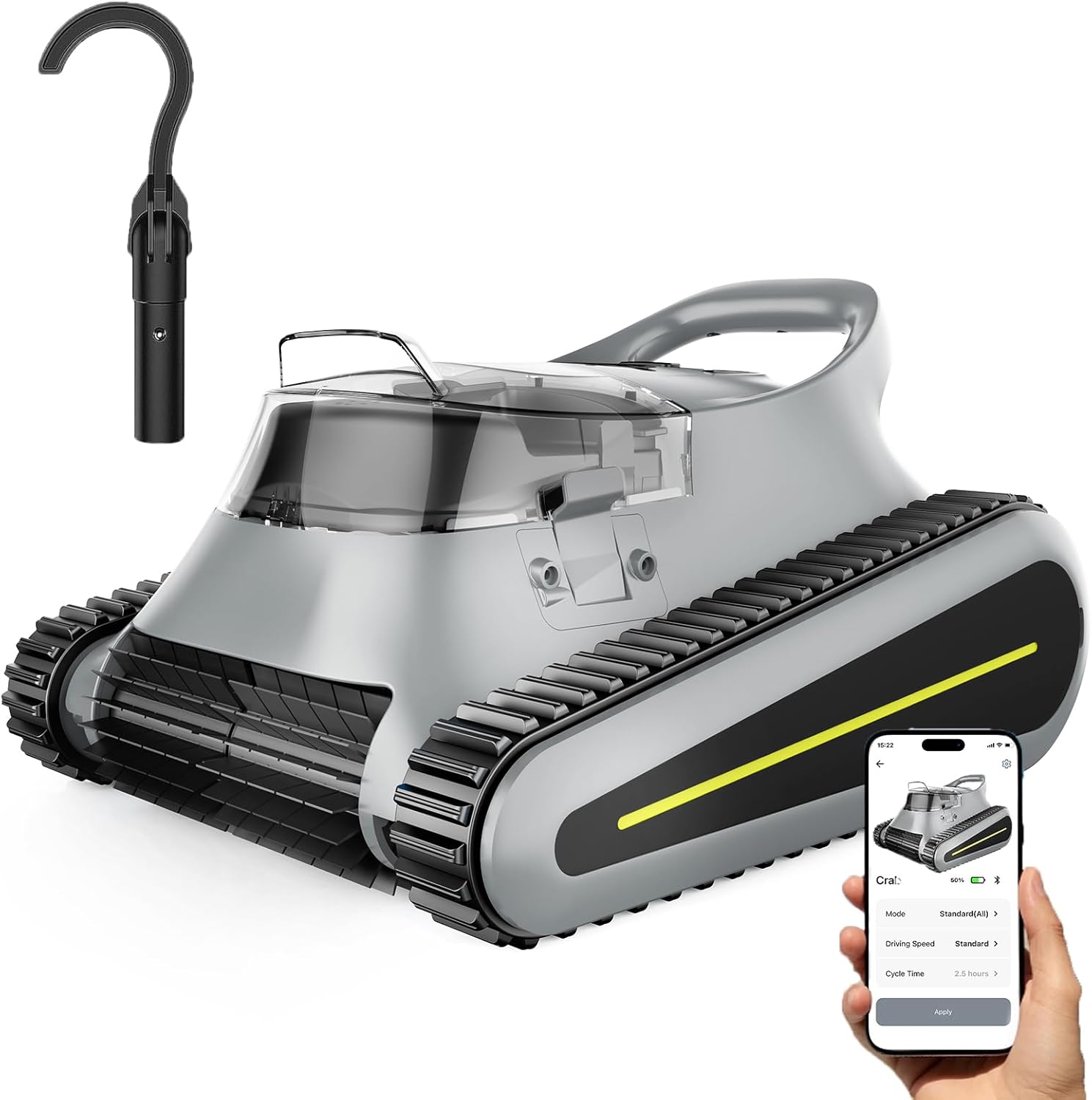
Image: The HISION Robotic Pool Vacuum, showcasing its sleek design, a charging hook, and a smartphone displaying its control application.
2. Safety Information
- Read all instructions carefully before operating the device.
- Ensure the charging port is dry before connecting the charger.
- Do not operate the cleaner if the pool water temperature is outside the recommended range (typically 50°F - 95°F / 10°C - 35°C).
- Keep children and pets away from the pool area while the cleaner is in operation.
- Only use the original charger and accessories provided by HISION.
- Do not attempt to disassemble or repair the unit yourself. Contact customer support for assistance.
- Remove the cleaner from the pool after each cleaning cycle and before adding chemicals or performing maintenance.
3. Product Features
- Powerful Suction: Equipped with a 180W motor and advanced suction technology for thorough removal of debris including leaves, sand, fine particles, and hair.
- Extended Runtime & Fast Charging: Offers up to 150 minutes of cleaning on a single charge, with a rapid 2.5-hour charging time. Covers up to 2,100 sq. ft.
- Smart Self-Parking: Automatically navigates to the pool's edge when the battery is low or the cleaning cycle is complete, indicated by LED lights and sound alerts.
- SonarNav Pro Navigation: Intelligent mapping and navigation system ensures comprehensive cleaning of floors, walls, and waterlines, adapting to various pool shapes and surfaces (concrete, tile, vinyl).
- Cordless Design: Provides hassle-free operation without tangled cords.
- Multiple Cleaning Modes: Supports Floor Only, Wall Only, and All-Cover modes for customized cleaning.

Image: The robotic pool vacuum actively cleaning the pool floor, illustrating its 180W suction power effectively removing different types of debris.

Image: A visual representation of the robotic cleaner operating in different modes: climbing a wall, cleaning the floor, and a combined all-cover mode.
4. Setup Guide
- Unpack the Cleaner: Carefully remove the robotic pool vacuum and all accessories from the packaging.
- Initial Charging: Before first use, fully charge the cleaner. Connect the charger to the unit and a power outlet. The LED indicator will show charging status. A full charge takes approximately 2.5 hours.
- Prepare the Pool: Ensure the pool is free of large objects that could obstruct the cleaner's path.
- Place in Pool: Gently lower the cleaner into the pool. It will sink to the bottom. Ensure no air bubbles are trapped inside.

Image: The robotic pool vacuum connected to its charger, illustrating the rapid charging process.
5. Operating Instructions
- Start Cleaning: Once the cleaner is submerged, press the power button (if applicable, or activate via app) to begin the cleaning cycle. The cleaner will automatically start its programmed cleaning path.
- Select Cleaning Mode (via App): For specific cleaning needs, use the companion mobile application to select between Floor Only, Wall Only, or All-Cover cleaning modes.
- Monitor Operation: The cleaner will navigate your pool using its intelligent mapping technology. LED indicators and sound alerts will inform you of its status.
- Automatic Retrieval: When the battery is low or the cleaning cycle is complete, the cleaner will automatically move to the edge of the pool for easy retrieval.
- Retrieve the Cleaner: Use the provided hook or carefully lift the cleaner from the pool using its handle. Allow excess water to drain before placing it on a clean surface.

Image: Illustrations showing the robotic cleaner's intelligent mapping capabilities and its smart self-parking function at the pool's edge.
6. Maintenance
Regular maintenance ensures optimal performance and longevity of your HISION Robotic Pool Vacuum.
6.1. Cleaning the Filter Basket
The cleaner features a 3.5L top-load filter basket for easy access and cleaning.
- Remove the cleaner from the pool.
- Open the top cover of the cleaner.
- Lift out the filter basket.
- Empty any collected debris into a waste bin.
- Rinse the filter basket thoroughly with a garden hose until all debris is removed.
- Ensure the filter basket is completely dry before reinserting it into the cleaner.
- Close the top cover securely.

Image: A close-up view of the robotic cleaner with its top filter basket being removed, highlighting its easy-to-clean design.
6.2. General Cleaning
- Wipe down the exterior of the cleaner with a soft, damp cloth after each use.
- Inspect the tracks and brushes for any trapped debris or wear. Clean as necessary.
- Store the cleaner in a cool, dry place away from direct sunlight when not in use.
7. Troubleshooting
If you encounter issues with your HISION Robotic Pool Vacuum, refer to the following common solutions:
| Problem | Possible Cause | Solution |
|---|---|---|
| Cleaner does not start | Low battery; Power button not pressed; Obstruction | Charge the cleaner fully; Ensure power button is pressed; Check for debris blocking movement. |
| Poor cleaning performance | Full filter basket; Worn brushes; Water chemistry issues | Clean the filter basket; Inspect and replace brushes if worn; Ensure pool water chemistry is balanced. |
| Cleaner gets stuck | Obstruction; Uneven pool surface; Air trapped inside | Remove any large debris; Ensure cleaner is fully submerged and no air is trapped. |
| Cleaner does not climb walls | Low battery; Slippery pool surface (algae); Incorrect cleaning mode | Charge the cleaner; Brush pool walls to remove algae; Select Wall Only or All-Cover mode. |
If the problem persists, please contact HISION customer support for further assistance.
8. Specifications
| Feature | Specification |
|---|---|
| Model Name | SAT30-GRAY |
| Suction Power | 180W |
| Battery Type | Lithium-Ion |
| Charging Time | 2.5 Hours |
| Runtime | Up to 150 Minutes |
| Max Cleaning Area | 2,100 sq. ft. |
| Control Method | App |
| Filter Basket Capacity | 3.5L |
| Product Dimensions (L x W x H) | 15.1" x 10.1" x 16.8" |
| Color | Gray |
9. Warranty and Support
The HISION Robotic Pool Vacuum (Model SAT30-GRAY) is backed by a 2-year protection plan (24-month warranty) from the date of purchase.
This warranty covers defects in materials and workmanship under normal use. It does not cover damage resulting from misuse, accident, unauthorized modification, or failure to follow the instructions in this manual.
For warranty claims, technical support, or any questions regarding your product, please contact the HISION support team. Our dedicated support team is available to assist you with any inquiries or issues you may encounter.
Please have your purchase receipt and product model number (SAT30-GRAY) ready when contacting support.