
Introduction
This manual provides essential instructions for the safe operation, assembly, maintenance, and troubleshooting of your CUSHYBITE DP103L 10-inch 5-Speed Drill Press. Please read this manual thoroughly before operating the tool to ensure proper use and to prevent injury. Keep this manual for future reference.
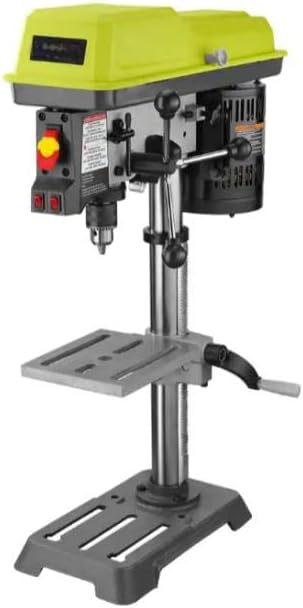
Figure 1: CUSHYBITE DP103L 10-inch 5-Speed Drill Press. This image shows the complete drill press unit, highlighting its compact benchtop design and key components such as the motor housing, drill head, worktable, and base.
Important Safety Instructions
Always follow basic safety precautions to reduce the risk of fire, electric shock, and personal injury.
- Wear appropriate eye protection.
- Ensure the workpiece is securely clamped.
- Keep hands clear of the drilling area.
- Disconnect power before making adjustments or changing accessories.
- Maintain a clean and well-lit work area.
- Do not operate in damp or wet conditions.
- Use the correct speed for the material and drill bit.
Product Components
Familiarize yourself with the main parts of your drill press.
- Motor Housing
- Drill Head
- Chuck
- Worktable (swivels 360°, tilts 45°)
- Base
- Depth Stop
- Power Switch (On/Off)
- Speed Adjustment Lever
- Feed Handles
- EXACTLINE Alignment System (Laser)
- LED Work Light

Figure 2: Power Switch and Laser/LED Controls. This image displays a close-up of the main power switch (red and yellow) and the separate switches for the laser alignment system and LED work light, located on the front of the drill press head.
Setup and Assembly
Your CUSHYBITE DP103L drill press requires minimal assembly.
- Unpacking: Carefully remove all components from the packaging. Verify all parts are present according to the packing list.
- Mounting the Base: Secure the drill press base to a sturdy workbench using appropriate fasteners (not included).
- Attaching the Column: Insert the column into the base and secure it with the provided bolts.
- Installing the Head Assembly: Slide the head assembly onto the column and tighten the locking mechanism.
- Attaching the Worktable: Mount the worktable assembly onto the column, ensuring it can move freely up and down and swivel.
- Installing the Chuck: Clean the tapered spindle and chuck bore. Firmly tap the chuck onto the spindle using a rubber mallet.
- Power Connection: Connect the drill press to a grounded power outlet.

Figure 3: Drill Press Chuck. This image provides a close-up view of the drill chuck, where drill bits are inserted and secured. It shows the knurled grip for tightening and loosening the chuck jaws.
Operating Instructions
1. Changing Speeds
The DP103L offers five-speed settings (620, 1100, 1700, 2300, 3100 RPM) for various materials.
- Disconnect the drill press from power.
- Open the motor housing cover.
- Adjust the belt position on the pulleys according to the speed chart inside the cover.
- Ensure the belt is taut and close the cover.
2. Installing Drill Bits
- Ensure the drill press is unplugged.
- Insert the drill bit into the chuck jaws.
- Tighten the chuck using the chuck key. Ensure the bit is centered and secure. Store the chuck key in its onboard holder after use.
3. Adjusting the Worktable
The worktable can be adjusted for height, swivel, and tilt.
- Height Adjustment: Loosen the table locking knob, adjust the table height using the crank, and re-tighten.
- Swivel Adjustment: Loosen the table locking knob, rotate the table 360° as needed, and re-tighten.
- Tilt Adjustment: Loosen the table tilt bolts, adjust the table angle up to 45°, and re-tighten.

Figure 4: Adjustable Worktable. This image shows the drill press worktable, which can be adjusted for height and angle. The slots in the table are visible, designed for clamping workpieces securely.
4. Using the EXACTLINE Alignment System and LED Light
The built-in laser and LED light enhance drilling accuracy and visibility.
- Activate the laser and LED light using their respective switches on the drill head.
- The laser projects a crosshair onto the workpiece, indicating the drill bit's center.
- The LED light illuminates the work area for better visibility.
5. Setting the Depth Stop
The locking depth stop ensures consistent drilling depth for repetitive tasks.
- Lower the drill bit until it touches the workpiece.
- Adjust the depth stop collar to the desired depth.
- Tighten the depth stop lock nut. The drill bit will stop at this preset depth.
Maintenance
Regular maintenance ensures optimal performance and extends the life of your drill press. Always disconnect power before performing maintenance.
- Cleaning: Keep the drill press clean and free of dust and debris. Use a brush or vacuum.
- Lubrication: Periodically apply light machine oil to moving parts such as the column, quill, and depth stop mechanism.
- Belt Inspection: Check the drive belt for wear, cracks, or damage. Replace if necessary.
- Chuck Maintenance: Keep the chuck jaws clean. If the chuck becomes stiff, clean and lightly lubricate the jaws.
- Fastener Check: Periodically check all nuts, bolts, and screws for tightness.
Troubleshooting
| Problem | Possible Cause | Solution |
|---|---|---|
| Drill press does not start | No power; faulty switch; motor overload. | Check power connection; inspect switch; allow motor to cool. |
| Excessive vibration | Loose components; unbalanced drill bit; worn belt. | Tighten all fasteners; replace or re-center drill bit; inspect and replace belt. |
| Drill bit not cutting efficiently | Dull drill bit; incorrect speed; insufficient feed pressure. | Sharpen or replace drill bit; adjust speed for material; apply steady feed pressure. |
| Chuck key sticks or is hard to remove | Dirty chuck jaws; damaged chuck key. | Clean chuck jaws; replace chuck key if damaged. |
Specifications
- Model: DP103L
- Motor: 1/4 HP Induction Motor
- Drill Press Size: 10 inches
- Speed Settings: 5 speeds (620, 1100, 1700, 2300, 3100 RPM)
- Worktable Tilt: 0-45 degrees (left and right)
- Worktable Swivel: 360 degrees
- Alignment System: EXACTLINE Laser
- Lighting: Integrated LED Work Light
- Included Accessories: Hex wrench, Chuck key, Operator's Manual
Warranty and Support
The CUSHYBITE DP103L 10-inch 5-Speed Drill Press is backed by a 3-year manufacturer’s warranty. This warranty covers defects in materials and workmanship under normal use.
For warranty claims, technical support, or replacement parts, please contact CUSHYBITE customer service.
Contact Information: Refer to the contact details provided on the CUSHYBITE official website or your purchase documentation.