
CAMECHO Motorcycle Dash Cam DVR System (B0F3272P5J)
CAMECHO Motorcycle Dash Cam DVR System User Manual
Model: B0F3272P5J
Introduction
This user manual provides detailed instructions for the installation, operation, and maintenance of your CAMECHO Motorcycle Dash Cam DVR System. Please read this manual thoroughly before using the product to ensure proper functionality and safety. This system is designed to record your motorcycle journeys with front and rear cameras, offering features like loop recording, G-sensor collision detection, and IP67 waterproofing.
Product Features
- IP67 Waterproof and Dustproof: Ensures reliable operation in various weather conditions.
- Dual Dash Camera System: Records simultaneously from front (120°) and rear (90°) wide-angle lenses.
- 3.0" Display: Features a split-screen preview for simultaneous viewing of both camera feeds.
- Loop Recording: Automatically overwrites older footage when the memory card is full, ensuring continuous recording. A 32GB TF card is included.
- G-Sensor: Detects sudden impacts or collisions and automatically locks the current video file to prevent it from being overwritten.
- Compact Size & Easy Installation: Specifically designed for motorcycles, tricycles, UTVs, ATVs, and Golf Carts, allowing for discreet placement of the main unit.
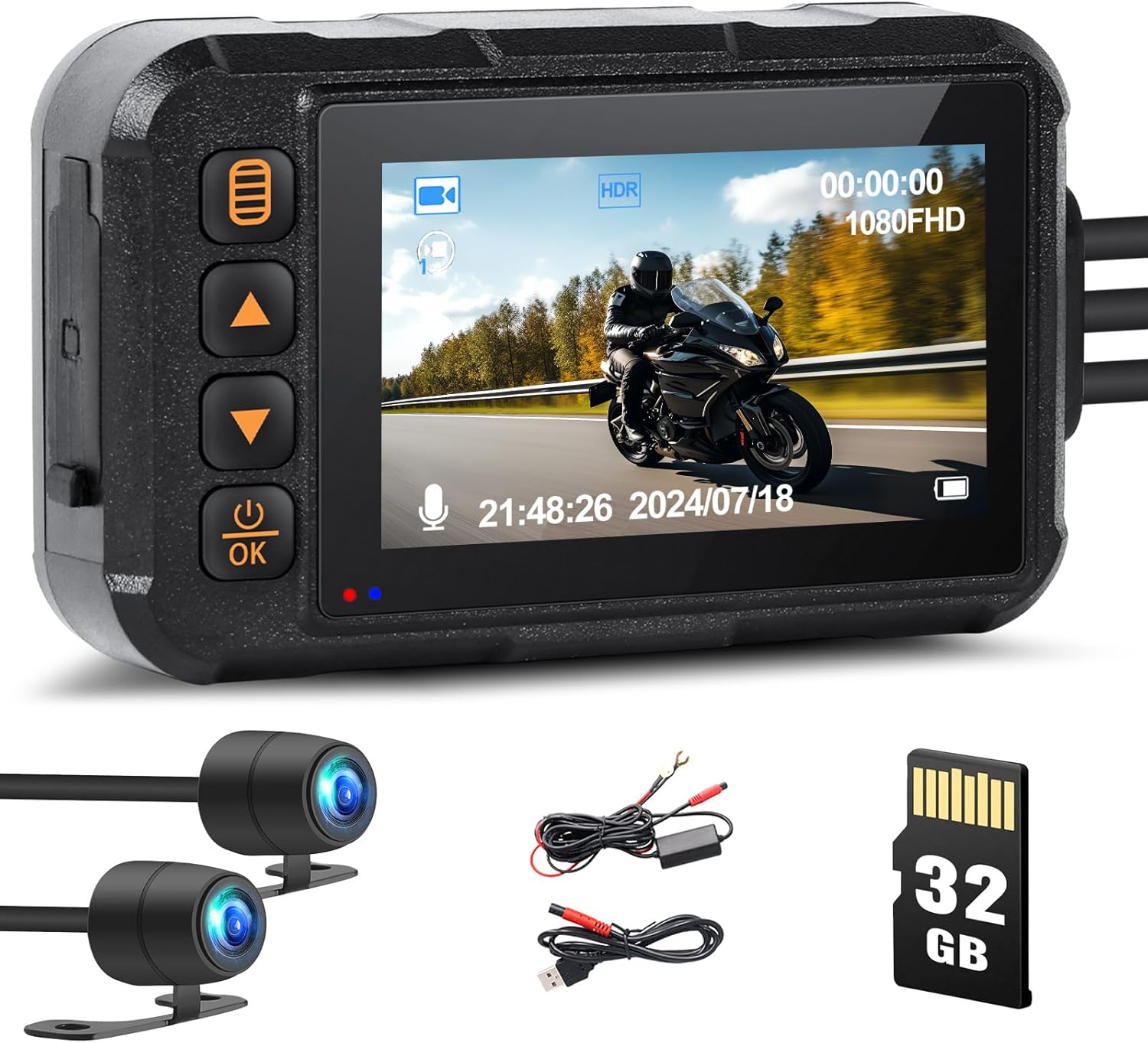
Image: The CAMECHO Motorcycle Dash Cam system, showing the main display unit, two waterproof cameras, power cables, and a 32GB TF card.

Image: Illustration of the dual-channel recording capability, displaying simultaneous views from the front (120° wide-angle) and rear (90° wide-angle) cameras.
What's in the Box
Upon opening the package, please verify that all components listed below are present and in good condition:
- 1 x Motorcycle Dash Cam Main Unit
- 1 x Front Camera
- 1 x Rear Camera
- 2 x Power Cords
- 2 x Extension Cords
- 1 x Brackets (for mounting)
- 1 x User Manual (this document)
- 1 x 32GB TF Card (pre-installed or separate)
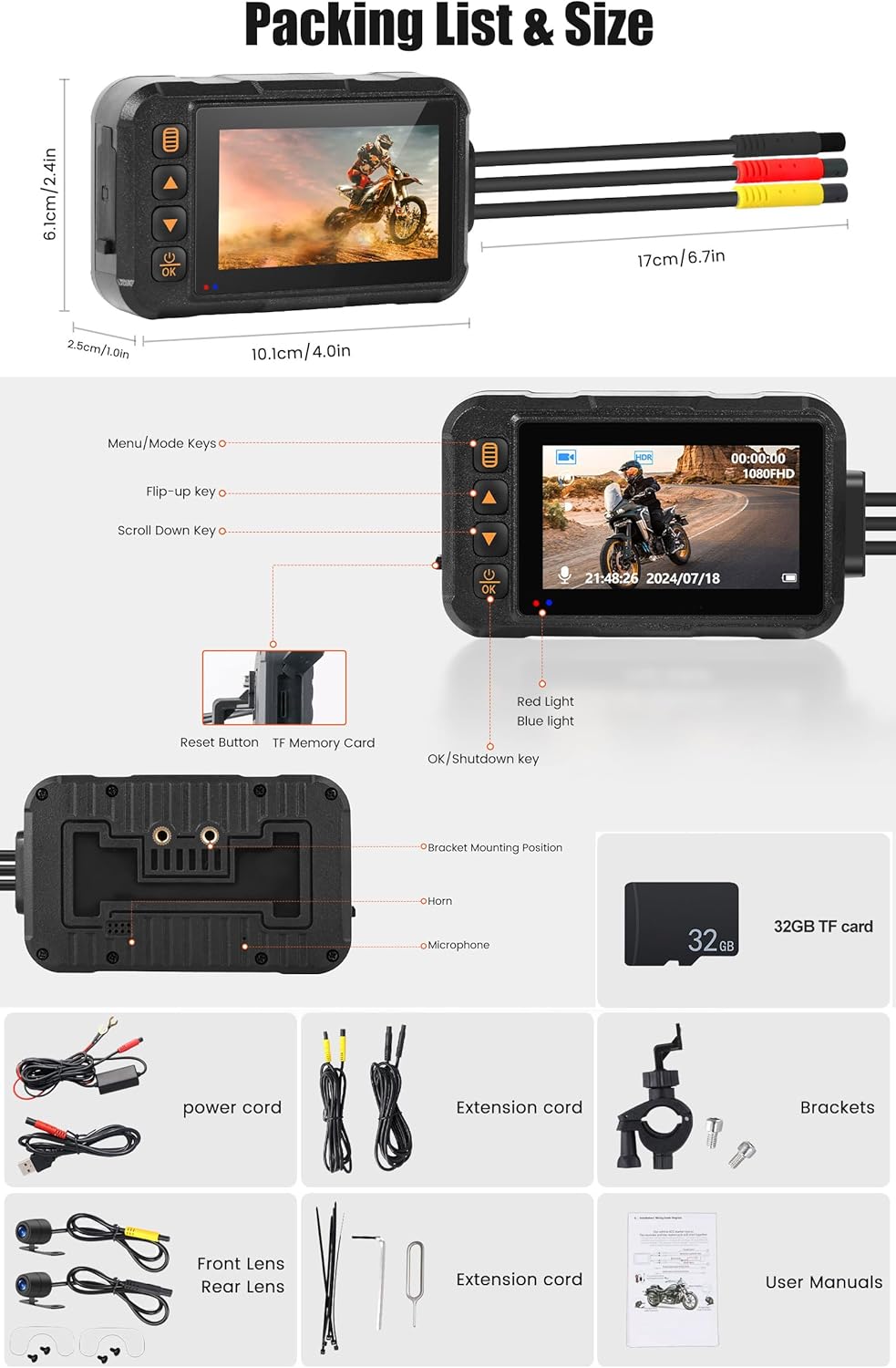
Image: A visual representation of the packing list, detailing the main unit, front and rear lenses, power cords, extension cords, brackets, and user manual.
Setup and Installation
Follow these steps for proper installation of your CAMECHO Motorcycle Dash Cam system.
1. Mounting the Main Unit
The main unit should be mounted in a secure location, preferably under the seat or in a storage compartment, to protect it from direct exposure to elements, although it is IP67 waterproof. Use the provided brackets to secure the unit.
2. Installing the Cameras
Mount the front camera at the front of your motorcycle, ensuring a clear, unobstructed view of the road ahead. Similarly, mount the rear camera at the back, providing a clear view of traffic behind you. Ensure both cameras are securely fastened and their cables are routed safely, away from moving parts or heat sources.

Image: An illustration demonstrating the recommended placement of the main logger mainframe, front camera, rear camera, and pressure drop line on a motorcycle.
3. Wiring Connections
Connect the front and rear cameras to the main unit using the provided extension cords. Connect the power cords to your motorcycle's power supply. It is recommended to connect the power to a switched power source (e.g., ignition) to ensure the dash cam turns on and off with the motorcycle. The pressure drop line is typically used for parking monitoring features, if applicable, and should be connected according to specific vehicle wiring diagrams or by a professional.

Image: A detailed wiring diagram showing how to connect the logger mainframe, front shot camera, pressure drop line, and rear shot camera using extension cords.
4. Inserting the TF Card
Locate the TF card slot on the main unit. Insert the included 32GB TF card into the slot until it clicks into place. Ensure the card is inserted correctly to avoid damage.

Image: A close-up view of the dash cam unit highlighting the TF card slot and the 32GB TF card, indicating where to insert the memory card.
Operating Instructions
1. Power On/Off
The device will typically power on automatically when your motorcycle's ignition is turned on, and power off when the ignition is turned off. You can also manually power on/off by pressing and holding the "OK/Shutdown" button on the main unit.
2. Recording Modes
The dash cam automatically begins loop recording upon power-on. This means it continuously records video in segments (e.g., 1, 3, or 5 minutes) and, once the memory card is full, it overwrites the oldest unlocked footage.

Image: A visual representation of the loop recording function, showing how the dash cam continuously records and overwrites older files on the memory card.
3. G-Sensor (Emergency Lock)
In the event of a sudden impact or collision, the built-in G-sensor will detect the event and automatically lock the current video file. This prevents the footage from being overwritten by loop recording, preserving critical evidence. These locked files are stored in a separate folder on the TF card.

Image: An icon symbolizing the G-sensor feature, indicating its ability to lock video files during an impact.
4. Display Modes
The 3.0" display supports various viewing modes. You can switch between front camera view, rear camera view, or a split-screen view showing both simultaneously. Use the "Menu/Mode" or "Scroll Down" keys to navigate through display options.

Image: Examples of the four different screen display modes available on the dash cam: front camera only, front and rear split view (two variations), and rear camera only.
5. Playback
To review recorded footage, stop recording (if active) and enter playback mode via the menu. You can then browse through video files and play them directly on the device's screen. For larger viewing, remove the TF card and insert it into a computer or compatible device.
Maintenance
- Cleaning: Use a soft, dry cloth to clean the main unit and camera lenses. Do not use abrasive cleaners or solvents.
- TF Card Maintenance: It is recommended to format the TF card periodically (e.g., once a month) to maintain optimal performance and prevent data corruption. Back up any important files before formatting.
- Firmware Updates: Check the official CAMECHO website for any available firmware updates. Follow the instructions provided with the update carefully.
- Cable Inspection: Periodically inspect all cables and connections for signs of wear, damage, or loose connections. Ensure they are securely routed and protected.
Troubleshooting
| Problem | Possible Cause | Solution |
|---|---|---|
| Device does not power on. | No power supply; loose connection; faulty power cord. | Check power connections. Ensure ignition is on if connected to switched power. Test power cord. |
| Recording stops unexpectedly. | TF card full (no loop recording); TF card error; faulty TF card. | Ensure loop recording is enabled. Format TF card. Replace TF card if error persists. |
| Video quality is poor or blurry. | Dirty camera lens; protective film still on lens; camera not securely mounted. | Clean lenses. Remove any protective film. Securely mount cameras. |
| G-sensor is too sensitive/not sensitive enough. | G-sensor sensitivity setting is incorrect. | Adjust G-sensor sensitivity in the device settings menu. |
Specifications
- Model: Motorcycle Dash Cam DVR System
- Display: 3.0-inch LCD
- Cameras: Front (120° wide-angle), Rear (90° wide-angle)
- Waterproof Rating: IP67 (Full body and cameras)
- Storage: Supports TF card (32GB included)
- Features: Loop Recording, G-Sensor
- Product Dimensions: 1"D x 4"W x 2.4"H (Main Unit)
- Item Weight: 1.06 pounds
- Manufacturer: CAMECHO
Warranty and Support
CAMECHO products are designed for reliability and performance. For warranty information, technical support, or any inquiries regarding your product, please refer to the contact information provided below. Keep your purchase receipt as proof of purchase for warranty claims.
Customer Support Email: CAMECHOVIP@126.com

Image: A customer support representative, symbolizing the available assistance for product inquiries and support. Contact via email for help and user manual.
Ask a question about this manual
Ask about setup, troubleshooting, compatibility, parts, safety, or missing instructions. Manuals+ will review the question and use this page’s manual context to help answer it.