
1. Introduction
Thank you for choosing the BOVUGAC Folding Stand Protective Case for your Headwolf fPad7 Pro tablet. This manual provides essential information on how to install, use, and maintain your new tablet case to ensure optimal protection and functionality. Please read these instructions carefully before use.
This case is specifically designed for the Headwolf fPad7 Pro tablet and is not compatible with any other model. Please verify your tablet model before attempting installation.
2. Product Overview
The BOVUGAC tablet case offers comprehensive protection and enhanced usability for your Headwolf fPad7 Pro. Key features include:
- Folding Stand: Provides multiple viewing angles for media consumption and comfortable typing.
- Pencil Holder: Securely stores your stylus or digital pen.
- Wrist Strap: Allows for secure, one-handed holding and easy portability.
- Full Protection: Premium PU material with scratch-resistant properties and reinforced corners for drop resistance.
- Precise Cutouts: Ensures easy access to all ports, buttons, and camera functions.
- Material Properties: Waterproof, lithe (flexible), and breathable design.

Image 2.1: General view of the BOVUGAC tablet case.
3. Setup and Installation
Follow these steps to properly install your Headwolf fPad7 Pro tablet into the BOVUGAC protective case:
- Prepare Your Tablet: Ensure your Headwolf fPad7 Pro tablet is clean and free of dust or debris.
- Align the Tablet: Gently slide your tablet into the case, starting with one side. Ensure that the tablet aligns with the case's edges and corners.
- Secure the Tablet: Press the tablet firmly into the case, making sure all corners are securely seated. Verify that the case's precise cutouts align perfectly with your tablet's buttons, ports, and camera.

Image 3.1: Illustration of precise cutouts for volume, charging port, and camera, ensuring full accessibility.
4. Operating Instructions
4.1 Using the Folding Stand
The case features a built-in folding stand that allows for versatile viewing and typing positions:
- Viewing Angle: Fold the back cover to create a stable triangular stand. This angle is ideal for watching videos, browsing, or video calls.
- Typing Angle: Adjust the stand to a lower, more reclined position for comfortable typing or drawing.

Image 4.1: The tablet case configured as a stand, providing an ergonomic viewing angle for extended use.
4.2 Using the Wrist Strap
For enhanced security and comfort during one-handed use, utilize the integrated wrist strap:
- Locate the elastic wrist strap on the inside of the front cover.
- Slide your hand through the strap to securely hold the tablet, reducing the risk of accidental drops.

Image 4.2: Detail of the integrated hand strap, designed for comfortable and secure one-handed tablet use.
4.3 Using the Pencil Holder
The case includes a dedicated holder for your stylus or digital pen:
- Locate the pencil holder slot, typically along the edge of the case.
- Insert your stylus into the holder for convenient storage and easy access.
5. Maintenance
To keep your BOVUGAC tablet case in optimal condition and prolong its lifespan, follow these maintenance guidelines:
- Cleaning: Wipe the exterior of the case with a soft, slightly damp cloth. Avoid using harsh chemicals, abrasive cleaners, or solvents, as these can damage the material.
- Protection: While the case offers scratch resistance and drop protection, avoid exposing it to extreme temperatures, direct sunlight for prolonged periods, or sharp objects that could cause damage.
- Inspection: Periodically check the case for any signs of wear or damage, especially around the corners and edges, to ensure continued protection for your tablet.
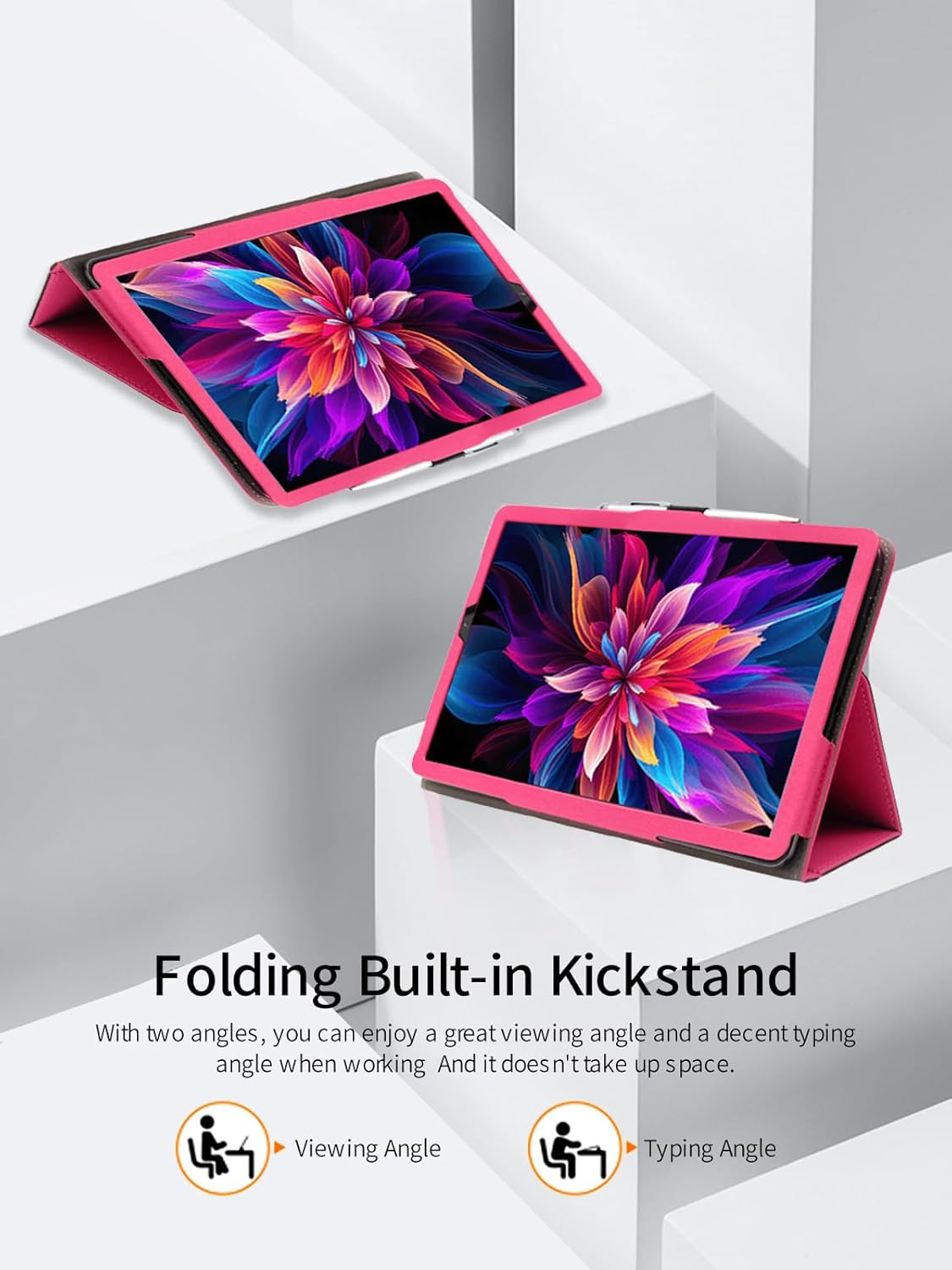
Image 5.1: Visual representation of the case's drop resistance and anti-scratch capabilities, emphasizing reinforced corners.
6. Troubleshooting
If you encounter any issues with your BOVUGAC tablet case, please refer to the following common solutions:
- Case Not Fitting: Ensure your tablet is indeed the Headwolf fPad7 Pro model. This case is designed exclusively for this model. Re-attempt installation, ensuring proper alignment.
- Difficulty Accessing Ports/Buttons: Verify that the tablet is correctly seated within the case and that all cutouts align precisely with the tablet's features. Adjust the tablet's position if necessary.
- Stand Instability: Ensure the folding stand is fully extended and locked into its designated position for maximum stability.
If the problem persists, please contact customer support for further assistance.
7. Specifications
| Feature | Detail |
|---|---|
| Model Compatibility | Headwolf fPad7 Pro |
| Brand | BOVUGAC |
| Form Factor | Case |
| Shell Type | Soft |
| Special Features | Slim Fit, Folding Stand, Pencil Holder, Wrist Strap, Full Protection, Scratch Resistant, Drop Resistance |
| Material | Premium PU, Waterproof, Lithe, Breathable |
| Item Weight | 3.52 ounces |
| Package Dimensions | 0.3 x 0.3 x 0.3 inches |

Image 7.1: Overview of the case's material properties, including waterproof, flexible (lithe), and breathable characteristics.
8. Warranty and Support
For warranty information or technical support regarding your BOVUGAC tablet case, please refer to the documentation provided with your purchase or contact the manufacturer directly. Keep your proof of purchase for any warranty claims.
Manufacturer: BOVUGAC
For further assistance, please visit the official BOVUGAC website or contact their customer service department.