
jiingekk B0F319Z714
jiingekk Professional USB Soldering Iron Tips User Manual
Introduction
This manual provides comprehensive instructions for the safe and effective use of your jiingekk Professional USB Soldering Iron Tips. Please read this manual thoroughly before use and retain it for future reference. Proper understanding and adherence to these guidelines will ensure optimal performance and longevity of your soldering tips.
Product Overview
The jiingekk Professional USB Soldering Iron Tips are designed to enhance your soldering experience, offering versatility for various electronic applications. Crafted from durable steel, these tips ensure consistent performance and extended lifespan. The set includes three distinct tip shapes to accommodate different soldering tasks.
Package Contents
- 1 set / 3 pieces of USB Soldering Iron Tips (Conical, Chisel, Blunt/Flat)

This image displays the three distinct soldering iron tips included in the set, showcasing their varied shapes designed for different soldering applications.
Setup Instructions
Follow these steps to properly install the soldering iron tips onto your compatible USB soldering iron.
- Ensure Safety: Before handling, confirm that your USB soldering iron is powered off and completely cool to prevent burns or damage.
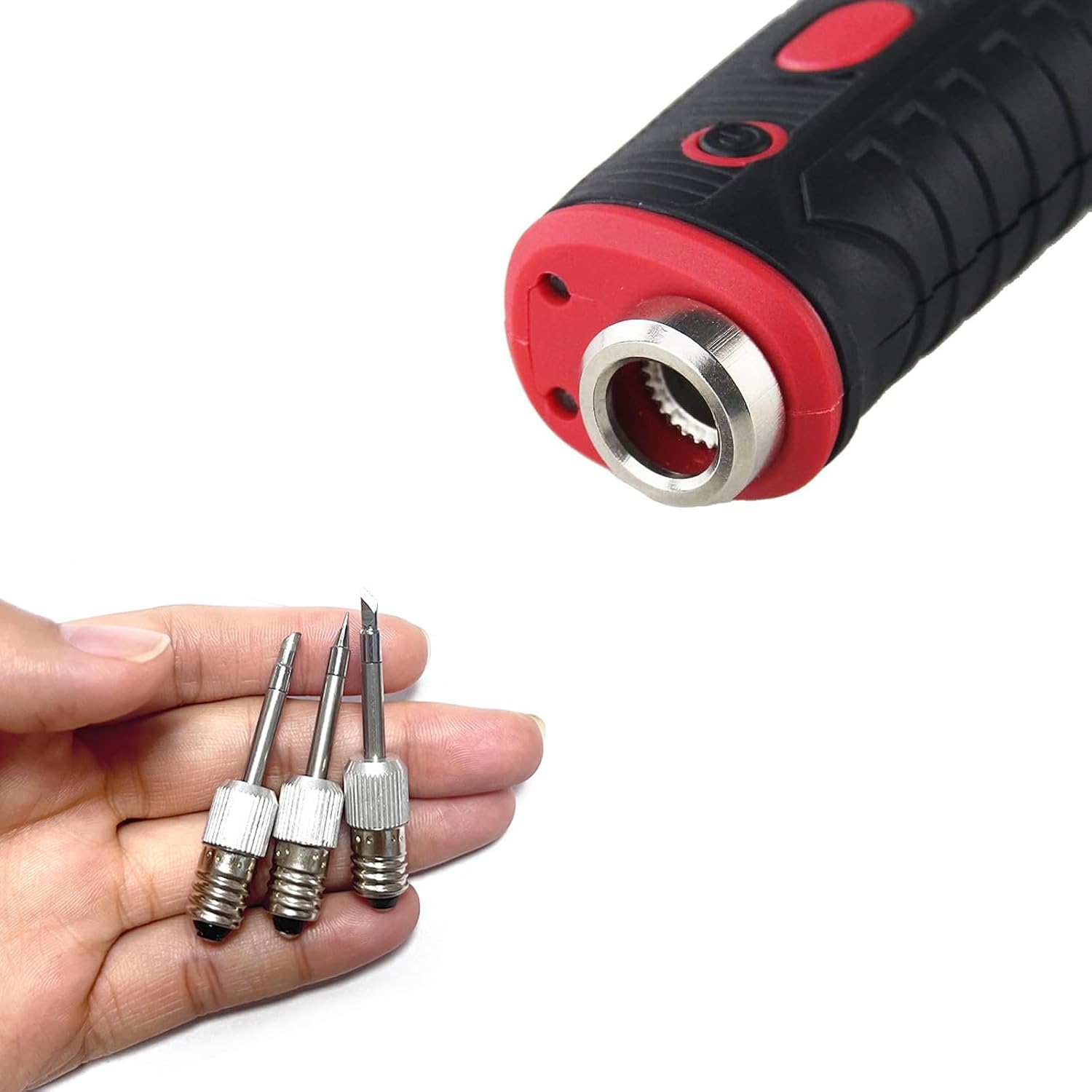
- Select Tip: Choose the appropriate tip shape (conical, chisel, or blunt/flat) based on your specific soldering task.
- Attach Tip: Carefully insert the selected tip into the heating element receptacle of your USB soldering iron. Ensure it is seated securely and fully engaged to allow for efficient heat transfer. Do not overtighten.

This image demonstrates the process of selecting and preparing to attach one of the soldering iron tips to a compatible USB soldering iron.
Operating Instructions
These tips are designed for use with compatible 8W USB soldering irons. Always refer to your soldering iron's manual for specific operating procedures.
General Soldering Practices
- Clean the Tip: Before each use, gently wipe the tip on a damp sponge or brass wool to remove any oxidation or old solder.
- Tin the Tip: Apply a small amount of fresh solder to the clean tip. This 'tinning' helps protect the tip from oxidation and improves heat transfer.
- Apply Heat: Place the tinned tip against both the component lead and the PCB pad you wish to solder. Allow a few seconds for the joint to reach soldering temperature.
- Apply Solder: Once the joint is hot, touch the solder wire to the joint (not directly to the iron tip). The solder should flow smoothly and create a shiny, conical joint.
- Remove Solder and Iron: First remove the solder wire, then remove the soldering iron. Allow the joint to cool naturally without disturbance.
- Clean After Use: Always clean and re-tin the tip after you finish soldering to prepare it for future use and prevent oxidation.
Tip Selection Guide
- Conical Tip: Ideal for precision work, fine pitch components, and small solder joints.
- Chisel Tip: A versatile general-purpose tip suitable for most through-hole components, wires, and larger pads.
- Blunt/Flat Tip: Useful for drag soldering, heating larger pads, or removing solder bridges.

This image illustrates the soldering process on a circuit board, highlighting the application of the soldering iron tip to electronic components.
Maintenance and Care
Proper maintenance extends the life of your soldering tips and ensures consistent performance.
- Regular Cleaning: Always clean the tip before and after each soldering session using a damp sponge or brass wool. Never use abrasive materials or files, as this can damage the tip's plating.
- Tinning: Keep the tip tinned with a thin layer of solder when not in use, especially during cool-down. This prevents oxidation and corrosion.
- Storage: Store tips in a dry, non-corrosive environment. If storing for extended periods, ensure they are clean and tinned.
- Avoid Excessive Force: Do not apply excessive pressure when soldering or cleaning, as this can bend or damage the tip.
- Temperature Control: Use the lowest effective temperature for your soldering tasks. High temperatures can accelerate tip oxidation and wear.
Troubleshooting
If you encounter issues with your soldering tips, refer to the following common problems and solutions:
| Problem | Solution |
|---|---|
| Tip not heating or heating slowly. | Ensure the tip is fully and securely inserted into the soldering iron. Verify the soldering iron is powered on and functioning correctly. Check for any loose connections. |
| Solder does not flow well or beads up on the tip. | Clean the tip thoroughly to remove oxidation. Re-tin the tip with fresh solder. Ensure the soldering iron is reaching the correct temperature for the solder type being used. |
| Tip appears corroded or pitted. | This indicates oxidation. Clean and re-tin the tip immediately. Ensure you are tinning the tip before and after each use, and avoid excessively high temperatures. If severely damaged, the tip may need replacement. |
Specifications
Technical details for the jiingekk Professional USB Soldering Iron Tips:
| Component | Detail |
|---|---|
| Material | Metal (Steel Construction) |
| Length | Approx. 52mm (2.04 inches) |
| Power Compatibility | Designed for 8W USB Soldering Irons |
| Tip Shapes Included | Conical, Chisel, Blunt/Flat |
This diagram provides precise measurements for the soldering iron tips, detailing their length and base diameter for compatibility reference.
Safety Information
Always observe the following safety precautions when using soldering equipment:
- Ventilation: Use soldering equipment in a well-ventilated area to avoid inhaling solder fumes.
- Eye Protection: Always wear safety glasses to protect your eyes from splashes of molten solder or flux.
- Hot Surfaces: Soldering iron tips become extremely hot. Avoid direct contact with skin or flammable materials. Use a heat-resistant stand for the soldering iron when not in use.
- Flammable Materials: Keep all flammable liquids, gases, and materials away from the soldering area.
- Power Off: Always unplug or power off the soldering iron when not in use or when changing tips.
- Children and Pets: Keep soldering equipment out of reach of children and pets.
Warranty and Support
For any questions, technical support, or warranty inquiries regarding your jiingekk Professional USB Soldering Iron Tips, please contact the manufacturer directly through their official channels. Please have your product model number (B0F319Z714) and purchase information ready when contacting support.
Ask a question about this manual
Ask about setup, troubleshooting, compatibility, parts, safety, or missing instructions. Manuals+ will review the question and use this page’s manual context to help answer it.