
Introduction
This manual provides comprehensive instructions for the Generic LT84 Mechanical Gaming Keyboard. It covers setup, operation, customization, maintenance, and troubleshooting to ensure optimal performance and longevity of your device. Please read this manual thoroughly before using the keyboard.
The LT84 keyboard features an 84-key compact design, ice blue LED backlighting, anti-ghosting technology, and hot-swappable mechanical switches, offering a responsive and customizable typing and gaming experience.
Package Contents
Verify that all items are present in the package:
- LT84 Mechanical Gaming Keyboard
- User Manual
Setup
- Unpack the Keyboard: Carefully remove the keyboard and its accessories from the packaging.
- Connect to Computer: Plug the USB cable of the LT84 keyboard into an available USB port on your desktop computer or laptop.
- Driver Installation: The keyboard is plug-and-play and typically does not require additional driver installation. Your operating system (Windows, macOS, iOS, Android) will automatically detect and configure the device.

Image: The LT84 Mechanical Gaming Keyboard connected and ready for use on a desk.
Operating Instructions
Key Functions and Anti-Ghosting
The LT84 keyboard features an 84-key QWERTY layout. It is equipped with full key rollover (anti-ghosting) technology, ensuring that every keypress is registered accurately, even when multiple keys are pressed simultaneously during fast-paced gaming or typing.

Image: The LT84 keyboard highlighting its anti-ghosting capability, ensuring all key presses are registered without conflict.
Backlighting and Logo Display Control
The keyboard features ice blue LED backlighting with multiple modes and brightness levels. Specific key combinations (often involving the Function key 'Fn' and other keys) are used to cycle through lighting effects and adjust brightness. The keyboard also includes an illuminated logo display. Refer to the keyboard's keycap legends for exact combinations, typically indicated by light bulb icons or similar symbols for lighting, and potentially a dedicated key for the logo display.

Image: The LT84 keyboard displaying various ice blue lighting effects and its illuminated logo, indicating customizable illumination and branding.
Volume Control and System Switch
The keyboard may include a dedicated knob or function keys for volume control. To adjust the volume, rotate the knob (if present) or use the designated Fn key combinations. Pressing the knob typically mutes/unmutes the audio. There may also be a switch or key combination to toggle between different operating system modes (e.g., Windows/Mac) for optimal compatibility.
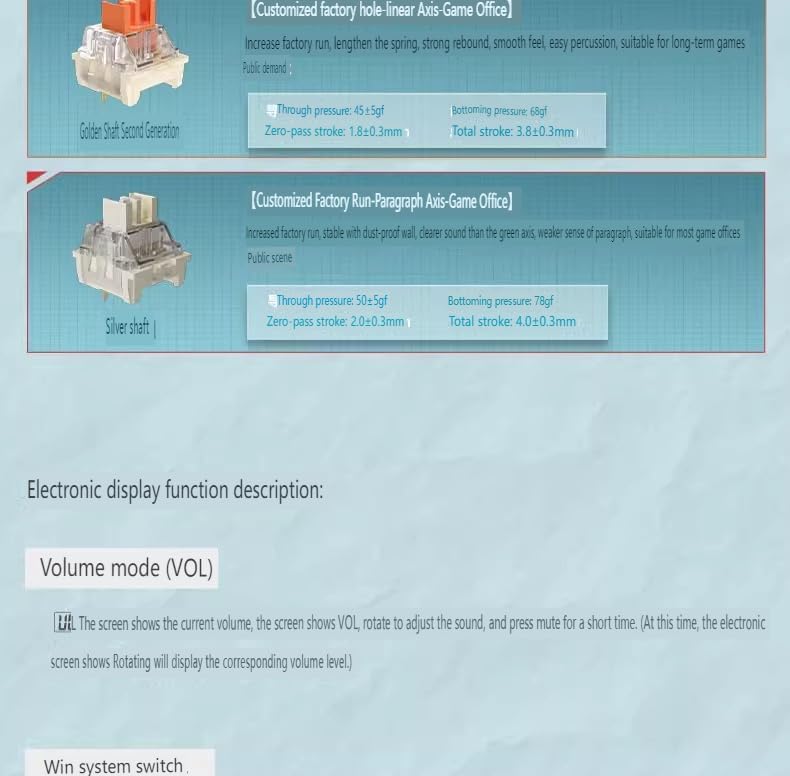
Image: A close-up of the keyboard showing details related to the volume control knob and system compatibility switches.
Customization
Hot-Swappable Mechanical Switches
The LT84 keyboard features hot-swappable mechanical switches, allowing you to change switches without soldering. This enables customization of typing feel and sound. Use the provided switch puller (if included) to carefully remove existing switches and insert new compatible 3-pin or 5-pin mechanical switches.
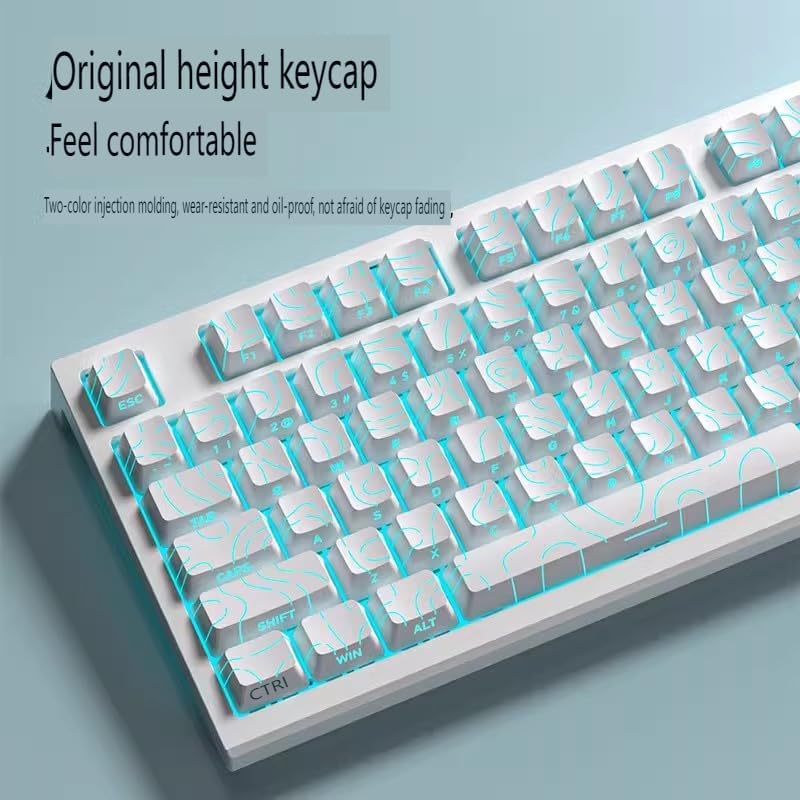
Image: A view of the keyboard's internal structure, highlighting the fine-tuned satellite axis and balance bar for stable key presses, particularly on larger keys.
Image: Detailed illustrations of different mechanical switch types (e.g., Xiangyun Axis, Silver gray shaft, Sea and air axis Pro) compatible with the hot-swappable design, showing their characteristics like actuation force and travel distance.
Keycaps
The keyboard comes with original height keycaps, designed for comfort and durability. These keycaps are typically made using a two-color injection molding process, making them wear-resistant and oil-proof, which helps prevent fading over time.

Image: A close-up of the LT84 keyboard's keycaps, emphasizing their original height and comfortable feel.
Maintenance
- Cleaning: Use a soft, dry cloth to wipe the keyboard surface. For deeper cleaning, you may use a can of compressed air to remove dust and debris from between the keycaps. For stubborn stains, a slightly damp cloth with mild soap can be used, ensuring no liquid enters the keyboard.
- Keycap Removal: If necessary, keycaps can be carefully removed using a keycap puller for thorough cleaning. Reinstall them by aligning and pressing down gently until they click into place.
- Storage: When not in use for extended periods, store the keyboard in a dry, dust-free environment.
- Avoid Liquids: The keyboard is not water-resistant. Avoid spilling liquids on it to prevent damage.
Troubleshooting
- Keyboard Not Responding:
- Ensure the USB cable is securely connected to both the keyboard and the computer.
- Try plugging the keyboard into a different USB port on your computer.
- Restart your computer.
- Test the keyboard on another computer to determine if the issue is with the keyboard or the computer.
- Backlighting Not Working:
- Check if the backlighting is turned off or set to the lowest brightness level using the keyboard's function keys.
- Ensure the keyboard is properly powered via the USB connection.
- Keys Not Registering or Double-Typing:
- This could indicate a faulty switch. If the keyboard is hot-swappable, try replacing the affected switch.
- Clean around the affected key to ensure no debris is obstructing the switch mechanism.
Specifications

Image: A configuration table detailing various specifications and model variations of the LT84 keyboard, including shaft types, colors, and connection methods.
| Feature | Detail |
|---|---|
| Brand | Generic |
| Model Number | LT84 |
| Connectivity | USB Wired |
| Number of Keys | 84 |
| Keyboard Layout | QWERTY |
| Switch Type | Mechanical, Hot-swappable |
| Backlighting | Ice Blue LED (Single Color), Customizable Modes |
| Anti-Ghosting | Full Key Rollover |
| Color | White |
| Enclosure Material | Plastic |
| Product Dimensions | 7.2"L x 2.2"W x 15.8"H |
| Compatible Devices | Desktop Computer, Laptop |
| Recommended Uses | Gaming, Professional Use, Typing |
| Water Resistance | Not Water Resistant |
| Warranty | 1 Year |
Warranty and Support
Warranty: This product comes with a 1-year limited warranty from the date of purchase. The warranty covers manufacturing defects and malfunctions under normal use. It does not cover damage caused by misuse, accidents, unauthorized modifications, or improper maintenance.
Customer Support: For technical assistance, troubleshooting, or warranty claims, please contact the retailer or manufacturer's customer support. Refer to your purchase documentation for specific contact information.