
TBZFNZXF DLC-02
DLC-02 Power Digital Lighting Controller DALI-2 User Manual
Model: DLC-02 | Brand: TBZFNZXF
1. Introduction
The DLC-02 is a sophisticated Power Digital Lighting Controller designed for DALI-2 systems. This device serves as a multi-master controller, enabling comprehensive management of lighting installations. It is built to provide reliable and efficient control for various lighting environments, from office spaces to smart homes.
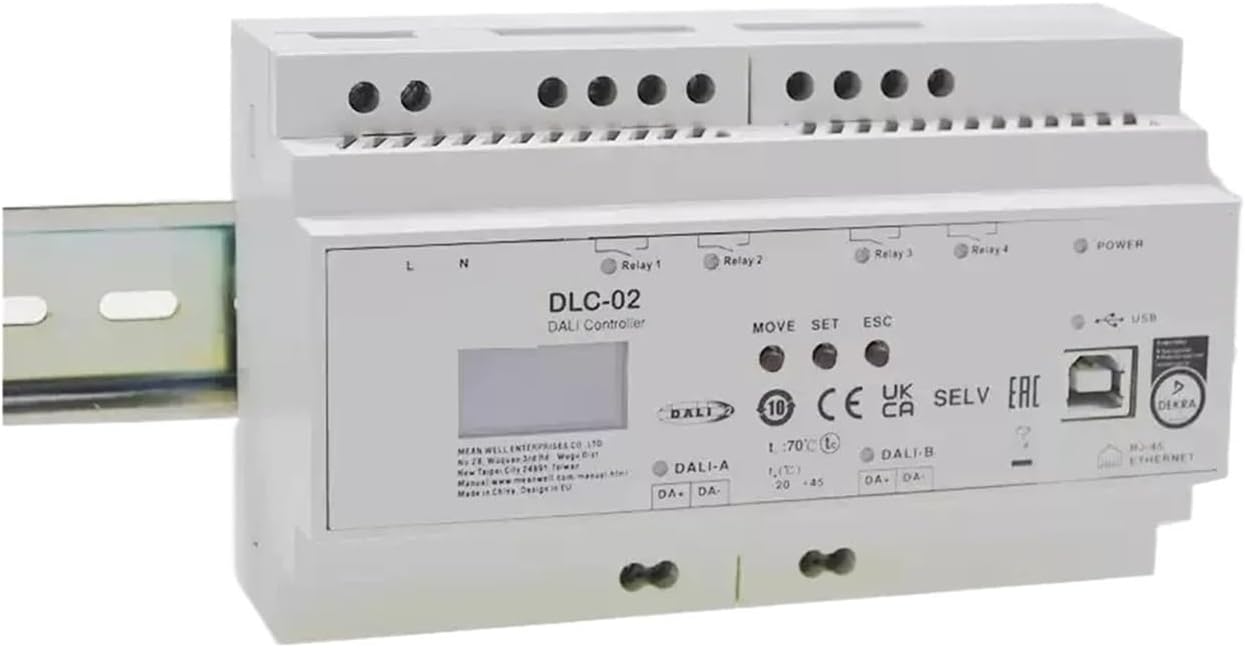
Figure 1: Front view of the DLC-02 DALI Controller, showing input/output terminals, display, and control buttons.
Key Features:
- DALI-2 multi-master controller
- 2 independent DALI Bus channels with built-in DALI power supply (up to 250mA per bus)
- Connect up to 2×64 DALI control gears and 2×12 input devices
- Max 16 scenes and groups setting per channel
- OLED display, LED indicators and buttons for local operation
- Built-in with 250V/5A (×4) relay
- Easy installation and configuration via DLC-02 software
- Effect setting with timer events and input devices
- Up to 255 timer events
- Support 8 sequences schedule up to 16 steps per sequence
- Support DALI-2 devices with Part 207/209/301/302/303/304
- Support DT8 colour control (Tunable white, RGBW, xy-coordinate)
- Built-in with Modbus TCP/IP protocol
Applications:
- Office lighting
- Smart home lighting
- Luxury villas lighting
- LED indoor lighting
- Human centric lighting control
- RGBW lighting control
- Building automation system
2. Setup and Installation
The DLC-02 controller is designed for easy installation, typically mounted on a DIN rail. Ensure all power is disconnected before proceeding with any wiring.
2.1 Physical Installation:
- Mount the DLC-02 securely onto a standard 35mm DIN rail.
- Ensure adequate ventilation around the device for optimal performance.
2.2 Wiring Connections:
Refer to the labels on the device for correct wiring. The DLC-02 features terminals for power input, DALI bus connections, relay outputs, and data interfaces.
- L, N: Connect the main AC power supply (100-305VAC, 140-430VDC).
- DALI-A, DALI-B: Connect to your DALI control gears and input devices. The controller provides built-in DALI power supply.
- Relay 1, Relay 2, Relay 3, Relay 4: Connect external loads to these 250V/5A relays as required for switching.
- USB: For configuration and software updates using the DLC-02 software.
- Ethernet: For Modbus TCP/IP communication and network integration.

Figure 2: Overview of DLC-02 features and typical applications.
After all connections are made, you can apply power to the device. The OLED display will illuminate, and LED indicators will show the status.
3. Operating the DLC-02
The DLC-02 can be operated locally via its front panel buttons and display, or remotely through its software interface and network protocols.
3.1 Front Panel Controls:
- OLED Display: Shows current status, settings, and menu options.
- LED Indicators: Provide visual feedback on power status and relay states.
- MOVE Button: Navigates through menu options or adjusts values.
- SET Button: Confirms selections or enters sub-menus.
- ESC Button: Exits current menu or cancels an operation.
3.2 Configuration and Programming:
The primary method for detailed configuration is via the dedicated DLC-02 software, connected via the USB port or Ethernet.
- Use the software to discover and address DALI control gears and input devices.
- Set up to 16 scenes and groups per DALI channel.
- Program timer events (up to 255) and sequences (8 sequences, up to 16 steps each) for automated lighting control.
- Configure DT8 color control for tunable white, RGBW, and xy-coordinate luminaires.
- Integrate with building management systems using the Modbus TCP/IP protocol via the Ethernet port.
4. Maintenance
The DLC-02 is designed for long-term reliability with minimal maintenance. However, periodic checks can help ensure optimal performance.
- Cleaning: Keep the device clean and free from dust. Use a soft, dry cloth for cleaning. Do not use liquid cleaners.
- Connections: Periodically check all wiring connections to ensure they are secure and free from corrosion.
- Ventilation: Ensure that the ventilation openings are not obstructed to prevent overheating.
- Software Updates: Check the manufacturer's website for any available firmware or software updates that may improve performance or add features.
5. Troubleshooting
If you encounter issues with your DLC-02 controller, consider the following common troubleshooting steps:
- No Power/Display Off:
- Verify that the main AC power supply is connected correctly to the L and N terminals and is active.
- Check the power source for any tripped circuit breakers or blown fuses.
- DALI Devices Not Responding:
- Ensure DALI-A and DALI-B connections are correct and secure.
- Verify that the DALI control gears are powered and functioning correctly.
- Check for short circuits on the DALI bus. The device has short circuit protection with a 0.7-second retry.
- Confirm that DALI addresses have been assigned to all devices using the DLC-02 software.
- Relays Not Activating:
- Check the wiring to the relay terminals (Relay 1-4).
- Ensure the connected loads are within the specified 250V/5A rating.
- Verify that the relay commands are correctly configured in the software or via local controls.
- Communication Issues (USB/Ethernet):
- For USB, ensure the correct drivers are installed on your computer.
- For Ethernet, check network cable connections and IP settings.
If the problem persists after attempting these steps, please contact technical support.
6. Specifications
Detailed technical specifications for the DLC-02 Power Digital Lighting Controller:

Figure 3: Comprehensive technical specifications of the DLC-02.
| Category | Parameter | Value |
|---|---|---|
| Model | Model Name | DLC-02 |
| BUS Voltage | Built-in DALI bus power supply; Voltage range: 2x16V | |
| Output | Guaranteed Supply Current | 2x240mA |
| Maximum Supply Current | 2x250mA | |
| Rated Power | 7.68W | |
| Input | Setup/Rise Time | 250ms, 50ms/115VAC, 230VAC |
| Voltage Range | 100-305VAC, 140-430VDC (class II) | |
| Frequency Range | 47-63Hz | |
| AC Current (Typ.) | 0.5A/115VAC, 0.25A/230VAC | |
| Protection | Short Circuit | Short circuit delay 0.7S shutdown, Restart period 5S, Retry time 0.7S |
| Function | USB Interface | 1 USB slave connector, Type-B |
| Display | OLED display for easy operation | |
| Indicator | 2*LED indicators for BUS voltage; 4*LED indicators for relay; 1*LED indicators for power on. | |
| Generic Setting | Three buttons (MOVE, SET, ESC) on the front panel to set and view settings | |
| Environment | Working Temp. | -25 ~ +45°C |
| Working Humidity | 5 ~ 93% RH non-condensing; comply with climatic EN50090-2-2 | |
| Storage Temp./Humidity | -25 ~ +70°C, 10 ~ 95% RH non-condensing | |
| Vibration | 5 ~ 150Hz, 2G 12min./1cycle, each along X, Y, Z axes according to EN50090-2-2 | |
| Safety & EMC | DALI Standards | Compliance to BS EN/EN61347-1, BS EN/EN61347-2-11 |
| EMC Emission | Compliance to BS EN/EN62368-1, BS EN/EN62368-103 | |
| EMC Immunity | Compliance to BS EN/EN61547, Harmonic current class A | |
| MTBF | 618.9K hrs min. (Telcordia SR-332 (Bellcore)); 190.1K hrs min. (MIL-HDBK-217F (25°C)) | |
| Others | Dimension | 144*90*58.3mm (L*W*H) |
| Packing | 0.43kg; 30pcs/13.9kg/ 1.30CUFT | |
| DIN Rail Mounting | 35 mm rail; 8 units wide | |
| Enclosure Material | ABS-V0 |
Additional Specifications from Product Data:
- Package Dimensions: 1.18 x 0.79 x 0.39 inches
- Item Weight: 7.1 ounces
- Country of Origin: China
- Assembly required: No
- Number of pieces: 1
7. Warranty and Support
7.1 Warranty Information:
The DLC-02 Power Digital Lighting Controller comes with a 5-year warranty from the date of purchase. This warranty covers defects in materials and workmanship under normal use. Please retain your proof of purchase for warranty claims.
7.2 Technical Support:
For technical assistance, troubleshooting beyond this manual, or warranty inquiries, please contact TBZFNZXF customer support. Provide your product model (DLC-02) and a detailed description of the issue when contacting support.
Note: Specific contact details for TBZFNZXF support are not provided in this manual. Please refer to the product packaging or the vendor's website for the most current support information.
Related Documents - DLC-02
 |
MEAN WELL DLC-02-KN KNX DALI Gateway User Manual Comprehensive user manual for the MEAN WELL DLC-02-KN KNX DALI Gateway. Includes installation, electrical configuration, ETS parameter setup, and safety guidelines for building lighting control systems. |
 |
Lumec RoadFocus Plus LED Cobra Head Luminaires - Technical Specifications and Ordering Guide Detailed technical specifications, ordering guide, and performance data for Lumec RoadFocus Plus LED cobra head luminaires. Features include various lumen packages, optical distributions, and integrated systems like Service Tag and Interact City connectivity. |
 |
MEAN WELL Smart Building Power Solutions - KNX and DALI Systems Explore MEAN WELL's comprehensive range of power solutions designed for smart buildings. This overview details components for KNX and DALI systems, including power supplies, IP routers, LED drivers, and gateways, enabling intelligent building automation. |
 |
MEAN WELL DALI Digital Lighting System Solutions Explore MEAN WELL's DALI digital lighting system solutions, featuring controllers, sensors, and a wide range of LED drivers for various applications. This overview details system architecture and product specifications. |
 |
Ledalite BloomBox 2'x2' Recessed LED Luminaire - Specifications and Features Detailed specifications, features, control options, and ordering information for the Ledalite BloomBox 2'x2' recessed LED luminaire, designed for efficient, low-glare architectural lighting. |
 |
Synapse CSEN1 PIR Sensor + D4i/0-10V Wireless Lighting Controller Overview of the Synapse CSEN1, an intelligent wireless lighting controller featuring integrated PIR occupancy sensing and a photocell. It supports D4i and 0-10V dimming for simplified installation and compliance with energy standards. |
Ask a question about this manual
Ask about setup, troubleshooting, compatibility, parts, safety, or missing instructions. Manuals+ will review the question and use this page’s manual context to help answer it.