1. Product Overview
The 600C-CAN Color TFT Display is an advanced e-bike computer designed for seamless integration with Bafang M510, M600, and M500 mid-drive motors. This display provides essential riding data and advanced customization options to enhance your electric bicycle experience.
Key Features:
- Vivid Color TFT Screen: High-resolution display for clear visibility in various lighting conditions.
- CAN Protocol Support: Ensures stable and reliable communication with compatible Bafang motors.
- Adjustable Wheel Diameter: Allows for precise calibration of speed and distance measurements.
- Speed Limit Adjustment: Provides options to modify the e-bike's maximum assisted speed.
- Waterproof & Durable: IP65-rated protection ensures functionality in diverse weather conditions.

Image 1.1: Front view of the 600C-CAN Color TFT Display, showing the screen and control buttons, along with its integrated connector cable.
2. Safety Information
Please read all safety instructions before installation and use to prevent damage to the product or injury. Keep this manual for future reference.
- Always ensure the e-bike is powered off before installing or removing the display.
- Do not attempt to open or modify the display unit. This may void the warranty and cause damage.
- Ensure all connections are secure and waterproof to prevent electrical shorts.
- Avoid direct impact or dropping the display.
- Regularly check the display's mounting for stability.
- Do not immerse the display in water, despite its waterproof rating.
3. Package Contents
Verify that all items are present in the package:
- 600C-CAN Color TFT Display Unit
- Mounting Bracket and Screws
- Instruction Manual (this document)
4. Installation Guide
Follow these steps to properly install your 600C-CAN display on your e-bike.
4.1 Physical Installation
- Choose Mounting Location: Select a suitable position on your handlebar, typically near the left grip, ensuring it does not obstruct braking or shifting.
- Attach Mounting Bracket: Secure the display's mounting bracket to the handlebar using the provided screws. Ensure it is tight and stable. The display is designed for standard handlebar diameters.
- Mount the Display: Slide the 600C-CAN display onto the bracket until it clicks into place. Adjust the angle for optimal viewing.

Image 4.1: The 600C-CAN display securely mounted on an e-bike handlebar, showing its position relative to other controls.
4.2 Electrical Connection
- Power Off E-bike: Ensure your e-bike's battery is disconnected or the power is turned off.
- Connect Cable: Locate the display cable from your Bafang motor system. Connect the 600C-CAN display's cable to the corresponding connector. Ensure the connection is firm and the waterproof seals are properly seated.
- Secure Cables: Route and secure all cables to prevent them from snagging or interfering with moving parts.
- Power On: Reconnect the battery or power on your e-bike. The display should power on automatically or by pressing the power button.
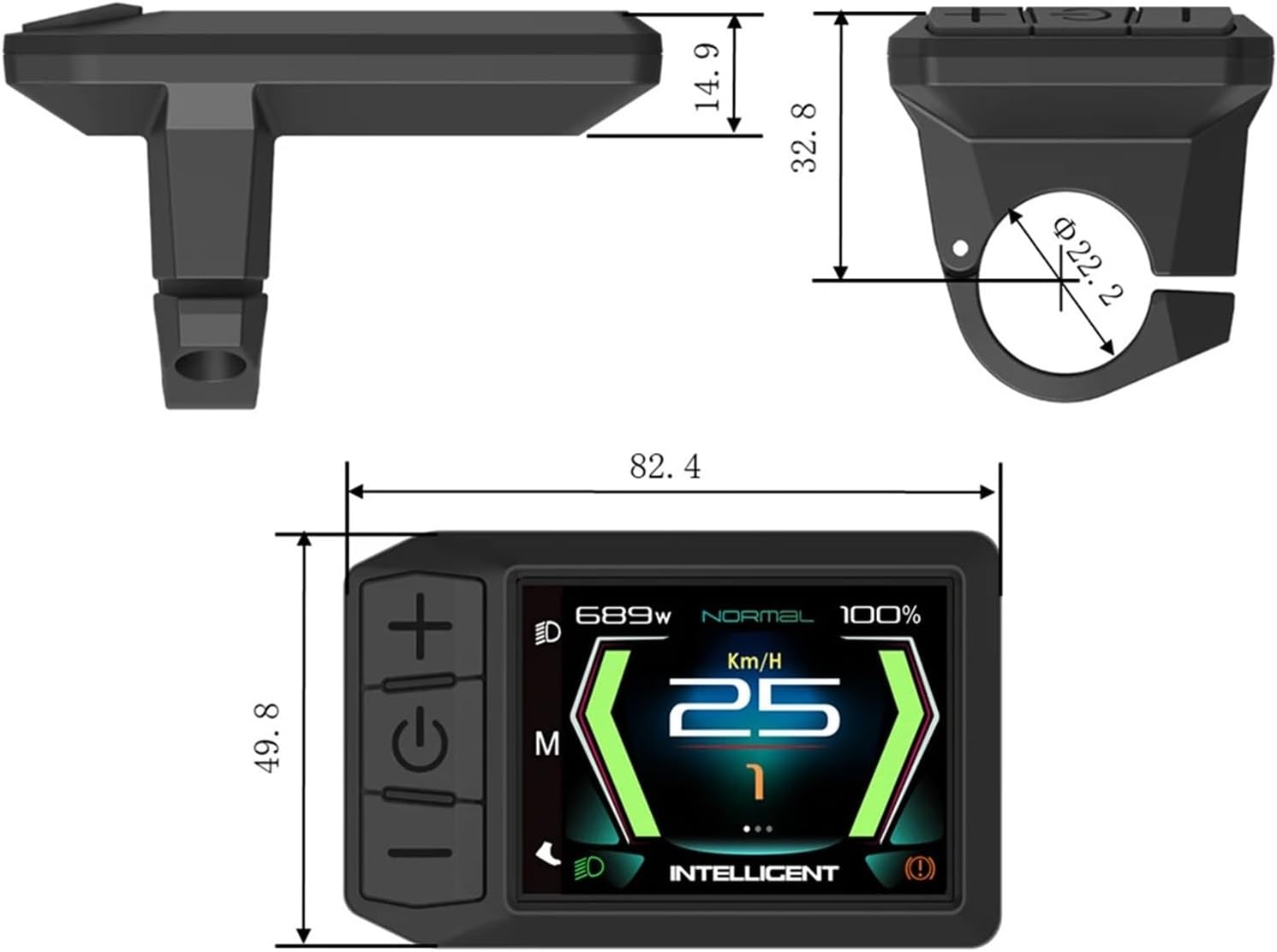
Image 4.2: Dimensional drawing of the 600C-CAN display, illustrating its physical measurements for installation planning.
5. Basic Operation
This section covers the fundamental functions and controls of your 600C-CAN display.
5.1 Button Functions
- Power Button (Middle): Press and hold to turn the display ON/OFF. Short press to cycle through display information (e.g., ODO, Trip, Max Speed).
- Up Button (+): Increases assist level, navigates up in menus, or increases values.
- Down Button (-): Decreases assist level, navigates down in menus, or decreases values.
5.2 Display Interface
The main screen shows real-time riding data. The 600C-CAN supports multiple interface modes, allowing you to choose the layout that best suits your preferences.

Image 5.1: The 600C-CAN display in use, illustrating its key features such as the 2.4-inch HD screen and IP65 waterproof design.

Image 5.2: Examples of the multiple interface modes available on the 600C-CAN display, offering different data layouts and visual styles.
6. Advanced Settings
Access the settings menu to customize various parameters of your e-bike system.
6.1 Accessing the Settings Menu
Typically, press and hold the Power button and the Up button simultaneously for a few seconds to enter the settings menu. Navigation within the menu is done using the Up and Down buttons, and selections are confirmed with a short press of the Power button.
6.2 Wheel Diameter Adjustment
Accurate wheel diameter setting is crucial for correct speed and distance readings.
- Navigate to 'Wheel Diameter' in the settings menu.
- Use the Up/Down buttons to select your e-bike's wheel size (e.g., 26 inch, 27.5 inch, 29 inch).
- Confirm your selection.
6.3 Speed Limit Adjustment
The display allows for adjustment of the maximum assisted speed. Be aware of local regulations regarding e-bike speed limits.
- Enter the 'Speed Limit' setting in the menu.
- Adjust the desired maximum speed using the Up/Down buttons. The display supports speeds up to 35 km/h.
- Confirm your setting.

Image 6.1: The 600C-CAN display highlighting its compatibility with various Bafang motors and its capability to adjust wheel diameter and modify speed limits.
6.4 CAN Protocol
The 600C-CAN display utilizes the CAN (Controller Area Network) protocol for robust communication with compatible Bafang motors. This ensures efficient data exchange and system stability. No user configuration is typically required for the CAN protocol itself, as it operates automatically once connected to a compatible motor.
7. Maintenance
Proper care will extend the life and performance of your display.
- Cleaning: Use a soft, damp cloth to wipe the display screen and body. Avoid abrasive cleaners or solvents.
- Storage: When not in use for extended periods, store the e-bike and display in a dry, temperate environment.
- Inspection: Periodically check the display's mounting and cable connections for any signs of wear or looseness.
8. Troubleshooting
Refer to this section for common issues and their solutions.
| Problem | Possible Cause | Solution |
|---|---|---|
| Display does not turn on | Loose cable connection, e-bike power off, faulty display/motor | Check all cable connections. Ensure e-bike battery is charged and powered on. If issue persists, consult a technician. |
| Incorrect speed/distance readings | Incorrect wheel diameter setting | Adjust the wheel diameter setting in the display's menu to match your e-bike's wheel size. |
| Display shows error code | System malfunction, sensor issue | Refer to your Bafang motor's manual for specific error code meanings. Power cycle the e-bike. If persistent, seek professional assistance. |
| Buttons unresponsive | Moisture ingress, internal fault | Ensure display is dry. Try power cycling the e-bike. If unresponsive, contact support. |
9. Specifications
| Feature | Detail |
|---|---|
| Model Name | FDWHGYFDW-600C-CAN (600C-CAN) |
| Display Type | Color TFT |
| Compatibility | Bafang M510, M600, M500 Mid-Drive Motors |
| Protocol | CAN |
| Waterproof Rating | IP65 |
| Item Weight | 500 Grams |
| Item Package Dimensions | 5.91 x 3.94 x 3.94 inches |
| Suggested Users | Unisex-adult |