
KAYOTOM m22
KAYOTOM m22 Global Walkie Talkie User Manual
Model: m22
Brand: KAYOTOM
1. Introduction
The KAYOTOM m22 Global Walkie Talkie is a state-of-the-art Push-to-Talk Over Cellular (PoC) device designed for seamless, long-distance communication. Utilizing 4G LTE networks, it offers unlimited range wherever cellular coverage is available, making it ideal for nationwide and global team management. This manual provides essential information for setting up, operating, maintaining, and troubleshooting your device.
Key features include:
- PoC Technology: Instant communication via 4G LTE networks for clear voice transmission.
- Unlimited Range: Communicate across states and countries with cellular coverage.
- Lifetime Free SIM Card: Enjoy global PTT intercom connectivity without monthly fees.
- Military-Grade Ruggedized Chassis: Designed for durability with drop resistance and basic dust/water protection.
- Long-Lasting Battery: Equipped with a 3000mAh battery for extended continuous operation and up to seven days of standby time.
- Intuitive Controls: Bright display and simplified button layout for quick access to functions.

Image 1.1: KAYOTOM m22 Global Walkie Talkies (6-Packs).
2. Product Overview and Components
Familiarize yourself with the main components of your KAYOTOM m22 walkie talkie:
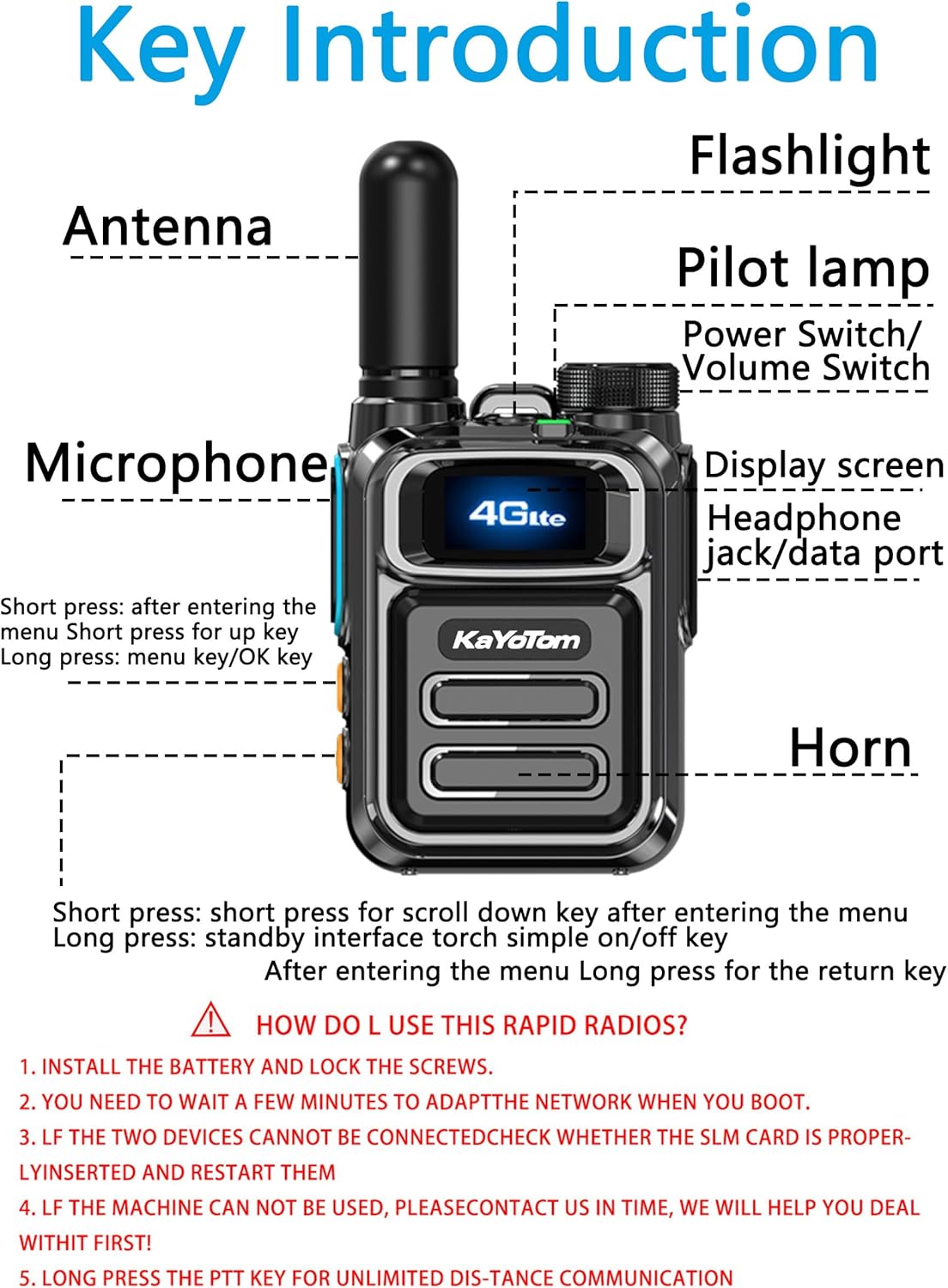
Image 2.1: Key components of the KAYOTOM m22 walkie talkie.
- Antenna: For signal reception and transmission.
- Flashlight: Integrated LED light for illumination.
- Pilot Lamp: Indicator light for device status.
- Power Switch/Volume Switch: Rotary knob to turn the device on/off and adjust volume.
- Display Screen: Shows network status, battery level, and other information.
- Headphone Jack/Data Port: For connecting accessories or data transfer.
- Microphone: For voice input.
- Horn (Speaker): For audio output.
- PTT (Push-to-Talk) Button: Press and hold to transmit voice.
- Menu/OK Key: Short press to enter menu, long press for OK.
- Up Key: Short press for up in menu.
- Down Key: Short press for scroll down in menu, long press for standby interface torch on/off.
- Return Key: Long press to return from menu.
3. Setup
3.1 Unboxing
Upon opening the package, ensure all components are present:

Image 3.1: What's included in the box (may vary by pack size).
- KAYOTOM m22 Walkie Talkie units
- Antennas
- Batteries
- SIM cards (pre-installed or included)
- USB-C charging cables
- Power adapters
- Belt clips and screws
- Wrist straps
- User Manual
3.2 Battery and SIM Card Installation
- Install the battery: Carefully align the battery with the compartment at the back of the walkie talkie and press it into place.
- Lock the screws: Secure the battery cover using the provided screws to ensure a firm connection and basic protection.
- SIM Card: The device comes with a pre-installed SIM card. Ensure it is properly seated in its slot. If you need to access the SIM card slot, remove the SIM card cover as shown in the diagram below.

Image 3.2: SIM card slot location and cover.
3.3 Initial Boot and Network Adaptation
- Turn on the device using the Power Switch/Volume Switch.
- You need to wait a few minutes for the device to adapt to the network when you boot it for the first time or in a new location.
4. Operating Instructions
4.1 Power On/Off and Volume Adjustment
Rotate the Power Switch/Volume Switch clockwise to turn on the device. Continue rotating to increase the volume. Rotate counter-clockwise to decrease volume and turn off the device.
4.2 Push-to-Talk (PTT) Communication
To communicate, simply press and hold the PTT button on the side of the walkie talkie. Speak clearly into the microphone. Release the PTT button to listen for a response. This enables instant group and private calls over the global cellular network.

Image 4.1: Nationwide communication capabilities.
4.3 Basic Functions
The KAYOTOM m22 offers several basic functions for enhanced usability:
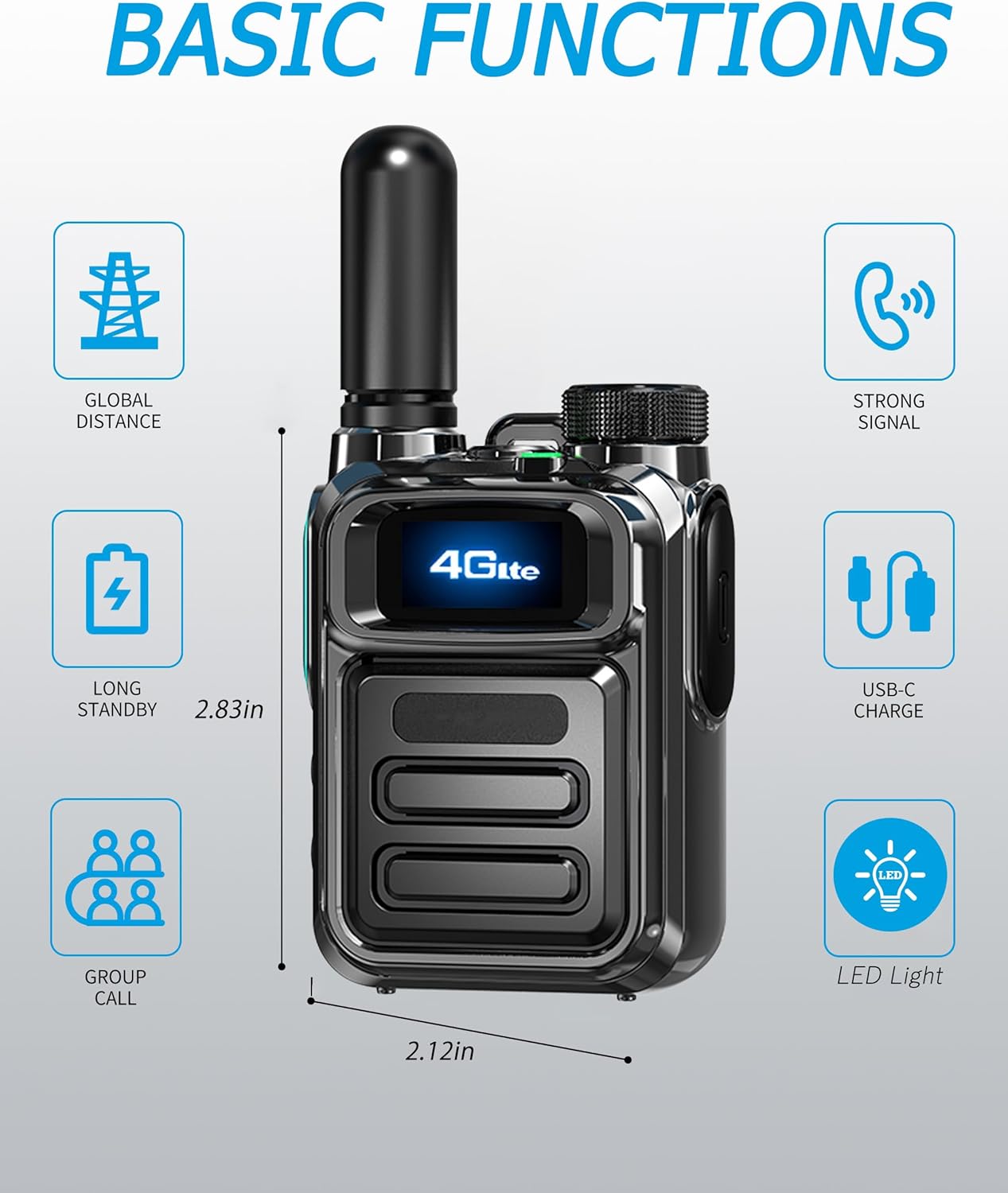
Image 4.2: Overview of basic functions.
- Global Distance: Communicate without range limitations within cellular coverage.
- Strong Signal: Optimized for stable and clear communication.
- Long Standby: Extended battery life for prolonged use.
- USB-C Charge: Convenient and fast charging.
- Group Call: Easily communicate with predefined groups.
- LED Light: Built-in flashlight for low-light conditions.

Image 4.3: The integrated LED flashlight function.
5. Maintenance
5.1 Battery Charging
To charge your walkie talkie, connect the provided USB-C cable to the device's charging port and the other end to the power adapter. Plug the adapter into a standard wall outlet. The device features a 3000mAh battery designed for long-lasting performance.
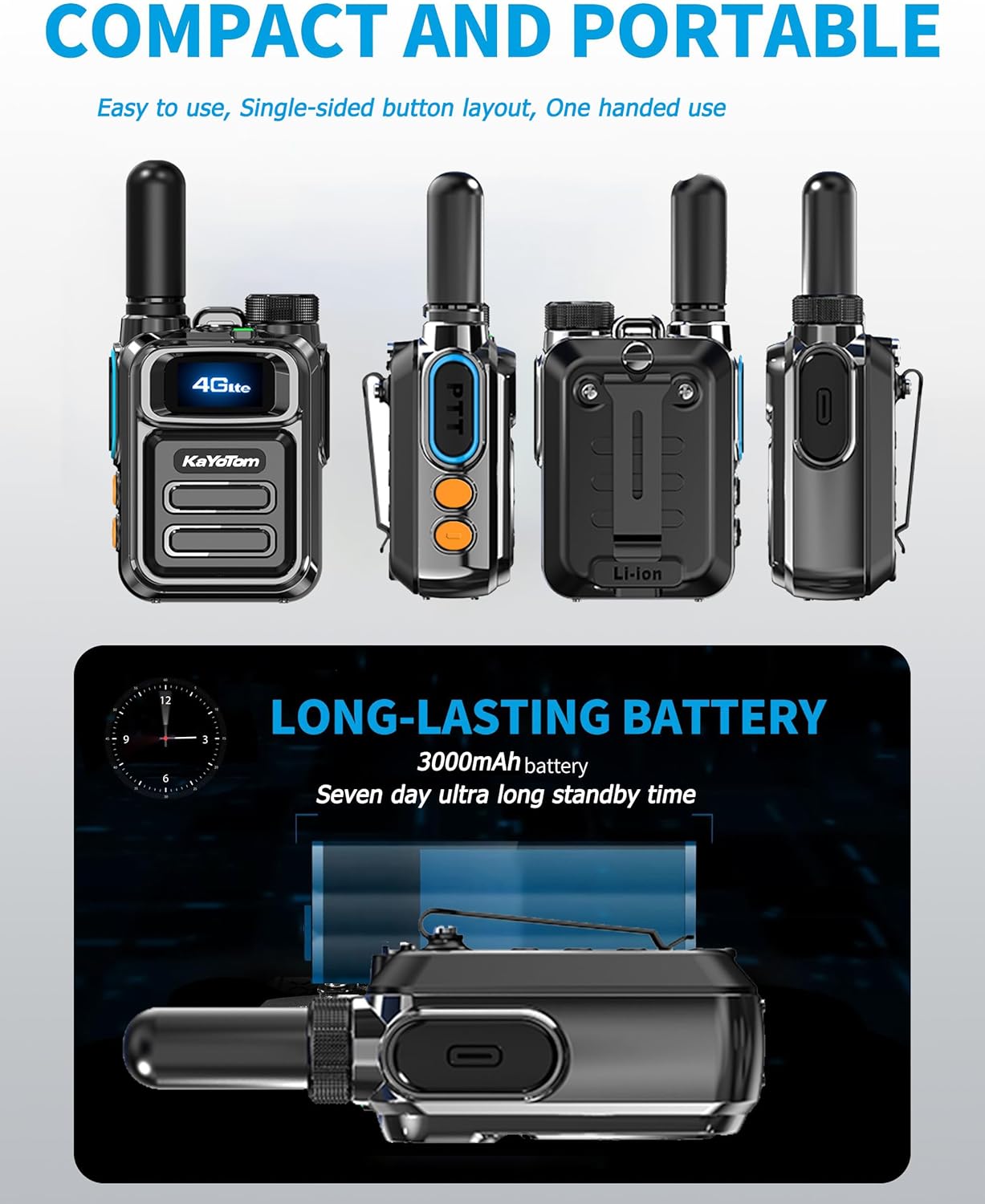
Image 5.1: Compact design and long-lasting battery.
5.2 General Care
- Keep the device clean by wiping it with a soft, dry cloth. Avoid using harsh chemicals or abrasive cleaners.
- While the device has a ruggedized chassis, it is Not Water Resistant. Avoid exposing it to water or excessive moisture.
- Store the walkie talkie in a cool, dry place when not in use.
- Protect the antenna from bending or breaking.
6. Troubleshooting
If you encounter issues with your KAYOTOM m22 walkie talkie, refer to the following common troubleshooting steps:
- No Network Connection: If the device is not connecting to the network, ensure the SIM card is properly inserted. Try restarting the device.
- Cannot Communicate with Other Devices: Verify that both devices are connected to the network and that their SIM cards are properly inserted. Restart both units.
- Device Not Functioning: If the machine cannot be used, please contact customer support for assistance.
- Poor Audio Quality: Ensure you are within an area with good cellular coverage. Check the volume settings.
7. Specifications
| Feature | Specification |
|---|---|
| Brand | KAYOTOM |
| Model Number | m22 |
| Item Weight | 1.04 pounds (0.48 Kilograms) |
| Product Dimensions | 1.22 x 2.08 x 2.83 inches |
| Number of Channels | 1 |
| Special Feature | Long Range (PoC) |
| Talking Range Maximum | 100,000 Miles (Network Dependent) |
| Voltage | 4.2 Volts (DC) |
| Water Resistance Level | Not Water Resistant |
| Battery Capacity | 3000mAh |
| Included Components | Antenna, Battery, SIM Card, Charger, Belt Clip, Wrist Strap |
8. Warranty and Support
8.1 Warranty Information
The KAYOTOM m22 Global Walkie Talkie comes with a 1-year warranty from the date of purchase. This warranty covers manufacturing defects and malfunctions under normal use. Please retain your proof of purchase for warranty claims.
8.2 Customer Support
If you have any questions, require technical assistance, or if your device is not functioning as expected, please contact KAYOTOM customer support. For the quickest resolution, refer to the contact information provided with your product packaging or visit the official KAYOTOM store on Amazon:
Ask a question about this manual
Ask about setup, troubleshooting, compatibility, parts, safety, or missing instructions. Manuals+ will review the question and use this page’s manual context to help answer it.