
1. Introduction
This manual provides comprehensive instructions for the safe and efficient operation of your Jesverty SPS-1352 Universal Compact Bench Power Supply. This AC-to-DC power converter offers an adjustable 9-15V (or fixed 13.8V switchable) output with a robust 50A capacity, featuring Anderson connectors, noise offset control, USB-C ports, and a cigarette plug terminal. Please read this manual thoroughly before use to ensure proper functionality and to prevent damage to the unit or connected devices.

Figure 1: Front view of the Jesverty SPS-1352 Bench Power Supply.
2. Safety Information
To ensure safe operation and prevent personal injury or damage to the power supply and connected equipment, always adhere to the following safety precautions:
- Read all instructions: Familiarize yourself with the operation and safety features before using the device.
- Proper ventilation: Ensure the power supply is placed in a well-ventilated area. Do not block ventilation openings.
- Indoor use only: This device is designed for indoor use in dry environments. Do not expose to rain, moisture, or extreme temperatures.
- Correct voltage input: Connect the power supply only to an AC outlet with the specified voltage and frequency.
- Grounding: Ensure the power supply is properly grounded.
- Avoid overloading: Do not exceed the maximum output current or wattage ratings of the power supply.
- Disconnect power: Always disconnect the power cord from the AC outlet before performing any maintenance or if the unit will be unused for an extended period.
- No user-serviceable parts: Do not attempt to open or repair the unit. Refer all servicing to qualified service personnel.
- Keep away from children: Store the power supply out of reach of children.
- Use appropriate cables: Ensure all connecting cables are rated for the current and voltage being used.
3. Product Overview
The Jesverty SPS-1352 is a compact and robust bench power supply designed for various applications requiring stable DC power. It features multiple output options and precise controls.
3.1 Front Panel Features
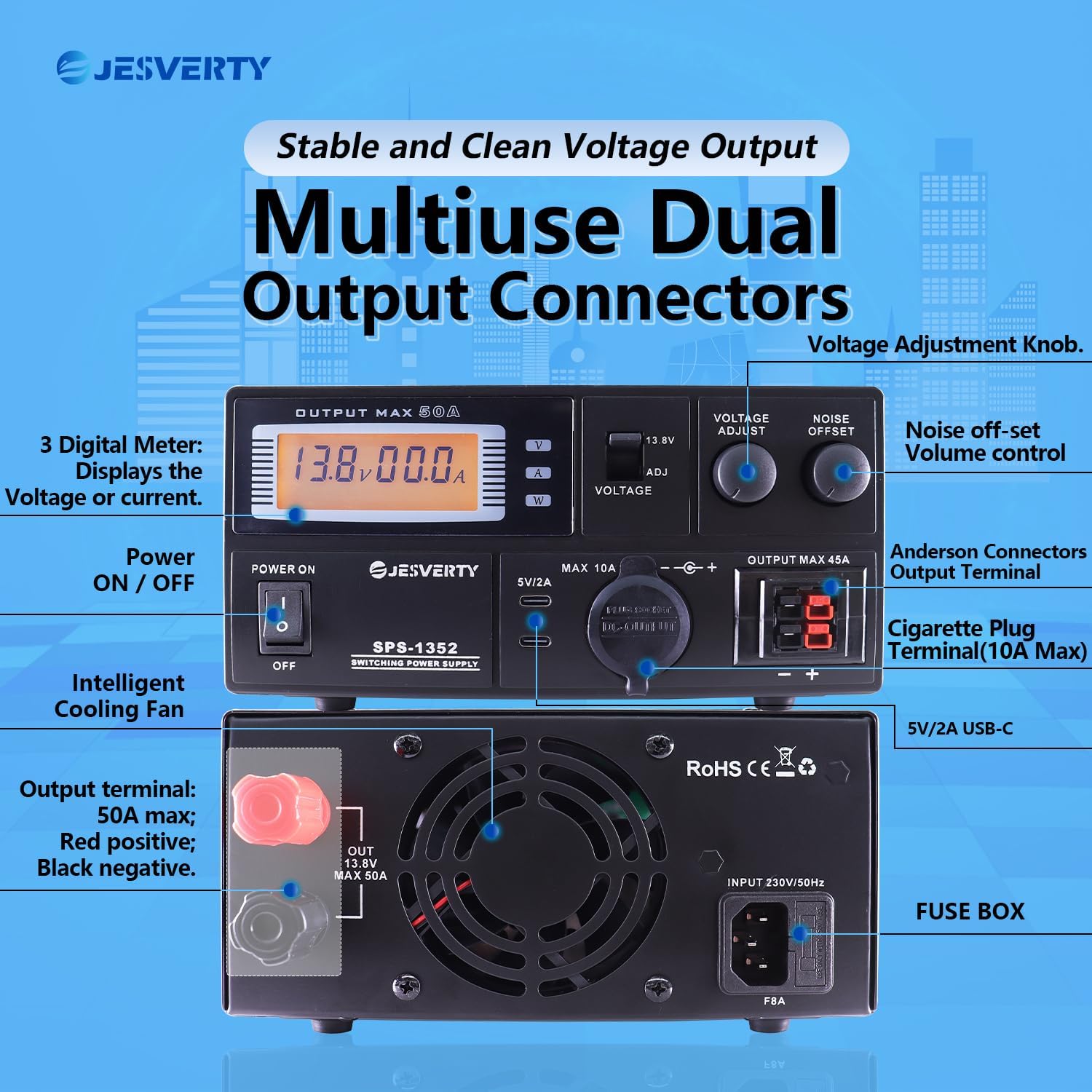
Figure 2: Detailed view of the front panel with key features labeled.
- Digital Meter: Displays real-time voltage and amperage readings.
- Power ON/OFF Switch: Main power control for the unit.
- Voltage Adjust Knob: Fine-tunes the output voltage (9-15V).
- 13.8V Fixed/Adjustable Switch: Toggles between fixed 13.8V output and adjustable voltage mode.
- Noise Offset Knob: Adjusts the noise reduction level to minimize interference.
- USB-C Ports (5V/2A): For charging small electronic devices.
- Cigarette Plug Terminal (MAX 10A): Standard automotive-style power outlet.
- Anderson Connectors Output Terminal (MAX 45A): High-current output for compatible devices.
3.2 Rear Panel Features
Figure 3: Detailed view of the rear panel with key features labeled.
- Output Terminal (MAX 50A): Main high-current output terminals (Red: Positive, Black: Negative).
- Intelligent Cooling Fan: Automatically activates to maintain optimal operating temperature.
- AC Input Socket: For connecting the power cord.
- Fuse Box: Contains the protective fuse for the unit.
4. Setup
Follow these steps to set up your Jesverty SPS-1352 power supply:
- Unpacking: Carefully remove the power supply from its packaging. Inspect for any signs of damage.
- Placement: Place the unit on a stable, flat surface with adequate clearance around all sides for proper ventilation. Ensure it is away from direct sunlight, heat sources, and moisture.
- Power Connection:
- Ensure the power ON/OFF switch on the front panel is in the "OFF" position.
- Connect the provided AC power cord to the AC Input Socket on the rear panel of the power supply.
- Plug the other end of the AC power cord into a suitable grounded wall outlet.
- Connecting Load:
- Before connecting any device, ensure the power supply is OFF and the device to be powered is also OFF.
- Connect your device to the appropriate output terminal (Anderson, Cigarette Plug, or Rear Terminal) ensuring correct polarity (positive to positive, negative to negative).
- Verify that the current draw of your connected device does not exceed the maximum rating of the chosen output terminal or the overall power supply.

Figure 4: The compact and rugged housing construction, illustrating various power cord types that may be included depending on region.
5. Operating Instructions
Once the power supply is set up and your devices are connected, follow these steps for operation:
- Power On: Flip the Power ON/OFF switch to the "ON" position. The digital meter will illuminate, displaying the current voltage and amperage.
- Voltage Selection:
- For a fixed 13.8V output, ensure the 13.8V Fixed/Adjustable switch is in the "13.8V" position.
- For adjustable voltage (9-15V), set the switch to the "ADJ" position. Then, rotate the Voltage Adjust knob to set the desired output voltage. Observe the digital meter for the precise voltage reading.
- Connecting Devices:
- Anderson Connectors: Use for high-current devices up to 45A. Ensure secure connection.
- Cigarette Plug Terminal: Suitable for devices up to 10A.
- Rear Output Terminal: Provides the full 50A capacity. Ensure proper wiring with appropriate gauge wire.
- USB-C Ports: For charging USB-powered devices (5V/2A).
- Noise Offset Adjustment: If experiencing interference, particularly with radio communications equipment, slowly rotate the Noise Offset knob to find the optimal setting that minimizes noise.
- Monitoring: Continuously monitor the digital meter for voltage and amperage readings to ensure your devices are operating within their specified limits and the power supply is not overloaded.
- Power Off: When finished, turn off all connected devices first, then flip the Power ON/OFF switch on the power supply to the "OFF" position. Disconnect the power cord from the wall outlet if the unit will not be used for an extended period.
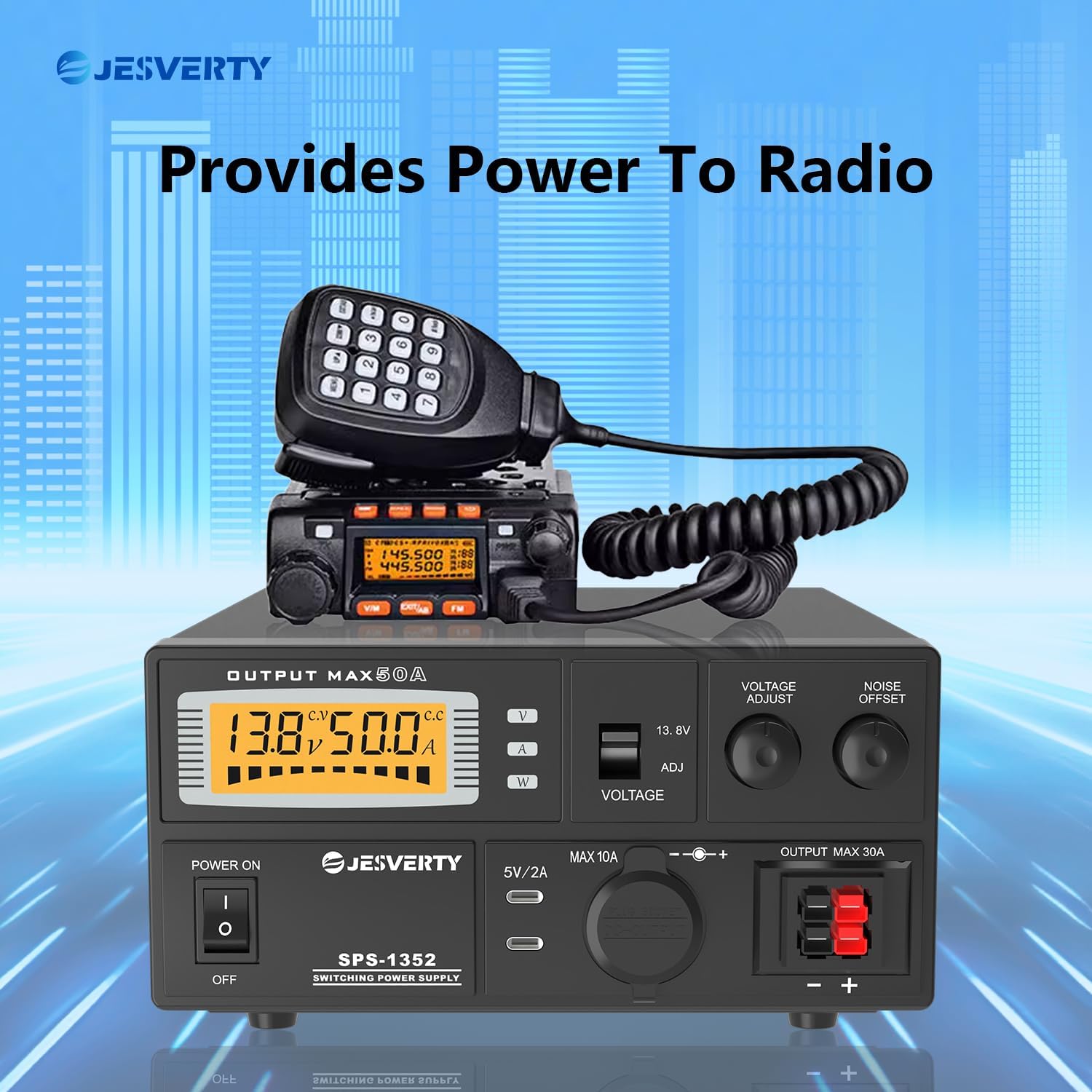
Figure 5: The Jesverty SPS-1352 providing stable power to a radio transceiver.

Figure 6: Examples of the Jesverty SPS-1352 in radio communications environments.
6. Maintenance
Regular maintenance helps ensure the longevity and reliable operation of your power supply.
- Cleaning: Disconnect the power supply from the AC outlet before cleaning. Use a soft, dry cloth to wipe the exterior. Do not use liquid cleaners or solvents.
- Ventilation: Periodically check that the ventilation openings are free from dust and debris. Use compressed air to gently clear any blockages if necessary.
- Cable Inspection: Regularly inspect the power cord and all connecting cables for any signs of damage, fraying, or loose connections. Replace damaged cables immediately.
- Fuse Replacement: If the unit fails to power on, the fuse may need replacement. Disconnect the power cord, open the fuse box on the rear panel, and replace the fuse with one of the exact same type and rating (refer to specifications).
7. Troubleshooting
If you encounter issues with your Jesverty SPS-1352, refer to the following common problems and solutions:
| Problem | Possible Cause | Solution |
|---|---|---|
| Unit does not power on. |
|
|
| No output voltage. |
|
|
| Output current is lower than expected. |
|
|
| Excessive noise/interference. |
|
|
8. Specifications
Key technical specifications for the Jesverty SPS-1352 power supply:
| Feature | Detail |
|---|---|
| Brand | Jesverty |
| Model | SPS-1352 |
| Output Voltage | Adjustable 9-15V DC (Switchable to Fixed 13.8V DC) |
| Output Amperage | 50 Amps (Continuous) |
| Output Wattage | 552 Watts (Maximum 690 Watts) |
| Input Voltage | AC 230V / 50Hz (Typical, check unit label for specific range) |
| Connectors | Anderson Powerpole (45A), Cigarette Plug (10A), Rear Terminal (50A), Dual USB-C (5V/2A) |
| Material | Aluminium |
| Item Weight | 3 Kilograms |
| Dimensions (L x W x H) | Approx. 280mm x 190mm x 90mm (11in x 7.5in x 3.54in) |
| Cooling | Intelligent Cooling Fan |
| Safety Features | Overheat, Short-circuit, Amperage Surge Protection, Overload/Fuse Protection |
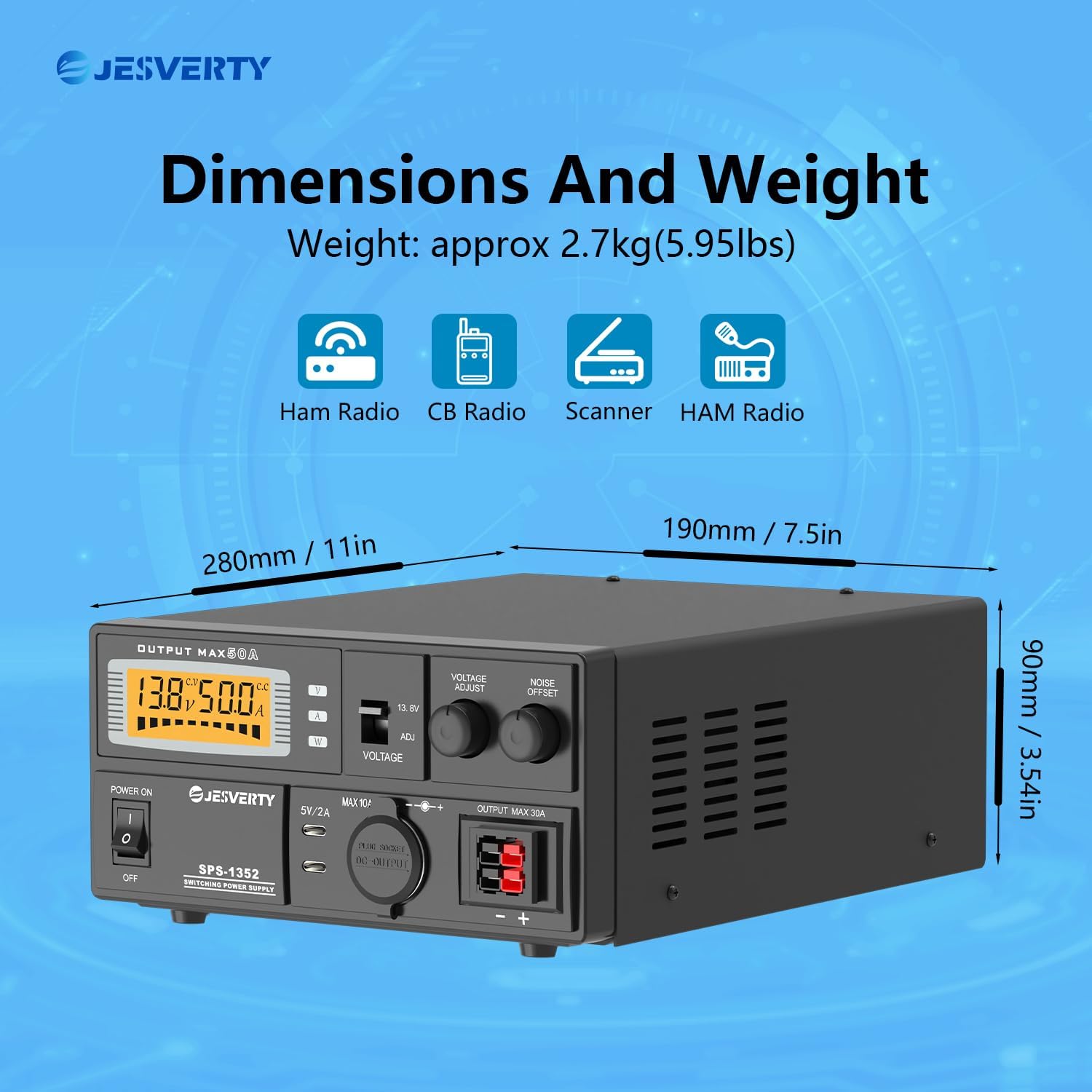
Figure 7: Dimensions and weight of the Jesverty SPS-1352 power supply.
9. Customer Support
For technical assistance, warranty information, or service inquiries, please contact Jesverty customer support through your purchase platform or the official Jesverty website. Please have your model number (SPS-1352) and purchase date available when contacting support.


