
1. Introduction
The CCHKFEI CD202 is a versatile portable CD player designed for various audio playback needs. It features CD playback, bidirectional Bluetooth connectivity, FM radio, USB input, AUX input/output, and optical output. This manual provides detailed instructions for setting up, operating, and maintaining your device.

Image 1: CCHKFEI CD202 Portable CD Player. This image displays the device with its lid open, revealing a CD, and highlights the integrated speakers.
2. Package Contents
Before using your CD202 player, please verify that all items are present in the package:
- 1x CCHKFEI CD202 Portable CD Player
- 1x Remote Control (AAA batteries not included)
- 1x Type-C Charging Cable
- 1x 3.5mm AUX Cable
- 1x Wired Earphone
- 1x User Manual

Image 2: Package contents of the CD202 player, showing the main unit, remote control, wired earphones, Type-C charging cable, and 3.5mm AUX cable.
2.1 Unboxing Video
Video 1: This video demonstrates the unboxing process of the CCHKFEI CD202 Portable CD Player, showing each component as it is removed from the packaging.
3. Setup
3.1 Charging the Device
The CD202 player features a built-in 4000mAh rechargeable battery. Before first use, fully charge the device using the provided Type-C charging cable.
- Connect the Type-C cable to the DC 5V port on the player.
- Connect the other end of the cable to a USB power adapter (not included) or a computer USB port.
- The charging indicator will show the charging status.

Image 3: The CD202 player connected to a power source via its USB-C port, illustrating the charging process and battery capacity.
3.2 Connecting Accessories
The CD202 offers multiple connection options:
- 3.5mm Headphone Jack: Connect wired headphones for private listening.
- 3.5mm AUX Port: Use the provided AUX cable to connect to external speakers or car audio systems.
- USB/TF Port: Insert a USB flash drive or TF card for playing digital audio files.
- Fibre Optic Port: Connect to home theater systems or external decoders for high-quality audio output.

Image 4: Rear panel of the CD202 player, highlighting the various input and output ports for connectivity.
4. Operating Instructions
4.1 Power On/Off
Press and hold the power button on the device or remote control to turn the player on or off.
4.2 CD Playback
- Open the CD compartment lid.
- Place a CD (CD, CD-R, CD-RW, MP3, WMA formats supported) onto the spindle, ensuring it is seated correctly.
- Close the lid. The player will automatically detect the disc and begin playback.
- Use the play/pause, skip forward/backward buttons on the device or remote to control playback.

Image 5: The CD202 player actively playing a compact disc, illustrating the disc compartment and spinning CD.
4.3 Bluetooth Functionality
The CD202 supports bidirectional Bluetooth, acting as both a transmitter and a receiver.
4.3.1 Bluetooth Transmitter Mode
To transmit audio from the CD player to external Bluetooth speakers or headphones:
- Ensure the CD player is in CD mode.
- Press and hold the Bluetooth button on the device or remote until the Bluetooth icon appears on the display.
- The player will search for nearby Bluetooth devices.
- Put your external Bluetooth speaker or headphones into pairing mode.
- Once connected, audio from the CD player will be transmitted to the external device.

Image 6: Illustration of the CD202 player transmitting audio via Bluetooth to a pair of headphones.
4.3.2 Bluetooth Receiver Mode
To receive audio from a smartphone, tablet, or other Bluetooth-enabled device:
- Switch the CD player to Bluetooth mode.
- On your external device, enable Bluetooth and search for "CD player".
- Select "CD player" to connect. A confirmation tone will sound upon successful connection.
- Audio from your external device will now play through the CD202's speakers.

Image 7: Illustration of the CD202 player receiving audio via Bluetooth from a smartphone.
4.4 FM Radio
To use the FM radio function:
- Switch the player to FM mode.
- Use the tuning buttons to scan for available radio stations (87.5-108 MHz band).
- Stations can be saved as presets for quick access.
4.5 USB Playback
Insert a USB flash drive into the USB port. The player will automatically switch to USB mode and begin playing compatible audio files.
4.6 AUX Connection
Use the 3.5mm AUX cable to connect the player to other audio devices. The AUX port functions as both an input and an output depending on the selected mode.
4.7 Optical Output
For enhanced audio quality, connect the player to a home theater system or external decoder using an optical cable (not included).

Image 8: The CD202 player connected to a larger speaker system using an optical cable, demonstrating its use in a home theater setup.
4.8 Controls
The CD202 can be operated using the on-device buttons and the included remote control.
- Volume Knob: Rotate to adjust the volume level.
- Mode Button (M): Cycle through different playback modes (CD, Bluetooth, FM, USB, AUX, Optical).
- Play/Pause, Skip Buttons: Control audio playback.
- A-B Repeat: Repeat a specific section of audio during CD playback.

Image 9: The remote control for the CD202 player, detailing its buttons for comprehensive control over all functions.
4.9 Sound Quality
The CD202 features a dual speaker system designed to deliver clear audio. For optimal sound, ensure the device is placed on a stable surface to minimize vibrations.
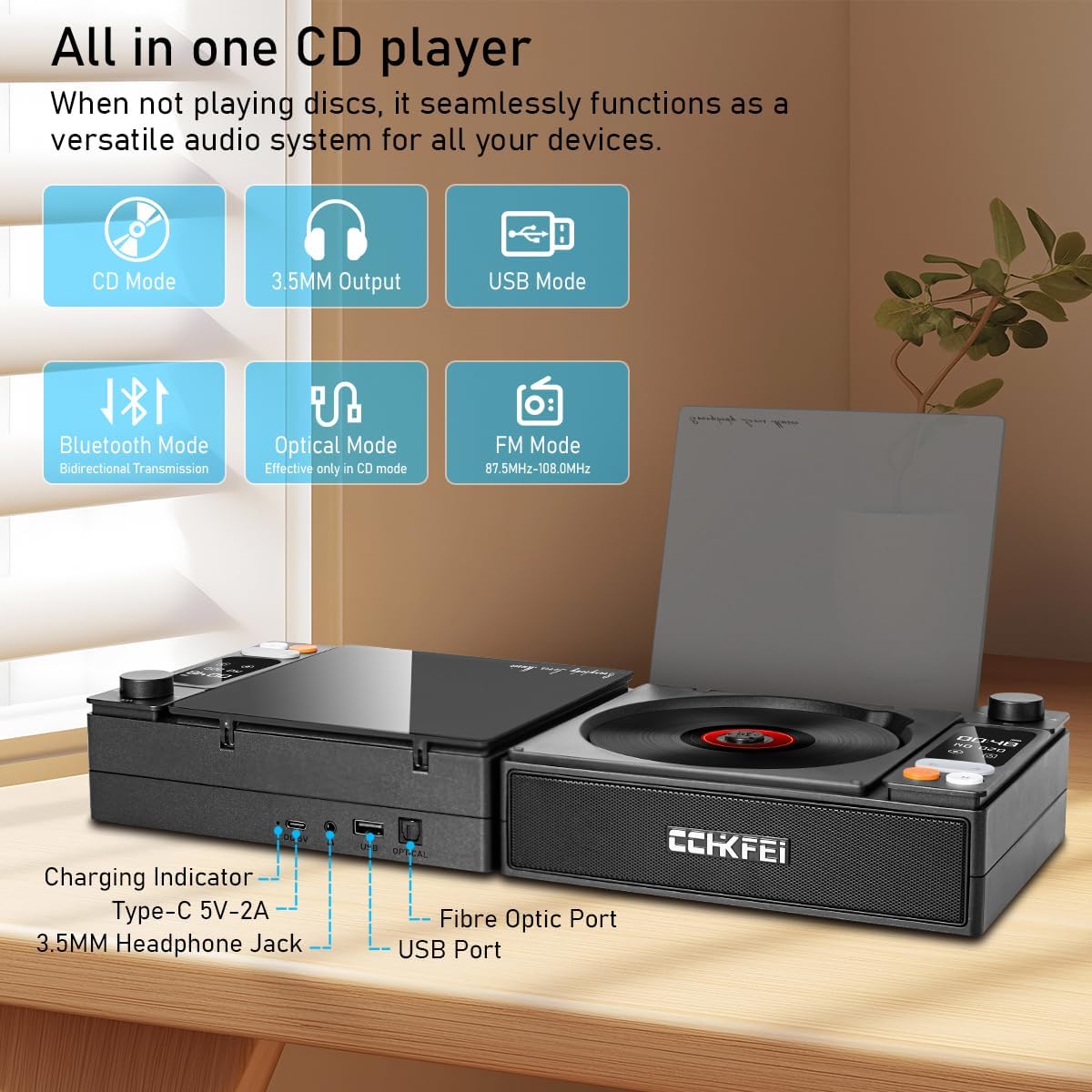
Image 10: The CD202 player in use, emphasizing its sound output through dual speakers and HiFi audio processing.
4.10 Features Overview Video
Video 2: This video provides a concise overview of the key features and functionalities of the CCHKFEI CD202 Portable CD Player.
5. Maintenance
5.1 Cleaning the Device
- Wipe the exterior of the player with a soft, dry cloth.
- Do not use abrasive cleaners or solvents.
- For the CD lens, use a specialized CD lens cleaner kit.
5.2 Battery Care
- To prolong battery life, avoid fully discharging the battery frequently.
- Charge the device regularly, even if not in use for extended periods.
- Store the device in a cool, dry place.
5.3 Disc Handling
- Always handle CDs by their edges to avoid fingerprints and scratches.
- Store CDs in their cases when not in use.
- Clean dirty CDs with a soft, lint-free cloth, wiping from the center outwards.
6. Troubleshooting
If you encounter issues with your CD202 player, refer to the following common problems and solutions:
| Problem | Possible Cause | Solution |
|---|---|---|
| Player does not power on | Low battery; Power adapter not connected | Charge the device; Ensure power adapter is securely connected |
| CD does not play | Disc is dirty or scratched; Disc inserted incorrectly; Incorrect mode selected | Clean or replace disc; Reinsert disc correctly; Switch to CD mode |
| No sound from speakers/headphones | Volume too low; Headphones/speakers not connected properly; Incorrect mode selected | Increase volume; Reconnect headphones/speakers; Verify correct mode (e.g., Bluetooth, AUX) |
| Bluetooth pairing fails | Device not in pairing mode; Too far from player; Interference | Ensure both devices are in pairing mode; Move closer; Reduce interference sources |
7. Specifications
- Model Number: L-CD202
- Product Dimensions: 7.3 x 5.7 x 2.1 inches
- Item Weight: 1.4 pounds
- Battery: 4000mAh (1 AAA battery required for remote, included)
- Connectivity Technology: Bluetooth
- Special Features: Anti-Skip Protection, Bidirectional Bluetooth, Built-In FM Radio, Portable, Rechargeable, Dual Speakers, Optical Output, USB Playback, AUX
- Supported Disc Formats: CD, CD-R, CD-RW, MP3, WMA
- FM Radio Frequency: 87.5-108 MHz
8. Warranty and Support
For warranty information and technical support, please refer to the contact details provided with your purchase or visit the official CCHKFEI website. Keep your purchase receipt for warranty claims.