
WAVERIDERXXUS
ION Block Rocker Icon Portable Bluetooth Speaker User Manual
Model: WAVERIDERXXUS
Introduction
Thank you for purchasing the ION Block Rocker Icon All-Terrain Portable Bluetooth Speaker. This manual provides important information regarding the setup, operation, maintenance, and troubleshooting of your new speaker. Please read this manual thoroughly before using the product to ensure proper operation and to maximize its lifespan.

Figure 1: ION Block Rocker Icon Portable Bluetooth Speaker, showcasing its robust design and integrated lighting.
Safety Information
- Do not expose the unit to extreme temperatures or humidity.
- Do not use near water or in excessively wet conditions, despite its weather-resistant design.
- Ensure proper ventilation; do not block any ventilation openings.
- Use only attachments/accessories specified by the manufacturer.
- Refer all servicing to qualified service personnel.
- Keep the speaker away from direct sunlight and heat sources.
Package Contents
- ION Block Rocker Icon Speaker
- Power Cable
- Quickstart Guide (not included in this manual)
- Safety & Warranty Manual (not included in this manual)
Setup
Charging the Battery
The Block Rocker Icon comes with a built-in rechargeable lithium-ion battery. Before first use, fully charge the battery for optimal performance. Connect the power cable to the speaker's power input and then to a power outlet. The charging indicator light will show the charging status. A full charge provides up to 30 hours of playback time, depending on usage.
Initial Power On
Press and hold the Power button located on the control panel to turn the speaker on or off. The display will illuminate, indicating the unit is ready for use.

Figure 2: Top control panel of the Block Rocker Icon, featuring the power button, display, and FM radio controls.
Operating Instructions
Bluetooth Connection
- Ensure your Block Rocker Icon is powered on.
- Press the Bluetooth button on the control panel. The Bluetooth icon on the display will flash, indicating it's in pairing mode.
- On your Bluetooth-enabled device (smartphone, tablet, laptop), go to the Bluetooth settings and select "ION Block Rocker Icon" from the list of available devices.
- Once paired, the Bluetooth icon on the speaker's display will stop flashing and remain solid. You can now stream audio wirelessly.
The speaker supports Bluetooth 5.2 and has a wireless range of up to 100 feet (30.5 meters).
FM Radio Operation
To use the FM radio, press the FM button on the control panel. Use the tuning buttons to scan for available radio stations. The current frequency will be displayed on the screen.
Stereo-Link Function
For a true stereo sound experience, you can link two Block Rocker Icon speakers together using the proprietary Stereo-Link technology. Refer to the detailed instructions in the full manual for pairing two units.

Figure 3: Key features of the Block Rocker Icon, highlighting its Stereo-Link capability for connecting two speakers.
Microphone Input (PA Function)
The Block Rocker Icon features a microphone input, allowing it to function as a portable PA system. Connect a standard 1/4-inch microphone (not included) to the microphone input jack. Adjust the microphone volume using the dedicated knob on the control panel.
USB-A Charge Port
Use the built-in USB-A port to charge your external devices, such as smartphones or tablets. This port provides power output for convenience on the go.

Figure 4: Overview of additional features including the USB-A charge port and microphone connectivity.
ION Sound Control App
Enhance your experience by downloading the ION Sound Control app from your device's app store. The app allows for remote control of various speaker functions, including lighting effects, EQ adjustments, and more.
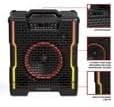
Figure 5: The Block Rocker Icon's front panel with dynamic multi-colored lights, controllable via the ION Sound Control app.
Maintenance
- Cleaning: Use a soft, dry cloth to clean the exterior of the speaker. Do not use abrasive cleaners or solvents.
- Battery Care: For optimal battery life, fully charge the speaker before long periods of storage. Recharge the battery every 3 months if not in regular use.
- Storage: Store the speaker in a cool, dry place away from direct sunlight and extreme temperatures.
- Weather Resistance: While the speaker is IPX5 weather-resistant, it is not waterproof. Avoid submerging it in water or exposing it to heavy rain for extended periods. Ensure all port covers are securely closed when used outdoors.
Troubleshooting
| Problem | Solution |
|---|---|
| No power | Ensure the power cable is securely connected and the outlet is functional. Check if the battery needs charging. |
| No sound from Bluetooth device | Ensure the speaker is paired correctly and the volume on both the speaker and your device is turned up. Try unpairing and re-pairing the device. |
| Bluetooth connection drops | Move your device closer to the speaker. Avoid obstacles between the speaker and the device. Ensure no other devices are interfering with the Bluetooth signal. |
| FM radio static | Adjust the speaker's position to improve reception. Try scanning for a stronger signal. |
| Microphone not working | Ensure the microphone is securely plugged in and its volume knob is turned up. Test with another microphone if possible. |
Specifications
| Feature | Detail |
|---|---|
| Model Name | WAVERIDERXXUS |
| Speaker Type | Portable, Outdoor |
| Connectivity | Bluetooth 5.2, Proprietary Speaker Link Technology |
| Bluetooth Range | Up to 100 feet (30.5 meters) |
| Power Source | Battery Powered (Rechargeable Lithium-ion) |
| Battery Life | Up to 30 hours |
| Woofer Diameter | 10 inches |
| Control Method | On-unit controls, ION Sound Control App |
| Additional Features | FM Radio, Microphone Input, USB-A Charge Port, Multi-colored Lights, IPX5 Weather-Resistant |
| Product Dimensions (L x W x H) | 5.5 x 9.1 x 9.1 inches |
| Item Weight | 24 pounds |

Figure 6: Diagram illustrating the dimensions of the Block Rocker Icon speaker.
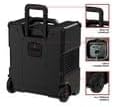
Figure 7: The integrated top handle and all-terrain wheels, designed for easy transport of the speaker.
Warranty and Support
The ION Block Rocker Icon comes with a Limited Warranty. For detailed warranty terms and conditions, please refer to the separate Safety & Warranty Manual included with your product or visit the manufacturer's official website. For technical support, troubleshooting assistance beyond this manual, or to inquire about replacement parts, please contact the manufacturer's customer support.
Manufacturer: Generic
For the most up-to-date support information, visit www.ionaudio.com/support.