
1. Introduction
This manual provides essential instructions for the safe and efficient use of your XL Perform Tools 553997 6V/12V 6A Smart Car Battery Charger. Please read this manual thoroughly before operating the device to ensure proper function and to prevent damage or injury. This charger is designed for charging and maintaining 6V and 12V batteries found in family cars and utility vehicles.
2. Safety Information
WARNING: Read all safety warnings and instructions before use. Failure to follow the warnings and instructions may result in electric shock, fire, and/or serious injury.
- Always wear eye protection and protective clothing when working with batteries.
- Ensure adequate ventilation when charging batteries to prevent accumulation of explosive gases.
- Never charge a frozen battery.
- Keep the charger away from moisture, rain, and flammable materials.
- Do not operate the charger if it has been dropped or damaged.
- Disconnect the AC power before making or breaking connections to the battery.
- This appliance is not intended for use by persons (including children) with reduced physical, sensory or mental capabilities, or lack of experience and knowledge, unless they have been given supervision or instruction concerning use of the appliance by a person responsible for their safety.
- The charger is equipped with protection against reverse polarity, short circuits, overcharge, and overheating. However, always ensure correct connection.
3. Product Overview
The XL Perform Tools 553997 is an intelligent battery charger designed for optimal battery health and performance. It features automatic charge control, maintenance mode, and a clear digital display.
Key Features:
- Intelligent Charging: Automatic charge control, stop, and maintenance functions. Automatically adjusts charging current up to 6A.
- Digital Display: Provides clear and instant readings of charge level, battery voltage, and battery type.
- Wide Compatibility: Supports 6V / 12V batteries including Lead-Acid, Deep Cycle, AGM, GEL, Lithium, and LiFePO4 types. Recommended for capacities between 4 Ah and 130 Ah.
- Safety Protections: Features reverse polarity protection, short-circuit protection, overcharge protection, and overheating protection.
- IP65 Rated: Protected against dust and water jets.
- Supply Mode: Provides power during battery changes to preserve vehicle data.
Package Contents:
- 1 x XL Perform Tools 553997 Battery Charger
- 1 x Set of Battery Clamps (Red for positive, Black for negative)
- 1 x User Manual
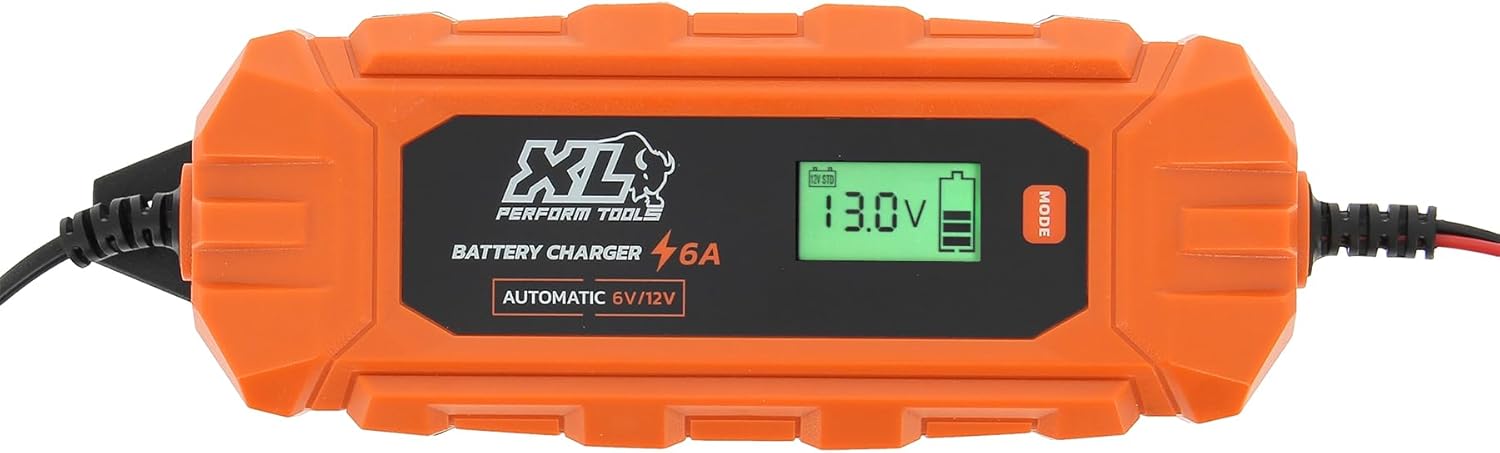
Figure 1: Front view of the XL Perform Tools 553997 Smart Battery Charger, displaying its digital screen and robust orange casing.

Figure 2: The smart battery charger highlighting its intelligent control and automatic current management, suitable for batteries up to 130Ah.

Figure 3: The charger in use, connected to a vehicle battery, demonstrating its clear digital display showing charging status (14.5V).

Figure 4: The complete package, showing the battery charger, power cable, and red and black battery clamps.
4. Specifications
| Feature | Specification |
|---|---|
| Model | 553997 |
| Input Voltage | 220-240V, 50Hz |
| Charging Voltage | 6V / 12V |
| Charging Current (Max) | 6A |
| Max Power | 100W |
| Compatible Battery Types | Lead-Acid, Deep Cycle, AGM, GEL, Lithium, LiFePO4 |
| Battery Capacity Range | 4 Ah - 130 Ah |
| Protection Rating | IP65 (Dust and water jet protected) |
| Cable Length | 3 meters |
| Dimensions (L x W x H) | 11 x 32.5 x 10 cm |
| Weight | 821 g |
| Operating Temperature | -20°C to 40°C |
5. Setup
Before connecting the charger, ensure the area is well-ventilated and free from flammable materials. Verify that the battery is not damaged or frozen.
- Identify Battery Terminals: Locate the positive (+) and negative (-) terminals on your vehicle's battery. The positive terminal is usually larger and marked with a plus sign, while the negative terminal is marked with a minus sign.
- Connect to Battery:
- Connect the RED (+) clamp from the charger to the POSITIVE (+) battery terminal.
- Connect the BLACK (-) clamp from the charger to the NEGATIVE (-) battery terminal. If charging a battery installed in a vehicle, connect the black clamp to the vehicle chassis away from the battery and fuel line.
- Ensure connections are secure and free from corrosion.
- Connect to Power: Plug the charger's AC power cord into a standard 220-240V wall outlet. The charger will power on, and the digital display will illuminate.
- Select Mode (if necessary): The charger is intelligent and often detects the battery type and voltage automatically. However, if specific modes are required (e.g., for Lithium batteries or Supply Mode), use the "MODE" button on the charger to cycle through available options until the desired mode is displayed.
6. Operating Instructions
Charging a Battery:
- Follow the "Setup" instructions to connect the charger to the battery and power outlet.
- The charger will automatically begin the charging process, detecting the battery voltage (6V or 12V) and type. The digital display will show the current voltage and charging status.
- Monitor the display. The charger will automatically adjust the charging current (up to 6A) and switch to maintenance mode once the battery is fully charged.
- Once charging is complete and the charger indicates full charge or maintenance mode, unplug the charger from the AC outlet first.
- Then, disconnect the BLACK (-) clamp from the battery (or vehicle chassis), followed by the RED (+) clamp from the battery.
Maintenance Charging:
The charger can be left connected for extended periods to maintain battery charge, especially for vehicles stored for long durations. After a full charge, the charger automatically enters maintenance mode, providing a trickle charge to keep the battery at optimal levels.
- Connect the charger as described in the "Setup" section.
- Allow the charger to complete its full charging cycle.
- The charger will automatically transition to maintenance mode. You can leave it connected to keep the battery topped up.
Supply Mode:
This mode is useful when changing a vehicle's battery, as it provides a continuous low-current power supply to the vehicle's electrical system, preventing loss of settings (e.g., radio presets, ECU data).
- Connect the charger to the vehicle's battery terminals (or designated power points) before disconnecting the old battery.
- Select "Supply Mode" using the MODE button if the charger does not automatically detect it.
- Once the new battery is installed, disconnect the charger from the vehicle, then unplug from the AC outlet.
7. Maintenance
- Cleaning: Disconnect the charger from power and battery before cleaning. Wipe the exterior with a soft, damp cloth. Do not use harsh chemicals or abrasive cleaners.
- Storage: Store the charger in a cool, dry place when not in use. Keep cables neatly coiled to prevent damage.
- Inspection: Regularly inspect the charger, cables, and clamps for any signs of damage, wear, or corrosion. Do not use if any part is damaged.
- Battery Terminals: Ensure battery terminals are clean and free of corrosion for optimal connection.
8. Troubleshooting
| Problem | Possible Cause | Solution |
|---|---|---|
| Charger does not turn on. | No power from outlet; faulty connection; internal fault. | Check AC power outlet with another device. Ensure power cord is securely plugged in. If problem persists, contact support. |
| Charger not charging battery. | Incorrect battery connection; battery too deeply discharged; incompatible battery type; faulty battery. | Verify positive (+) and negative (-) connections. Ensure battery voltage is within charger's range. Check battery health. |
| Error message on display (e.g., "Reverse Polarity"). | Battery clamps connected incorrectly. | Disconnect from AC power, then correct the battery clamp connections (Red to +, Black to -). Reconnect AC power. |
| Charger gets hot during operation. | Normal operation; poor ventilation; excessive load. | Some heat is normal. Ensure adequate ventilation around the charger. If overheating is severe, disconnect and allow to cool. |
9. Warranty & Support
XL Perform Tools products are manufactured to high-quality standards. For warranty information, please refer to the warranty card included with your purchase or visit the official XL Perform Tools website. Keep your proof of purchase for warranty claims.
For technical support, troubleshooting assistance, or to inquire about replacement parts, please contact XL Perform Tools customer service through their official channels. Contact information can typically be found on the product packaging or the brand's website.
Manufacturer: IMPEX SAS