
1. Product Overview
The ARCCAPTAIN TIG 5-Pin Welding Foot Pedal is designed to provide remote amperage control for compatible welding machines, specifically the ARCCAPTAIN MIG205 MP. This pedal allows for precise adjustment of welding current, enhancing control and efficiency during TIG welding operations.

Image 1.1: ARCCAPTAIN TIG 5-Pin Welding Foot Pedal with 10-foot cable.
Key Features:
- Compatibility: Specifically designed for the ARCCAPTAIN MIG205 MP TIG welding machine. Verify your welder supports remote amperage control.
- Precision Control: Features a 12-tooth alloy gear potentiometer for fine current adjustment, with a range of 0 to 200 Amps.
- Hands-Free Operation: Enables amperage control without using hands, improving workflow and productivity.
- Durable Construction: Rugged outer casing for extended lifespan.
- Cable Length: Equipped with a 10-foot (3-meter) wire cable for flexible placement.
2. Setup and Installation
Proper installation ensures safe and effective operation of your foot pedal.
Compatibility Note:
This foot pedal is exclusively compatible with the ARCCAPTAIN MIG205 MP welding machine. Do not attempt to use it with other welding machines unless compatibility is explicitly confirmed by ARCCAPTAIN.

Image 2.1: Visual reminder of compatibility with ARCCAPTAIN MIG205 MP.
Installation Steps:
- Locate the Remote Control Port: Identify the 5-pin remote control port on your ARCCAPTAIN MIG205 MP welding machine.
- Connect Pedal Cable to Welder: Plug one end of the foot pedal's 5-pin control cord into the corresponding port on the welding machine. Ensure a secure connection.
- Connect Pedal Cable to Pedal: Insert the other end of the control cord into the input port on the foot pedal. Ensure it is firmly seated.
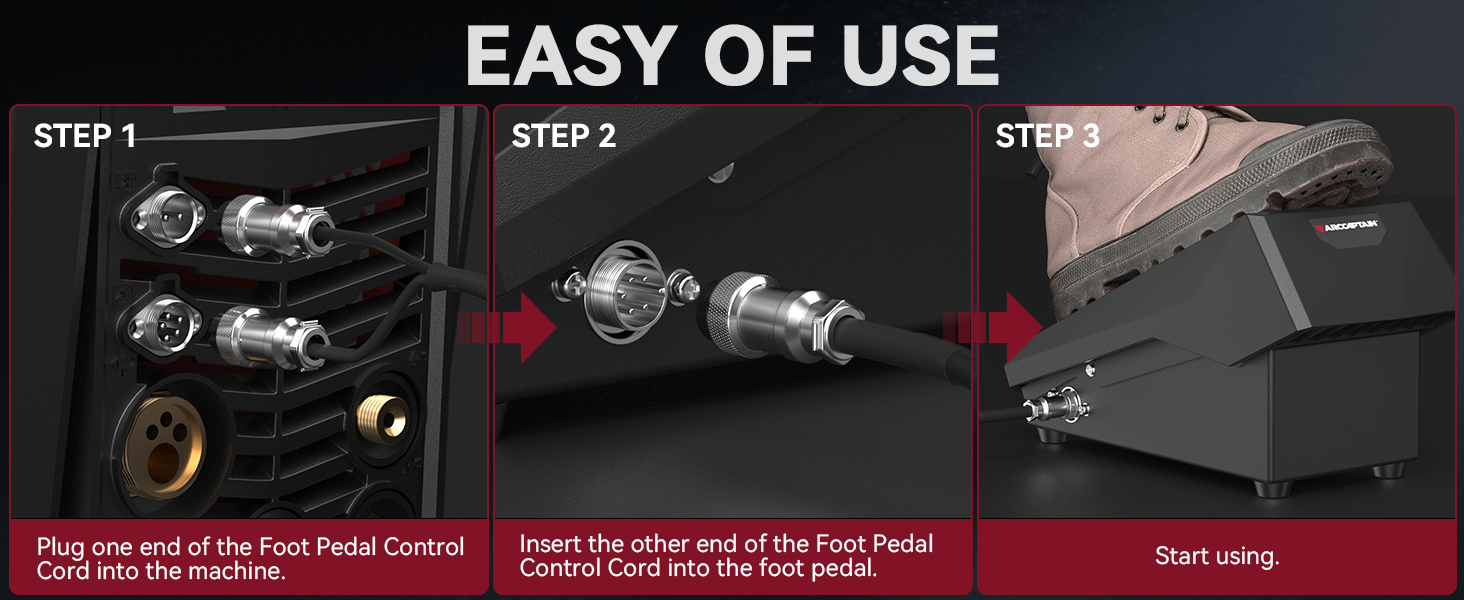
Image 2.2: Step-by-step connection of the foot pedal to the welding machine.
Once connected, the foot pedal is ready for operation with your ARCCAPTAIN MIG205 MP.
3. Operating Instructions
The foot pedal provides intuitive control over welding amperage.
Amperage Control:
- Activate and Increase Amperage: Press down on the foot pedal to activate the welding arc and gradually increase the amperage. The current will increase proportionally to how far the pedal is depressed, up to the maximum set current on your welding machine.
- Decrease Amperage and Finish Weld: Release pressure on the foot pedal to decrease the amperage. Fully releasing the pedal will turn off the welding arc and conclude the weld.
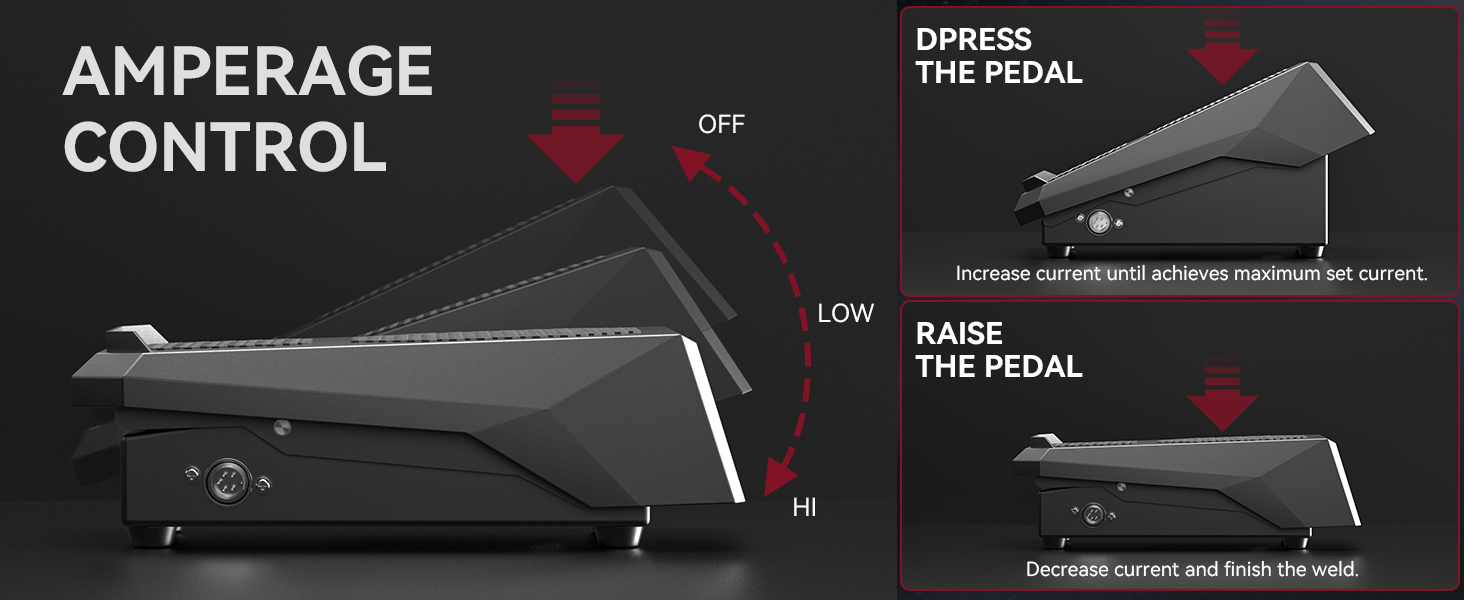
Image 3.1: Visual representation of amperage control via foot pedal.
This method allows for precise, on-the-fly amperage adjustments, optimizing your welding experience.
4. Maintenance
Regular maintenance helps ensure the longevity and reliable performance of your foot pedal.
- Cleaning: Keep the pedal surface clean and free from welding spatter, dust, and debris. Use a dry cloth or soft brush. Avoid using harsh chemicals or solvents.
- Cable Inspection: Periodically inspect the 10-foot cable for any signs of damage, cuts, or fraying. Ensure the connectors are clean and free from corrosion. Damaged cables should be replaced immediately by a qualified technician or by contacting ARCCAPTAIN support.
- Storage: Store the foot pedal in a dry, clean environment when not in use, away from extreme temperatures and direct sunlight.
5. Troubleshooting
If you encounter issues with your ARCCAPTAIN TIG 5-Pin Welding Foot Pedal, refer to the following common troubleshooting steps:
- Pedal Not Responding:
- Ensure the foot pedal is correctly and securely connected to the ARCCAPTAIN MIG205 MP welding machine.
- Verify that the welding machine is powered on and configured for remote amperage control (TIG mode).
- Check the cable for any visible damage.
- Inconsistent Amperage Control:
- Inspect the pedal mechanism for any obstructions or debris that might hinder smooth operation.
- Ensure the potentiometer inside the pedal is functioning correctly (this typically requires professional inspection).
- Compatibility Issues:
- Reconfirm that your welding machine is indeed the ARCCAPTAIN MIG205 MP. This pedal is not universally compatible.
If these steps do not resolve the issue, please contact ARCCAPTAIN customer support for further assistance.
6. Specifications
| Model Number | 5P-WFP-10FT |
| Compatibility | ARCCAPTAIN MIG205 MP Welding Machine |
| Connector Type | 5-Pin |
| Cable Length | 10 feet (3 meters) |
| Amperage Adjustment Range | 0 - 200 Amps |
| Material | Iron |
| Item Weight | 5.55 pounds |
| Package Dimensions | 13.03 x 7.91 x 6.46 inches |
| Included Components | 1x 5-Pin TIG Welding Foot Pedal |
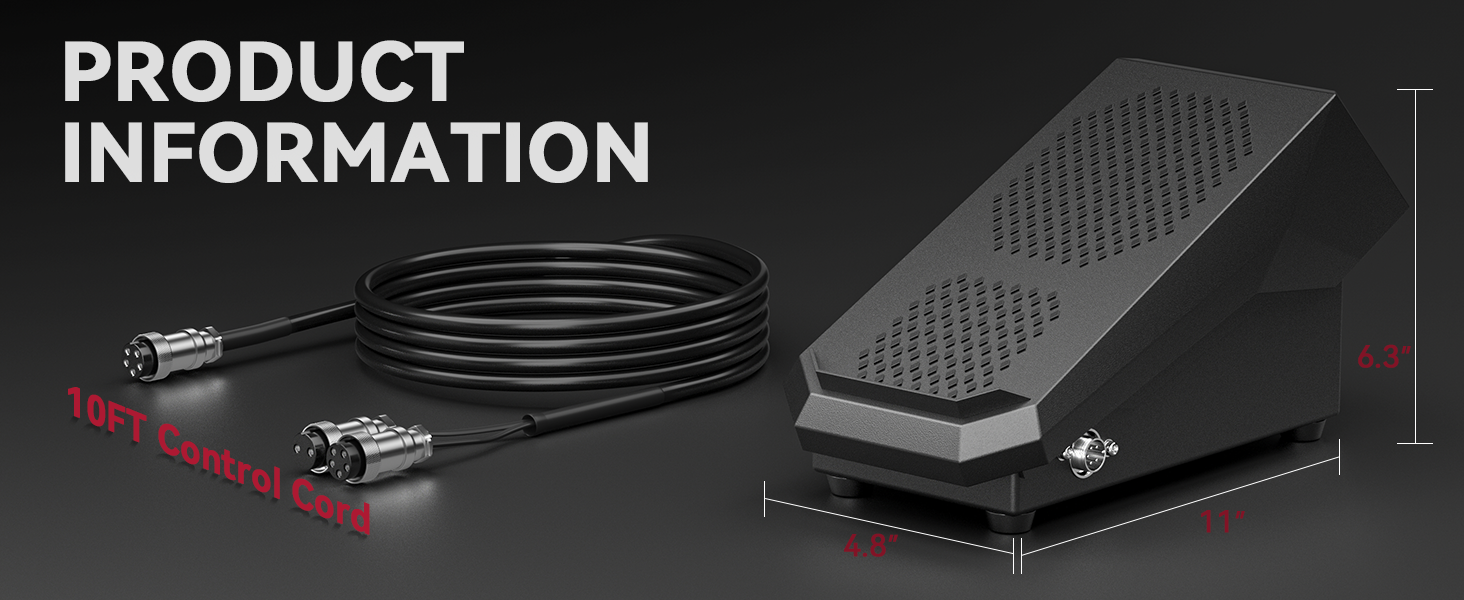
Image 6.1: Product dimensions and cable length.
7. Warranty and Support
For warranty information, technical support, or any inquiries regarding your ARCCAPTAIN TIG 5-Pin Welding Foot Pedal, please contact ARCCAPTAIN customer service directly.
You can visit the official ARCCAPTAIN store for more information and contact details: ARCCAPTAIN Store