
NOVOPAL LCD005UK/EU24B
NOVOPAL 500W Pure Sine Wave Power Inverter
User Manual
Introduction
This manual provides essential information for the safe and efficient operation of your NOVOPAL 500W Pure Sine Wave Power Inverter. Please read it thoroughly before use and retain it for future reference. This inverter converts DC 24V battery power into AC 220V household power, suitable for various electronic devices.
Important Safety Instructions
WARNING: Failure to follow these instructions may result in electric shock, fire, or serious injury.
- Ensure proper ventilation around the inverter. Do not cover ventilation openings.
- Keep the inverter away from water, moisture, and flammable materials.
- Do not open the inverter casing. There are no user-serviceable parts inside.
- Connect the inverter only to a 24V DC power source. Connecting to a 12V or 48V source will damage the unit.
- Ensure correct polarity when connecting battery cables (positive to positive, negative to negative). Reverse polarity will cause damage.
- Do not overload the inverter. The continuous output power is 500W.
- Disconnect the inverter from the power source before performing any maintenance or cleaning.
- This device is not intended for use by persons (including children) with reduced physical, sensory or mental capabilities, or lack of experience and knowledge, unless they have been given supervision or instruction concerning use of the appliance by a person responsible for their safety.
Package Contents
Upon opening the package, please verify that all items listed below are present and undamaged:
- 1 x NOVOPAL 500W Pure Sine Wave Power Inverter
- 1 x User Manual (English and Italian)
- 1 x Electronic Cigarette Lighter Adapter
- 2 x Spare Fuses
- 1 x Wrench
- 1 x Grounding Cable
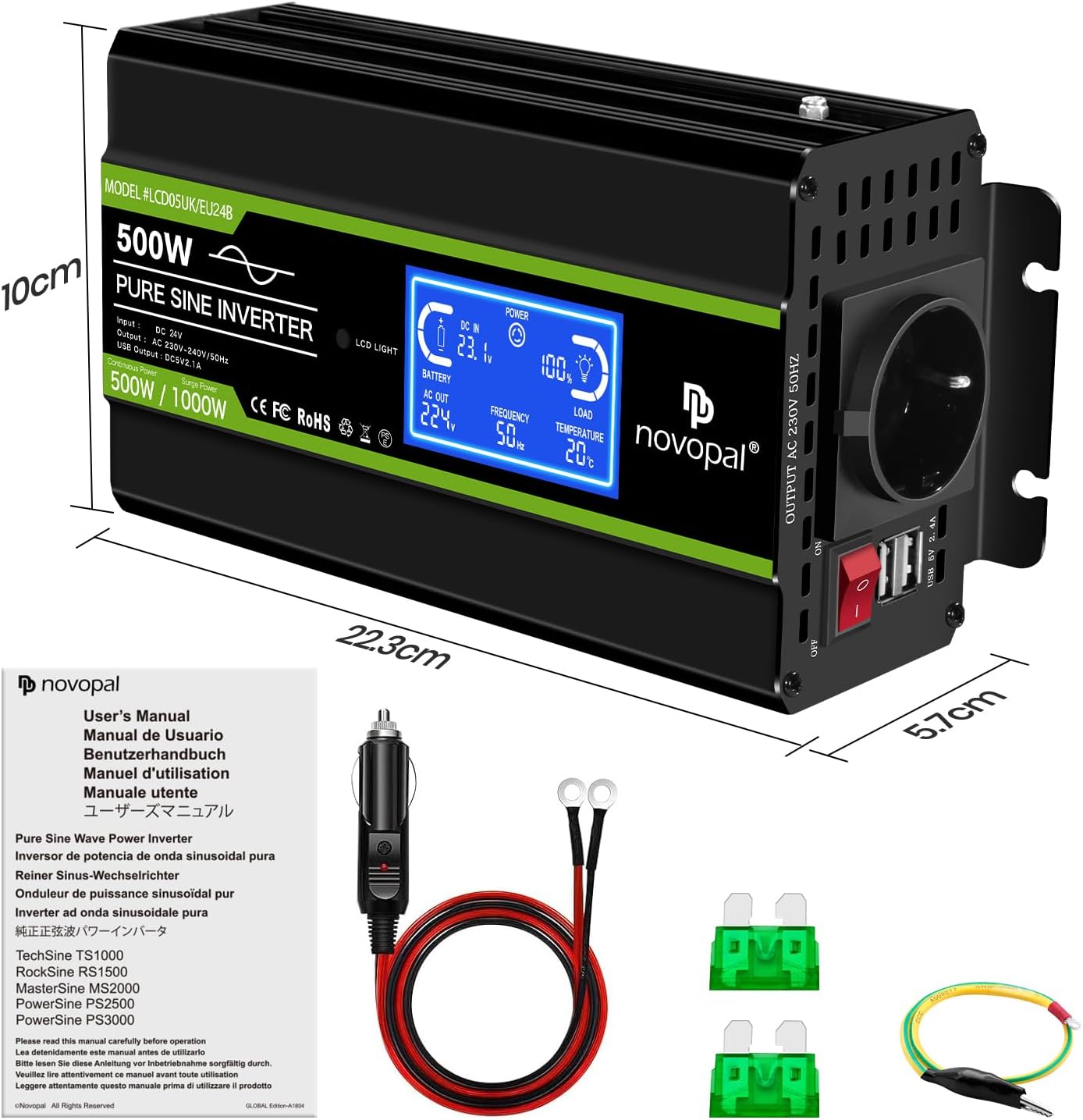
Image: Contents of the NOVOPAL 500W Pure Sine Wave Power Inverter package, showing the inverter unit, battery cables, cigarette lighter adapter, spare fuses, and user manual.
Product Overview
The NOVOPAL 500W Pure Sine Wave Power Inverter is designed to provide stable AC power from a DC source. Key components and features are detailed below.
Front Panel Features

Image: Front panel of the inverter, highlighting the ON/OFF switch, AC output receptacles, and dual USB 2.1A ports.
- ON/OFF Switch: Controls the power to the inverter.
- AC Receptacles: Standard EU sockets for connecting AC appliances.
- USB Ports (2.1A x2): For charging USB-powered devices.
- LCD Display: Shows real-time operational status, including input voltage, output voltage, frequency, load percentage, temperature, and battery status.
Rear Panel Features

Image: Rear panel of the inverter, showing the DC 24V input terminals (positive and negative) and the cooling fan.
- DC 24V Input Terminals: Connect to the 24V DC battery source. Ensure correct polarity.
- Cooling Fan: Automatically activates based on internal temperature or load to prevent overheating.
- Pure Copper Terminal: Ensures efficient power transfer.
LCD Display Functionality

Image: Close-up of the LCD display on the inverter, illustrating the various real-time parameters displayed, such as DC input voltage, AC output voltage, frequency, load percentage, and internal temperature.
The intelligent LCD provides real-time insights into the inverter's operation:
- DC IN: Displays the input DC voltage from the battery.
- BATTERY: Shows the battery status level.
- AC OUT: Indicates the output AC voltage.
- FREQUENCY: Displays the output AC frequency (50Hz).
- LOAD: Shows the percentage of the inverter's capacity currently being used.
- TEMPERATURE: Displays the internal operating temperature.
- Hours of Service: Tracks the total operational time.
- ERROR Indicator: Changes from "POWER" to "ERROR" to indicate a problem.
Setup and Installation
- Choose a Suitable Location: Place the inverter in a dry, well-ventilated area, away from direct sunlight, heat sources, and flammable materials. Ensure adequate space around the unit for proper airflow, especially for the cooling fan.
- Prepare the Battery: Ensure your battery is a 24V DC battery system. Fully charge the battery before connecting the inverter for optimal performance.
- Connect Grounding Cable: Connect one end of the grounding cable to the grounding terminal on the inverter and the other end to a suitable ground point (e.g., vehicle chassis or earth ground).
- Connect DC Input Cables:
- Ensure the inverter's ON/OFF switch is in the "OFF" position.
- Connect the positive (+) red cable to the positive (+) terminal on the inverter and then to the positive (+) terminal on the 24V battery.
- Connect the negative (-) black cable to the negative (-) terminal on the inverter and then to the negative (-) terminal on the 24V battery.
- WARNING: Double-check all connections for correct polarity before proceeding. Reverse polarity will damage the inverter and void the warranty.
- Secure Connections: Ensure all cable connections are tight and secure to prevent loose connections, which can cause overheating or power loss.
Operating Instructions
- Powering On the Inverter:
- After ensuring all connections are secure, press the ON/OFF switch on the front panel to the "ON" position.
- The LCD display will illuminate, showing the current operational status.
- Connecting AC Appliances:
- Plug your AC appliance into one of the AC receptacles on the front panel.
- Ensure the total power consumption of all connected AC appliances does not exceed 500W continuous power.
- The inverter provides a pure sine wave output, suitable for sensitive electronics.
- Using USB Charging Ports:
- Connect your USB-powered devices (e.g., smartphones, tablets) to the USB ports.
- The USB ports provide 2.1A output for faster charging.
- Monitoring the LCD Display:
- Regularly check the LCD display for input voltage, output voltage, load, and temperature to ensure optimal operation.
- If the "ERROR" indicator appears, refer to the Troubleshooting section.
- Powering Off the Inverter:
- Before disconnecting any appliances or the inverter from the battery, switch the ON/OFF button to the "OFF" position.
Maintenance
- Cleaning: Use a dry, soft cloth to wipe the exterior of the inverter. Do not use water or cleaning agents.
- Ventilation: Ensure the cooling fan and ventilation openings are free from dust and obstructions. Periodically clean them with compressed air if necessary.
- Connections: Periodically check all electrical connections to ensure they remain tight and free from corrosion.
- Storage: When not in use for extended periods, store the inverter in a cool, dry place, disconnected from the battery.
Troubleshooting
If you encounter issues with your inverter, refer to the table below for common problems and solutions.
| Problem | Possible Cause | Solution |
|---|---|---|
| Inverter does not turn on. |
|
|
| No AC output. |
|
|
| Cooling fan runs constantly or loudly. |
|
|
| LCD displays "ERROR". |
|
|
Specifications
| Parameter | Value |
|---|---|
| Model | LCD005UK/EU24B |
| Continuous Power | 500 Watts |
| Peak Power | 1000 Watts |
| Input DC Voltage | 24V DC |
| Output AC Voltage | 220V AC |
| Output Frequency | 50Hz |
| Output Waveform | Pure Sine Wave |
| USB Output | 2 x 2.1A (Total 4.2A) |
| Efficiency | >92% |
| Protections | Short circuit, Over/Under input voltage, Output short circuit, Overload, Overcurrent, Over-temperature |
| Cooling | Intelligent Cooling Fan |
| Dimensions (Approx.) | 22.3cm x 10cm x 5.7cm |
Image: Dimensions of the NOVOPAL 500W Pure Sine Wave Power Inverter, showing approximate measurements of 22.3cm length, 10cm width, and 5.7cm height.
Warranty and Support
NOVOPAL products are manufactured to high-quality standards. For warranty information, technical support, or customer service inquiries, please refer to the contact details provided with your purchase or visit the official NOVOPAL website. Please retain your proof of purchase for warranty claims.