
1. Introduction
This manual provides detailed instructions for the installation, operation, and maintenance of your LETOURWM RV Tire Pressure Monitoring System (TPMS). This system is designed to enhance driving safety by providing real-time monitoring of your RV, truck, or trailer tire pressure and temperature, alerting you to potential issues before they become critical.
2. Product Features
- Real-Time Monitoring: Continuously displays tire pressure and temperature for up to 4 tires.
- 6 Alarm Modes: Alerts for fast leakage, high pressure, low pressure, high temperature, sensor battery low, and signal loss.
- Dual Charging Options: Features both solar and USB-C charging for the monitor.
- Auto-Dimming LCD Display: Large, clear display with automatic backlight adjustment for optimal visibility in various lighting conditions.
- Weatherproof Sensors: Sensors are designed to withstand various weather conditions, including rain and dust.
- Anti-Theft Design: Sensors include an anti-theft nut for added security.
- Easy Installation: Simple 5-minute installation process for external sensors.

Image: Overview of the LETOURWM TPMS system highlighting its robust features including anti-theft, high/low temperature resistance, waterproof, anti-rejection, and dust-proof capabilities.
3. Installation Guide
Follow these steps for a quick and easy installation of your TPMS sensors:
- Prepare the Valve Stem: Ensure the tire valve stem is clean and dry.
- Install Anti-Theft Nut: Screw the anti-theft nut onto the valve stem first, but do not tighten it yet.
- Install Sensor: Screw the corresponding sensor (FL, FR, RL, RR) onto the valve stem until it is snug.
- Lock Anti-Theft Nut: Use the provided wrench to tighten the anti-theft nut against the sensor, securing it in place.
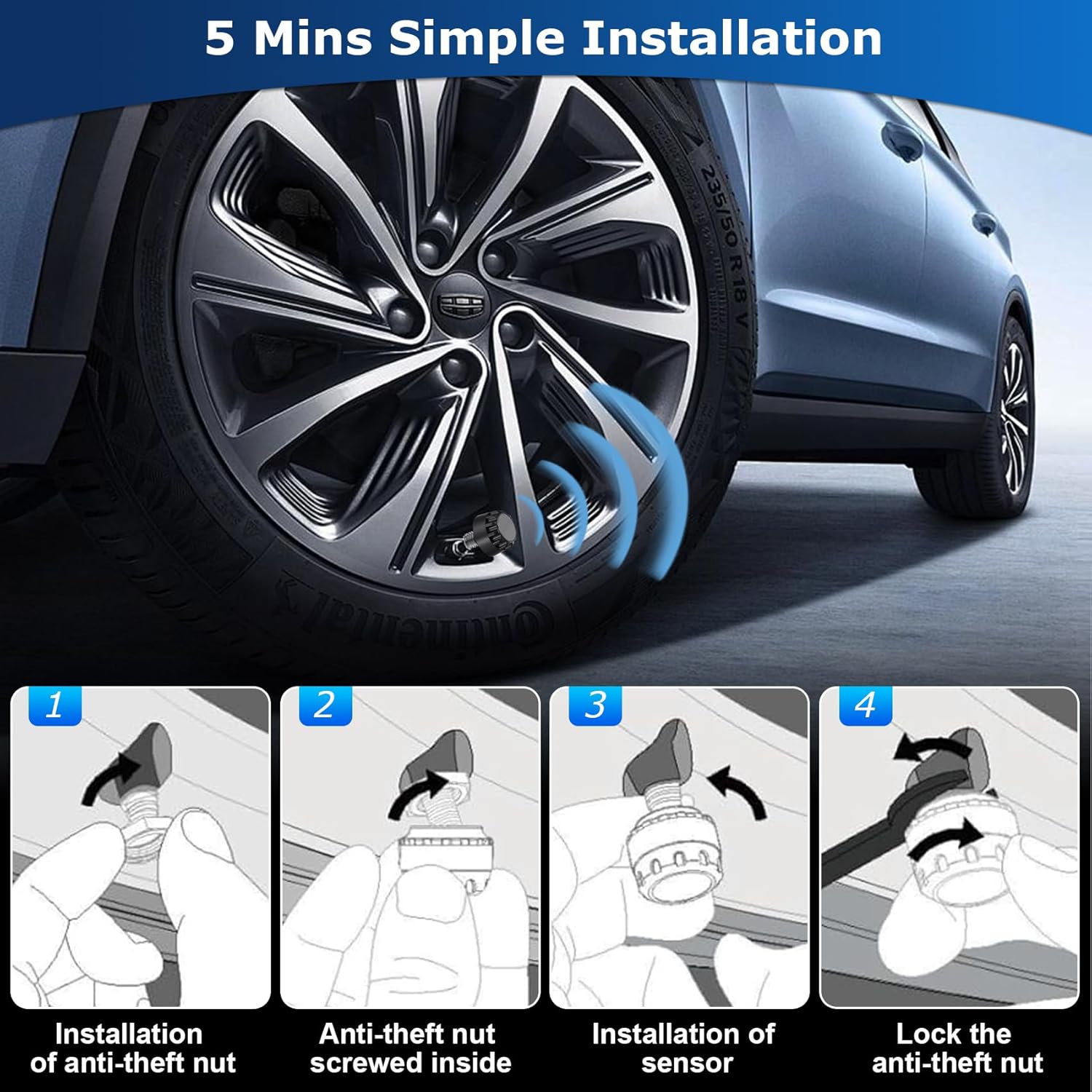
Image: Visual guide demonstrating the four steps for installing the external tire pressure sensors, including the anti-theft nut.
Place the monitor on your dashboard using the adhesive pad or a non-slip mat, ensuring it has access to sunlight for solar charging.
4. Operating Instructions
4.1 Powering On/Off
- The monitor will automatically power on when it detects vibration (e.g., when the vehicle starts moving).
- To manually power on, press and hold the Power button (usually the left button) for 3 seconds.
- To power off, press and hold the Power button for 3 seconds. The monitor will also automatically power off after a period of inactivity.
4.2 Display Overview
The LCD display shows real-time pressure and temperature for each tire. It features an automatic backlight that adjusts brightness based on ambient light conditions, ensuring readability day or night.

Image: The TPMS monitor's large LCD screen demonstrating its automatic backlight feature, providing clear visibility in both bright daylight and dark night conditions.
4.3 Setting Parameters
To access settings (e.g., unit conversion, alarm thresholds), press and hold the 'M' button (Menu button, usually the middle button) for approximately 3-6 seconds until the settings menu appears. Use the left and right buttons to navigate and adjust values. Press 'M' again to confirm and exit.
- Unit Conversion: You can switch between PSI/Bar for pressure and °C/°F for temperature.
- Alarm Thresholds: Set custom high/low pressure and high temperature alarm values according to your vehicle's specifications.
5. Alarm Modes
The LETOURWM TPMS is equipped with 6 distinct alarm modes to alert you to various tire conditions:
- Fast Leakage Alarm: Alerts when a rapid drop in tire pressure is detected.
- High Pressure Alarm: Activates if tire pressure exceeds the preset high limit.
- Low Pressure Alarm: Activates if tire pressure falls below the preset low limit.
- High Temperature Alarm: Alerts if tire temperature exceeds the preset high limit.
- Sensor Battery Low Alarm: Indicates that a sensor's battery is running low and requires replacement.
- Signal Loss Alarm: Alerts if communication with a sensor is lost.

Image: The TPMS monitor illustrating its various monitoring and alarm modes, including indicators for fast leakage, high pressure, low pressure, high temperature, real-time pressure, and battery status.
When an alarm is triggered, the monitor will emit an audible alert and display the specific tire and alarm type on the screen. Address the issue promptly for safe driving.
6. Charging the Monitor
Your LETOURWM TPMS monitor offers two convenient charging methods:
- Solar Charging: The monitor is equipped with a solar panel. For optimal charging, place the monitor on your dashboard where it receives direct sunlight.
- USB-C Charging: For charging in low light conditions or when faster charging is needed, connect the monitor to a USB power source using the provided USB-C cable.
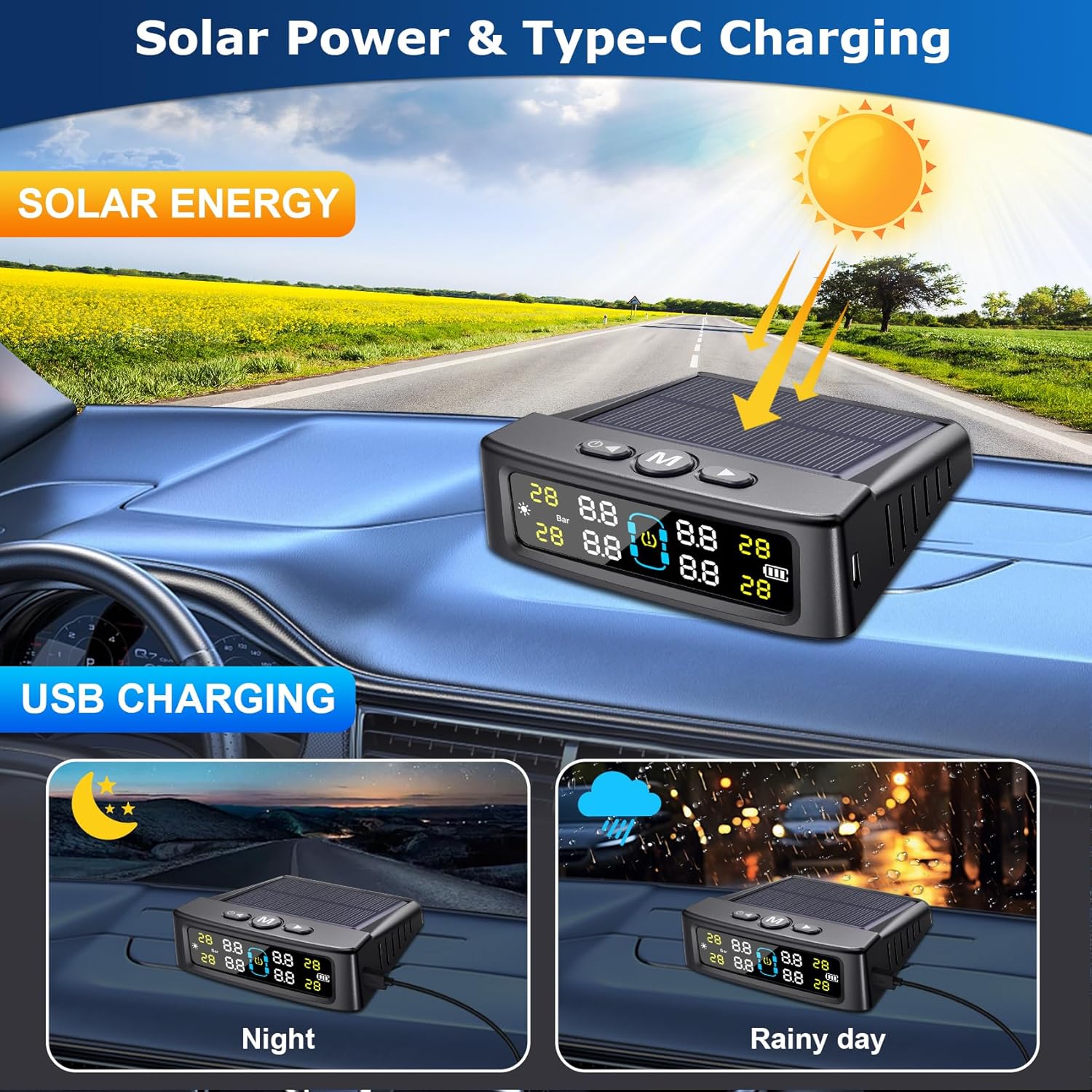
Image: The TPMS monitor illustrating its dual charging capabilities: solar energy for daytime charging and USB-C for night or rainy day charging.
A full battery charge ensures continuous operation even without direct sunlight for extended periods.
7. Maintenance
- Cleaning: Wipe the monitor and sensors with a soft, dry cloth. Do not use abrasive cleaners or solvents.
- Sensor Battery Replacement: The external sensors use replaceable batteries. When a "Sensor Battery Low" alarm occurs, replace the battery promptly. Refer to the sensor's design for specific battery type and replacement instructions.
- Storage: If storing the system for an extended period, ensure the monitor is fully charged and store it in a cool, dry place.
8. Troubleshooting
| Problem | Possible Cause | Solution |
|---|---|---|
| Monitor not turning on | Low battery; no vibration detected. | Charge the monitor via USB-C. Press and hold the Power button for 3 seconds. |
| Sensor not displaying data or showing incorrect readings | Sensor battery low/dead; sensor not properly installed; signal interference; sensor malfunction. | Replace sensor battery. Re-install sensor, ensuring it's snug. Check for obstructions. If issue persists, contact support. |
| Alarm sounds frequently | Tire pressure/temperature outside set limits; alarm thresholds set too narrowly. | Check tire pressure/temperature and adjust if necessary. Review and adjust alarm thresholds in settings. |
| Monitor not charging via solar | Insufficient sunlight; solar panel obstructed or dirty. | Ensure monitor is placed in direct sunlight. Clean the solar panel. Use USB-C charging as an alternative. |
9. Specifications
- Model: 4-Sensor
- Item Weight: 7 ounces
- Package Dimensions: 6.06 x 5.24 x 1.73 inches
- Charging: Solar / USB-C
- Display: Auto-Dimming LCD
10. Customer Support & Warranty
LETOURWM is committed to providing reliable products and excellent customer service. If you encounter any issues or have questions regarding your TPMS, please contact our customer support team. While specific warranty details are not provided in this manual, we encourage you to reach out for assistance with product defects or operational concerns.
For support, please refer to the contact information provided with your purchase or visit the official LETOURWM website.