
1. Introduction
This manual provides instructions for the HWAEYEM Self-Cleaning Automatic Cat Litter Box, Model HY-Litter Box. This device is designed to automate the litter cleaning process, offering convenience and maintaining a hygienic environment for your cat. It features a large capacity, advanced safety mechanisms, and smart app control for remote management and monitoring.
Please read this manual thoroughly before operating the device to ensure proper use, maintenance, and safety.
2. Safety Information
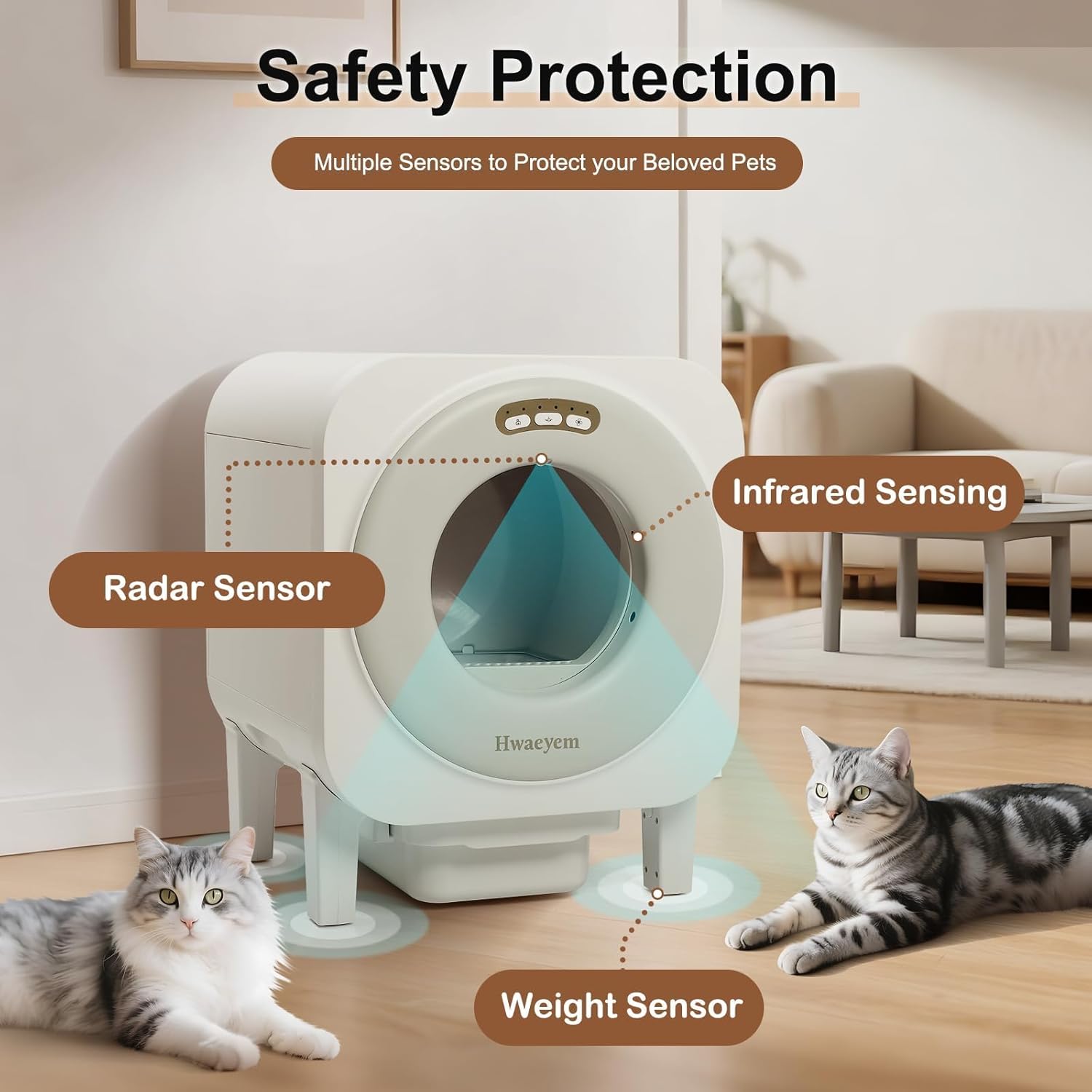
The HWAEYEM Self-Cleaning Automatic Cat Litter Box incorporates multiple safety features to protect your pets.
- Advanced Sensor System: Equipped with infrared sensors and Hall sensors to detect the presence of a cat. Cleaning cycles will pause immediately upon detection of a cat entering the unit and resume only after the cat has safely exited.
- Multiple Security Protections: Includes Door Radar, Gravity-Sensing Radar, Living-Being Radar, and Trash Bin Radar. These sensors work in conjunction to ensure the safety of your pet during operation. The motion radar can be activated or deactivated via the companion application.
- Weight Limit: Suitable for cats weighing between 3.3 lbs and 44 lbs. Do not allow cats outside this weight range to use the device.

3. Package Contents
Verify that all items listed below are included in your package:
- Automatic Cat Litter Box (x1)
- Waste Bag (x1)
- Support Legs (x4)
- Exhaust Fan (x1)
- User Manual (x1)
- Power Adapter (x1)
- Cat Litter Mat (x1)
- Litter Sifter (x1)

4. Setup
- Unpacking: Carefully remove all components from the packaging.
- Assemble Support Legs: Attach the four support legs to the base of the litter box unit. Ensure they are securely fastened.
- Install Waste Bag: Open the waste drawer and insert a waste bag. Ensure the bag is properly seated to prevent leaks.
- Add Litter: Pour suitable cat litter into the drum. The device supports various types of cat litter, including Tofu, Bentonite, Mixed, and other common types. Do not overfill.
- Connect Power: Plug the power adapter into the litter box and then into a wall outlet.
- Exhaust Fan Installation (Optional): If using the external exhaust system for odor removal, connect the exhaust fan and ducting as per the separate instructions provided with the fan.

5. Operating Instructions
5.1 Initial Operation
After setup, the litter box will perform an initial calibration. Allow the device to complete this process before your cat uses it.
5.2 Automatic Cleaning
The litter box is designed to automatically detect when your cat has used it and left the unit. After a preset delay, it will initiate a cleaning cycle, sifting waste into the sealed waste drawer.
5.3 Smart App Control
The HWAEYEM litter box can be controlled and monitored via the Tuya Smart APP. This app allows for:
- Remote Cleaning: Initiate a cleaning cycle manually.
- Feces Disposal: Manage waste disposal settings.
- Health Monitoring: Track your cat's usage patterns.
- Alerts: Receive notifications for a full litter box or other anomalies.
- Timed Silence: Set specific periods for silent operation.
Note: The litter box is compatible with 2.4G WiFi networks only. Ensure your home network is configured accordingly for app functionality.

6. Maintenance
6.1 Waste Drawer Emptying
The 9-liter waste drawer can hold waste for up to 10 days for a single cat. Monitor the app for 'full' alerts or visually check the drawer. To empty, pull out the drawer, seal the waste bag, and dispose of it. Replace with a new waste bag.
6.2 Odor Removal System
The external exhaust system, featuring a silent exhaust fan and ducting, actively removes odors from the unit, ensuring a fresh living space. Ensure the exhaust duct is clear and properly positioned for optimal performance.

6.3 Cleaning the Unit
- Removable Litter Tray: The internal litter tray is removable for thorough cleaning. Disconnect power before removing.
- Exterior Cleaning: Wipe the exterior surfaces with a damp cloth. Do not use abrasive cleaners or submerge the unit in water.
- Sensor Cleaning: Periodically clean the sensor areas to ensure accurate detection.
7. Troubleshooting
- Device Not Cleaning:
- Check if the power adapter is securely connected.
- Ensure no cat is currently inside or near the unit, triggering safety sensors.
- Verify the waste drawer is not full.
- Check app settings for any paused cleaning schedules.
- App Connectivity Issues:
- Confirm your WiFi network is 2.4G.
- Ensure the litter box is within range of your WiFi router.
- Restart the litter box and your router.
- Odor Persistence:
- Ensure the waste bag is properly sealed and replaced regularly.
- Check that the exhaust fan and ducting are correctly installed and unobstructed.
- Clean the removable litter tray and the interior of the unit thoroughly.
- Unusual Noise:
- Ensure the unit is placed on a flat, stable surface.
- Check for any obstructions inside the drum or waste drawer.
8. Specifications
| Feature | Specification |
|---|---|
| Model Name | HY-Litter Box |
| Brand | HWAEYEM |
| Dimensions (L x W x H) | 19.3" x 23.2" x 24.4" |
| Item Weight | 33 Pounds |
| Drum Capacity | 68 Liters |
| Waste Drawer Capacity | 9 Liters (up to 10 days for 1 cat) |
| Suitable Cat Weight | 3.3 - 44 lbs |
| Material | Polypropylene (PP) |
| Connectivity | 2.4G WiFi only |
| Noise Level | Approximately 35dB (HWAEYEM) |

