
Introduction
Thank you for choosing the Dong Cheng Cordless Jigsaw DCMQ85. This manual provides essential information for the safe operation, maintenance, and troubleshooting of your new tool. Please read these instructions carefully before use and keep them for future reference.

Image: The Dong Cheng Cordless Jigsaw DCMQ85, shown with its included 20V battery, charger, various saw blades, and a blue carrying case.
General Safety Instructions
Always follow basic safety precautions when using power tools to reduce the risk of fire, electric shock, and personal injury.
- Work Area Safety: Keep your work area clean and well-lit. Cluttered or dark areas invite accidents. Do not operate power tools in explosive atmospheres, such as in the presence of flammable liquids, gases, or dust.
- Electrical Safety: Avoid body contact with earthed or grounded surfaces such as pipes, radiators, ranges, and refrigerators. Do not expose power tools to rain or wet conditions.
- Personal Safety: Always wear eye protection. Use hearing protection when operating for extended periods. Dress properly; avoid loose clothing or jewelry. Secure long hair.
- Tool Use and Care: Do not force the power tool. Use the correct power tool for your application. Disconnect the battery pack from the power tool before making any adjustments, changing accessories, or storing power tools.
- Battery Tool Use and Care: Recharge only with the charger specified by the manufacturer. Use power tools only with specifically designated battery packs.
Product Overview
Familiarize yourself with the components of your Dong Cheng Cordless Jigsaw DCMQ85.

Image: A detailed view of the jigsaw highlighting its features: integrated dust blower function, variable speed trigger, cable protection for precise cutting, and 45-degree miter capacity.
Key Components:
- Brushless Motor: Provides efficient power and extended tool life.
- Variable Speed Trigger: Allows for precise control over cutting speed.
- Orbital Action Selector: Adjusts the blade's orbital movement for different materials and cutting speeds.
- Bevel Adjustment: Enables angled cuts up to 45 degrees.
- Integrated Dust Blower: Keeps the cutting line clear of debris.
- LED Work Lights: Illuminates the work area for improved visibility.
- Tool-Free Blade Change: For quick and easy blade replacement.

Image: An illustration detailing the advantages of the brushless motor, including +30% power, -50% noise level, +40% lifespan, and +30% runtime.
Setup
1. Battery Installation and Charging
- Ensure the battery is fully charged before first use. Connect the charger to a power outlet and insert the battery pack.
- To install the battery, slide it into the battery slot at the rear of the jigsaw until it clicks into place.
- To remove the battery, press the release button and slide the battery out.
2. Blade Installation (Tool-Free)
- Ensure the tool is switched off and the battery is removed.
- Locate the blade clamp lever on the front of the tool.
- Push the blade clamp lever forward to open the blade clamp.
- Insert the shank of the jigsaw blade fully into the clamp with the teeth facing forward.
- Release the blade clamp lever to secure the blade. Gently pull on the blade to ensure it is firmly seated.
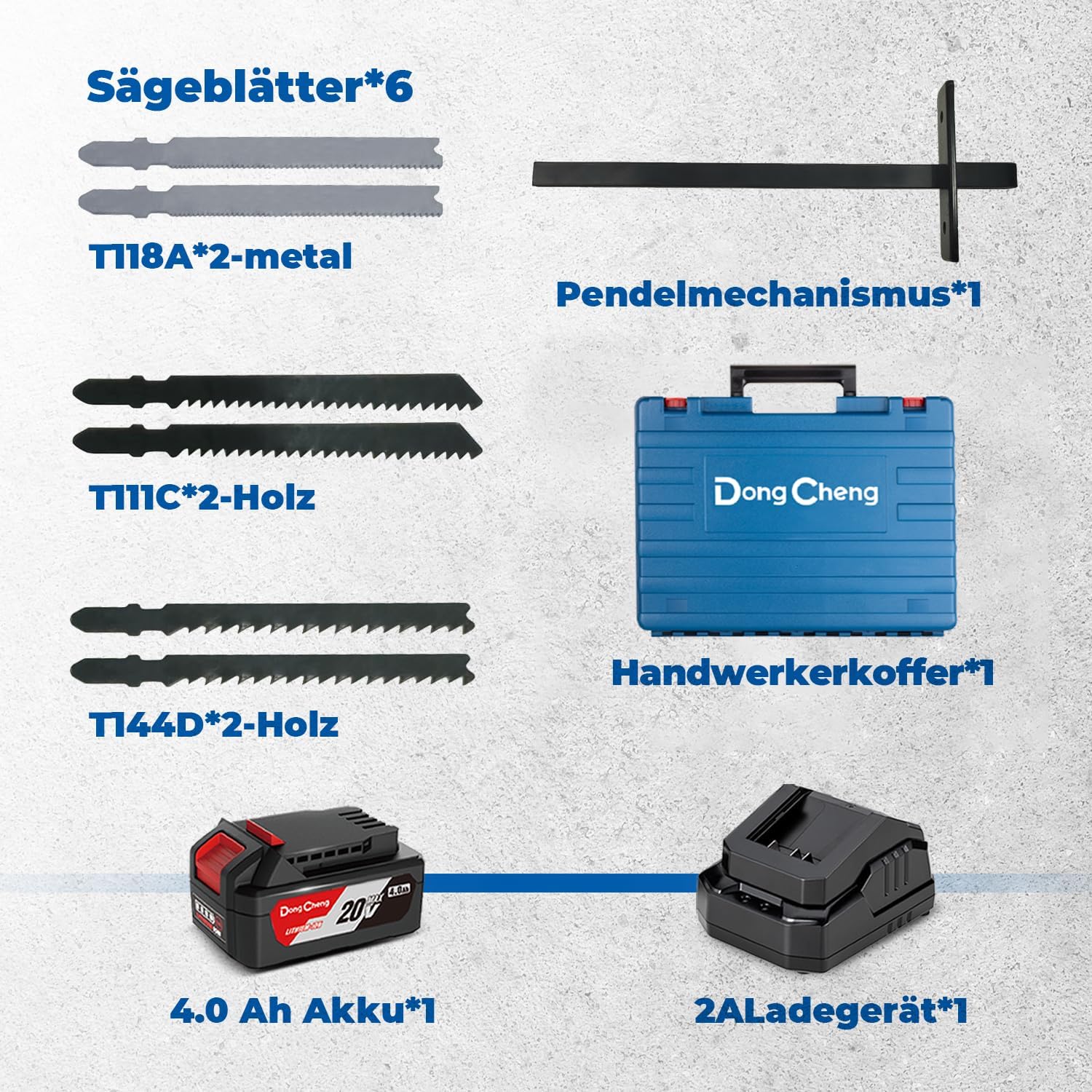
Image: A display of the included accessories: 6 saw blades (2 for metal, 4 for wood), a pendulum mechanism, a robust carrying case, one 4.0 Ah battery, and a 2A charger.
Operating Instructions
1. Powering On/Off and Speed Control
- To start the jigsaw, press the variable speed trigger. The cutting speed is controlled by how far the trigger is pressed.
- For continuous operation, press the lock-on button while the trigger is depressed. To release, press the trigger again.
- The speed adjustment dial (located at the rear of the tool) allows you to pre-set the maximum speed from 800 to 3500 strokes per minute (SPM) for different materials.
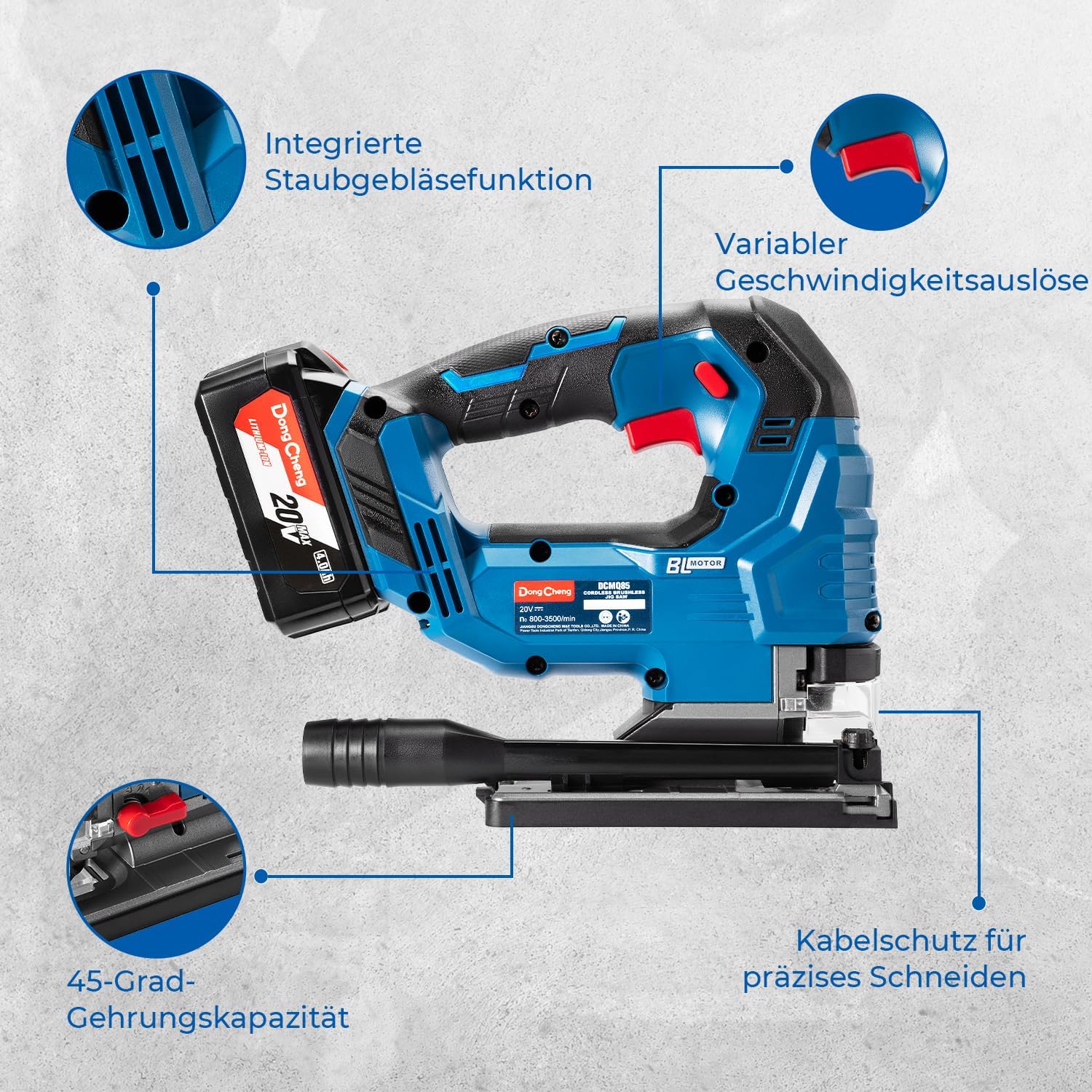
Image: A user demonstrating the variable speed control of the jigsaw, which ranges from 800 to 3500 strokes per minute (SPM).
2. Orbital Action Settings
The orbital action feature allows the blade to move in an elliptical motion, providing faster cutting in certain materials. Adjust the orbital action selector based on the material and desired cut quality.
- Setting 0 (No Orbital Action): For fine, precise cuts in wood, plastic, and metal.
- Setting I (Low Orbital Action): For cutting hard materials like metal and hard plastics.
- Setting II (Medium Orbital Action): For general wood cutting and softer plastics.
- Setting III (High Orbital Action): For fast, rough cuts in wood.
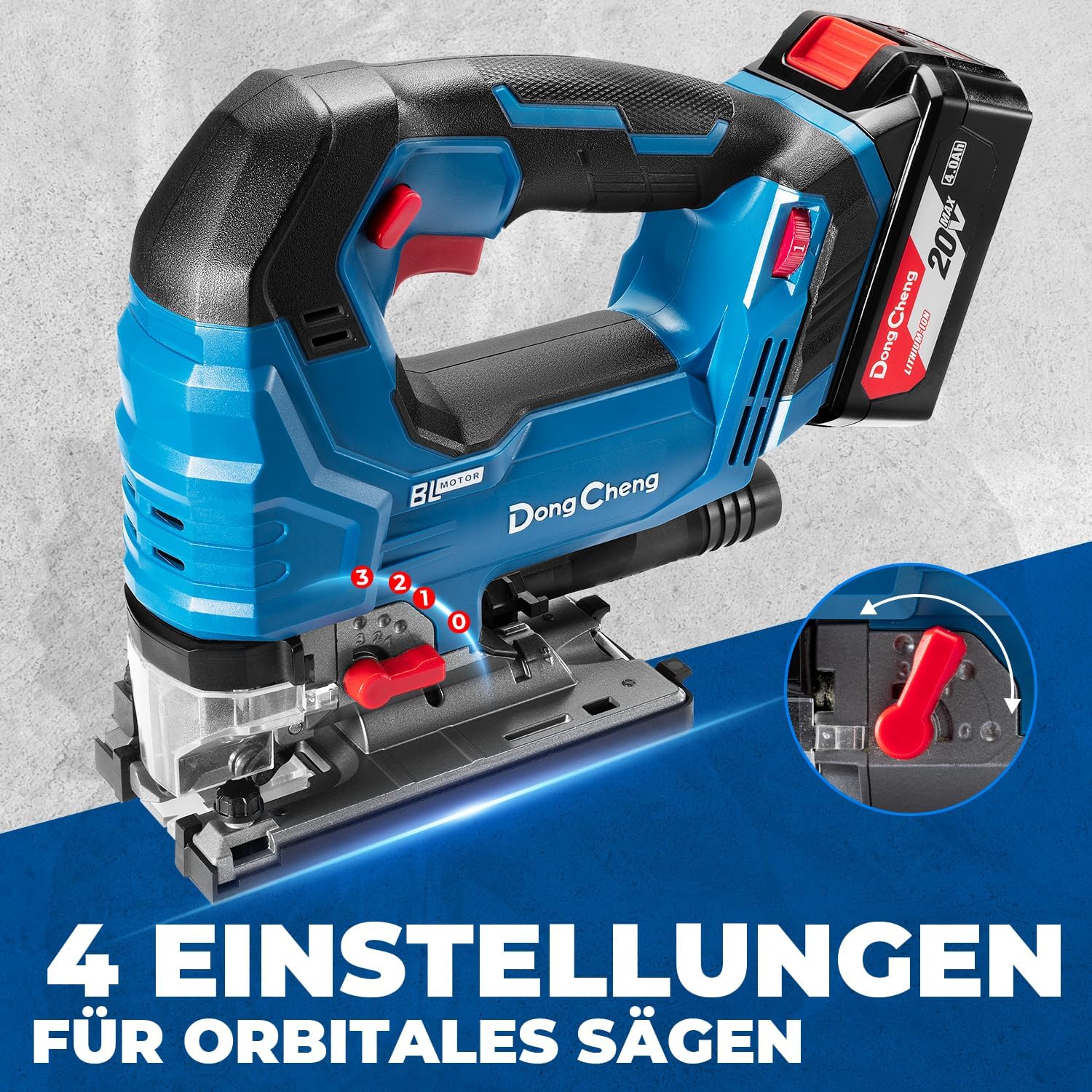
Image: A close-up of the jigsaw's base, illustrating the four orbital action settings (0, 1, 2, 3) for different cutting applications.
3. Bevel Cutting (Angled Cuts)
The base plate can be tilted to make bevel cuts up to 45 degrees to the left or right.
- Loosen the base plate locking screw (usually located at the front or rear of the base plate).
- Tilt the base plate to the desired angle (0-45 degrees), using the angle scale as a guide.
- Tighten the locking screw firmly to secure the base plate.

Image: A user adjusting the base plate to achieve a maximum cutting angle of 0-45 degrees, with indicators for 15°, 30°, and 45° left/right.
4. Cutting Applications
The DCMQ85 is suitable for various cutting tasks:
- Straight Cuts: Guide the saw along a straight line, ensuring the base plate is flat on the workpiece.
- Curve Cuts: Use a narrow blade and a lower speed setting for intricate curves.
- Plunge Cuts: For starting a cut in the middle of a workpiece, refer to advanced techniques or consult a professional.

Image: Four examples of cutting applications: straight cuts, circular cuts, curved cuts, and miter cuts, demonstrating the jigsaw's versatility.

Image: The jigsaw being used for versatile applications, including cutting wood (up to 120mm), PVC, and metal (steel up to 10mm, aluminum up to 20mm).
Maintenance
Regular maintenance ensures the longevity and optimal performance of your jigsaw.
- Cleaning: After each use, clean the tool with a soft, damp cloth. Remove any sawdust or debris from the ventilation openings and the blade area. Do not use harsh chemicals or abrasive cleaners.
- Blade Care: Always use sharp, undamaged blades. Dull or bent blades can cause kickback and poor cut quality. Store blades safely.
- Battery Care: Store batteries in a cool, dry place away from direct sunlight. Do not store fully discharged batteries for extended periods.
- Inspection: Periodically check all screws and fasteners for tightness. Inspect the power cord (if applicable) and battery for any damage.
Troubleshooting
| Problem | Possible Cause | Solution |
|---|---|---|
| Tool does not start. | Battery not charged or improperly installed. | Ensure battery is fully charged and correctly inserted. |
| Poor cut quality or blade jamming. | Dull or incorrect blade; incorrect speed/orbital setting; forcing the tool. | Replace blade, select appropriate blade for material, adjust speed/orbital setting, do not force the tool. |
| Excessive vibration. | Loose blade; damaged blade; worn components. | Check blade for tightness and damage; replace if necessary. If problem persists, contact customer support. |
| Battery not charging. | Charger not plugged in; faulty battery/charger. | Check power connection. Test with another battery/charger if available. Contact customer support if issues persist. |
Specifications
| Feature | Specification |
|---|---|
| Brand | Dong Cheng |
| Model Number | DCMQ85(DM-EU01) |
| Power Source | Battery Powered |
| Voltage | 20 Volts (DC) |
| Battery Type | Lithium-ion (1 included) |
| No-Load Strokes Per Minute (SPM) | 800-3500 |
| Max. Cutting Depth (Wood) | 120 mm |
| Max. Cutting Depth (Aluminum) | 20 mm |
| Max. Cutting Depth (Steel) | 10 mm |
| Bevel Cutting Angle | 0-45 degrees (Left/Right) |
| Blade Material | High-Speed Steel (HSS) |
| Handle Material | Plastic |
| Included Components | Battery Charger, 1 Battery |
| Product Dimensions | 34.2L x 21W x 21.8H cm |
| Package Dimensions | 37.6 x 30.7 x 11.9 cm |
| Item Weight | 4.76 kilograms |
Warranty and Support
For warranty information or technical support, please refer to the documentation included with your purchase or contact Dong Cheng customer service through their official website or your retailer. Keep your purchase receipt as proof of purchase.


